Teletext subtitles of a broadcast channel
Half of the channels on European satellite and cable carry teletext, and their subtitles live on one of its pages — usually 888. A TV set decodes that page itself and puts the lines over the picture. A subscriber watching the same channel in your app gets nothing: no OTT player has ever decoded teletext.
Catena decodes the subtitle pages and serves each one as a separate WebVTT track that every player understands. Nothing has to be added to the channel: the text comes from the very signal you already receive.
For captions embedded in the picture itself (CEA-608/708, the American way of doing the same thing) see Closed captions.
Why a provider needs it
- Subtitles stop getting lost on the way to the subscriber. The broadcaster delivered them, your player failed to show them — and the complaint lands on you, not on the broadcaster.
- Accessibility requirements. The European Accessibility Act asks for subtitles to be preserved when broadcast material is distributed online. The practical meaning is simple: if the subtitles were on air, they must be in the app too.
- Multiple languages for free. A broadcaster often puts several subtitle pages into one channel — one per language. Each becomes its own subtitle menu entry, with no second input and no manual work.
- One input, every output. Decode once on ingest, deliver to the browser, to the app and to the TV set alike.
Enabling extraction
Extraction is off by default and has to be asked for per channel. Open the stream, the Process tab, the Teletext section, and pick the mode:
- Pass through inside MPEG-TS (no subtitle track) — the default. Teletext travels on to MPEG-TS consumers untouched, and nothing is decoded.
- Extract subtitle pages into tracks — every subtitle page becomes a WebVTT track. Teletext keeps travelling inside MPEG-TS as well: extraction adds a track, it does not take one away.
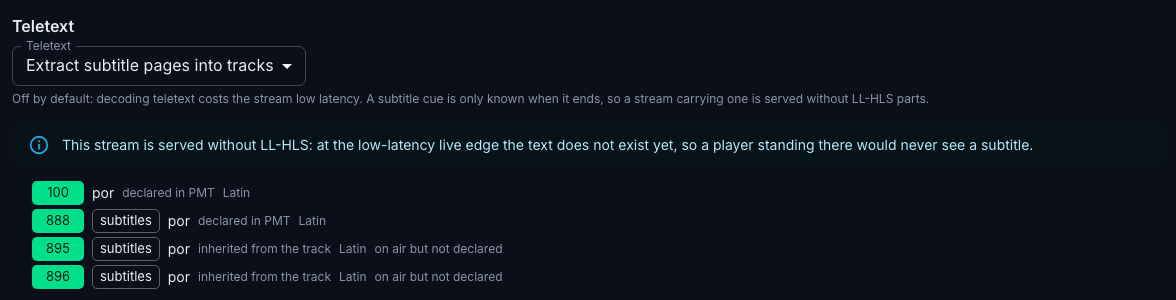
Below the selector Catena lists the pages of the channel with what is known about each: its number, its language, where the language came from, and whether the page was declared by the broadcaster, seen on air, or both. The list is filled in from the air, so it only makes sense on a running stream.
Extraction costs the channel low latency
A subtitle cue is only known when it ends: until the page changes, the line still stands on screen and its duration is not decided. At the low-latency live edge the text therefore does not exist yet, and a player standing there would never see a subtitle at all. That is why a channel with a text track is served without LL-HLS parts — ordinary HLS and DASH segments, with their usual few seconds of delay.
This is also why extraction is not switched on automatically for every channel carrying a teletext PID: a channel you only pass through has no reason to pay that price.
What the subscriber sees
The player gets an ordinary subtitle menu: one entry per subtitle page, with its language. The text follows the speech and sits where it sat on air.
Subtitles work in the archive too, so a recorded programme keeps them. Extraction has to be on at the time of recording, though: what was not decoded on ingest cannot be recovered from the archive afterwards.
Reading the page list
Two independent things are known about every page, and the list keeps them apart:
- Declared — the broadcaster announced the page in the channel's service tables, with its language and its purpose (subtitles or an ordinary teletext page).
- On air — the page actually arrived in the stream.
Hence the states you may see next to a page:
- declared but never seen — announced by the broadcaster and never sent. Nothing to extract; the entry is there so that the difference between "the broadcaster is silent" and "the channel has no such page" stays visible.
- on air but not declared — the page is being sent while the tables say nothing about it. Common in practice: a broadcaster forgets to update the tables. Such pages are extracted all the same.
- Nothing extra — the announcement and the air agree.
The language is shown together with its origin, because those are not equally trustworthy:
- declared in PMT — the broadcaster named the language of this very page. A fact.
- inherited from the track — the page itself is not announced, but the whole teletext track speaks one language, so it was taken. A reasonable guess, not a fact.
- no source — the page is not announced and the track is multilingual. Nothing to take the language from; the player shows the entry by page number.
If there are no subtitles
- The «Teletext» section says the stream has no pages. Then there is no teletext in the channel at all. Make sure you are looking at a running stream: pages are detected from the air, not from the configuration.
- Pages are listed but there is no track in the player. Check the mode: with pass-through there is no track by definition.
- The subtitle page is listed but it is not marked as subtitles. Only pages the air marks as a subtitle page are extracted. An ordinary teletext page — the programme guide, the news — is not subtitles and does not become a track.
- There is a track but no text. Normal while nobody is speaking: empty subtitle windows are a valid state. If the text is missing during speech as well, send a fragment of the stream to support.
- The channel stopped being low-latency after extraction was enabled. That is the documented price of a text track — see the warning above. If low latency matters more than subtitles on this particular channel, go back to pass-through.