Edge streamers
An edge is a streamer dedicated to delivery. It captures no sources, transcodes nothing and records no archive, and everything it serves to viewers it receives from other streamers inside the cluster. Edges take the viewer load off the capture machines, and delivery scales by adding them.
Enable an edge
An edge starts out as an ordinary streamer. Join the machine and turn on the Edge node switch next to the role on the Cluster tab of the streamer page. The switch is only compatible with the Streamer role and does not combine with the DVR node switch — a streamer either delivers or records the archive. Once it is on, the streamer gets the edge badge in the registry.
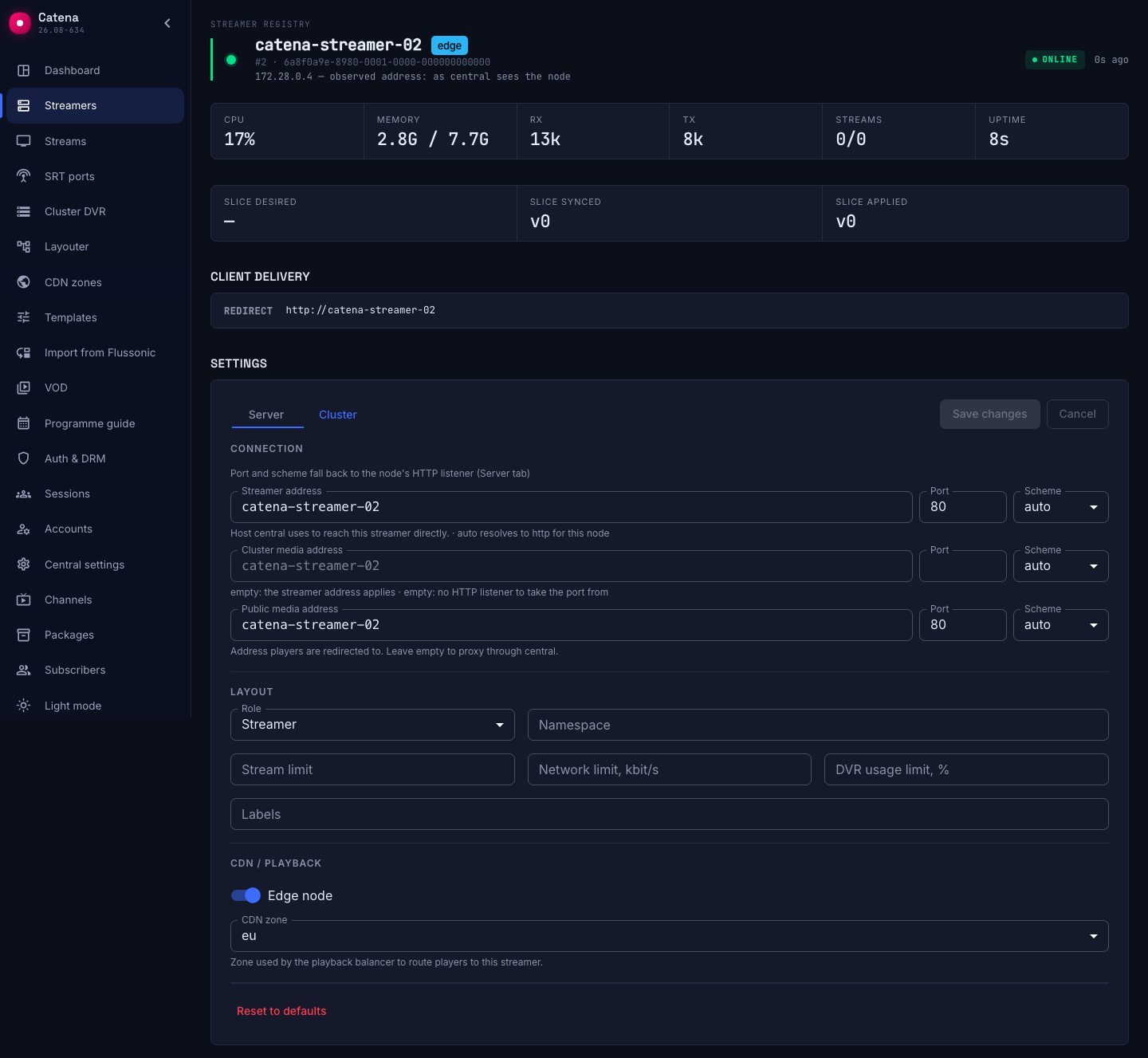
An edge needs a public payload URL — set it in connection and delivery. An edge exists for direct delivery to viewers, so a streamer the viewer cannot reach directly cannot work as an edge — no streams will be placed on it. The single exception is the local streamer. Its delivery is served by the central process itself, so it needs no external address.
The rest happens without you. On its next run the layouter places onto the edge every cluster stream the machine fits by namespace and tags. Turning the switch off removes the edge placements the same way.
Streams on an edge
A stream on an edge has a few particularities:
- The edge captures no sources. It receives live ready-made — from the streamer that captures the stream, as a single intra-cluster feed, no matter how many viewers are watching.
- The edge records no archive. The parts a viewer requests it reads from the streamers that hold the archive, and can keep them in the cache.
- The stream runs on demand. With no viewers, the stream on the edge is not up and pulls nothing from the cluster — even if its settings choose the always-on start mode, that mode acts only on the capture streamer. The first viewer brings the stream up, and after the last one leaves it stops. The pause before shutdown is set by the stream's Idle before stop setting, one minute by default.
- Heavy work stays on the capture streamer. Transcoding, pushes and motion detection do not run on the edge — it serves the finished result.
None of this needs configuring — the streams, and changes to their settings, are delivered to the edges by central.
Send the viewers through the balancer
Viewers are taken to the edges by the central playback balancer — hand players the addresses under the /playback prefix instead of direct machine addresses. The balancer sends the viewer to a live edge that has the stream first, and when no live edge is left — to the capture streamer. In the second case delivery degrades but does not fail.
The choice can be tuned further — CDN zones tie the viewer to their group of streamers by the viewer's IP address.
The edge cache
Every archive read the edge does not have is a trip to a streamer with the archive. To serve repeat requests locally, add cache disks to the edge and enable Cache the archive on the stream. Such an edge is called an edge cache, and it keeps the parts of the archive the viewers actually watch.
The cache works with the archive only. Live is not cached — the live feed already arrives at the edge once and is served from there to every viewer of the machine.
How much the cache has taken and what share of reads it serves — in the Cluster DVR section.
If something is off
- The stream does not play from the edge. Open the stream's Layout tab and check that there is an edge placement and that it is applied. A stream that does not fit the machine by namespace or tags will not be placed on the edge — same as in regular placement.
- Viewers go to the capture streamer. Either no edge is alive, or the player goes to
/streamingof a specific machine instead of/playback—/streamingaddresses bypass balancing. - The edge has no streams at all. Check the public payload URL — without it the edge receives no placements (connection and delivery). The refusal reason is shown on the stream's Layout tab.