Flussonic Watcher
Flussonic Watcher VMS is a central video surveillance platform for enterprises and organizations with distributed sites. It combines camera and archive access, user management and API integrations. Users work through the web interface, mobile application or API.
Watcher VMS runs in the customer's infrastructure, including a private cloud. Cameras are grouped into organizations and folders; each user receives permissions for specific cameras and operations. The Watcher NVR appliance provides local recording at sites; central VMS combines access to these sites.
Who Flussonic Watcher is for
- Telecom operators — enterprise surveillance projects with branch offices.
- Enterprises — monitoring sites and production processes.
- Property management companies — cameras at residential developments and construction sites.
- Organizations with distributed sites — shared access to cameras and archives across locations.
Flussonic Watcher features
- Camera connections — RTSP, ONVIF discovery and Flussonic Agent for cameras behind NAT.
- Video and archives — browser playback, time search and recording export with the required permissions.
- Mosaics and maps — multiple cameras on one screen, camera locations on maps and floor plans.
- Access permissions — organizations, users, folders and camera permissions.
- NVRs — local recording on Watcher NVR and cloud management of NVRs.
- Video analytics — motion, face recognition and vehicle analytics events. Analytics requires the relevant modules and cameras to be configured.
- Integrations — API, external account management systems and embedding cameras on websites.
- Interface appearance — branding the web interface and email messages.
Getting started
Follow the quick start: sign in, add a test camera and check video and archives. Installation and cluster organization are covered in the deployment guide.
Flussonic Watcher components
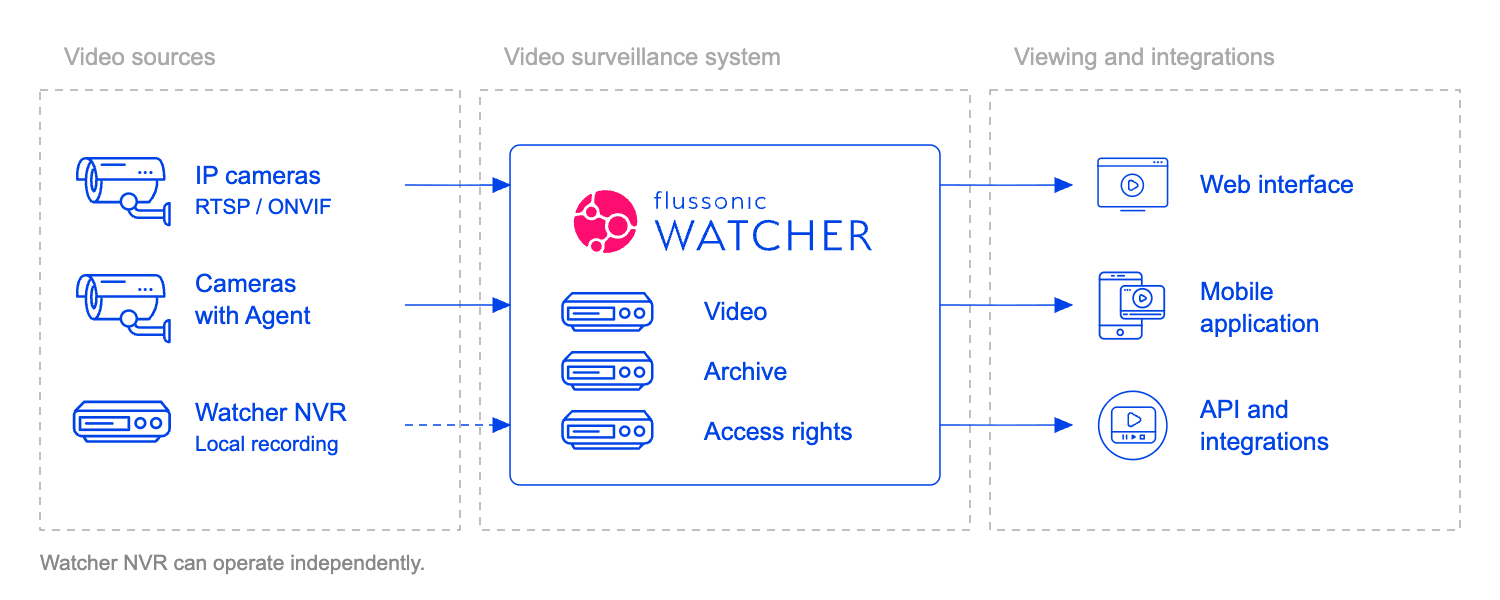
The diagram shows connection and access options. Watcher NVR records locally and can operate autonomously; its optional connection to central Watcher is dashed. Server component roles are described below.
Cameras
A camera sends a stream that Watcher receives through a streamer. A direct connection requires streamer access to the camera address and a supported video format.
Flussonic Agent establishes an outgoing server connection, allowing a camera on a local network to connect without an incoming connection to it. See the camera guide for connection methods.
Servers
Components perform different tasks:
- Watcher VMS stores accounts, organizations, access permissions, folders and camera settings. Users access their data and video through it.
- Central stores stream configuration and manages placement in the cluster.
- Watcher Streamer receives video, records archives and delivers video to players. Video archives are stored on streamers, separately from Watcher's database.
- Video analytics processes streams and produces events. Installation and requirements are described under analytics.
Camera settings are changed through Watcher. Directly changing these streams on the streamer does not replace Watcher settings: synchronization applies the management system's configuration.
Single-server and cluster deployment
On one server, management components and the streamer run together. In a distributed installation, streamers run on separate machines while Watcher manages shared organizations and permissions.
Size resources for camera count, bitrate, archive retention, concurrent viewers and analytics. Use the hardware requirements and hardware calculation. Redundancy requires separate configuration; see archive protection.
Applications
- Web interface — cameras, archives, favorites, mosaics, maps, events and administrative settings within the user's permissions.
- Mobile access — native applications and the web interface on a phone.
- API — integrations and custom applications; for an external website, use links and camera iframes.