Streamer settings
A streamer has no configuration of its own: central stores it and delivers it to the machine. The settings form lives at the bottom of the streamer's card — open it from the registry by clicking the row.
How changes apply
The Save changes button submits only what you changed — parallel edits of other sections are not clobbered. From there, a trace of three indicators follows the delivery:
- Saved — central accepted the changes.
- In flight — the configuration is on its way to the streamer; the indicator pulses. If the streamer is offline, the form says so outright: the settings will apply when the link comes back.
- Applied — the streamer confirmed the apply; next to it — how many seconds the delivery took.
If the settings were changed in parallel with you, the form shows a conflict banner with a choice: Show latest — re-read the other version, Overwrite — insist on yours.
A yellow ENV badge on a field means the value is set by the machine's own environment: it outranks whatever central delivers, and editing the form will not take effect on this streamer until the variable is removed.
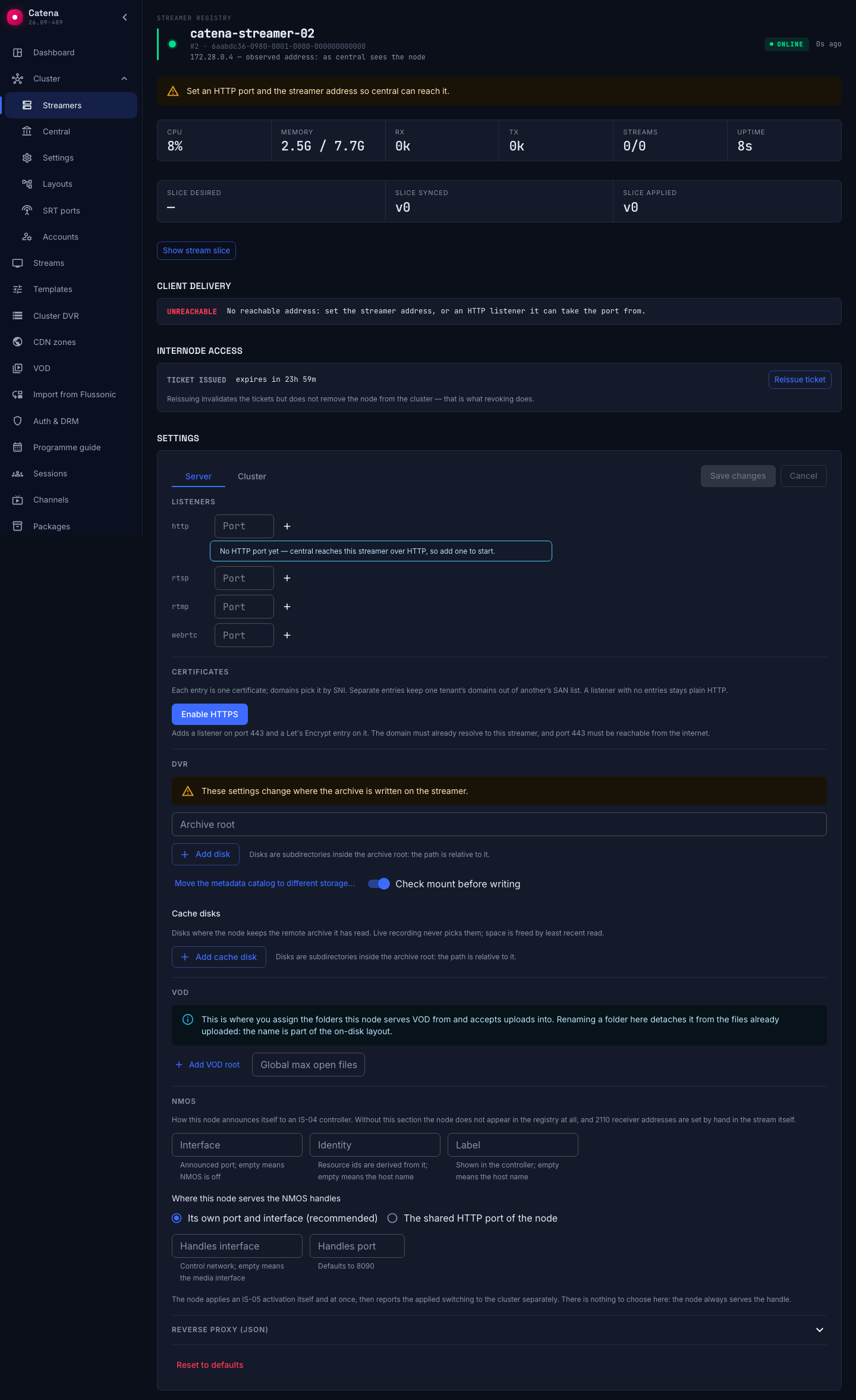
Listeners
The ports the streamer opens per protocol: HTTP, RTSP, RTMP, WebRTC. A port is added as a chip; a chip marked tls means the port carries a certificate.
The WebRTC port is optional: the streamer automatically opens one free UDP port and announces it to the client during connection setup. Set a port explicitly for firewall rules or port forwarding behind NAT. Removing all WebRTC ports restores automatic selection.
Certificates and HTTPS
The Certificates section hangs TLS onto the HTTP listeners — a certificate lives on a port, so a listener comes first. Enable HTTPS does both at once: a listener on 443 and a Let's Encrypt entry on it. One port can carry several entries: clients pick the certificate by SNI.
The certificate source of an entry:
- Let's Encrypt — automatic issue for the listed domains. The ACME contact e-mail appears right there and is required: without it nothing gets issued and saving is refused, and the CA sends expiry warnings to it. Under Advanced live the ACME directory URL and the test-CA switch — an empty URL is production Let's Encrypt.
- Static PEM — your own certificate and private key: full PEM or a file path on the streamer.
- Self-signed — for stands and internal networks.
Domains are comma-separated; the form suggests the hostname from the streamer's delivery addresses. ACME will not issue for a bare IP — you need a domain.
The issue state shows next to the entry itself, and repeats in the streamer's card above: issued (with time to expiry), pending, failed — with the error text. Two weeks before expiry the row turns yellow.
The whole path, with the preconditions and the reasons issuance gets stuck — HTTPS certificate.
DVR
Where the streamer writes the archive: the Archive root, a list of disks when there are several, and the Catalog path. The Verify mount before writing switch is on by default: writing onto the system root partition is forbidden, and a disk without a mount of its own reports as "not mounted". Turn it off only deliberately.
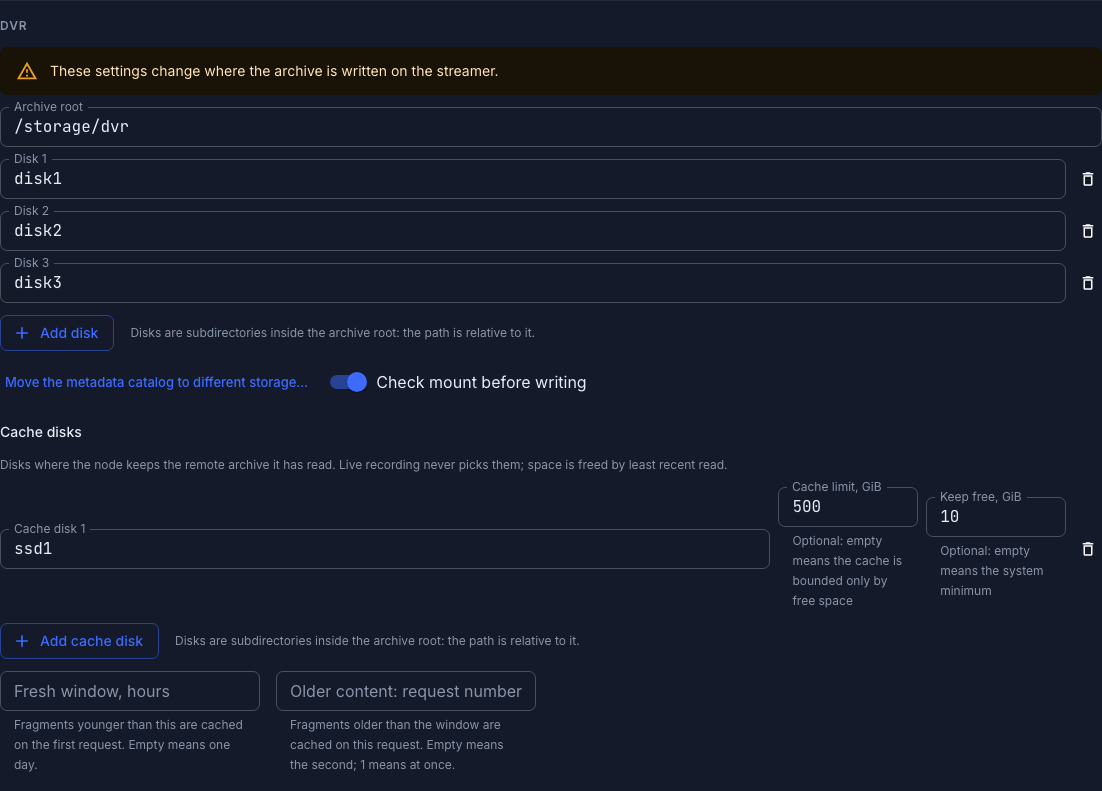
The archive root is the base for relative paths and the home of the metadata catalog, not a write disk: with no disk in the list there is nowhere to write the archive, and the streamer reports an honest write error instead of silently writing into the root.
Cache disks
The second list is Cache disks. These are disks in a different role: archive reads settle on them — the parts the streamer fetched for a viewer from another streamer or from its own archive disks — and a repeat request is served by the cache: locally and from a fast disk. Live recording never picks them, stream retention does not govern them, and space is freed by eviction according to last read. This is how an edge becomes an edge cache.
Each cache disk has two optional limits:
- Cache limit, GiB — how much the cache may occupy; empty means bounded only by free space.
- Keep free, GiB — how much space to leave on the volume; empty means the system minimum.
The same path cannot be listed both as an archive disk and as a cache disk — saving rejects such a configuration.
Below them is cache admission, shared by the whole cache of the streamer:
- Fresh window, hours — fragments younger than this are cached on the first request; empty means one day.
- Older content: request number — which repeat request starts caching a fragment older than that boundary; empty means the second,
1means at once.
The reason for the split is simple: almost everybody watches the fresh tail of the archive and only a handful watch its depth, so a single seek must not evict what is popular.
A streamer without cache disks is not broken by a stream with caching enabled: the cache simply does not work, and a warning goes to the log.
Cache volume and hit rate are visible in the Cluster DVR section; the full mechanics of the cache are in the Sapsan documentation.
Recording and watching the archive in detail — the DVR page.
VOD
The VOD section defines the VOD roots the node serves and accepts uploads into. Without at least one root the VOD catalog stays empty: there is nowhere to upload.
Each root has a Root name and a Path, plus the fine print: Max open files, Idle timeout, s, Max read handles; there is also a node-wide Global max open files.
The name is not a caption but part of the on-disk layout, so renaming a root is not supported. Pick the name you intend to keep.
A typo in a field name is rejected on save: 422 with the path to the field — unknown field "vod.root", say, if you write root instead of roots.
Publish prefixes
The name prefixes under which the streamer accepts incoming publications. Without prefixes, publishing is accepted only into existing streams.
Role and placement
The Cluster tab carries the streamer's control fields. Role defines what the machine does in the cluster — only machines with the Streamer role receive streams. The switches next to the role turn the streamer into delivery (Edge node) or into archive recording (DVR node); both cannot be on at once. Namespace, Labels and the limits steer placement — their meaning is laid out in Stream placement.
The Transcoding and Copying switches are the streamer's VOD roles: whether it receives transcoding jobs and whether it takes copies of assets onto its storages. Both are on by default; a switched-off role stops only the handing out of new work, running jobs finish, and the console warns about them before the switch. A note under the switch says when the streamer cannot do it, for instance a build without a transcoder backend. These are control fields of central; they are not delivered to the streamer. Details in VOD copies and balancing.
Connection and delivery
- Streamer API URL — the address central uses to reach the machine's management API. Without it the streamer carries a reachability chip in the registry, and its sessions vanish from the output.
- CDN zone — which zone the streamer belongs to; the playback balancer routes viewers by it.
- Public payload URL — the public base of viewer addresses. Set — players get a redirect straight to the streamer; empty — central proxies the media through itself.
- Intra-cluster payload URL — the base for streamer-to-streamer transfers and proxying; defaults to the API URL. Without it the neighbours do not read from this streamer: archive remains on it are not served, only erased.
The resulting delivery mode shows in the streamer's card: in-process (the local streamer), redirect, proxied by central, or unreachable — in red when nothing is set. A separate warning appears when a certificate is issued for a name but the delivery base is still http:// — TLS goes unused in that case.
Reverse proxy and reset
The Reverse proxy (JSON) section is a temporary editor of the raw rproxy section; invalid JSON blocks saving.
The Reset to default button in the danger zone returns all of the streamer's settings to their defaults — the streamer applies them on its next sync. The action is irreversible.