SRT publishing
Catena accepts SRT publications and distributes their processing across streamers. Reception and processing can run on the same server or on different servers.
With GPU transcoding limits set, the layouter accounts for occupied capacity and redistributes publications that have not started yet. If the cluster has insufficient suitable capacity, some streams remain without processing.
Before you start
The publishing application or device must be able to reach the publication's UDP port.
Quick start
If the entire installation runs on one server, no cluster changes are needed: accepting publisher connections is enabled by default. In a cluster, first choose receiving streamers and set the publish address.
- Open Streams, create a stream, and select the Sources tab.
- In SRT publishing, click Enable SRT publishing.
- Set the UDP port. It must be available and dedicated to this stream.
- Keep the generated Passphrase or enter your own.
- Click Save and wait for the configuration to be applied.
- Copy the Encoder URL into the publishing application or device and start sending.
- Check the received track parameters on Sources and the video in the built-in player.
A stream with SRT publishing does not need a separate source.
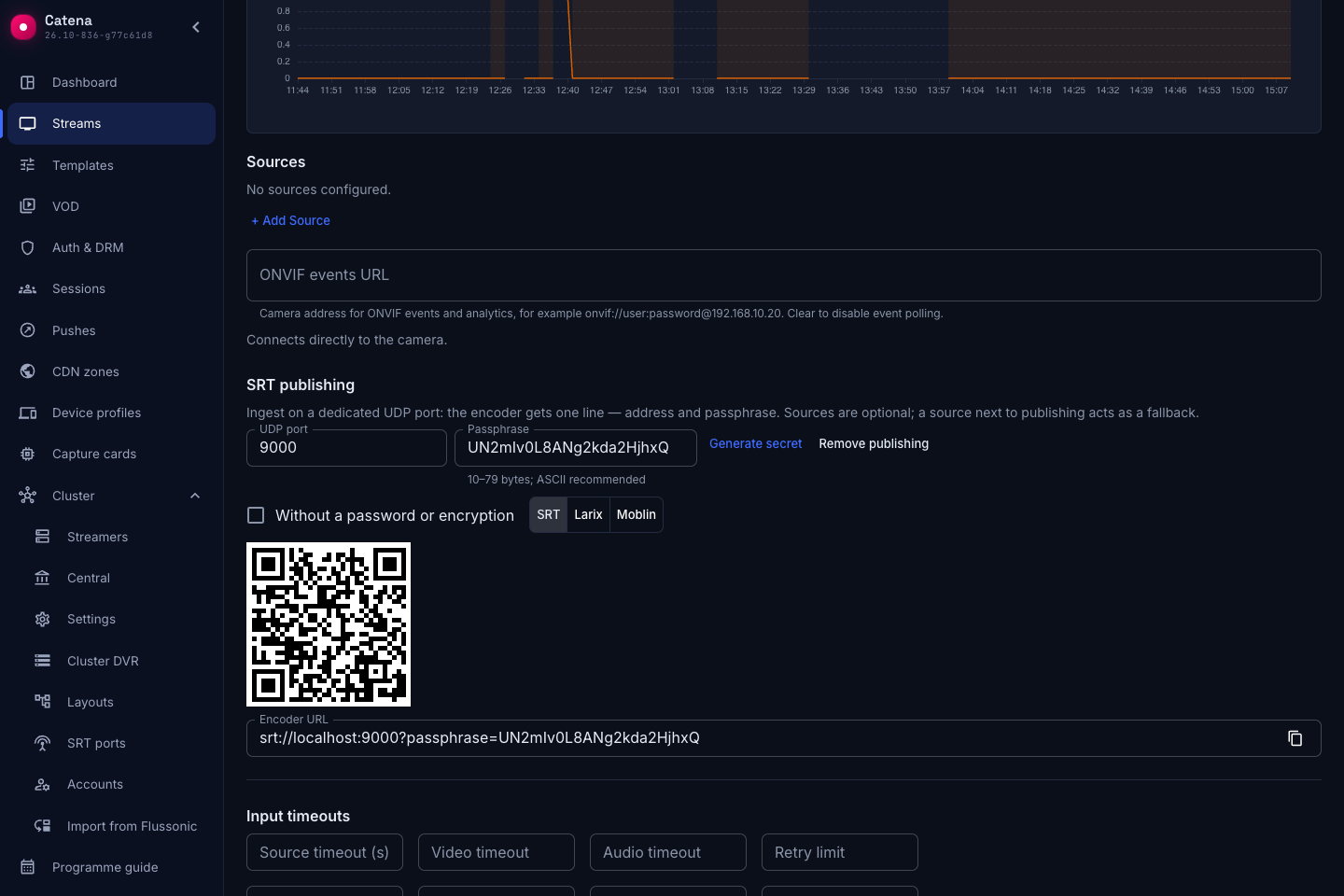
For open reception on a trusted network, select Without a password or encryption and save. Simply clearing Passphrase results in a validation error when saving.
Changing the port or passphrase disconnects the active connection once the receiving streamer applies the changes. Give the encoder the new connection URL.
Choose receiving streamers
In a cluster, reception can be separate from processing. Use a trusted network between streamers; the receiving streamer must be able to reach the processing streamer's HTTP/HTTPS port.
Open Cluster → Streamers, select a server, and open the Cluster tab. Accept publisher connections allows this streamer to receive SRT connections. Save the changes.
Reception is enabled by default. Edge streamers do not accept publisher connections.
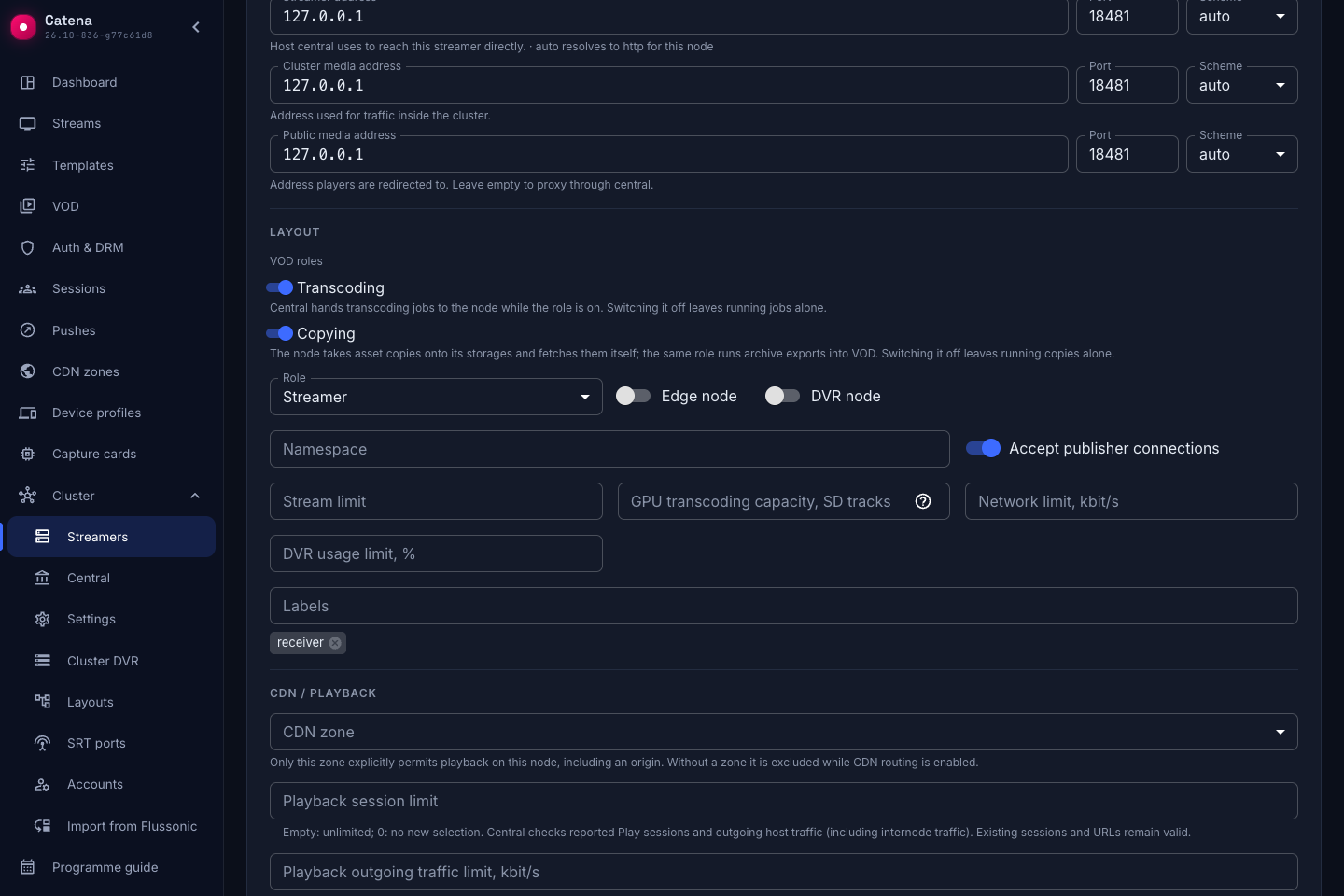
To accept publications only on selected servers:
- Leave Accept publisher connections enabled on those streamers and disable it on the others. Save each server's settings.
- Point the publish address only to the selected streamers.
At least one receiving streamer must be available. Publishers can connect only to the selected servers. The layouter can assign processing to other streamers in the cluster.
Set the publish address
The stream page shows an Encoder URL to copy into the application or device that will publish the stream. To build this URL, the console uses the Publish address from Central settings, and the port and passphrase from the stream settings. The address is shared by all streams.
The field does not create DNS records, configure a load balancer, or enable reception. In a cluster, leaving it empty hides the URL and QR code, but publishers can still connect directly to a receiving streamer using its address and the stream's port and passphrase.
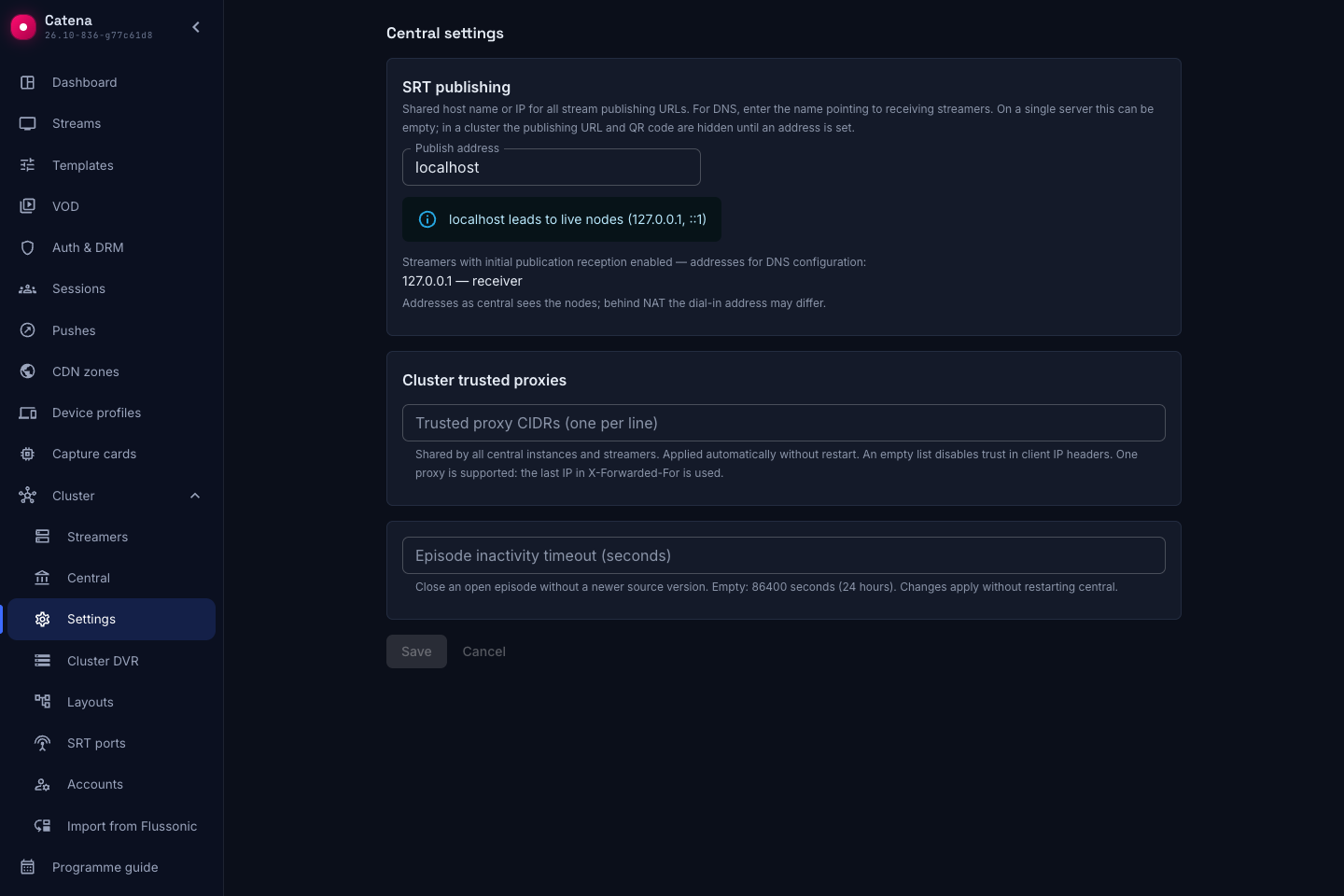
The sender needs the address of a receiving streamer. Choose a connection method based on how many servers accept publisher connections.
One receiving streamer
If the entire installation runs on one server, the address can be left empty: the connection URL uses the server address where the console is open.
In a cluster, set the address explicitly even if only one streamer accepts publications:
- Open Central settings. Find the receiving streamer and its address below Publish address. Behind NAT, use the external address through which the sender can reach this server.
- Enter it in Publish address and save.
- Copy the Encoder URL from the stream page. The sender will use it to connect to the selected server.
Multiple receiving streamers
A publisher can connect to any streamer with reception enabled, but one connection URL contains one address. Enabling reception on several servers does not create a shared address for them.
To give senders one URL without asking them to choose a server, we recommend a shared DNS name. If you do not want to configure DNS, start with one receiver's address.
Configure a shared DNS name
DNS maps a name to IP addresses. One name can have multiple addresses, one for each receiving streamer. You need access to your domain's DNS settings.
- In Central settings, take the addresses from the list of streamers accepting publisher connections. Senders must be able to reach these addresses; behind NAT, use external connection addresses.
- Configure the chosen DNS name to point to the receiving streamers' addresses.
- Enter this name in Publish address and save.
- Copy the Encoder URL from the stream page: it now contains the shared name instead of a single server's address.
DNS address selection and reconnection depend on the publishing application. DNS does not distribute connections according to streamer load; multiple records alone do not guarantee failover if a server fails.
Without DNS
Enter one receiving streamer's address as for a single server. You can start publishing: the generated URLs point only to that streamer. Other receivers will not be used automatically.
If you already have an external UDP load balancer configured to forward SRT to the receiving streamers, enter its address instead of an individual server's address.
Reception and processing
The layouter assigns processing in advance. If the encoder connects to another permitted streamer, that streamer receives SRT and forwards the stream to the processing streamer over m4f2. You do not need to create a push manually.
Transcoding and DVR recording run on the processing streamer. Moving processing can preserve the incoming SRT connection, but moving active processing can interrupt video and archive recording.
To record an additional copy on another streamer, configure an archive backup.
Check the result
Received track parameters appear on Sources. Check the video in the built-in player. To check assignments, open Layout:
- publication (
publish) — the processing streamer. If it accepts publisher connections, it can receive SRT directly. - publication relay (
publish_relay) — a streamer that receives SRT and forwards it to the processing streamer.
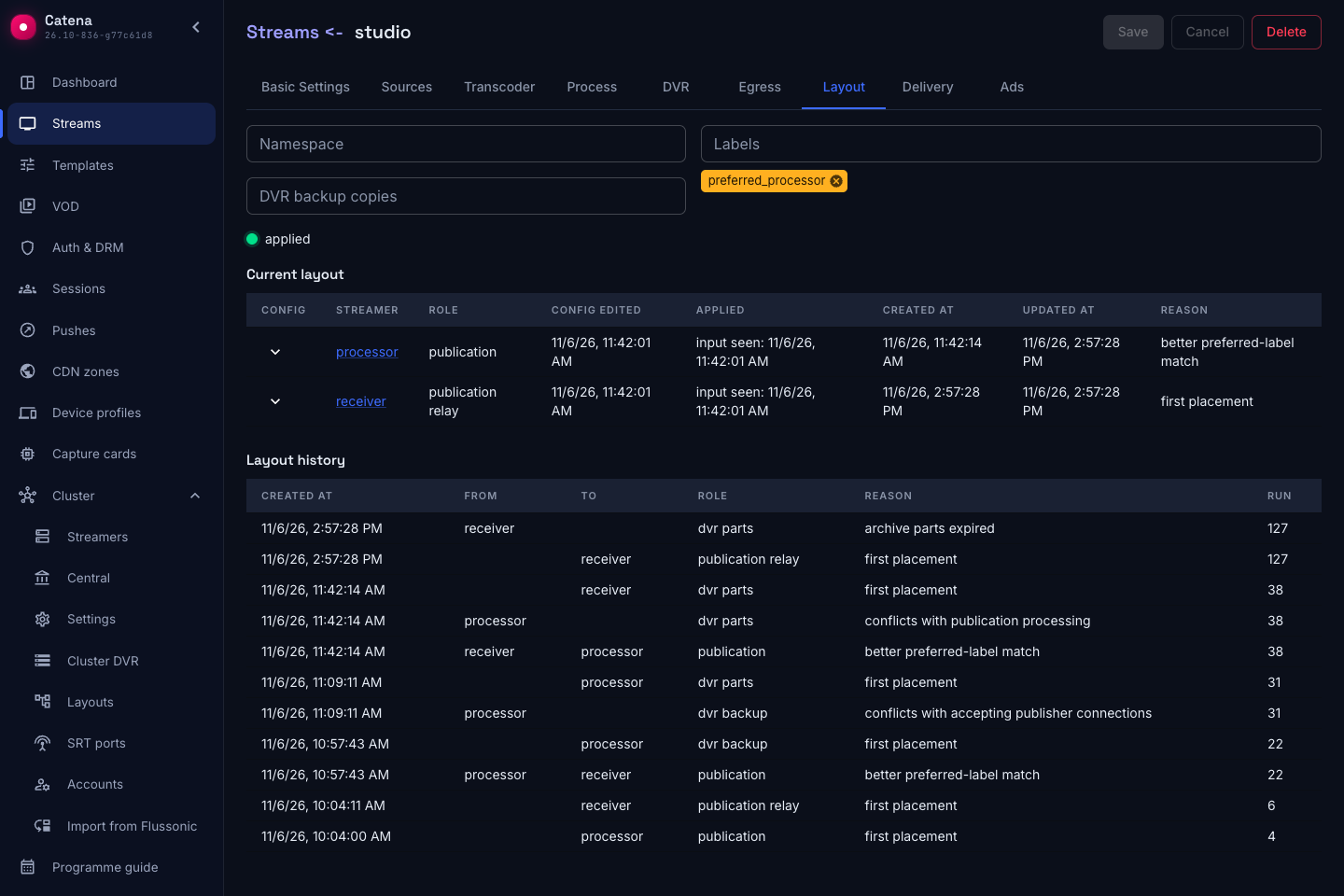
In the separate-server setup, Pushes shows a publish-relay transfer over m4f2. Check its status on the receiving streamer and the m4f2 input status on the processing streamer.
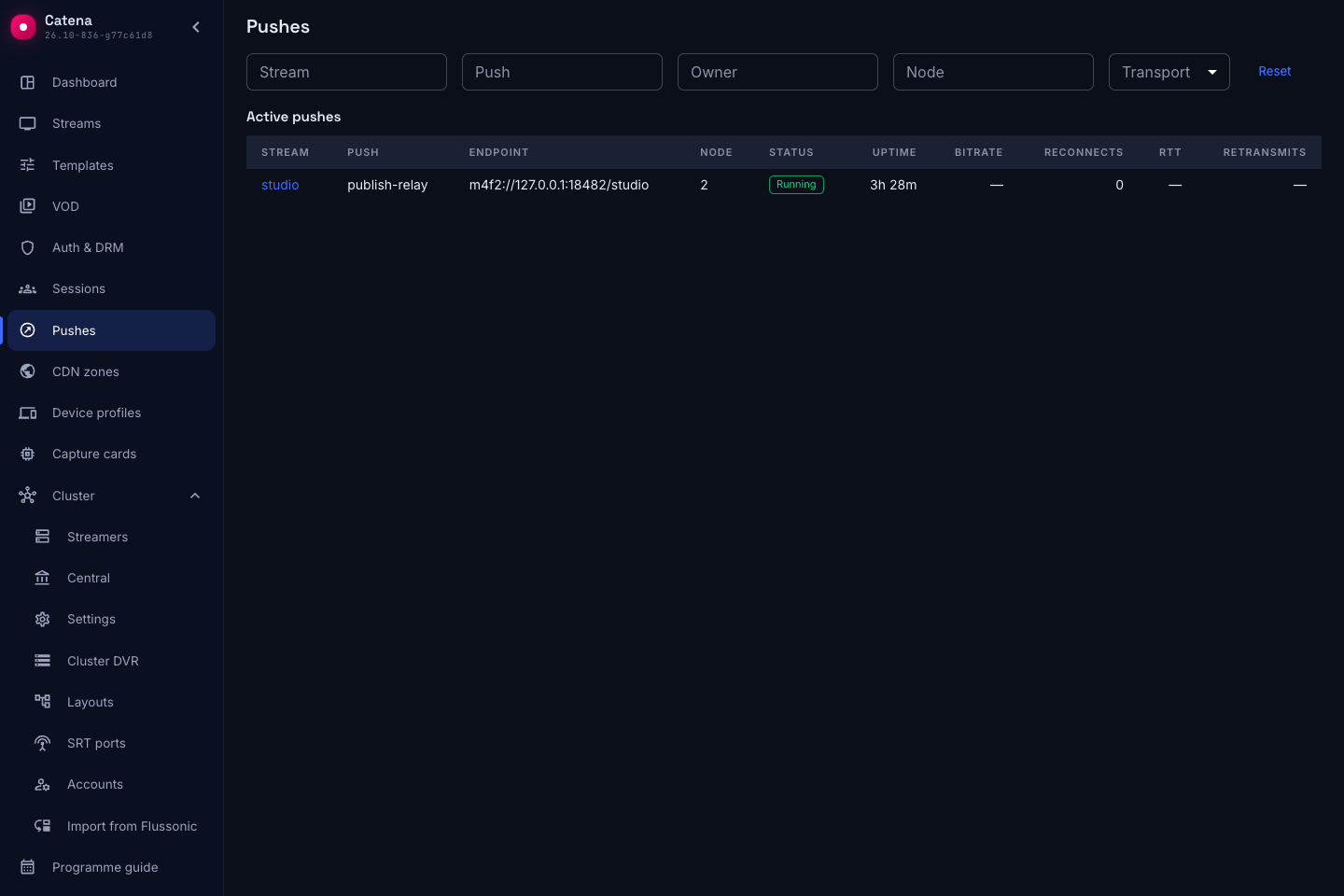
If reception and processing share a server, there is no separate publish-relay push between them. When serving previously recorded archive, the receiving streamer can have the dvr parts role and combine it with forwarding.
The SRT ports page shows configured ports and where senders have connected.
If publishing does not work
| What you see | What to check |
|---|---|
| The encoder cannot connect | UDP access to the receiving streamer; matching passphrase; publisher reception enabled on the server |
| Unmet relay demand | An available streamer with publisher reception enabled; whether its configuration has been applied |
| SRT is received, but the m4f2 input does not work | The processing streamer's internal address and HTTP/HTTPS port; the state of publish-relay |
| Unmet publication demand | Reasons on Layout: streamer eligibility, placement restrictions, and transcoding capacity |
| The source works, but there is no output video | Output tracks and transcoder errors; input status alone does not confirm encoding works |
Removing the SRT publishing section and saving stops reception once the changes reach the streamers.
Next steps
GPU transcoding capacity — limit simultaneous processing and distribute publications that have not started yet.