Stream with an external source
A Catena stream pulls the stream itself: you say where it lives, and the streamer connects, watches the signal's health and reconnects after drops. This page takes a stream on air with a real source; the end-to-end example is an SRT contribution, the other protocols' fields are collected below.
Add a source
Create a stream if you have none yet, and open the Sources tab on its page. Press + Add Source and pick the protocol:
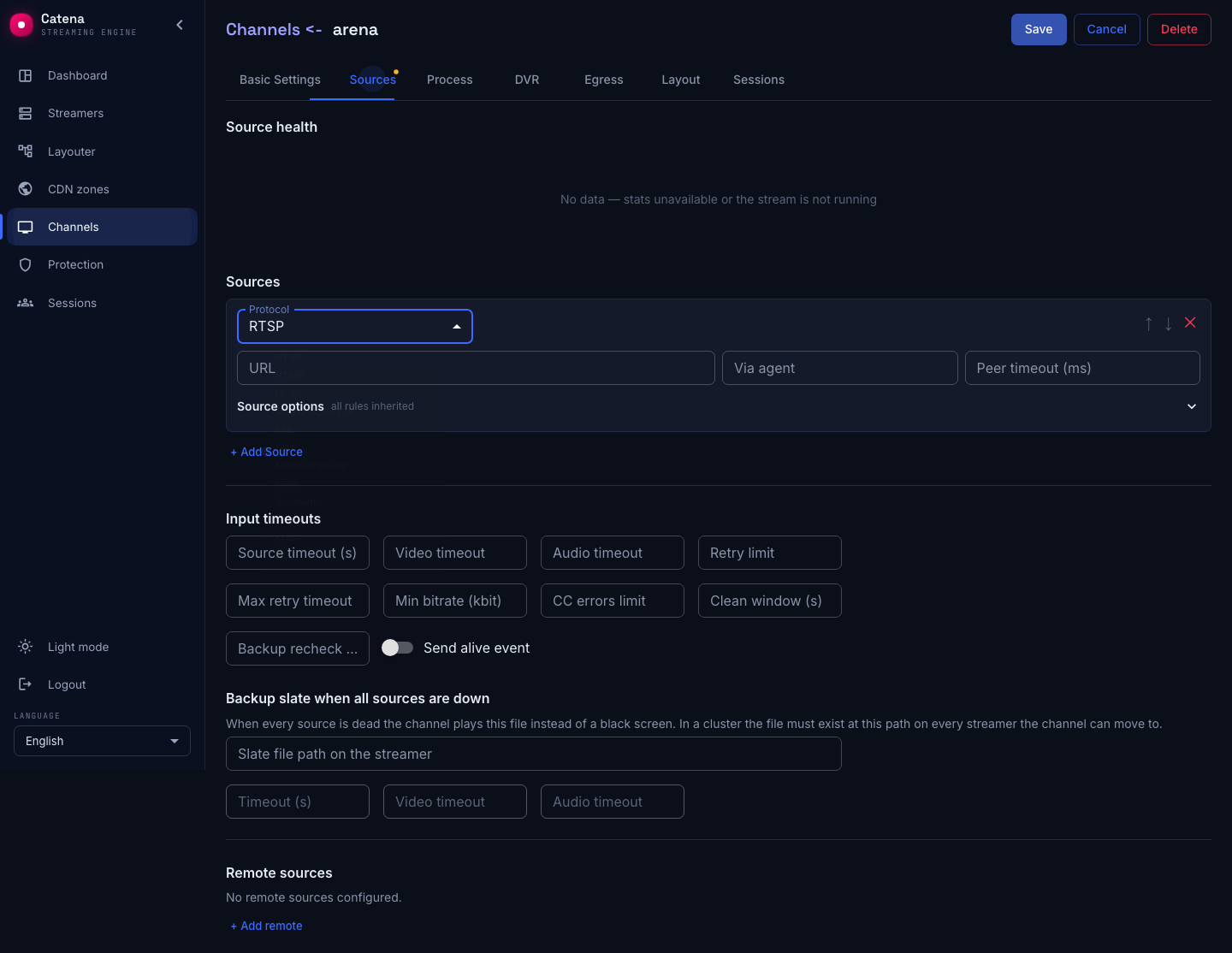
The form shows the fields of the chosen protocol. Fill them in and press Save — the streamer starts connecting as soon as central delivers the configuration.
End to end: an SRT contribution
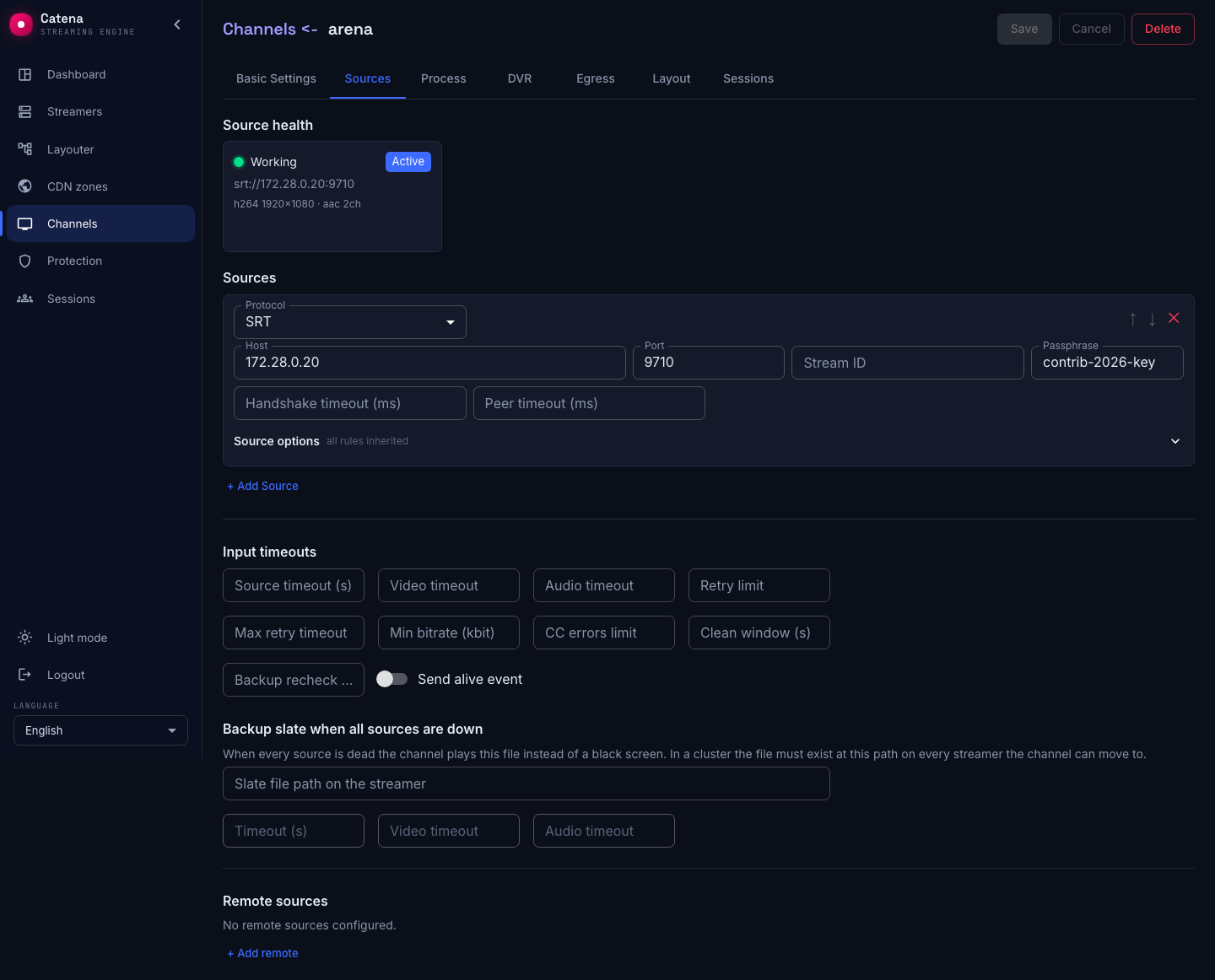
Given: the on-site encoder serves the program as an SRT listener at 172.28.0.20:9710, the link is encrypted with a passphrase. In the source form:
- Host —
172.28.0.20: the listener's IP address. The streamer acts as the caller and initiates the connection itself. - Port —
9710. - Passphrase — the same key configured on the encoder (the SRT standard wants 10–79 characters). With a key the link is encrypted, and a listener with a key rejects unencrypted clients; an empty field means an unencrypted link.
- Stream ID — needed only when the listener tells several programs apart by it; otherwise leave empty.
- Handshake timeout (ms) and Peer timeout (ms) — how long to wait for the connection to establish and for a silent peer before reconnecting. Empty fields are sensible defaults.
After Save, the stream's status in the header turns green, and the source health card shows a live bitrate and tracks:
The stream is already watchable — in the built-in player on the basic settings tab, or at /streaming/v/<name>/index.m3u8.
The other protocols' fields
| Protocol | Fields |
|---|---|
| RTSP | URL like rtsp://login:password@host/path, peer timeout. The typical case is an IP camera |
| RTMP | URL rtmp://host/app/stream, peer timeout |
| HLS | Playlist URL http(s)://…/index.m3u8 |
| MPEG-DASH | Manifest URL http(s)://…/manifest.mpd; representation choice, ladder capture and ClearKey keys — see MPEG-DASH source |
| MPEG-TS/HTTP | Transport stream URL, peer timeout |
| MPEG-TS/UDP | Host — the multicast group address, Port — see Multicast source |
| File | Path to a file on the streamer's disk; the file loops |
| Synthetic | The built-in generator — SMPTE bars and a beep; walked through in the Quick start |
| M4F, M4S | URL and Cluster key — pulling a stream off a Flussonic Media Server, handy during migration |
| MBR | A container of several sources assembled into one multi-bitrate stream — see Transcoding and MBR |
The program inside an MPTS
A transport stream may carry several programs (MPTS). The Program (PNR) field picks the one you need by its number; the default is first with content. State the number explicitly when the feed carries several TV channels and you need a particular one.
SRT receive latency
An SRT source has a Receive latency (ms) field. It is not a plain delay but the budget for retransmitting lost packets: the hint under the field asks for at least 3–4 RTT to the source, with 120 as the default. Setting it too low turns losses into holes in the feed, because the retransmission does not make it in time.
The splash for when every source is gone
The Splash on source loss block sets the Splash file on the streamer and a Timeout (s). When every source is dead, the stream plays that file instead of a black screen.
In a cluster there is a condition the hint itself warns about: the file must exist at that path on every streamer the stream may move to. Otherwise there will be no splash after a relocation. If the path is left empty, the object is removed entirely — the splash is switched off.
A stream can have several sources — the list is ordered by priority, and the streamer runs off the highest-priority live one. How switching, degradation thresholds and returning to the primary are tuned — Input failover.
If the source did not come up
- The health card says Dead and the retry counter grows. The streamer cannot connect: address, port, firewall. Check reachability from the streamer's machine, not from yours — it is the one connecting.
- SRT does not connect: the handshake is rejected (Unauthorized). The passphrase does not match the other end.
- The stream is green but the player does not play. The source delivers codecs the player cannot read (raw frames, for example). The stream needs a transcoder — see Transcoding and MBR.
- The source flaps between alive and dead. Look at the thresholds and timeouts: Input failover.