Device profiles
Not every viewer device plays every track of a stream. A set-top box cannot handle 720p60, a TV does not play HEVC, a webOS player breaks on subtitles. A device profile hides the extra tracks from such a device and leaves every other viewer alone.
A profile is a named record of four parts:
- how to recognise the device — by
User-Agent, a request header or a URL parameter; - where the profile applies — request modes and streams;
- which tracks to keep — video, audio and subtitle limits;
- in which form to serve HLS — an optional part for old set-top boxes that request Flussonic URLs.
There is one set of profiles for the whole cluster. Central stores it and delivers it to every streamer together with the rest of the configuration; the streamer the viewer reached makes the decision without asking central.
A profile only narrows: it removes tracks and never adds any, and the output form does not change access. It is not an access control — a viewer who fakes a header gets the set that belongs to that header, and "4K for premium only" is a job for the access policy.
What a profile is made of
The Device profiles console section lists the profiles in the order the streamer tries them. Click a profile to open its card.
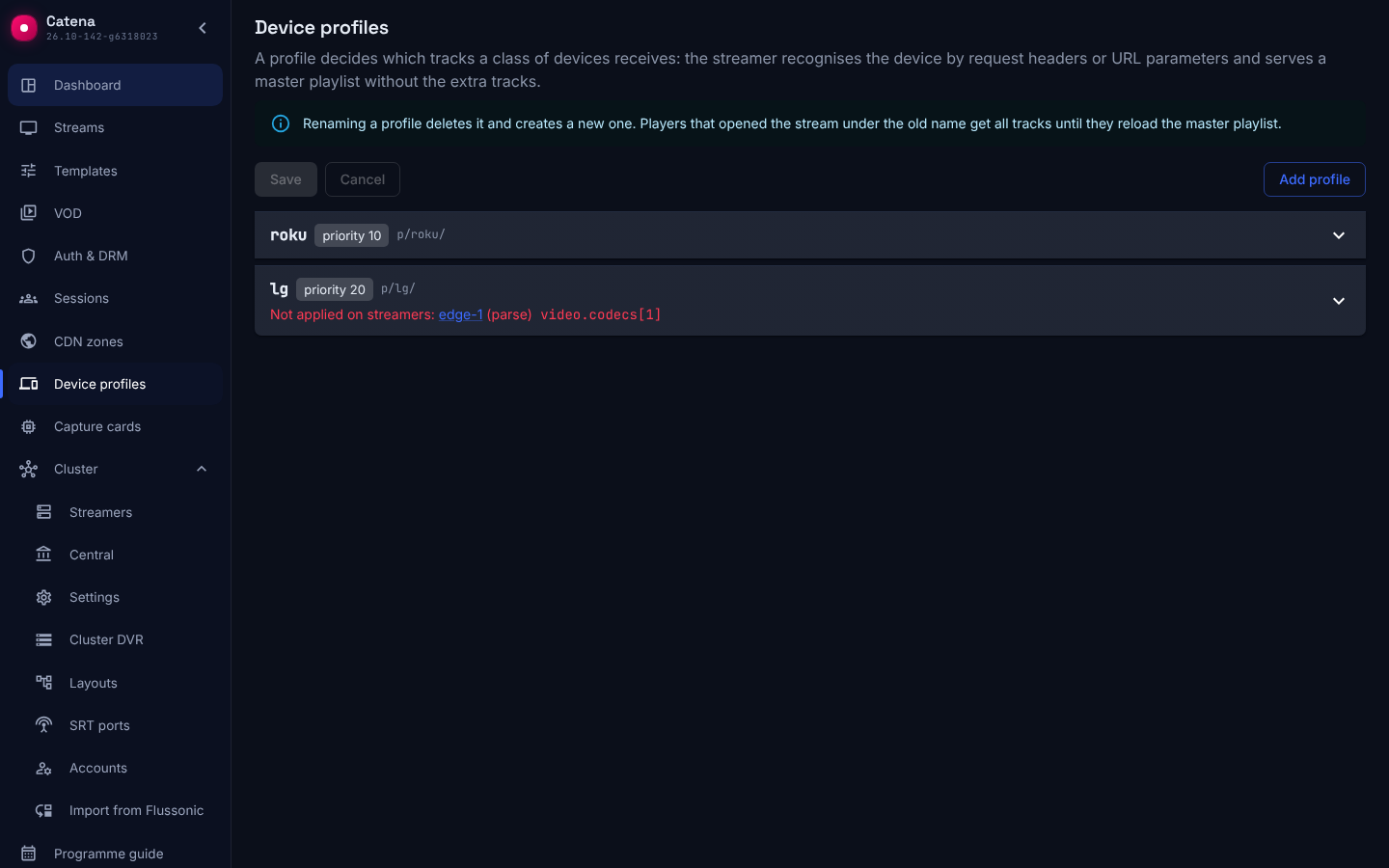
The card header shows:
- the profile name and its
p/<name>/URL; - the priority, for example priority 10, or the URL only mark for a profile without conditions;
- the changed mark when the profile has unsaved edits.
To create a profile, click Add profile, enter a name in the New profile dialog and click Add profile. A profile name consists of lowercase Latin letters, digits and the characters ., _, -, is at most 64 characters long and starts with a letter or digit. The name is part of the p/<name>/ URL (see profile URLs). There can be at most 64 profiles: with 64 of them, Add profile is unavailable. A new profile, like any edit, takes effect only after Save (see editing).
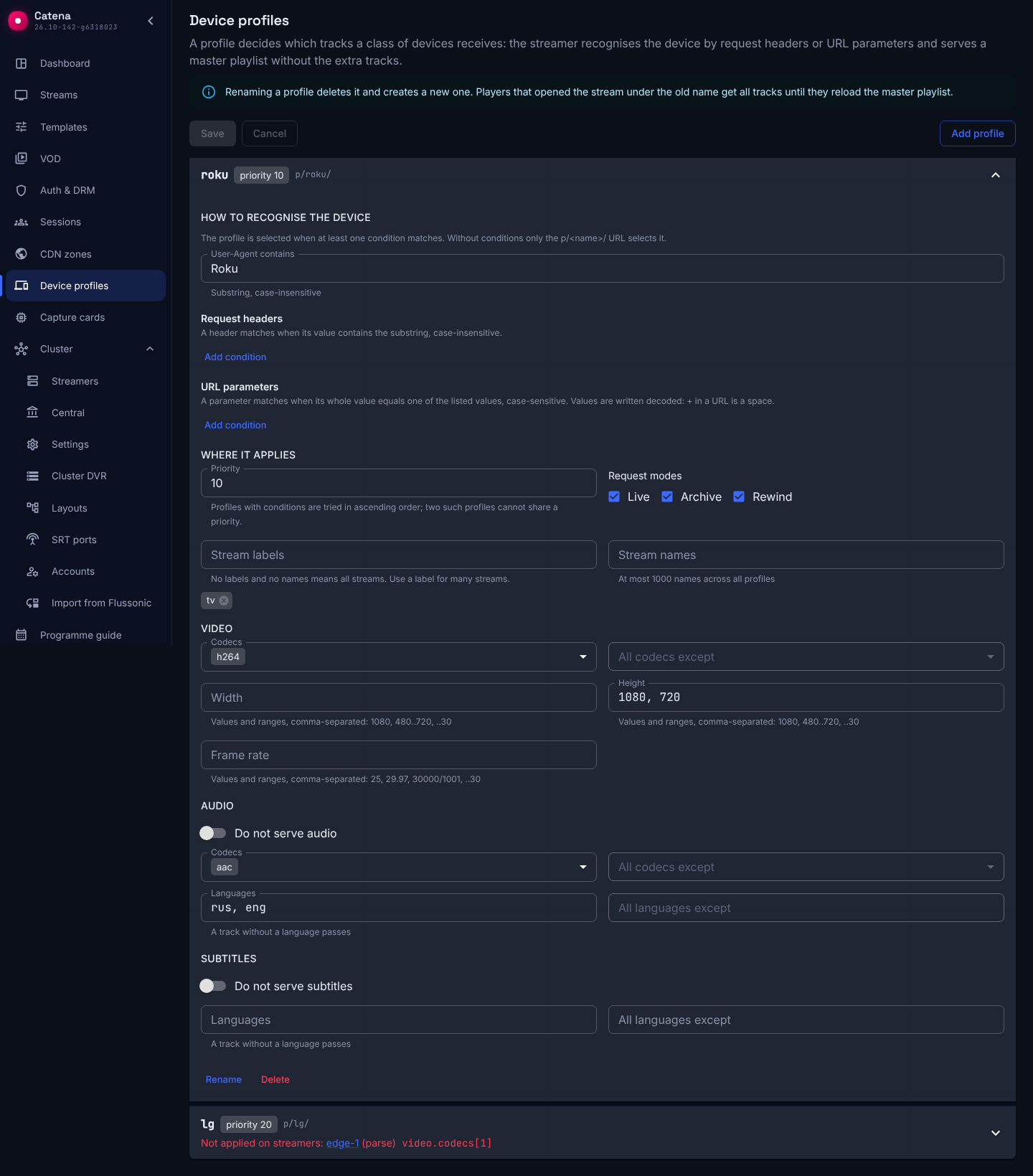
How to recognise the device
A profile is selected when at least one condition matches:
- User-Agent contains — a substring of the
User-Agentheader, case-insensitive:RokumatchesRoku/DVP-14.5. - Request headers — a header name and a substring of its value, case-insensitive for both. This is how you recognise a device by a header your middleware sets (
X-CDN-DEV-MODEL: 4800X) or by a ready-made device class from a CDN (CloudFront-Is-SmartTV-Viewer: true,X-UA-Device). The streamer has no built-in device database. - URL parameters — a parameter name and a comma-separated list of values. A parameter matches when its whole value equals one of the values, case-sensitive:
?device_profile=arrismatches the valuearris, but notarris-4205orArris. Values are written decoded:+in a URL is a space, so?p=S10+matches the valueS10(with a space), and the valueS10+only matches?p=S10%2B.
A request without User-Agent does not match a User-Agent condition.
A profile without any condition is marked URL only: the streamer selects it only when the URL itself names the profile (see profile URLs).
Where it applies
- Priority — required and unique for profiles with conditions: the streamer tries them in ascending order and takes the first one that fits. It has no effect on a profile without conditions.
- Request modes — which requests the profile applies to. All three modes by default.
- Stream labels and Stream names — which streams the profile applies to: a stream is in scope when it carries at least one of the labels or is named. Empty means all streams. All profiles together may name at most 1000 streams; for many streams use a label.
Request modes:
- Live — a request for the live stream;
- Archive — a request with
from; - Rewind — a
rewind/<seconds>/URL.
Stream labels are entered one at a time: type a label and press Enter. A label consists of Latin letters, digits and the characters _, ., - and is at most 40 characters long. The console checks a label at once: a label of any other form is not added, and an error appears under the field. A label already in the list is not added a second time.
Which tracks to keep
Limits are grouped by track type, and each group judges only tracks of its own type:
- Video — Codecs or All codecs except, Width, Height, Frame rate.
- Audio — Codecs or All codecs except, Languages or All languages except, the Do not serve audio switch.
- Subtitles — Languages or All languages except, the Do not serve subtitles switch.
Fields of one section affect each other:
- a filled Codecs field disables All codecs except, and the other way round: central does not accept both lists in one section;
- in the same way, a filled Languages field disables All languages except, and the other way round;
- the Do not serve audio or Do not serve subtitles switch, when on, removes all tracks of that type and hides the other fields of the section.
A track stays when it passes all limits set in its group; within one limit, matching any value is enough. Width, height and frame rate are comma-separated exact values and ranges; a range may leave one end open:
1080, 720          exactly 1080 or exactly 720
..720              at most 720
720..              at least 720
480..1080          from 480 to 1080 inclusive
..30               at most 30 frames per second
25, 29.97          frame rate as an integer or a decimal with a point
30000/1001         frame rate as a fraction
A limit does not remove a track whose limited property is unknown (no frame rate, no language): there is nothing to judge. Languages are compared by their standard tag: eng in the track description and en in the profile are the same language; und ("undetermined") counts as no language.
A profile without any limit is selected but removes nothing.
HLS output form
Old set-top boxes play HLS in MPEG-TS only, and some — Motorola VIP 1xx3, for example — expect video and audio in one segment. Their playlist URL is built by middleware and carries no form. Then the profile chooses the form — the Output form field in the HLS output section:
- Not set (redirect to fMP4) — the profile has no HLS output section, Flussonic URLs redirect to fMP4;
- fMP4;
- MPEG-TS, separate audio (ts/) — audio as separate tracks;
- MPEG-TS, audio inside the video segment (ts/mux/) — video and audio as one program in every segment; no subtitles, at most ten audio tracks.
MPEG-TS carries only H.264, HEVC, AAC, MP3, MP2, AC-3 and E-AC-3 tracks.
On rewind rewind-<seconds>.m3u8 a profile with the HLS output section answers with the live playlist of its form, the way an operator proxy answers old set-top boxes. On this URL the profile is selected as on a live request: a profile without Live in its Request modes does not fire there. So on rewind the form and the track filtering come from one and the same profile.
The form applies only to Flussonic URLs that carry no form. On /streaming/v/… and /playback/v/… URLs the URL itself sets the form, and a profile only filters tracks there.
The form comes from the profile selected by conditions — by the same rules as for track filtering: on rewind-<seconds>.m3u8, for example, as on live. A URL only profile never sets the form: Flussonic URLs have no p/ segment.
How a profile is selected
The streamer selects a profile on every request for an HLS master playlist (fMP4 and MPEG-TS, with and without LL-HLS) and for a DASH manifest, in every request mode:
- Live;
- Archive;
- Rewind.
The selection goes as follows:
- If the URL contains a profile segment
p/<name>/, the named profile is selected and conditions are not checked. - Otherwise the streamer tries the profiles with conditions in ascending priority and takes the first one whose condition matched and whose scope covers the request mode and the stream.
Exactly one profile applies to a request: limits of different profiles do not add up. When no profile is selected, the viewer gets the full set of tracks — exactly the playlist served without profiles.
A removed track disappears from the master together with its variant or rendition; an audio or subtitle group left empty disappears entirely. If the profile removed the default audio track, the first remaining track of the same group becomes the default: a group is the tracks of one codec (see audio in different codecs).
Audio in different codecs in HLS
An HLS master groups audio tracks by codec. For a stream with AAC and AC-3, the master gives the player two audio groups, aac and ac3, and pairs every video quality with each of them. A player without an AC-3 decoder skips the variants of the ac3 group and plays AAC instead of losing the whole stream.
A profile whose Audio section has only aac selected in Codecs removes AC-3 entirely: neither the ac3 group nor its variants stay in the master.
The player offers the viewer the languages of the group it plays. A language that exists only in AC-3 is not visible to a player without an AC-3 decoder.
Profile URLs
The decision is made once, on the master playlist, and then travels in the URL. A master whose profile was selected by conditions points the player to child playlists under the profile segment:
/playback/v/<stream>/index.m3u8                     player request
/playback/v/<stream>/p/<profile>/variant/v2/...     where the master points
Playlists, parts and segments under p/<profile>/ ignore request headers and parameters and are the same for every viewer of that URL. The playlist of a track the profile removed answers 404 under p/. Without the profile segment, a track playlist is served to any viewer: conditions are checked on the master only.
A URL with a profile segment can also be given to the player directly — this is how a storefront or middleware that already knows the device selects the profile:
/playback/v/<stream>/p/<profile>/index.m3u8
/playback/v/<stream>/p/<profile>/Manifest.mpd
/playback/v/<stream>/p/<profile>/ts/index.m3u8
/playback/v/<stream>/p/<profile>/rewind/600/index.m3u8
A profile the streamer does not know (deleted, renamed, or the streamer has not applied the edit yet), or whose scope does not cover the request, removes nothing: the URL under it serves the full set, without an error.
Intermediary headers and redirects. When central proxies a request, it passes the player headers to the streamer. When central answers with a redirect to the streamer's public address, a header set by an intermediary in front of central (CDN, middleware) does not reach the streamer: the player does not repeat it. In that setup select the profile by the p/<profile>/ URL.
Flussonic URLs
Old-style master URLs with no form in the name answer under a profile with the HLS output section with the playlist at once, without a redirect:
/<stream>/index.m3u8— live, with afromparameter — archive;/<stream>/index-<start>-<duration>.m3u8and/<stream>/archive-<start>-<duration>.m3u8— the archive for the interval;/<stream>/rewind-<seconds>.m3u8— rewind; answers with live.
The profile is selected by the same conditions as on /streaming/v/<stream>/index.m3u8, URL parameters included (?device_profile=motorola_vip_1xx3). The playlist comes in that profile's form. Its links lead to /streaming/v/<stream>/… URLs.
Without a profile, or under a profile without the HLS output section, these URLs redirect to the fMP4 master /streaming/v/<stream>/… with the same parameters, as before.
Other URLs do not take the profile's form:
index.fmp4.m3u8,index.ll.m3u8and intervals such asindex-<start>-<duration>.fmp4.m3u8redirect to the fMP4 master with the same parameters;video.m3u8answers at once with MPEG-TS with audio inside the video segment,video-<start>-<duration>.m3u8works the same way, andvideo-rewind-<seconds>.m3u8answers with live, likevideo.m3u8: this form has no rewind;- a single-track URL (
tracks-v1/index.m3u8) leads straight to that track's playlist, without a profile.
On the fMP4 master and on video… the profile only filters tracks.
Catena does not perform Flussonic track selection by number — the filter.tracks parameter and track-set URLs such as tracks-v1a1/index.m3u8: its track numbers are different, and the viewer gets the full set. Create a profile for that device; the device_profile_track_numbers_total counter (see diagnostics) shows how many such requests no profile covers.
DASH
In DASH the decision is also made on the manifest: the profile removes Representation elements with unsuitable tracks, and an AdaptationSet left without any Representation is dropped. A manifest selected by conditions keeps segment URLs at the stream root; a manifest under p/<profile>/ points to segments under the same profile segment.
The player re-reads a live DASH manifest, and every re-read selects the profile again, by the current version of the profiles. Editing a profile during playback can remove the Representation the player is playing, and many players stop there. Make a radical change as a new profile (see editing).
DASH has no rewind: a profile that applies only to Rewind does not affect the manifest.
The empty result
If no track of the leading type is left after filtering — video, or audio for a stream without video — the streamer answers the master with 400 and the code device_profile_empty and writes a warning to its log. The viewer does not get the full set: that is exactly what the profile was hiding from the device. Audio alone is not served for a stream with video either: the device player would not accept such a master as video.
A p/<profile>/ URL answers the same way: the storefront that set the URL will see it. Fix an empty result with the profile scope (labels, modes) or with softer limits.
Editing, deleting and renaming
The Delete button on the card deletes a profile, Rename renames it. A new profile, a deletion and a rename, like field edits, take effect only after Save: until then they exist only in the form. The Cancel button discards all unsaved edits, incomplete fields included.
The Save button sends only the changed fields. If profiles were edited concurrently, the form shows a conflict; your edits stay in the form — Show latest reloads the document without your edits, Move my edits applies them to the latest version. The result stays in the form unsaved: check it — for example, a profile another operator deleted while you edited it comes back with only your fields — and save. While the form has an incomplete field (a bound that does not parse, a condition without a name or value, a repeated name), Save is unavailable.
An edit reaches the streamers without a restart and without recalculating placement. An HLS player reads the master rarely, so an edit that hides a track it is playing leads to a 404 on that track's playlist, and the player switches to another one. In DASH the live manifest is re-read, and the edit takes effect at once. Therefore:
- a small edit (narrow a range, add a codec to All codecs except) — edit the profile;
- a radical edit (remove a whole quality, change the codec) — create a profile with a new name and move the conditions or storefront URLs to it.
Renaming is deleting and creating. Players that opened the stream under the old name get the full set of tracks until they re-read the master. Deleting works the same way: a URL under a deleted profile serves everything.
When a profile does not apply
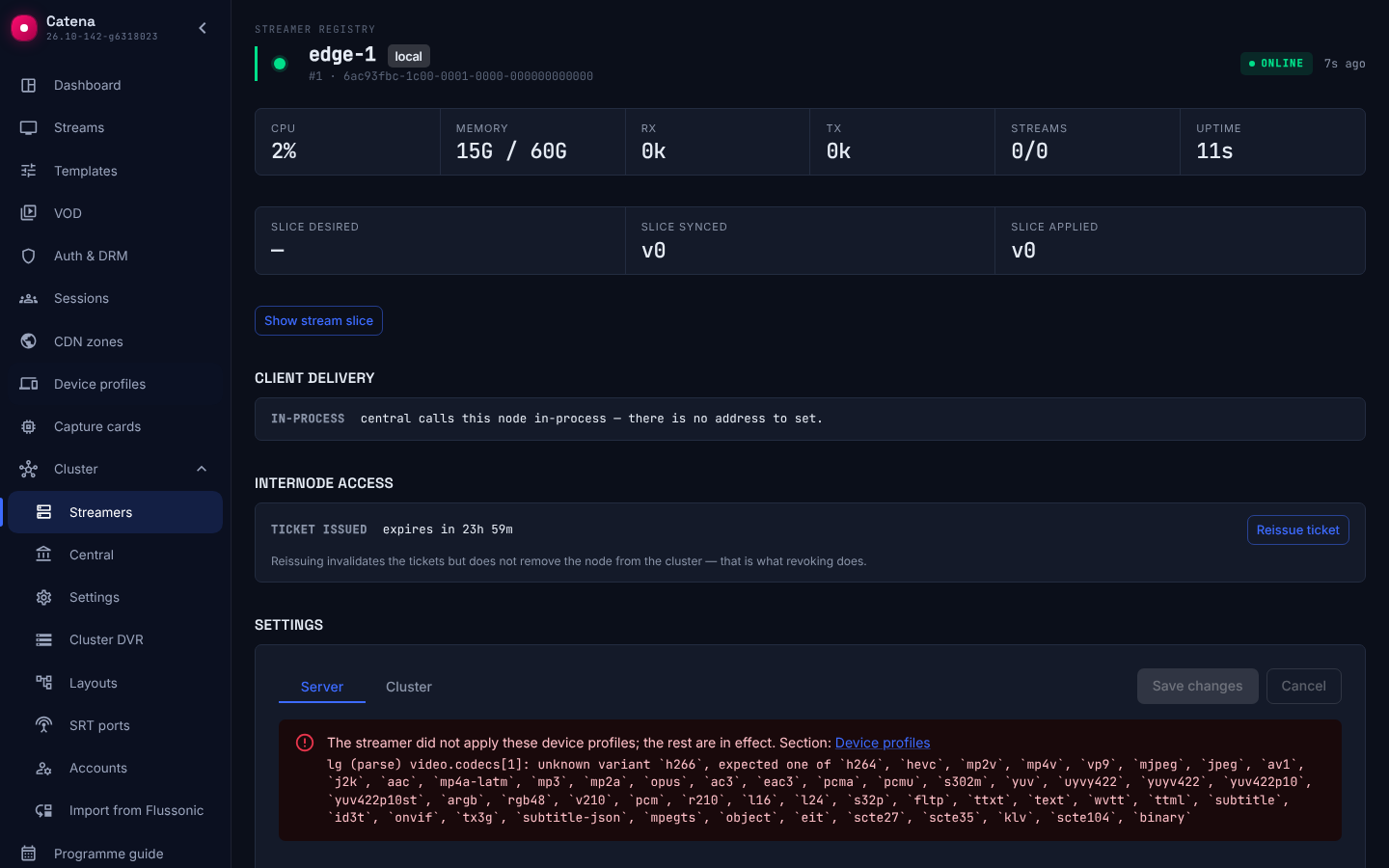
A streamer may not apply a profile when central stored a value the streamer version does not know. The other profiles and the rest of the streamer configuration still apply. Where you see it:
- in the Device profiles section — the Not applied on streamers mark in the card header: streamer names, the reason in parentheses and the path to the field, for example
e1 (parse) video.codecs[1]; a name leads to the streamer page. The expanded card shows the rejection messages the streamers sent; - on the streamer page — a block next to the configuration apply error: profile name, reason, path to the field and the message;
- in the API — the
rejected_profilesfield inGET /central/api-v4/nodes/stats; - in the streamer metrics —
device_profile_rejected{reason}.
Reasons:
- parse — a field did not parse: unknown value or type;
- invalid — the profile parsed but failed validation;
- limit — the profile is beyond 64.
A streamer whose version does not know profiles at all serves all tracks to every viewer, and central answers a profile edit with success. The console warns about it in two places:
- in the Device profiles section — a common banner above the list, "Profiles have no effect on streamers whose version does not support them…", with links to those streamers;
- on the streamer page — the note "Profiles have no effect on this streamer: its version does not support them…".
The warning appears only when the profiles document holds at least one profile. It is not shown for revoked streamers or for a streamer that has not applied its configuration since it started.
Upgrade and rollback
- Create profiles after all streamers are upgraded. A streamer of the previous version does not know
p/URLs and answers them with 404 when the master came from an upgraded streamer and the child playlist from an old one. - Set the output form after all streamers are upgraded, too. A streamer of the previous version skips the field with a warning in the log and serves fMP4 — and that is what set-top boxes get if a streamer is rolled back to such a version.
- A streamer skips a field of the HLS output section it does not know, with a warning in the log, and takes the form from the
outputfield. Central does not write such a field: an edit carrying it is answered with 422. - Rolling central back to a version without profiles turns them off across the cluster until you return: streamers receive a configuration without profiles. The profiles document stays in the database, and returning central delivers it without an edit.
- Rolling central back by one version does not break delivery: streamers receive the profiles as they are. A field only the newer version knows gets in the way only of an edit that contains this field: that edit answers 422. An unknown value (a new codec, for example) makes any edit of the document answer 422 until the value is deleted.
- After a central rollback, save each streamer's config with any edit: otherwise a streamer that was offline during the rollback may stay with its previous configuration.
Limitations
- Frame rate does not limit the archive: the recording description has no frame rate, and an unknown property does not remove a track. Live and rewind apply the limit; height, width and codec work in the archive too.
- At most 64 profiles, and at most 1000 stream names across the scopes of all profiles.
- A profile applies only to HLS (including LL-HLS and MPEG-TS) and DASH; it does not touch the delivery listed below.
- There is no Flussonic
720p60format: height and frame rate are independent limits, and "remove 720p60, keep 1080p60" cannot be expressed with one profile.
Delivery a profile does not apply to:
- MSE;
- MPEG-TS over HTTP;
- fMP4 stream;
- MSS;
- VOD.
Diagnostics
Streamer counters (Prometheus) per profile:
| Counter | What it counts |
|---|---|
device_profile_checks_total{profile} |
masters and manifests where the streamer checked the profile conditions |
device_profile_input_absent_total{profile} |
of those, requests without any header or parameter named in the conditions |
device_profile_selected_total{profile, by} |
the profile was selected: by="match" by conditions, by="path" by URL |
device_profile_noop_total{profile} |
selected but removed nothing |
device_profile_empty_total{profile} |
400 empty-result answers |
device_profile_undescribed_total{profile} |
archive playlists under the profile where the recording has no track description and filtering did not happen |
device_profile_unknown_total |
requests under a profile the streamer does not know |
device_profile_track_numbers_total{covered} |
requests with Flussonic track selection by number; covered="false" — no profile covered them |
device_profile_output_total{profile, output} |
answers of Flussonic URLs in the form from a profile; output is fmp4, ts or ts_mux. Answers under a profile with the HLS output section are counted; a redirect without such a profile and refusals are not counted |
How to read them:
checksandinput_absentgrow together,selecteddoes not. The header or parameter does not reach the streamer: a CDN, a proxy or a redirect strips it. Select the profile by thep/<profile>/URL.checksdoes not grow. The profile is never reached: another profile is selected earlier, or the request is outside its modes and streams.selectedgrows together withnoop. The profile is selected, but the stream has no tracks its limits apply to. For a profile that only sets the form,noopalways grows: it removes no tracks. Its hits show indevice_profile_output_total.
Profiles through the API
The profiles document is GET and PATCH (JSON Merge Patch) on /central/api-v4/device_profiles. PATCH changes only the named profiles, null under a name deletes the profile; pass If-Match with the ETag from the read so a concurrent edit comes back as 412 instead of being overwritten:
curl -X PATCH http://<central address>/central/api-v4/device_profiles \
  -H 'Content-Type: application/merge-patch+json' -H 'If-Match: "<etag>"' \
  -d '{
    "roku-4800x": {
      "priority": 10,
      "match": {"headers": {"x-cdn-dev-model": "4800x"}},
      "video": {"fps": [{"max": 30}]}
    },
    "arris": {
      "priority": 20,
      "match": {"query": {"device_profile": ["arris", "arris-4205"]}},
      "video": {"codecs": ["h264"]},
      "hls": {"output": "ts"}
    },
    "webos": {
      "priority": 30,
      "match": {"user_agent": "Web0S"},
      "text": {"exclude_all": true}
    }
  }'
The output form is the hls.output field: fmp4, ts or ts_mux; the section requires it. Without the hls section the profile sets no form; "hls": null removes the section. An empty hls section and a section without output are rejected at the path ["hls"], an unknown output value at the path ["hls", "output"]; an unknown field in the section, the former rewind included, is rejected. A profile with the hls section whose requests has neither live nor archive (only ["rewind"], for example) is rejected at the path ["requests"], and a streamer drops it: Flussonic URLs select the profile as a live request or an archive window, so they would never serve such a profile's form. Without requests the profile applies in every mode, and the rule does not touch it. An error in the document comes back as 422 with the path to the field — the same one the console highlights. A streamer serves the profiles it applied at GET /streamer/api-v4/device_profiles.