Streamer list
A Catena installation is central plus the streamers that carry the traffic. Central holds the configuration of every stream and decides where it runs; a streamer ingests sources, transcodes, records the archive and serves viewers. Streamers keep no configuration of their own — they receive it from central.
The Streamers screen is the registry: every streamer central knows about, and what each is doing right now.
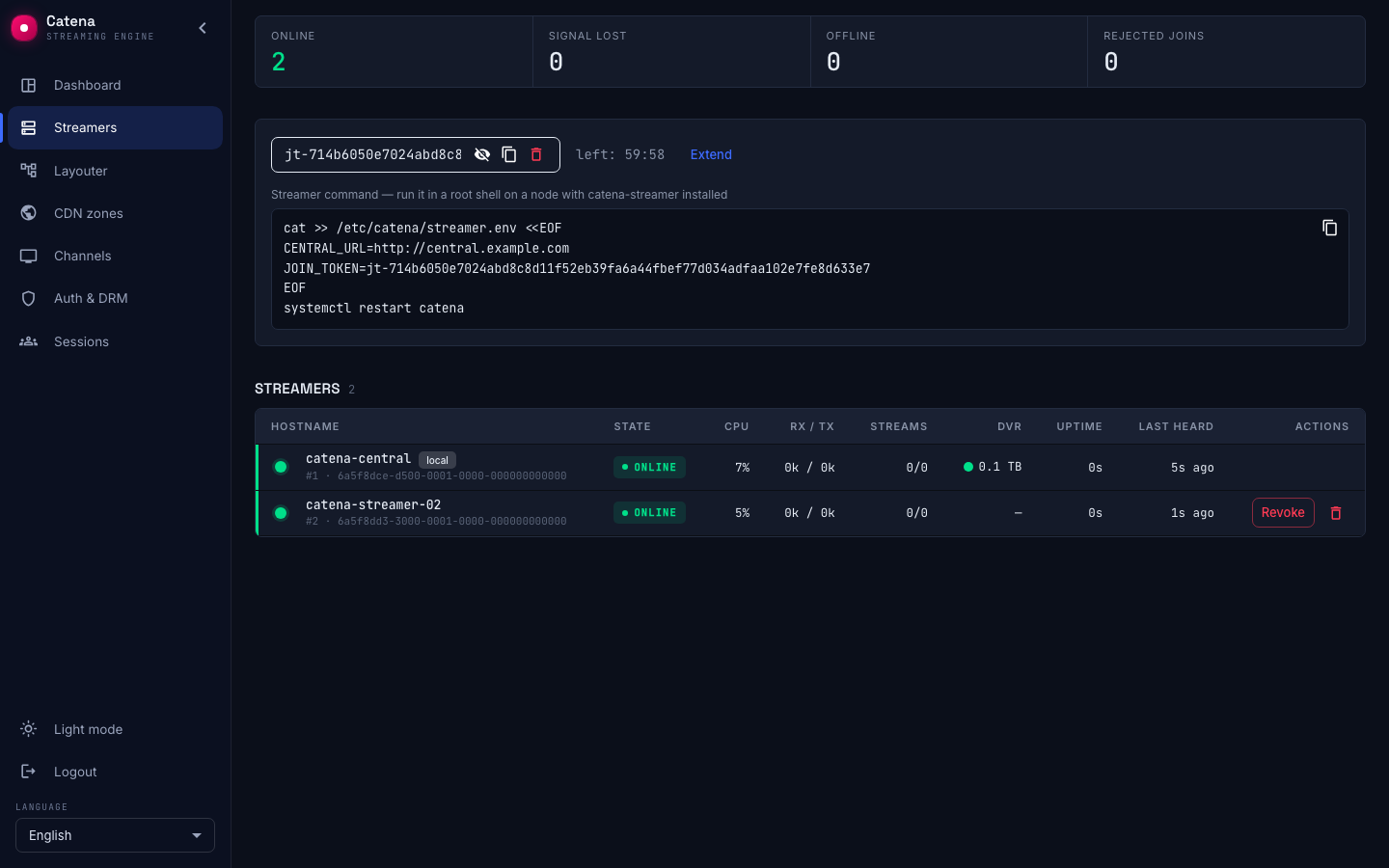
The counters
Four counters across the top summarise the installation:
- Online — the streamer is reporting and central counts it as live.
- Signal lost — it stopped reporting within the last 15 minutes. Something broke just now.
- Offline — silent for longer than that, or never reported at all.
- Rejected joins — attempts to join with a token central would not accept. See Adding a streamer.
The difference between signal lost and offline is only elapsed time. It exists so that a machine which died a minute ago does not look like one decommissioned last week.
The table
One row per streamer, refreshed every 2.5 seconds:
| Column | What it shows |
|---|---|
| Hostname | The streamer's label, with #node_id and server_id underneath |
| State | Online, Signal lost, Offline — or Revoked |
| CPU | Processor load |
| RX / TX | Network in and out |
| Streams | Running out of total placed on this streamer |
| DVR | Total archive capacity, with an indicator that turns red when a disk is unavailable |
| Uptime | How long the streamer has been up |
| Last heard | Age of the last report |
Telemetry of a streamer that went quiet is not blanked — it stays visible, dimmed, as the last known values.
Clicking a row opens that streamer: its telemetry in full, and the settings central delivers to it.
What identifies a streamer
node_id is the identity. Central mints it when the streamer joins, and it never changes. The hostname and server_id shown next to it are labels: they can change, and two live records may even carry the same server_id — the registry then marks both duplicate. The field keeps its API name even though the screen says streamer.
A duplicate is almost always the same machine registered twice, which happens because registration is not idempotent. Adding a streamer covers how that comes about and which record to delete.
One row carries a local chip: the streamer that runs inside central's own process. It behaves differently from the rest and cannot be removed — see The local streamer.
An edge badge next to a machine name marks a streamer dedicated to delivery — see Edge streamers. A dvr badge marks a streamer dedicated to recording the archive — see DVR streamers.
When central cannot reach a streamer
A row may carry a reachability chip — no api_url, no api_auth, api_auth shadowed locally or API unreachable. That is central reporting that it cannot call this streamer's management API.
The consequence is narrow but confusing if you do not know it: play sessions of such a streamer are missing from both the live list and the history. The streams keep running and viewers keep watching; it is the reporting that goes dark.
The first three causes are fixed in the streamer's own settings, and the chip links straight there. API unreachable means the address is set but nothing answers — a network or service problem on the machine itself.