Multicast source
The typical cable-operator picture: a headend or an encoder distributes streams as MPEG-TS transport streams into multicast groups on the local network — one group per stream. This page attaches such a group to a Catena stream.
Attach the group
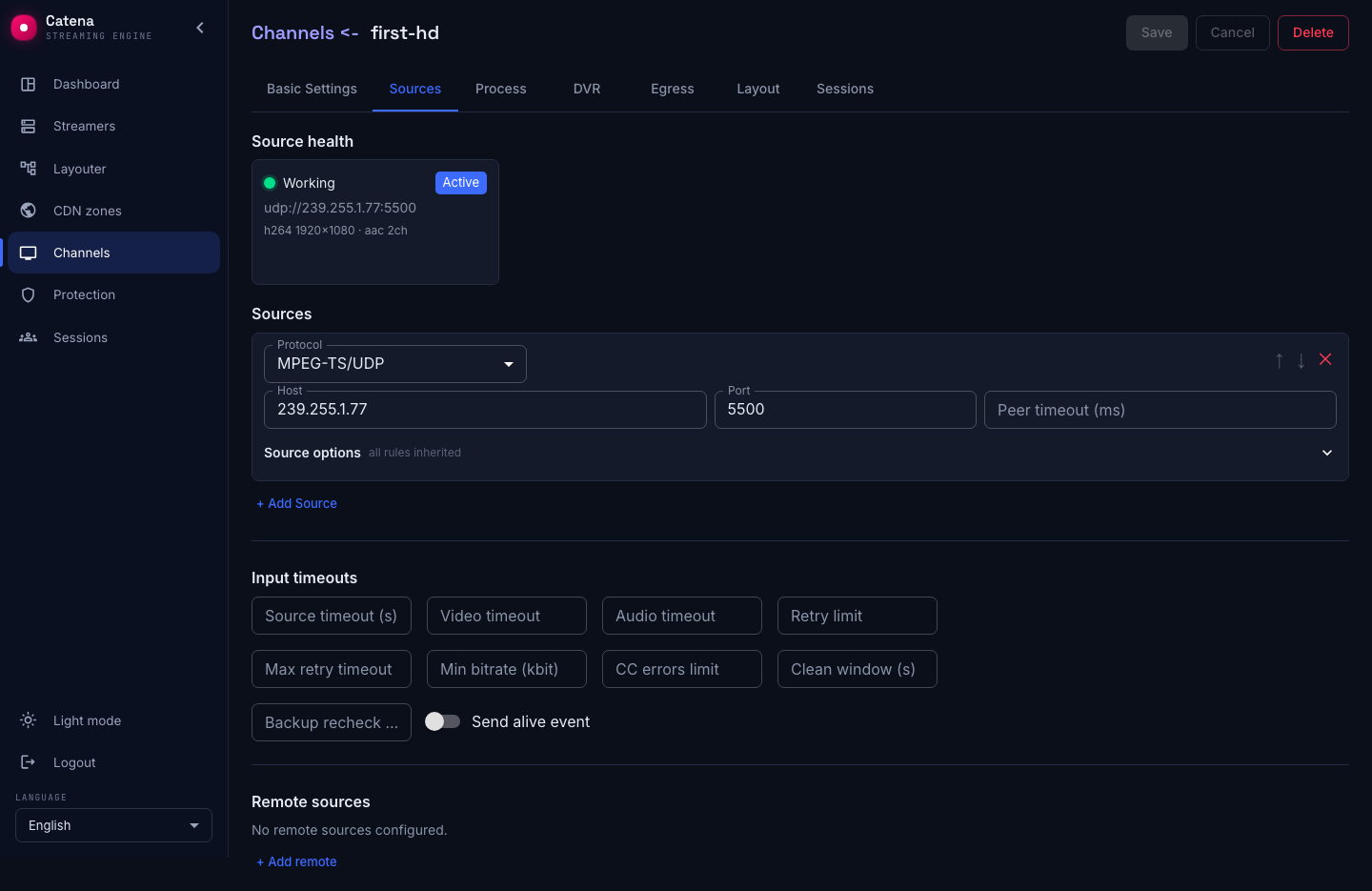
Create a stream and press + Add Source on the Sources tab. Pick the MPEG-TS/UDP protocol and fill in:
- Host — the multicast group address,
239.255.1.77for example. - Port — the group's port,
5500for example. - Incoming interface — the network interface name or its local IPv4 address; an empty field lets the system choose.
- Peer timeout (ms) — how much silence in the group to tolerate before restarting the ingest. An empty field is a sensible default.
Press Save. The streamer joins the group, locks the stream, and the stream's status turns green; the health card shows the bitrate and the tracks.
Selecting the incoming interface
When multicast arrives through a separate network card, set Incoming interface for the MPEG-TS/UDP input on the Sources tab. For example, set Host to 239.255.1.77, Port to 5500 and Incoming interface to eno2. You can use the card’s IPv4 address instead of its name, for example 192.168.20.10. The group subscription is created on that interface even when the default route uses eno1.
The field applies to IPv4 multicast, including source-specific multicast (SSM). Leave it empty for IPv6: explicit interface selection for IPv6 is not supported. For unicast, this field does not select the receiving interface. Clear the field and save to restore selection through the OS routing table. Changing the interface recreates the subscription and briefly interrupts ingest.
The name or address must belong to the streamer receiving the feed. If the interface cannot be found or has no IPv4 address, the source will not start; its input status shows the reason. In a cluster, check the setting on every streamer where this stream may be placed.
For a source configured by URL, use udp://239.255.1.77:5500?interface=eno2. The format udp://eno2@239.255.1.77:5500 is also supported; when the interface parameter is present as well, it takes precedence.
The interface for sending multicast is configured separately for each push.
Receive buffer
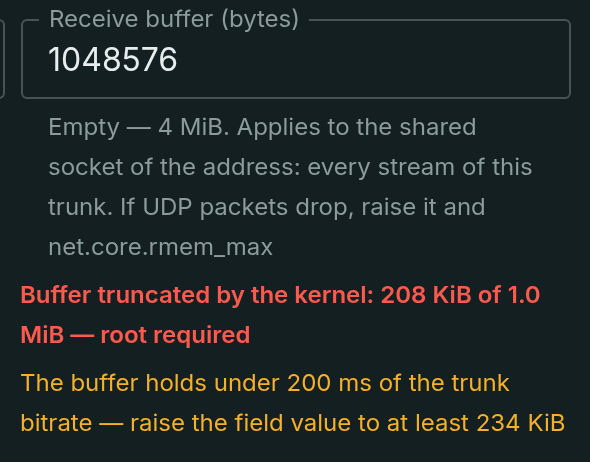
The OS kernel keeps a queue of incoming datagrams at the UDP socket: while the streamer is busy elsewhere, packets wait in it instead of being lost. The Receive buffer (bytes) field of the input sets the size of that queue. An empty field is the default of 4 MiB — about a second of a full 30–40 Mbit/s multiplex; the kernel's stock 212 KiB would hold only 40–50 ms, and any scheduling hiccup turns into losses that show up as CC errors in the counters.
What matters here in practice:
- One socket per address. Every stream on the same group and port shares the buffer too: the last explicitly configured value wins, and a change applies on the fly, without recreating the subscription.
- The kernel may truncate the request. Without
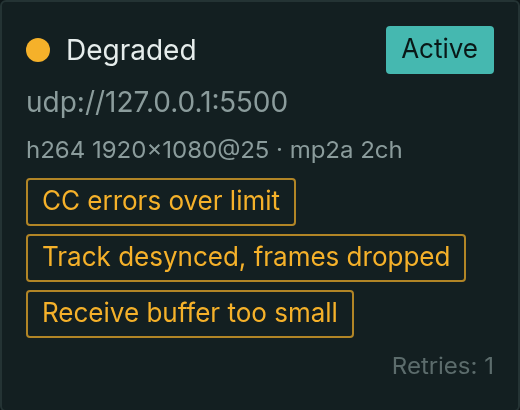
CAP_NET_ADMINthe size is capped by the sysctlnet.core.rmem_max— a warning with the actual size appears under the field. Raisermem_maxto the requested value or grant the streamerCAP_NET_ADMIN: then the request is honored in full. - The health card names the cause. When the kernel starts dropping datagrams, the input gets the "Receive buffer too small" problem, and a hint under the field says "at least N" — how many bytes 200 ms of the current bitrate takes. CC errors and track desync next to it are consequences: raise the buffer first.
What must be true of the network
- Multicast does not travel the internet. The streamer receiving the group must sit in the same network segment as its source — or the network in between must route multicast.
- The subscription is the streamer's doing. It sends an IGMP join; switches with IGMP snooping deliver the stream to subscribers only. Nothing needs configuring on the streamer for that — what matters is that the network lets the join through.
- One input — one group and port. Every stream gets its own group: that is how the headend distributes them too.
Onward by task
- The stream in the group is usually compressed already (H.264 or MPEG-2). H.264/AAC plays as is; if the headend sends MPEG-2 — add a transcoder, or browser players will not read the stream.
- TS inputs carry a continuity-error counter: the CC errors limit threshold turns the source "degraded" on packet loss — see Input failover.
- A multicast group can also be a standby: a second input with a priority below the primary.
If the group did not lock
- The card says Dead, no bitrate. Packets do not reach the streamer: wrong group or port, a different VLAN, the IGMP join not passed by a switch, a firewall cutting UDP. Check from the streamer's machine — it is the one subscribing.
- There is bitrate but the stream is not green. The stream arrives but the expected tracks are not found in it — look at the health card: what the streamer parsed out of the stream.
- The source flaps: working — degraded. Packet loss in the network; the CC-error counter in the card grows. That is a network problem, not a stream problem.