Moving from Flussonic Media Server
Catena can take the configuration of a running Flussonic Media Server and create its own streams from it: the import wizard reads the configuration over the source API, shows exactly what will transfer and what will be lost, and writes the documents only after you confirm.
Import is not a switch. It is the first step of a procedure that also includes setting up the machine, checking the air and finally moving your viewers. This page describes the whole of it.
Before you start
- Flussonic Media Server is running and reachable from central over the network. Import reads the configuration through the source API rather than parsing a file on disk. A stopped server has nothing to import from.
- An account allowed to read the configuration — the same one you use to log into the source interface (
edit_authorapi_auth). - A Catena installation is already up: central with the console and at least one streamer. If you don't have one yet, start with the quick start and come back here afterwards.
Central never stores the source credentials: they live only while the plan is being built and reach neither the database nor the logs.
Both servers on one machine
Both servers stay running until the switchover, and they share port 80: Catena will try to listen on it, fail, and keep restarting with an Address already in use error — the installer will report that the service failed to start. This is expected: move Catena to a free port:
sudo systemctl edit catena
The commented lines in the opened file are a reference copy of the unit — leave them as they are. Add your own lines above the "Lines below this comment will be discarded" marker; everything below it is discarded on save:
[Service]
Environment=INITIAL_HTTP_PORT=8081
Save, close the editor and restart: sudo systemctl restart catena. The Catena console will open on port 8081. At the "stop the old server" step, give port 80 back to Catena in the streamer settings — viewer links will stay the same.
What import transfers, and what you set up yourself
Import transfers content:
- streams,
- template sections (transcoder, archive, thumbnails, timeouts),
- authorization backends — into the cluster-wide access policy.
Import does not transfer the machine layout, because it describes one particular server rather than your air:
- listeners and ports,
- archive disks and their layout,
- VOD locations,
- reverse proxy and TLS certificates.
You define all of that when adding a streamer — see adding a streamer and node settings. Import lists every non-transferable section it found at the source in the report, so that nothing slips out of sight.
One thing worth remembering: a stream with a configured archive will transfer, but will not start recording until storage is configured on the streamer. The depth and size of the archive live in the stream document, while the storage location lives in the machine settings. Set up the disks before you switch traffic over, otherwise recording will look enabled and not happen.
A cluster is migrated one machine at a time
Import knows one address per run. If you have a Flussonic cluster, run the wizard once for every server: cluster configuration is spread across machines, and each has its own.
Streams the server sees from its neighbours will not become documents — they are its state, not its configuration. Streams created by publishing will not transfer either: the air creates them, not the operator.
The Flussonic cluster topology — peers, balancers, cluster_ingest — does not transfer at all. Placement here is the layouter's job: you say which streams you need, and it decides which machine runs them.
Going through the wizard
Open Import from Flussonic in the console and enter the source address and credentials.
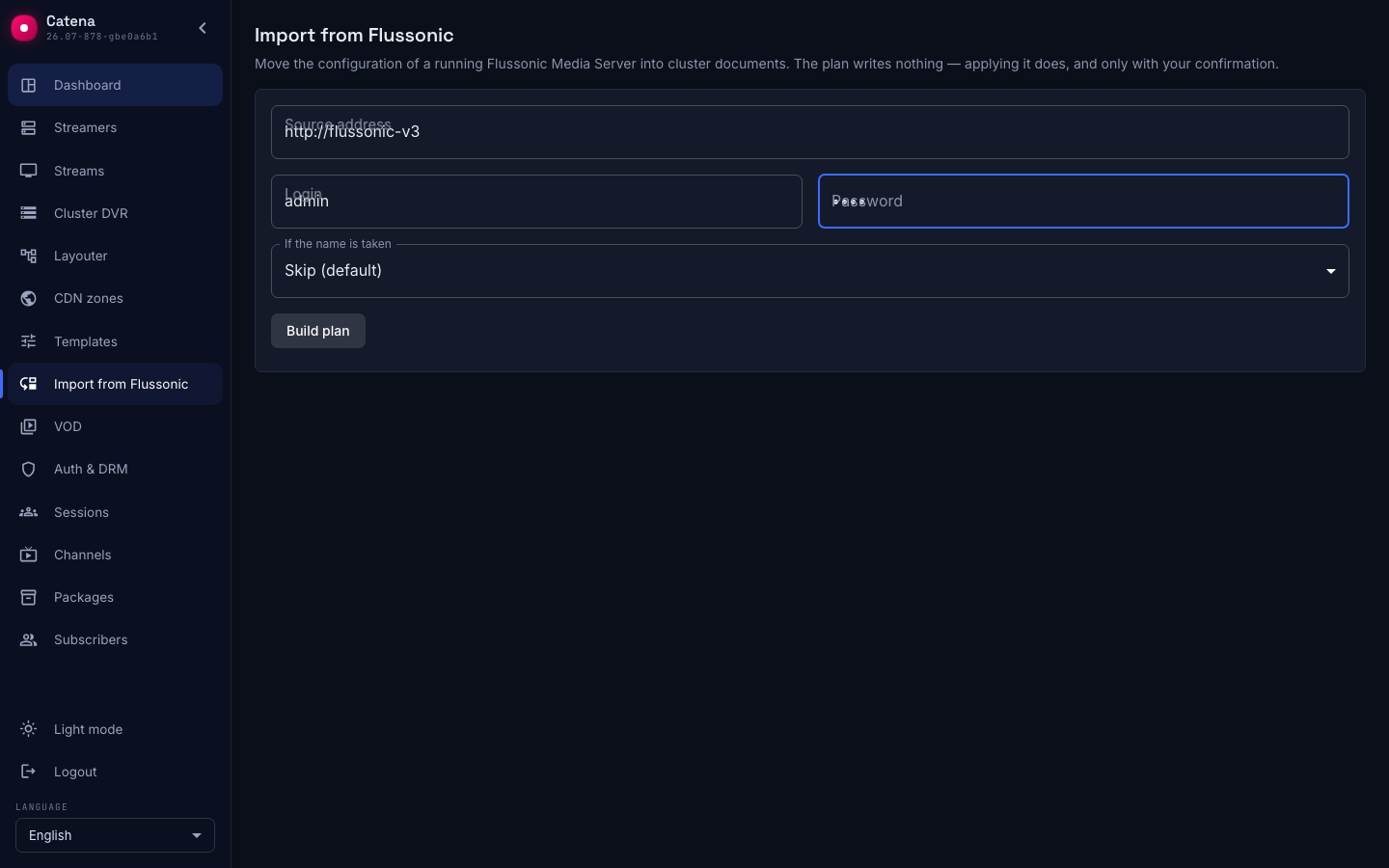
The wizard builds a plan — what exactly will be done, before a single write:
- how many documents will be created, and how many skipped or overwritten (and which ones, by name);
- whether the import fits your license;
- which access policy is in effect now and which one will replace it;
- which source sections do not transfer;
- the warnings described below.
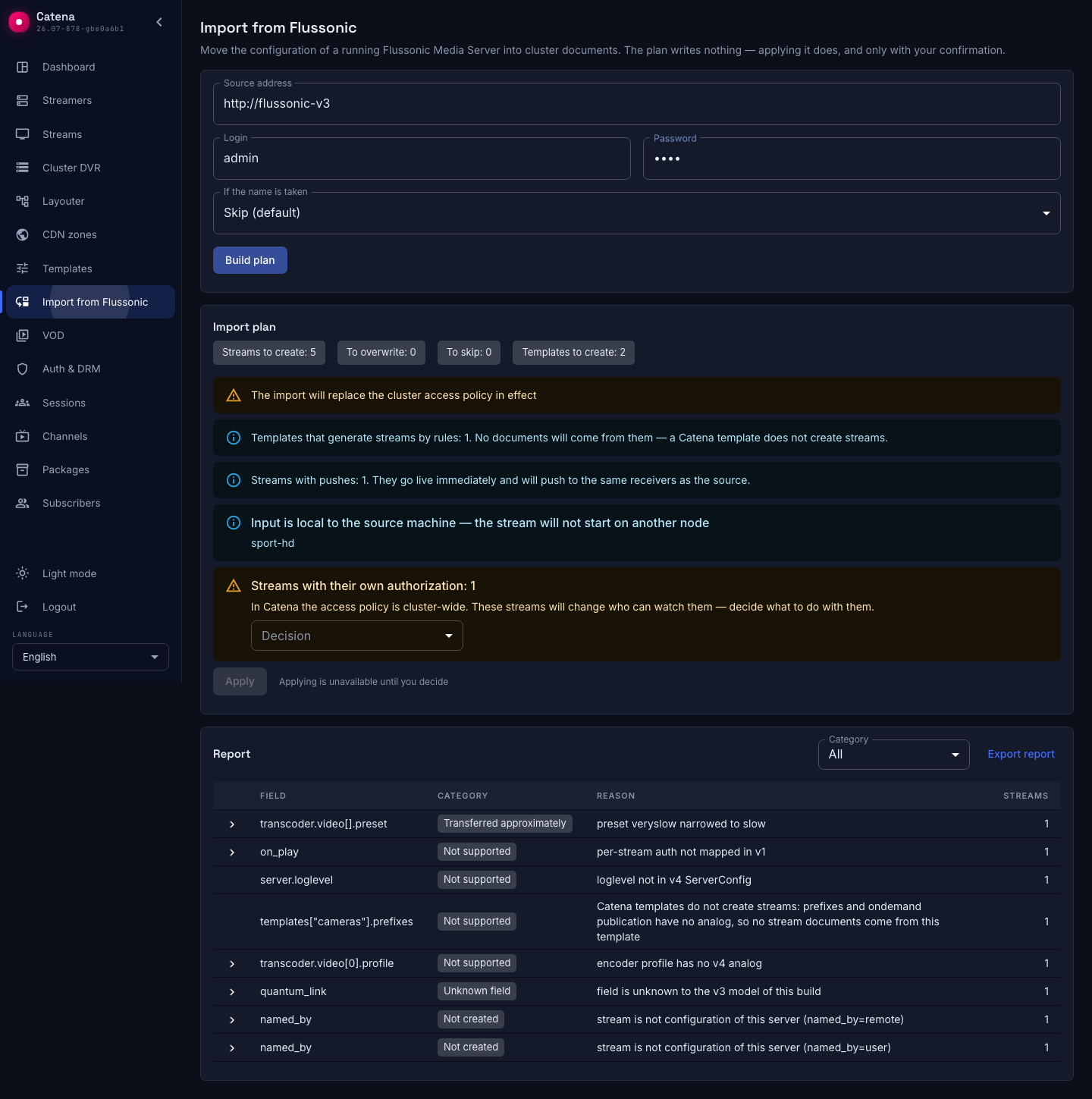
A plan lives for fifteen minutes and is applied once. What gets applied is exactly what you saw on screen: if the source configuration is edited in the meantime, those changes will not be part of this import — build the plan again.
There are two policies for name conflicts. Skip (the default) leaves whatever already exists in the cluster untouched — which is why repeating an import is harmless and convenient for topping up. Overwrite brings documents in line with the source; the plan lists such names, and mind that overwriting also wipes your own edits made in Catena.
Streams with their own authorization
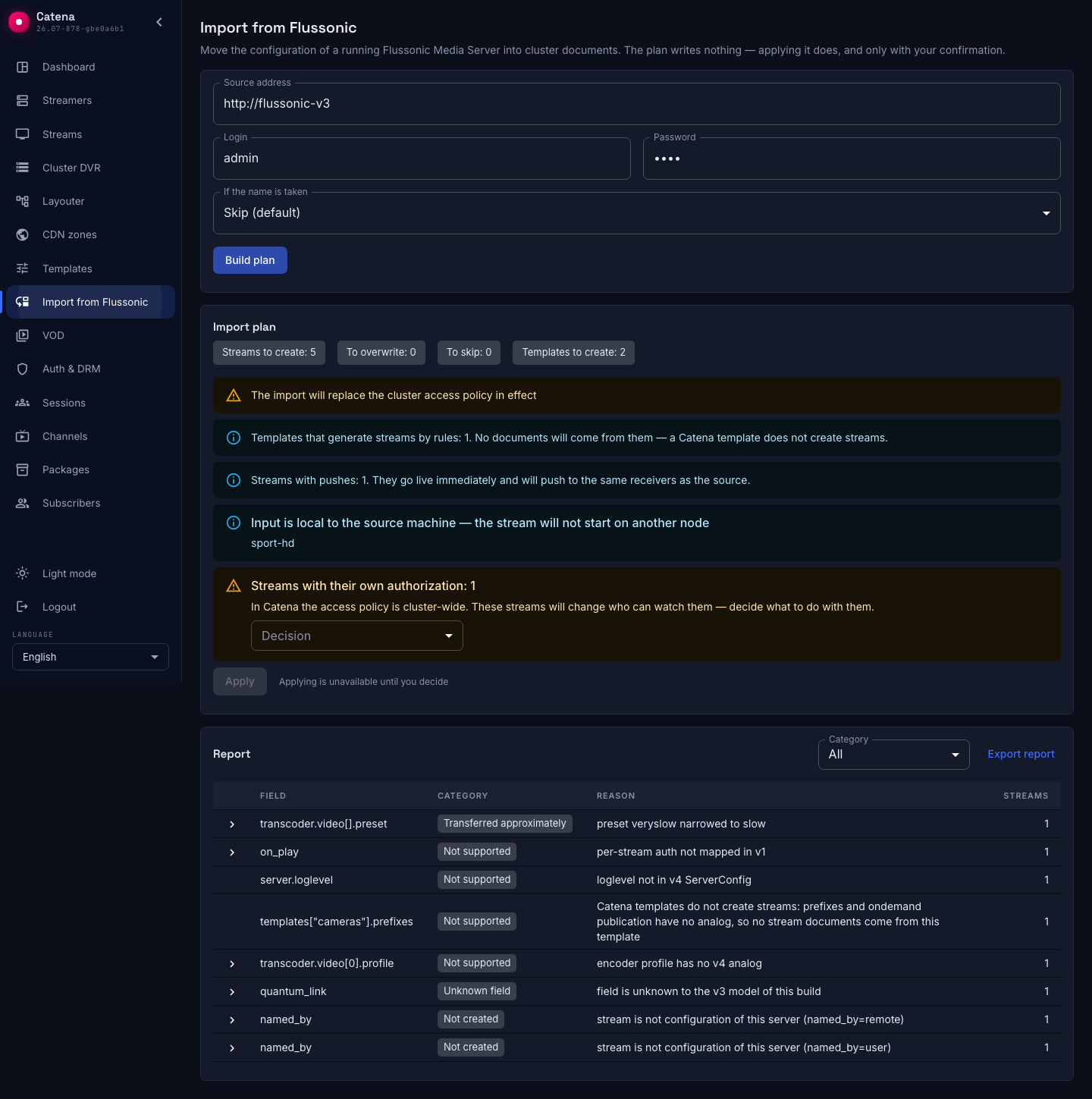
In Flussonic access can be configured per stream. In Catena the access policy is cluster-wide — a stream has no authorization of its own.
This means a stream protected at the source by its own backend ends up under the shared policy after the import and changes who can watch it. For a paid channel that can mean being opened to everyone.
So the wizard never lets such streams through silently: it shows how many there are and asks what to do — import them under the cluster-wide policy, or leave them out and set them up separately. Until you answer, applying is unavailable.
Imported streams go live immediately
A stream transfers enabled unless it was disabled at the source. While the old server is still on the air, this has a price, and the wizard warns about it:
- sources get a second consumer. An RTSP camera with a connection limit will give the stream to one of the servers; SRT and RTMP pull may kick the old connection.
- pushes will go to the same receivers. If your streams have pushes configured, the transponder or CDN gets a duplicate, and the viewer is the one who sees it.
Turning off only the delivery is not possible: a push configuration has no "disabled" flag. If running both servers in parallel is unacceptable for you, plan the import closer to the switch-over itself, or stop the pushes at the source.
Encrypted streams are the exception. A stream with DRM configured in Flussonic is imported disabled, and the reason is named in the report. The encryption settings do not travel literally: Flussonic has a dozen and a half key vendors against a single SPEKE. A stream that came up right away would be serving premium content in the clear — so encryption is configured anew, and only then is the stream enabled.
Why some streams may not start
Placement in Catena is the layouter's job, and a stream may end up on any suitable machine. If the stream input is local to the old server — multicast, a file on disk, a capture card — it simply does not exist on another machine, and the stream will not start.
Import lists such streams in the report. After applying, the wizard shows how many imported streams came up and which did not: that is your check that the move worked. The count is not instant — the console keeps asking the cluster while the streams start, so right after applying it reads lower than the final figure.
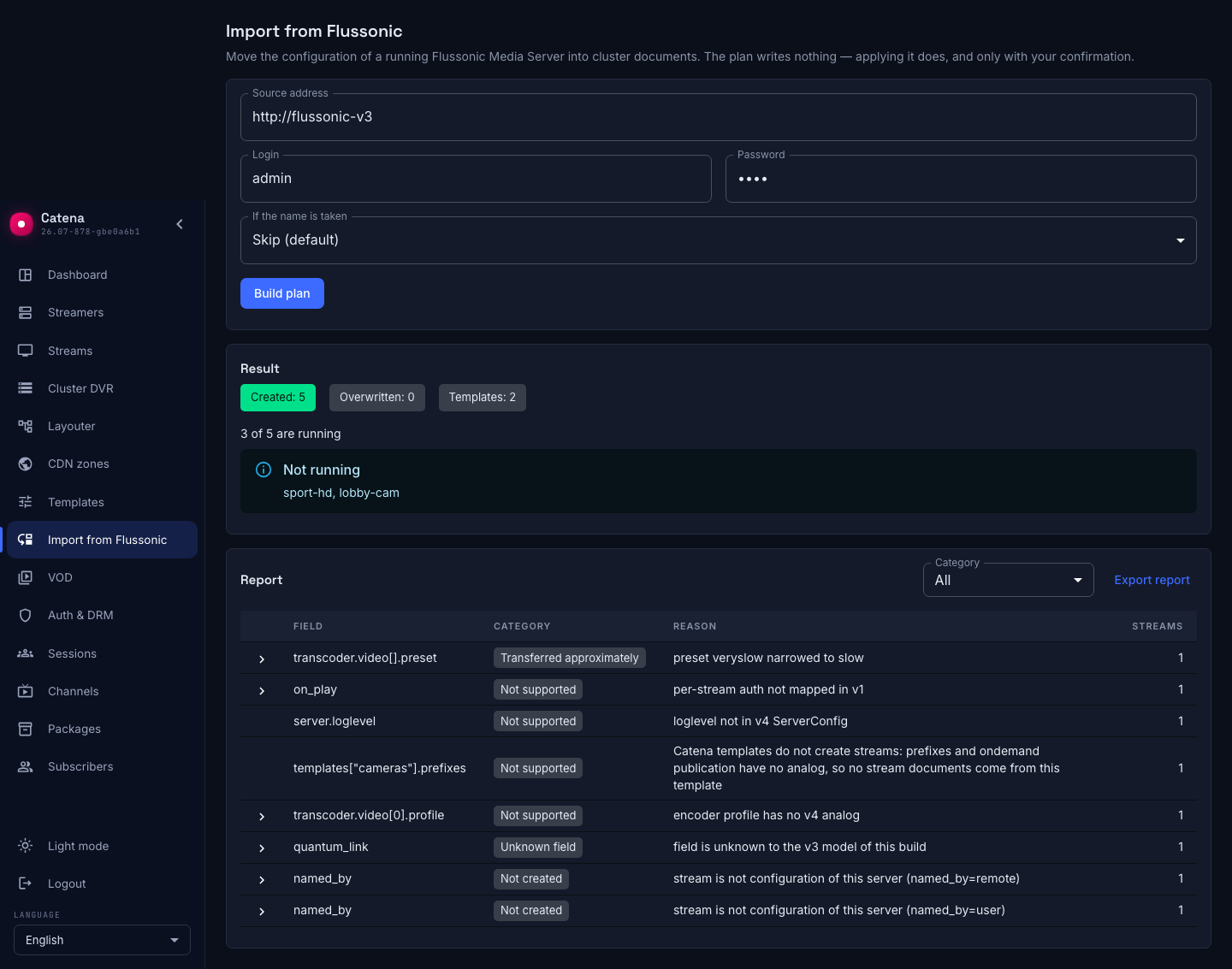
In the screenshot exactly the two that should have failed did: sport-hd listens to a multicast group only the old server can reach, and lobby-cam points at a camera that is not on this network.
Reading the report
The report is folded by reason: one row is one reason, with a count of affected streams; the stream names themselves expand from the arrow on the left. There are four categories:
| Category | What it means | What to do |
|---|---|---|
| Transferred approximately | The value moved but not literally: a setting was narrowed to the nearest supported one, or behaviour shifted | Check the air on those streams |
| Not supported | Catena has no such setting | Look for a replacement; for some capabilities it exists elsewhere in the documentation |
| Unknown field | The field exists at the source, but this build of Catena does not know it | Send the report to support: your Flussonic is most likely newer |
| Not created | A document or its section was not written | Handle separately: this stream or section did not transfer |
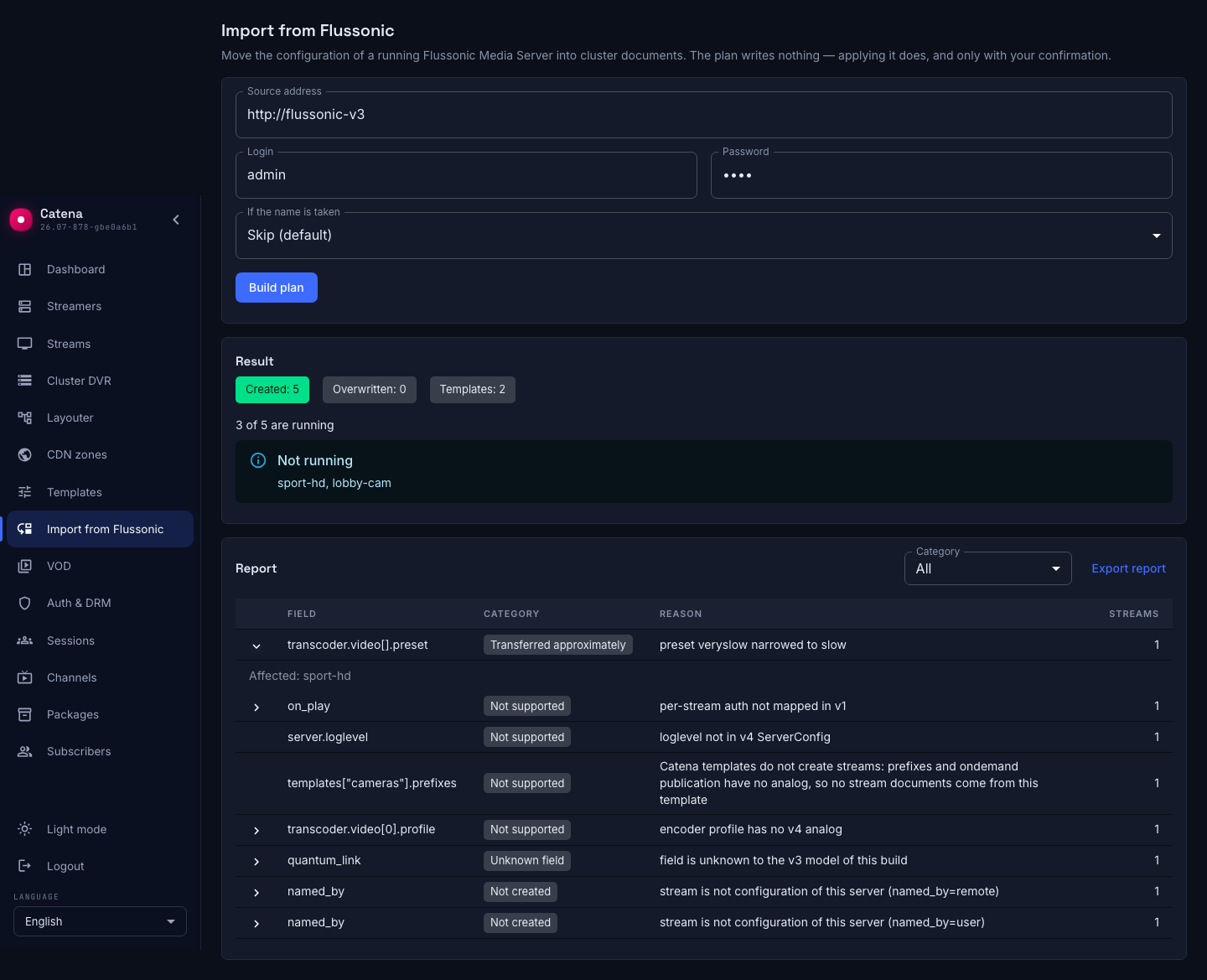
The report can be exported as a file — convenient to attach to a support request. Passwords in it are masked.
This page deliberately carries no list of all non-transferable fields: that list lives in the report itself and changes together with the product, while a copy in the documentation would drift away from reality.
The archive stays where it is
There is no need — and no reason — to move the recorded archive: Catena reads an archive written by Flussonic straight from disk. Import does not touch archive files at all.
It is enough that the streamer has the same disks configured and the stream keeps its name: the archive path is built from the stream name. Which disks exactly — the import wizard tells you: the plan's "Archive" section shows the source storages next to the disks configured on the streamers.
The section appears when the source has recording or storages, and carries:
- source storages and streamer disks side by side, as full paths;
- a mismatch warning when no streamer disk matches a source storage. A warning, not an error: matching paths is no guarantee (the files may be missing), and a mismatch is not a verdict (the disk may be mounted differently — check the mount points, especially if the source ran in a container);
- the list of recording streams — including those that record through a template;
- a registry line when the source has a separate index directory: copy it into the streamer's catalog path field, or retention will not clean the archive (reading works without it);
- an integrity hint: the wizard compares settings, not files, and the deep check of blobs and the registry belongs to a separate tool —
legacy-dvr-check, shipped with the package. You need it when there are many disks and the cost of an error is measured in archive: on one or two disks the automatic check is enough. Run it before applying the plan: once the plan is applied, the cleaner is already trimming the old archive to the configured depth.
If the source streams have episodic long-term retention (episodes_url/episodes_expiration), it does not transfer — Catena has no such settings. The wizard does not lose the recordings silently: the archive depth of such streams is widened to the episodic one, and the report explains this with a "transferred approximately" entry. The extra depth is reversible (space is reclaimed under pressure), cut recordings are not; narrow the depth yourself if you do not need it.
The archive depth applies to the old recordings as well: once the plan is applied, the cleaner immediately starts trimming the stream's archive to the depth from the source configuration. If the new server must keep more than Flussonic was configured for, raise the depth at the source before the import (the import takes it from there) or create the stream in Catena in advance with the depth you need — existing names are skipped by the import. Narrowing the depth can wait until after the move; widening it after the fact cannot — what the cleaner has cut does not come back.
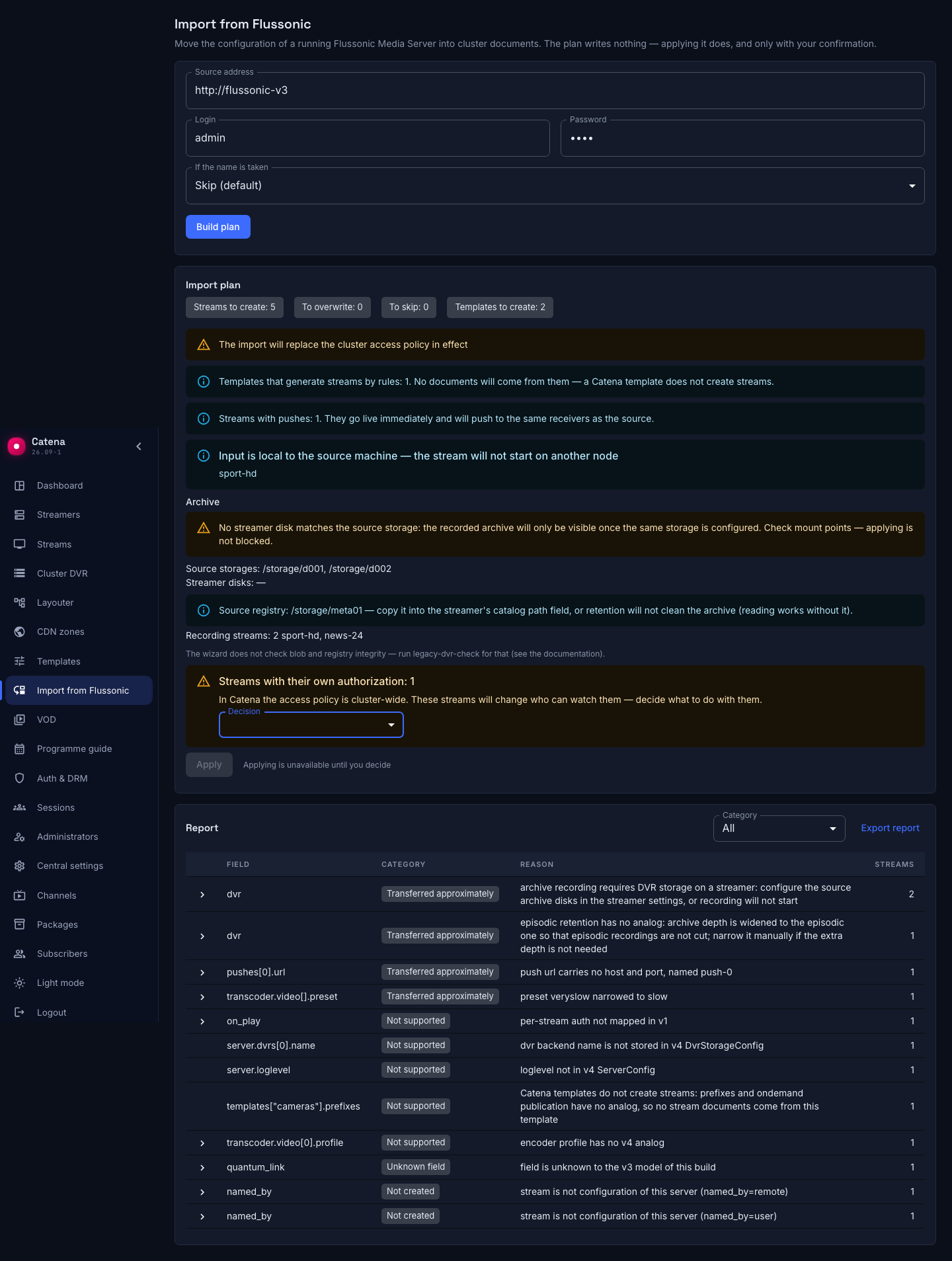
The result screen after applying shows, for every created recording stream, whether the archive is being written and whether the accumulated one is visible: "recording, old footage visible" — the move worked; "recording, old footage not visible" — check the storage; "not recording" — look for the cause in the streamer settings. The counters are not instant: streams take time to come up and start writing, and the screen keeps polling.
Player links and your integrations
Playback links do not change. Stream names transfer as they are — which is why import offers no renaming on conflict: a renamed stream would mean a broken link for every viewer and a broken archive path. The address stays the same, but access does not: streams watched on Flussonic without authorization will be closed off by the cluster access policy — viewers will get 403. If your air had open streams, set up the access policy before switching the viewers.
API v3 is read-only. If your scripts created or edited streams through the Flussonic API, they will have to move to the v4 API — in Catena the configuration is managed by central, and writes go through it. Reading statistics and listings over v3 keeps working.
Switch-over order and rollback
- Add a streamer to Catena and set up its machine part: listeners, archive disks, VOD locations.
- Run the import and read the report. Deal with the "not created" and "transferred approximately" entries. If there are many disks, run
legacy-dvr-checkbefore applying the plan (see "The archive stays where it is"). - Wait for the streams to come up and check the air on several links — especially where a transcoder was involved.
- Check the archive: open the oldest available recording in the player — the verdict on the result screen is an early signal (it looks at the catalog window), while opening a real recording checks the blobs themselves.
- Switch the viewers over to the new address.
- Only then stop the old server.
Rolling back before step 5 costs nothing: the old server keeps running the whole time, and going back simply means not switching the traffic. After step 5 a rollback means putting the previous address back into delivery; import neither changed nor deleted the source configuration, it is still there.