Transcoding and MBR
The transcoder solves two customer problems. The first is multi-bitrate: viewers on a weak link get 360p, viewers on a good one get 1080p, and the player switches between them on the fly. The second is compatibility: an input players cannot read (raw frames, audio that is not AAC) becomes something everything reads.
All of it is configured on the Transcoder tab of the stream page. While the transcoder is off, the input passes through untouched — and for an already-compressed h264/aac source that may be exactly right: transcoding costs CPU, and there is no reason to burn it without cause.
Start from a preset
The empty tab offers three presets — each closes a typical task in one click:
- Fix audio (video as is + AAC) — video is not re-encoded, audio is brought to AAC. The cheapest way to make a stream compatible when the source delivers non-standard audio.
- Standard ladder 1080/720/360 + AAC — a ready ABR set for typical broadcasting.
- RAW for SDI (v210) — uncompressed output for a studio SDI/2110 chain.
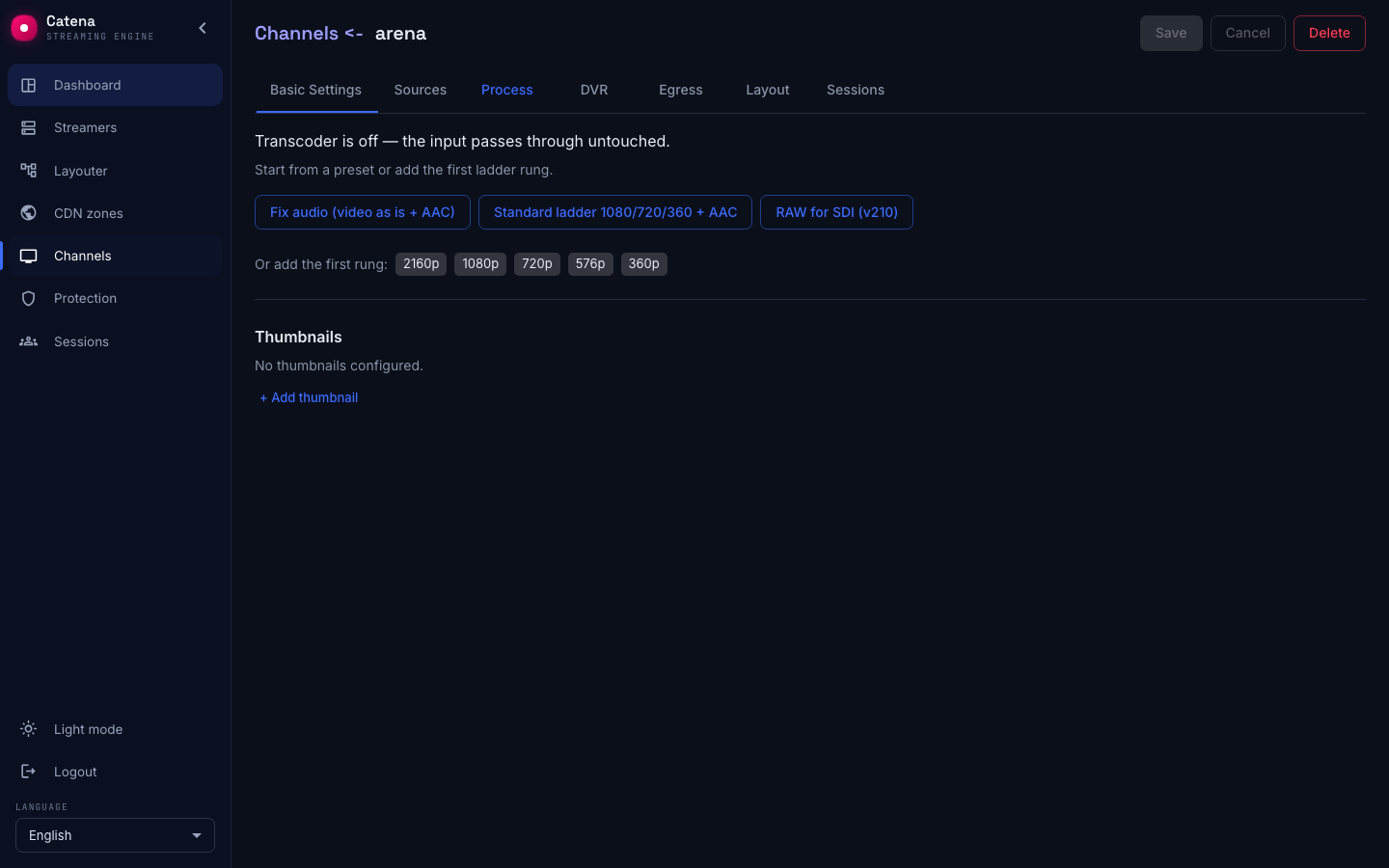
A preset is a starting point: it fills in the ladder and the rules, which you then edit. Do not forget Save.
The quality ladder
The Video (ladder) block — one rung per output quality:
- Height — 2160, 1080, 720, 576, 360 or custom. The width follows the input's proportions.
- Codec — H.264, HEVC, AV1; "As is" is a passthrough without re-encoding; the RAW codecs are for SDI output.
- Bitrate (kbps) and Rate control — CBR for predictable bandwidth, VBR for better quality at the same average.
The Original (no transcoding) rung passes the input into the ladder untouched. Next to encoded rungs it degrades the ladder — its GOP and IDR frames are not aligned with the rest, and seamless quality switching breaks; the UI warns about it with a banner.
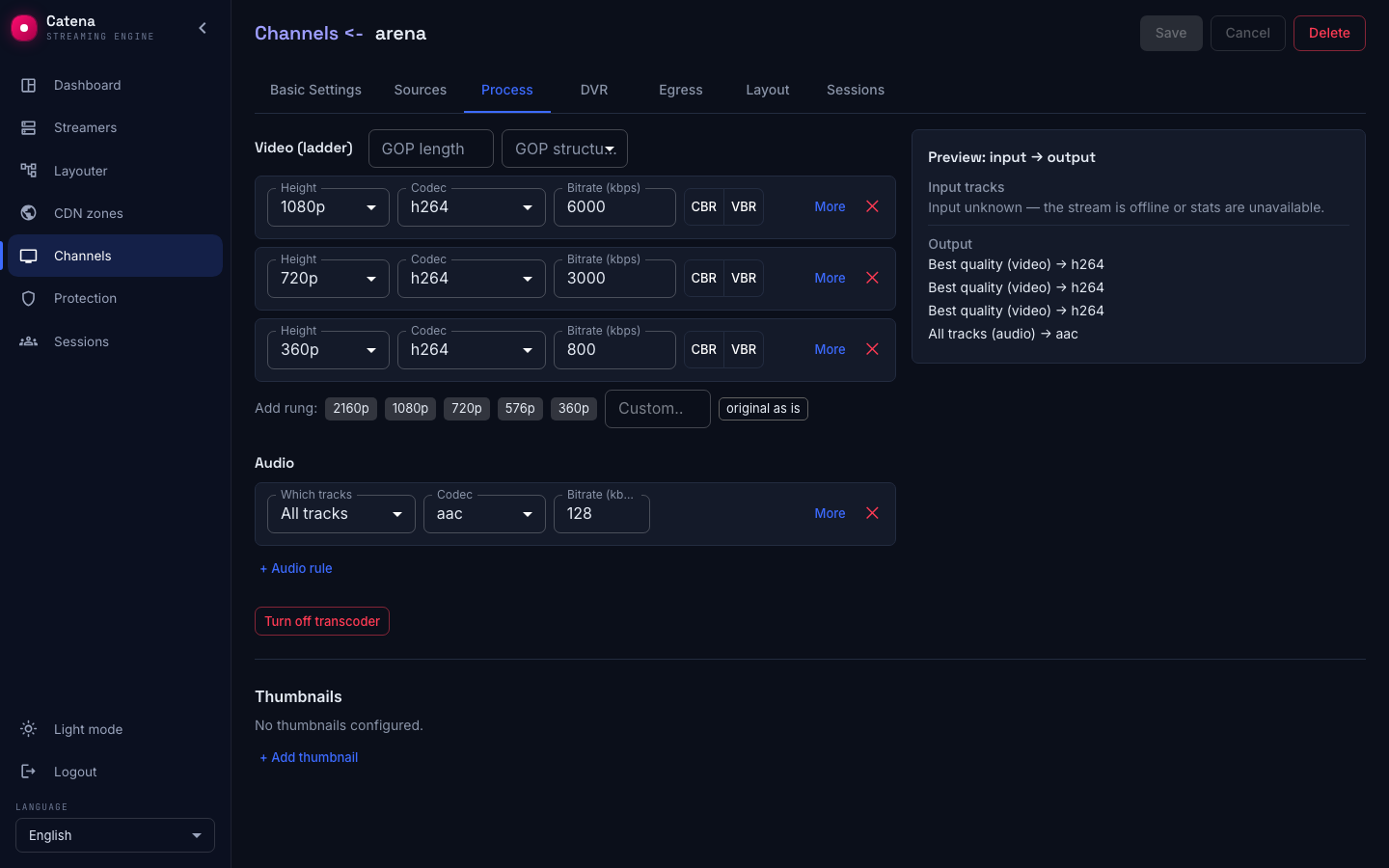
GOP is a property of the whole ladder, not of a single rung: for the player to switch qualities without a jolt, the keyframes of every rung must line up. The ladder header carries GOP length (in frames) and GOP structure (from ip with no B-frames to ibbbbp). A shorter GOP means faster stream start and lower switching delay; a longer one compresses better. If the rungs' GOP drifts apart — after manual edits, say — the UI shows "GOP: differs between rungs" and a Unify GOP button.
Audio
The Audio block holds the track selection and encoding rules. In each rule:
- Which tracks — All tracks, Best quality, Language…, Language + codec…, Exact ID…
- Codec — As is, AAC or Opus, and the bitrate.
The typical multilingual case: a single rule "All tracks → AAC" — every language goes on air re-encoded.
Advanced rung settings
The More button on a rung reveals:
- Resize strategy — what to do when the input's proportions do not match the output: Fit keeps the proportions and adds bars (the bar color is configurable), Scale stretches, Crop cuts.
- Source — overriding which input track the rung takes.
- If no tracks matched — the behavior when a track disappears: drop, silence / black frame, an SMPTE placeholder, or stop the stream with an error. The placeholder suits a stream that must always show a picture; the stop suits a chain where silently ruined air is worse than fallen air.
If the rules end up selecting nothing, the tab warns: "The manifest is empty" — such a stream serves the viewer nothing.
Encoding: CPU or GPU
The Encoding section decides what does the work. The Transcode on field has two values: CPU and NVIDIA GPU. The hint states the difference outright: CPU is the default; NVIDIA runs decode, scale and encode on the GPU — the whole video path moves to the card, not just the encoding.
Picking NVIDIA reveals a GPU field listing the cards the node reported. The Auto (least loaded) value picks a card when the stream starts — a stream already running does not migrate to another card. In a cluster, a stream with NVIDIA encoding is placed by the layouter only on a streamer with GPUs — no tags are needed for that (Stream placement).
The Encoder preset lives here too; the default is veryfast.
Deinterlacing
Interlaced sources show combing after encoding to progressive, so the Decoder block has a Deinterlace field. It is one for the whole transcoder, because the decode is shared by all rungs. It has three values:
- Off — frames are left alone.
- Auto (interlaced frames only) — only the frames flagged as interlaced are processed.
- Force (every frame) — every frame is processed regardless of the flag. Needed for sources that do not set it.
Logo on the video
The transcoder burns a channel logo or a watermark into the video: the picture is visible on every device, the archive included. The whole ladder gets its logo from the Ladder logo card; the same fields live in a rung's advanced settings.
The card sets the logo once for the whole ladder:
- Assign — pick the picture from the logo library: search by name and upload a PNG, JPEG or WebP file up to 1 MB.
- Position on frame — top left corner, top right, bottom left, bottom right or centre. Offsets are counted from the chosen corner inward, and for the centre a shift from the centre.
- Image height (…p), px — the logo height on the top rung; the width follows from the picture's proportions. An empty field means the picture's native size, which is shown next to the preview.
- Offset X, Offset Y — the offsets in pixels.
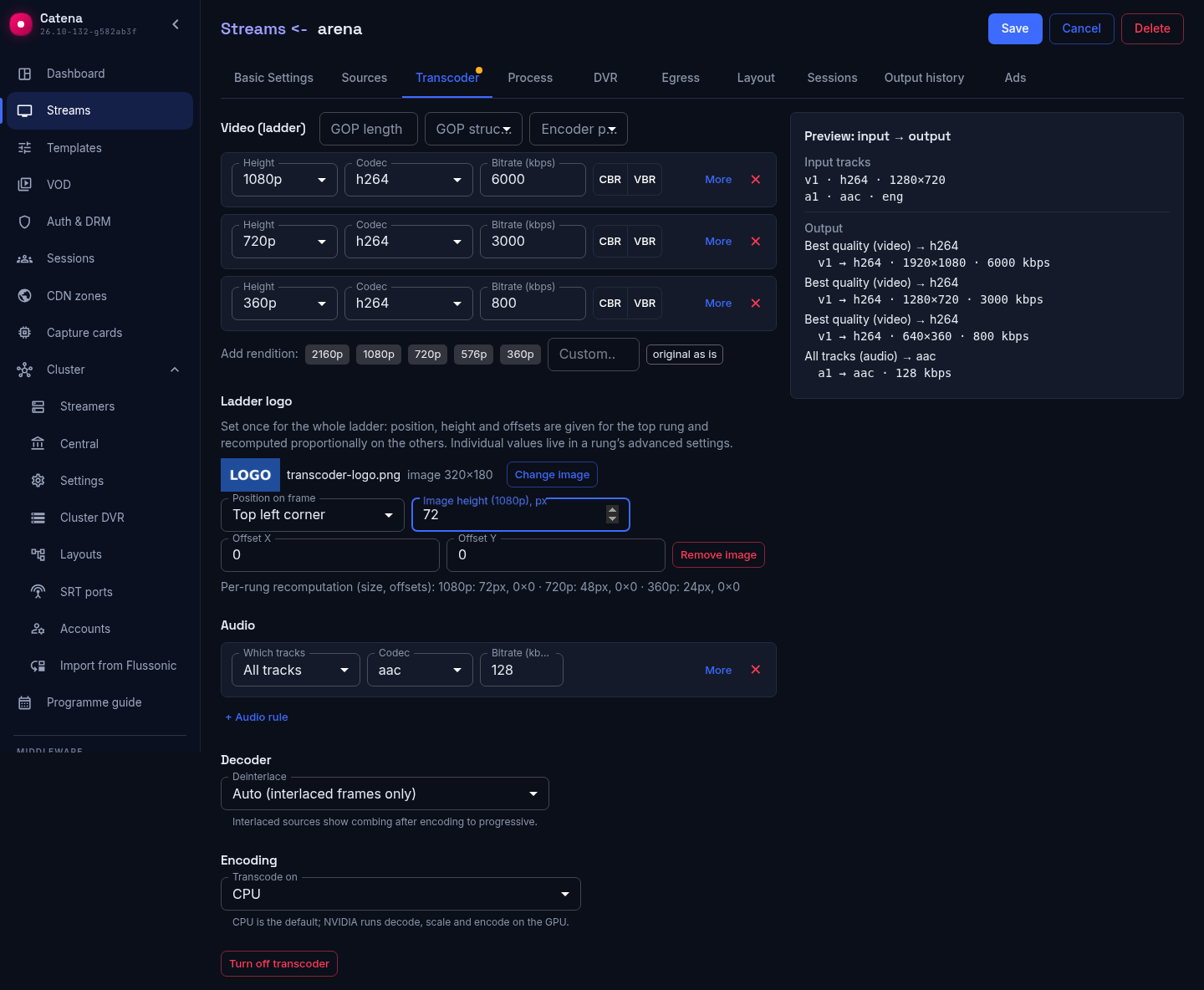
The values are given for the top rung and recomputed on the others in proportion to its height: below the fields you can see what each rung will get before you Save. A rung without resize takes its height from the input. Rungs configured by hand are left alone: when they diverge the card shows "Logo settings of the rungs differ", and applying a common value asks for confirmation — it overwrites the individual settings.
The logo goes on an encoding rung only: passthrough ("As is") and the RAW codecs have none, and when a rung switches to passthrough the UI drops the section. The picture is at most 1 MB and at most 4096 pixels per side. If the picture is unavailable, the rung is not built: a named error shows in the output state while the other rungs and the stream keep running.
The logo library lives in central, keyed by the sha256 of the picture bytes: a record is immutable, and uploading the same bytes again returns the existing record. The picture travels to the node with the stream configuration, so the logo works on a node that never had the file and survives central being unavailable. Records no stream references any more are removed by the library itself.
The preview
At the bottom of the tab — Preview: input → output. For every rule you can see what will land in the output manifest before you Save: which rung builds from what and whether the audio got lost. When input statistics are unavailable, the left side says so — input unknown — and the output is still computed from the rules.
MBR: a ladder without transcoding
If the quality ladder is already made elsewhere — the on-site encoder itself delivers 1080/720/360 — there is no point re-encoding it. That is what the MBR source is for: on the Sources tab pick the MBR protocol and add one input per ready-made quality into the container. The stream assembles them into a single ladder and serves the viewer an ordinary multi-bitrate stream — without spending a single core on encoding.
The transcoder and the MBR input are two roads to the same result: the first burns the streamer's CPU, the second burns bandwidth from the encoder. The choice is usually dictated by which is cheaper in your setup.
If the transcoder did not work
- The ladder is configured, the stream is green, but there are no output tracks. Check that the encoding plugins are installed on the streamer —
dpkg -l | grep sapsan-transcoder. Without them the server runs but has nothing to encode with; see the Quick start. - The player stutters on quality switches. Look at the ladder banners: a passthrough rung next to encoded ones, or a drifted GOP — both causes are visible right in the UI.
- A "Transcoder is not working" banner above the stream tabs. A rung failed to start or the transcoder stopped; the banner states the reason, and its button leads to the Transcoder tab. The output number in the reason counts from zero, as in the error on save.