Placement status
Every assignment and every move the layouter records together with its reason. The questions "why is this stream here" and "why is it not here" are answered by the interface.
The decisions can be seen in three places.
- Layouts — an item in the side menu; the screen itself is titled Layouter. The subsystem's work as a whole: the last run and the run history.
- The Layout tab of a stream page — the placement status, the unmet demands, that stream's current assignments and the history of changes. An unmet demand is an assignment the stream needs but which could not be created.
- The stream slice on a streamer's page — what was delivered to one machine: all of its assignments with roles and server configs. Described in the streamer diagnostics.
The last run
The first card of the Layouter screen answers whether your change has been taken into account. It carries the run number, the time, the outcome and the counters of what was done. If the run is older than your edit, the change has not been processed yet.
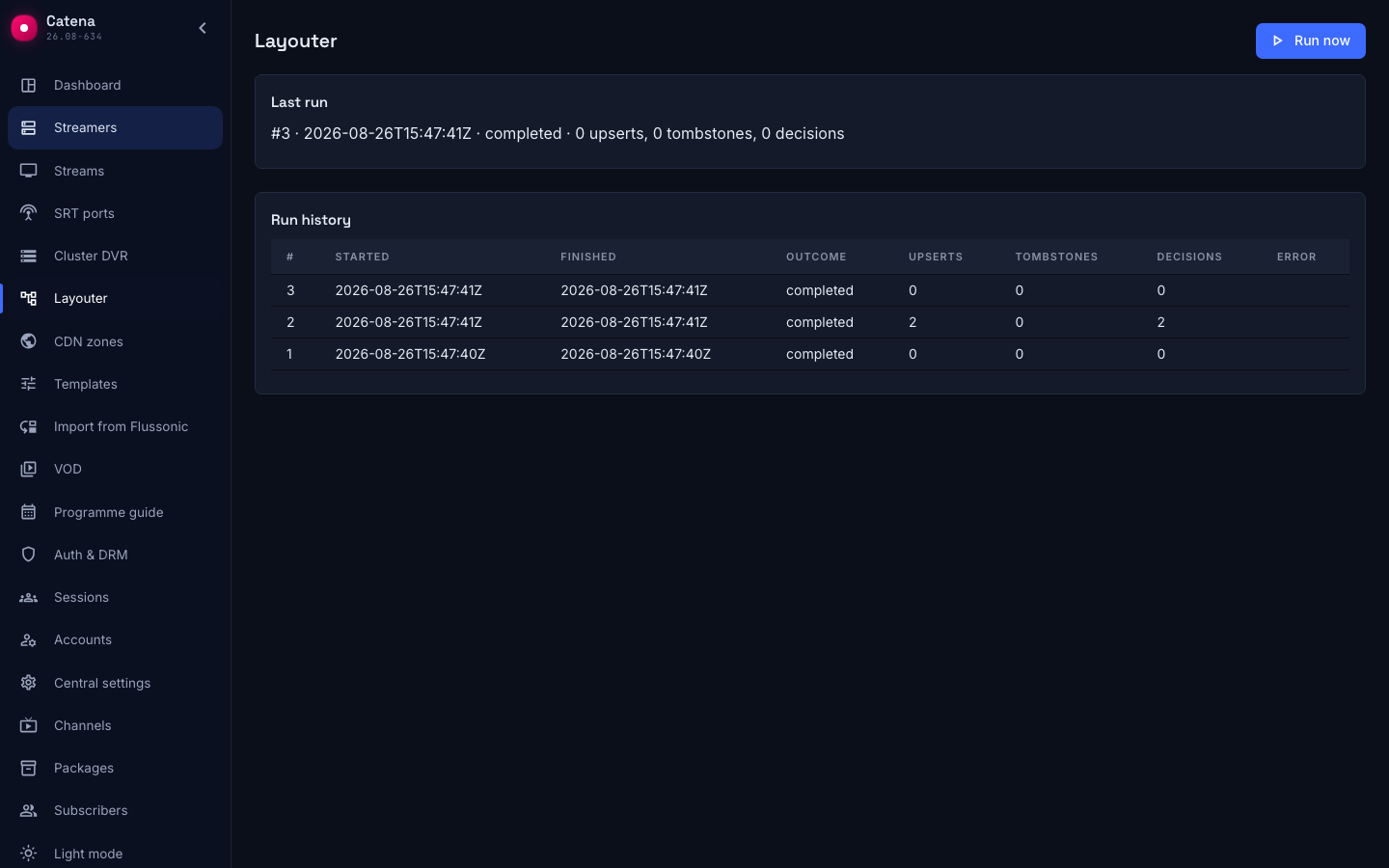
There is hardly ever anything to wait for. A run starts by itself when the configuration changes, and every few seconds the layouter checks, even without changes, whether the assignments need recomputing. Next to the card there is a Run now button that does the same immediately. Its answer Input unchanged, run skipped means nothing has changed since the last run and there is nothing to recompute.
Run history
The history answers when the layouter last changed the assignments, how often it does so, and whether any runs were torn. The table goes from newer runs to older ones: when a run started and finished, how it ended and how many changes it brought.
- Upserts — how many assignments were created or updated.
- Tombstones — how many assignments were removed.
- Decisions — how many entries were added to the streams' decision journal. This is not the sum of the previous two: moving a stream to another streamer is one journal entry, even though in the assignments it looks like a removal plus an appearance.
There are three outcomes. Completed — the run reached the end. Failed — the error text is in the last column. Torn — the run did not reach the end, or it is running right now and has no finish time yet.
A run with zeros in every counter is a normal result. The input changed, but nothing had to be reassigned.
From the stream's side
Why a stream is assigned exactly here is shown by the Layout tab of the stream page. Above the table stands the placement status. It answers whether the streamers carried out the layouter's decision, not whether the stream works.
- applied — the configuration has reached every assigned streamer.
- configuring — decided, not yet confirmed.
- stale — a streamer still runs an old version.
- rejected — a streamer refused to apply the configuration, the reason is in the table.
- unplaced — the stream has no assignments.
The Current layout table holds the stream's current assignments.
- Config — the arrow opens the server stream config that went to this streamer. Every role has its own: ingest — the inputs and the transcoder, dvr record and dvr backup — the input from the ingest streamer and the archive section, dvr parts — only the archive section, dvr cleanup — only the cleanup section.
- Streamer and Role — where the stream runs and what that machine does for it.
- Config edited — when the stream's configuration was last changed. The value belongs to the stream and is the same in every row.
- Applied — how far this streamer has got. Here you see either the time of the configuration it took into account, or "not yet", or the reason it rejected the configuration. A time older than in Config edited means the edit has not reached this machine yet.
- Created at and Updated at — when the assignment appeared, and when the layouter last rebuilt the configuration for it.
- Reason — why the assignment appeared or changed.
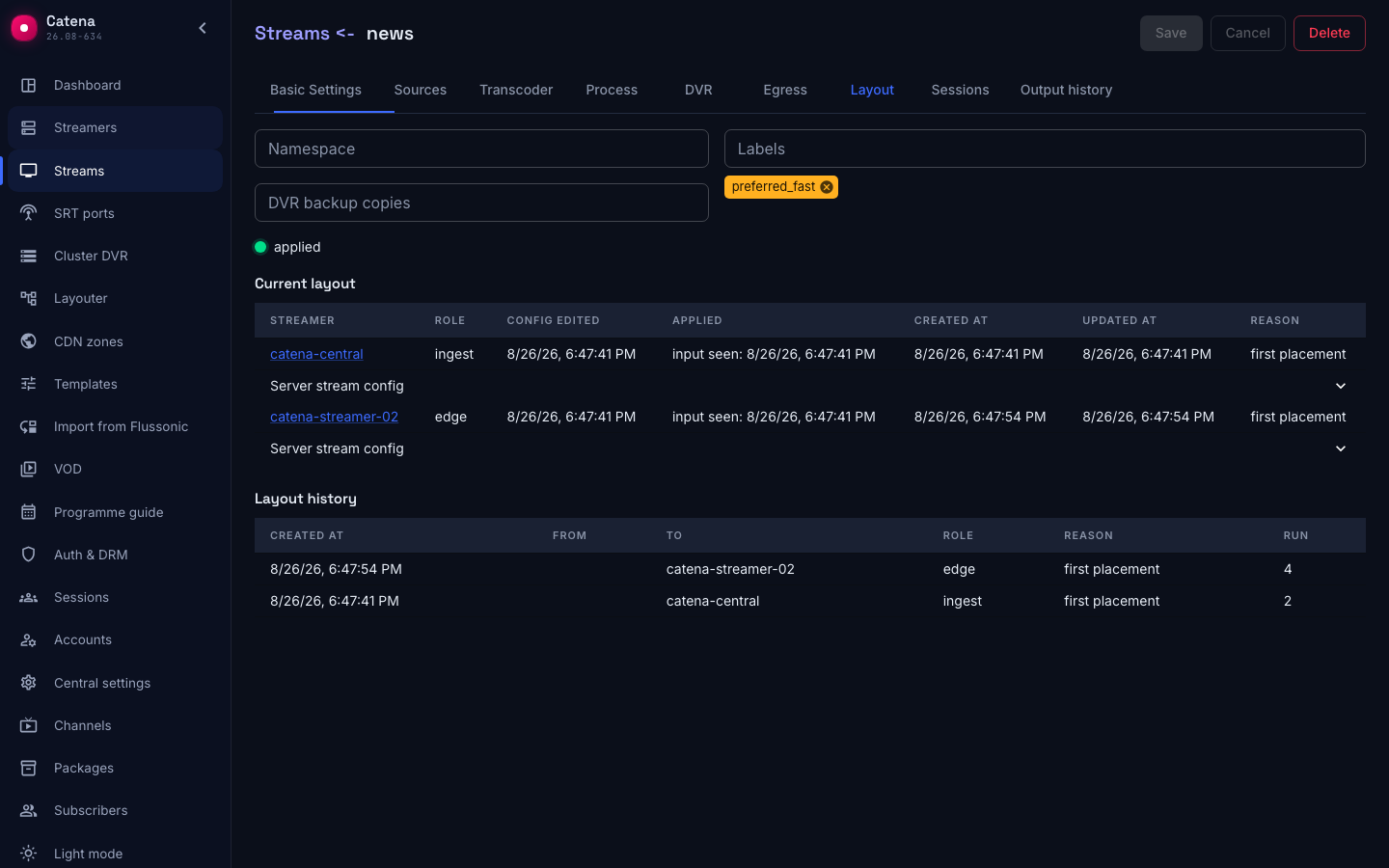
Below is the assignment history: from, to, role, reason and run number. It shows when and for what reason a stream was moved.
The same tab is where a stream's Namespace, Labels and DVR backup copies are edited — what they steer.
If a stream is elsewhere or nowhere
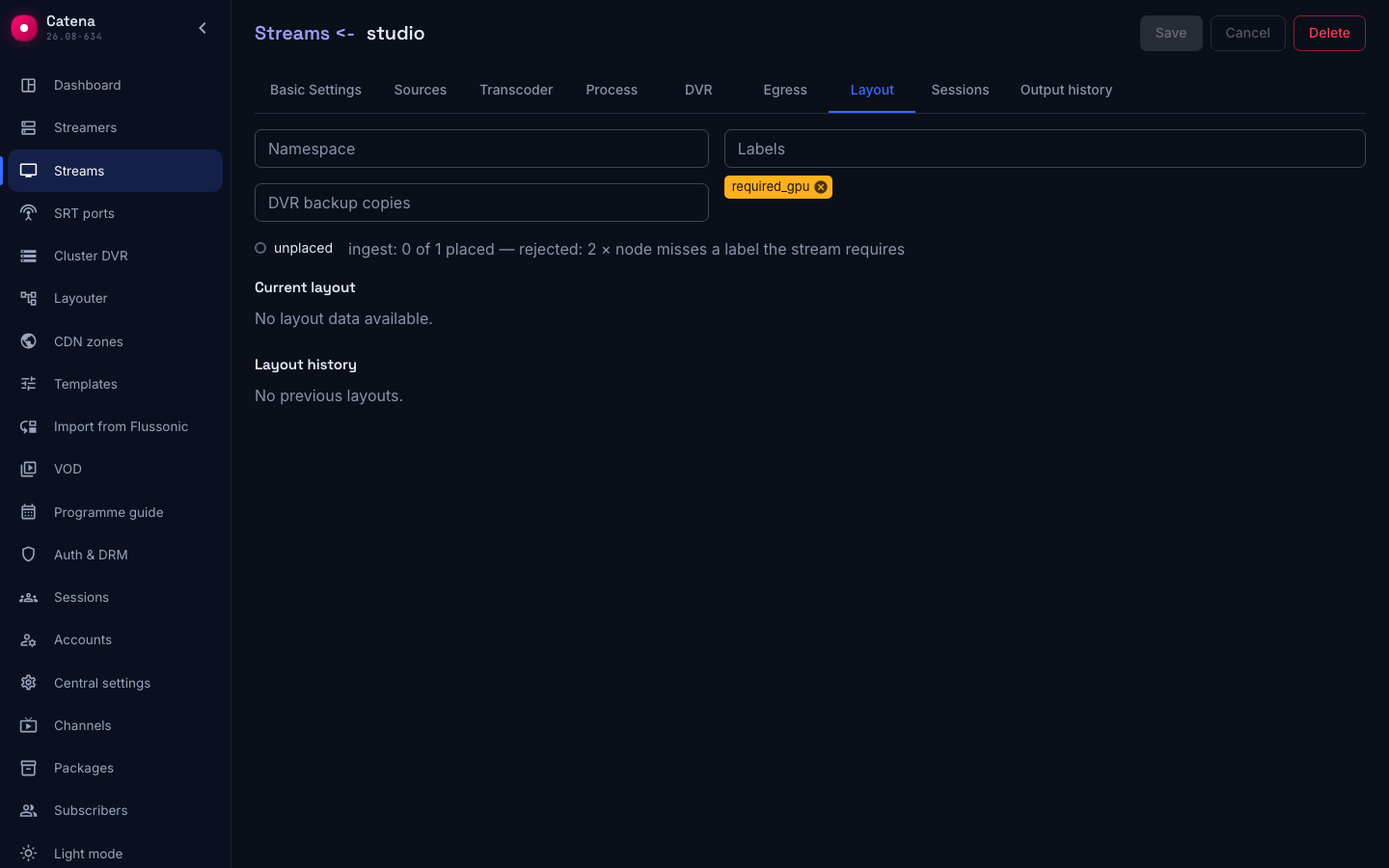
Such a stream is red in the stream list, and the header of its page carries the banner The layouter did not create every assignment of this stream. The button in the banner opens the Layout tab, where the block Unmet assignment demands stands above the assignments table. It lists, per role, how many assignments the stream needs, how many were created, and for what reasons the remaining streamers did not fit.
ingest: 0 of 1 placed — rejected: 2 × node misses a label the stream requires
This reads as follows: the stream needs one ingest, none was created, and both streamers lack a label the stream requires. The reason names exactly what to check.
| Reason in the interface | What to do |
|---|---|
| namespace mismatch | Compare the Namespace of the stream on the Layout tab and of the streamers on the Cluster tab. The values must match literally, empty with empty |
| node misses a label the stream requires | The stream carries required_X. Add the property X to a streamer, or drop the requirement from the stream |
| stream misses a label the node requires | The opposite case. Add the property X to the stream, or drop required_X from the streamer |
| stream limit reached | Raise the streamer's Stream limit, or free the machine by moving some streams off it |
| node has no transcoding cards | The stream is set to encode on NVIDIA, and none of the eligible streamers has cards. Join a machine with cards, or switch the stream to CPU |
| node has no archive storage | The stream has an archive configured, and the streamer has no archive disks — the ingest streamer, or the DVR streamer due to record. Set them up in the streamer settings |
| node archive is full | Disk usage is above the DVR usage limit, %. Free space or raise the threshold |
| no usable address | The addresses the streamer is reached at are not set: for edge delivery — the addresses of the ingest streamer or of the edge itself, for dvr parts — the intra-cluster address of the streamer holding the archive, which is therefore only erased. Fill in connection and delivery |
| node role mismatch | The streamer holding archive remains does not carry the Streamer role, and nobody erases the archive on it. Set the role on the Cluster tab, or take the machine out of the cluster. For a backup copy: the stream's archive is recorded by DVR streamers, and the candidate is an ordinary streamer; one more DVR streamer is needed |
| node offline | The eligible streamers are not reporting. See the registry and the streamer diagnostics |
| node is an edge node | An edge streamer does not perform ingest. A streamer without the Edge node switch is needed |
| node is a DVR node | A DVR streamer does not perform ingest. A streamer without the DVR node switch is needed |
| conflicts with the dvr record node | A copy, dvr parts or dvr cleanup are not created on the streamer that records this stream's archive. Nothing to do: the copy is created on another DVR streamer |
Three cases belong not to placement:
- The status stays "stale" or "configuring" for over a minute. The assignment is made, but the configuration has not reached the streamer. That is slice delivery, not placement.
- The banner "A node rejected the stream configuration". The assignment is made, but the streamer refused to apply it; the reason stands in red in the Applied column. What needs fixing is the stream's configuration, not the placement.
- You need to know why a stream was moved. The history on the Layout tab keeps the reason of every change together with the run number.