Delivery encryption
The rights holder of premium content requires that the stream never reaches a viewer in the clear. The streamer can encrypt what leaves it: the viewer gets ciphertext and the address where their player asks for a licence. Configured in the Delivery encryption (DRM) block on the stream's Delivery tab — and the same way in a stream template when there are many streams.
What is encrypted is the output, not the recording. The archive on the streamer stays unencrypted, so rewind, thumbnails, transcoding and subtitle recognition keep working exactly as for an ordinary stream.
The origin encrypts. Encryption is done by the streamer that took the source. Edges receive ready ciphertext from it and serve it as is: they have no key and never get one — more below.
The opposite task — pulling an encrypted source in — is solved on the stream's input, not here: see MPEG-DASH source.
Turn encryption on
The Encrypt delivery toggle enables the block. Then choose the Key source:
- In settings — you supply the key yourself. This fits when the key comes from an agreement with the rights holder rather than from a server.
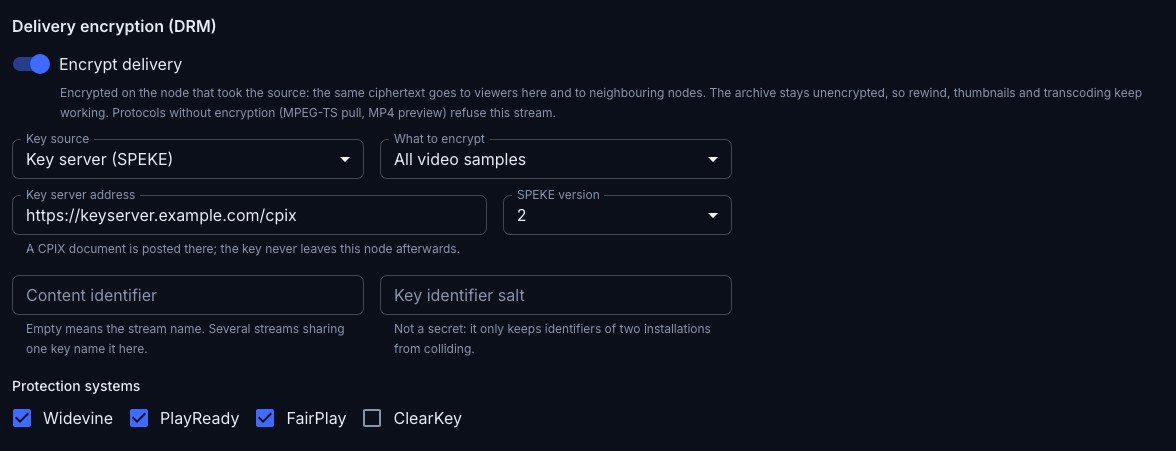
- Key server (SPEKE) — the key is requested from an external server over SPEKE. This is how commercial DRM services work.
- EZDRM — the key is requested from EZDRM with the login and password or the Secure Token of your EZDRM account.
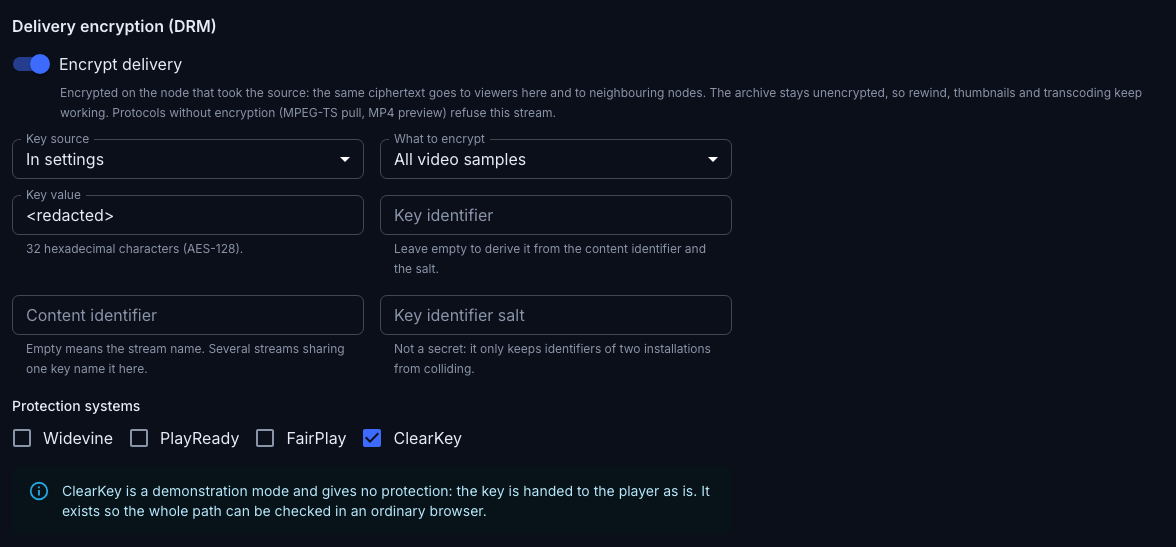
Watch it work, on ClearKey
To see encryption end to end — from the fragment to a picture in the browser — no commercial DRM is needed: ClearKey plays in an ordinary browser, and the licence is issued by the streamer itself. This mode protects nothing, the key travels to the player in the clear — but the whole path is verified in a minute, without a single subscription.
- On the Delivery tab turn Encrypt delivery on.
- Key source — In settings. In Key value type 32 hexadecimal characters, for example
00112233445566778899aabbccddeeff. Leave Key identifier empty. - Under Protection systems leave ClearKey alone.
- Save and open the Player page — the link to it is in the How to get the stream block further down the same tab.
The picture starts as usual, and that is the result: the fragments left encrypted, the player asked the streamer for a licence, got the key and decrypted them itself.

Two checks show what is actually going on.
A key appeared in the playlist. An encrypted stream carries a protection-system line before the list of qualities; an ordinary one does not:
curl -s http://<address>/streaming/v/<name>/index.m3u8 | grep KEY
#EXT-X-SESSION-KEY:METHOD=SAMPLE-AES,URI="data:text/plain;base64,...",KEYFORMAT="org.w3.clearkey"
A protocol without encryption refuses. The server cannot encrypt MPEG-TS, and therefore does not serve such a stream at all:
curl -s -o /dev/null -w '%{http_code}\n' http://<address>/streaming/mpegts/<name>
403
The console no longer shows a saved key — the field holds <redacted>, as in the screenshot above. The key value is given out neither over the API nor to the logs; to set a different one, type a new key over it.
The key in settings
- Key value — 32 hexadecimal characters (AES-128).
- Key identifier — may be left empty: it is then derived from the content identifier and the salt.
The key server
- Key server address — a CPIX document is posted there. The key never leaves this streamer afterwards.
- SPEKE version — the protocol version agreed with the server.
EZDRM
EZDRM asks for the key its own way, so it is a key source of its own rather than a SPEKE server: pick EZDRM in Key source.
Authorization sets how the streamer introduces itself to EZDRM, one way of two:
- Login and password — the EZDRM account credentials, the same as in Flussonic. This is the default: fill in EZDRM login and EZDRM password.
- Secure Token — the token from the My Account section at accounts.ezdrm.com. It can be revoked there without changing the account password.
Key server address can be left empty: the EZDRM default address is used then. It is needed only if EZDRM has given you an address of your own.
The saved password and token are not shown back: the field stays empty and is marked with dots. To change the value, type a new one; left untouched, it stays as saved.
What to encrypt
The What to encrypt field sets the extent:
- All video samples — the default, and what a rights holder usually requires.
- Keyframes only — noticeably cheaper on CPU: difference frames do not decode without their keyframe anyway.
Audio is encrypted in both modes: it is cheap, and leaving it in the clear makes protecting the content pointless.
Protection systems
Protection systems lists the systems the protection is announced to: Widevine, PlayReady, FairPlay, ClearKey. At least one has to be selected: encrypting without telling any player how to decrypt means nobody can watch the stream.
ClearKey is a demonstration mode and gives no protection: the key is handed to the player as is. It exists so the whole path — from encryption to playback — can be checked in an ordinary browser, without buying a commercial DRM. For real content pick a system whose licence is delivered securely.
Older devices
The streamer encrypts with the cbcs scheme: all three protection systems understand it, so one encrypted copy serves both HLS and DASH. Devices that know only the older cenc scheme cannot decrypt it — Smart TVs and set-top boxes with PlayReady older than 4.0, and Android devices older than 7.1. Check the devices of your audience before switching a channel over.
Content identifier and salt
- Content identifier — empty means the stream name. Several streams that must be encrypted with one key name a shared identifier here.
- Key identifier salt — not a secret: it only keeps identifiers of two installations from colliding.
Both fields feed the key identifier, so editing them changes what is announced to the player.
A stream has one key
A stream is given its key once, and it does not change while the stream runs: there is no key rotation.
- The whole quality ladder is encrypted with one key — 1080p, 360p and the audio alike.
- The archive is encrypted with the same key as the live edge. Rewinding a week back needs neither a second key nor a second trip to the key server.
- The playlist carries one key tag for the whole window — no groups of segments under different keys arise.
The key changes only together with the settings: editing Key value, Content identifier or Key identifier salt means a new key, and the stream starts being encrypted with it. A viewer watching at that moment keeps watching: the player requests a licence again, as it does on a codec change.
No key, no delivery
Encryption itself does not break — getting the key does, and that is what to watch.
Until the key is in hand, an encrypted stream is not served at all: a media request ends in an error. Such a stream never answers with clear content under any circumstances — an unreachable key server stops the delivery, it does not remove the encryption.
What can happen to the key server:
- No answer — the stream is not served. As soon as the server answers, delivery resumes on its own: without restarting the stream and without a hole in the archive.
- Not all requested systems returned — the answer is rejected whole. With Widevine and FairPlay selected and only Widevine in the answer, the key is not accepted: incomplete signalling would mean part of the audience silently cannot watch.
- The wrong thing returned — not a CPIX document, or XML that does not parse: the key is not accepted and the reason goes to the streamer's log. Key values are never written to logs.
- A key for another scheme — the key server marked the key for a scheme other than
cbcs: the answer is rejected, and the scheme is named in the log. Signalling issued for another scheme would not decrypt the stream for any viewer.
There is one request to the key server per stream, not per viewer and not per fragment: the streamer keeps the key it received. A thousand viewers arriving at once make one request.
What stops working
For an encrypted stream the surfaces that have no encryption refuse to serve: MPEG-TS pull and its HLS subtree, the MP4 archive preview, the archive feed for RTSP, WebRTC and SRT delivery. The refusal is deliberate: serving such a stream in the clear would be a way around the protection.
Still working: JPEG previews and thumbnails, WebVTT subtitles and stream pushes.
Delivering streamers
The key stays on the streamer that took the source — on the origin. Neighbouring streamers, the edges, receive the same ciphertext as a viewer and serve it on, announcing the protection in playlists and manifests — but they have no key, and none appears in their settings either. A compromised delivering streamer hands out no clear media.
Only the streamer that took the source talks to the key server, so the number of requests to it depends on the number of streams, not on the size of the cluster.
If a delivering streamer has cache disks configured, the ciphertext settles on them as it is, and a repeat request for the same fragment is served locally. The streamer still cannot decrypt that cache: it hands out exactly the bytes that arrived. The ciphertext does not reach the archive — the archive feeds previews, thumbnails and the timeline, and all of those look inside the picture.
Migrating from Flussonic
A stream that had encryption configured in Flussonic Media Server is imported disabled, with the reason named in the report — always, whatever happens to its settings.
EZDRM settings travel: the login, the password and the resource identifier arrive in the EZDRM source, and What to encrypt keeps its Flussonic value — keyframes only, unless full encryption was set there. The stream's key identifier changes, though: the streamer derives it by its own rule, and EZDRM issues the channel a new key. Enable the stream after checking that it plays.
The settings of other key vendors do not travel: Flussonic has a dozen and a half of them against three key sources here, and they cannot be mapped literally. Encryption for such a stream is configured anew — safer than a channel that would come up serving in the clear after the import.