Restreaming
Besides viewers with players, a stream often has to deliver itself into other systems: to a social network over RTMP, to a partner over SRT, into the local network as a transport stream. All of it lives on the Egress tab of the stream page and works off the stream's output — with a transcoder configured, what leaves is the processed stream.
The two ways of handing the stream over differ in who establishes the connection:
- A push — the streamer dials the receiver itself and pushes the stream. Fits social networks and any system that waits for an incoming stream.
- SRT play — the streamer opens a listener and waits for the partner to come and take the stream.
Pushes
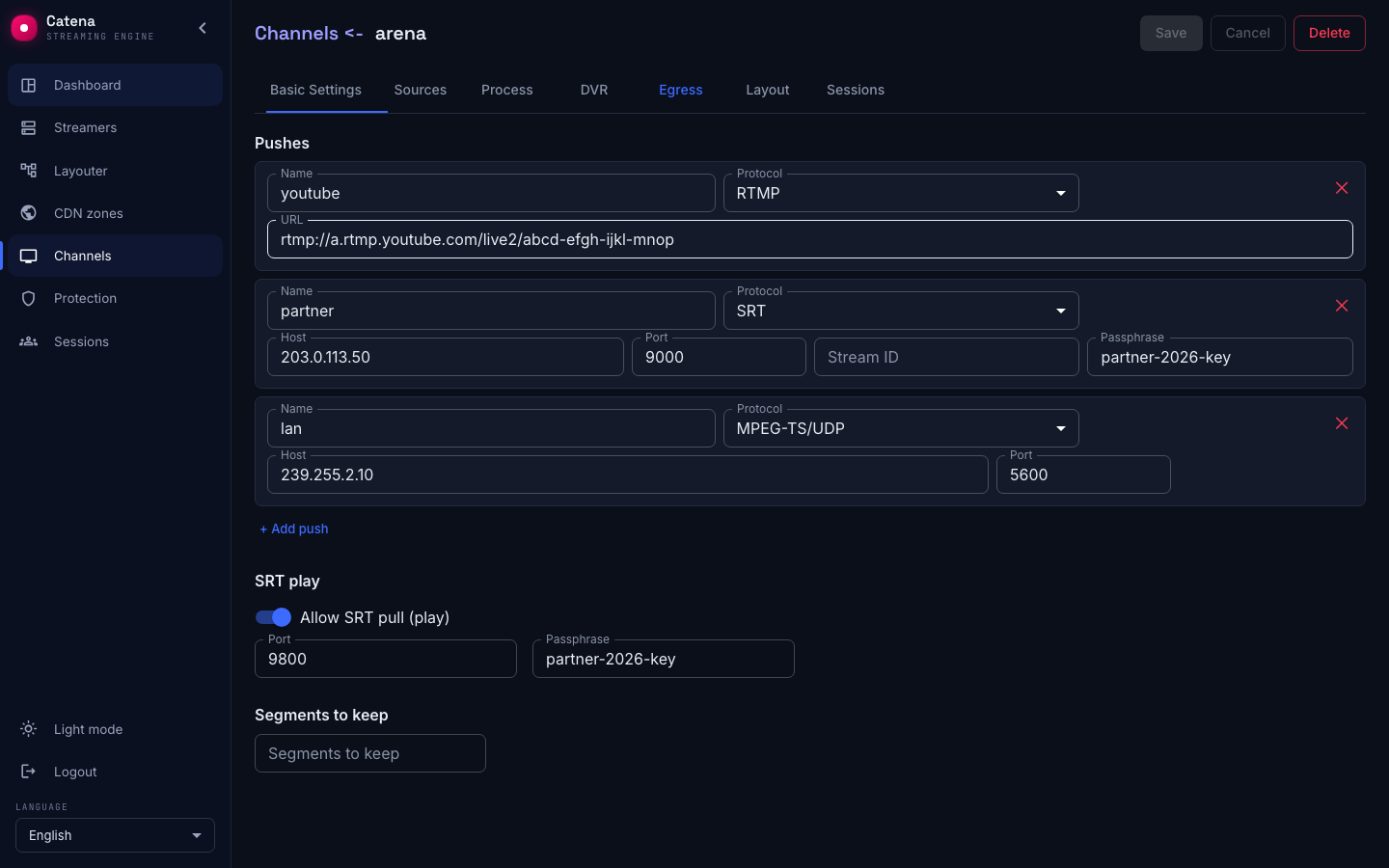
In the Pushes block press + Add push, name the push and pick the protocol:
- RTMP — the receiver's URL in full, stream key included:
rtmp://a.rtmp.youtube.com/live2/<key>. That is how YouTube and the other socials connect. - SRT — the Host and Port of the partner's SRT listener, plus Passphrase and Stream ID when needed. The streamer acts as the caller.
- MPEG-TS/UDP — the receiver's Host and Port. The host may be a multicast group — that is how a stream is handed into an operator's LAN, to a modulator or a neighboring receiver.
- MPEG-TS/RTP — the same MPEG-TS wrapped in RTP: the same Host and Port, with the encapsulation chosen by the push kind. Needed by receivers that expect RTP rather than bare TS over UDP.
A stream can carry several pushes — each works independently. Do not forget Save.
Selecting the outgoing interface
On the Egress tab, set Outgoing interface for a MPEG-TS/UDP or MPEG-TS/RTP push: a network card name such as eno4, or its local IPv4 address such as 192.168.40.10. Set Host to group 239.255.2.77 and Port to 5500, then press Save. Multicast leaves through the selected card regardless of the default route.
Incoming and outgoing interfaces are independent: you can receive through eno2 and send through eno4. Each push has its own outgoing interface. An empty field lets the OS routing table choose; clear the field and save to restore that behaviour. This setting applies to IPv4 multicast. For unicast, routing selects the outgoing interface; Bind address sets the socket’s local address and serves a different purpose.
The interface must exist on the sending streamer and have an IPv4 address. An incorrect name or address prevents the push from starting and produces an error. Changing the outgoing interface restarts the push. In a cluster, check that the interface is available on every streamer that may send this stream.
Ingest is configured separately — see selecting the incoming interface.
Serving over SRT
The SRT play block: enable Allow SRT pull (play), set the Port and the lock — a shared Passphrase or a client map. The streamer opens an SRT listener on that port, and the partner takes the stream themselves by calling srt://<streamer-address>:<port> from their side.
A single port passphrase is a shared key: everyone you handed it to holds it. The Clients map gives counterparties personal locks: a record is created by name, and the server generates the secret on save — it is never typed by hand, only copied, rotated or removed; addresses and subnets are the record's optional filter. Switching the delivery from a shared passphrase to the map comes with a warning before saving: the shared key is removed, and the current viewers reconnect with their new keys.
Next to a client record is a button copying a ready-made link of the form srt://…?mode=caller&passphrase=…; for a passwordless address record the link carries no encryption parameters. In the channel's playback links list, a delivery with a map gives a separate SRT line to every client, and a delivery without a map keeps the single line, as before.
Handy when the stream is needed by a counterparty with their own schedule and their own equipment: you hand out the address and the key, the rest is theirs.
The segment window
The Segments to keep field sets the length of the stream's live HLS/DASH window — how many recent segments the playlist lists. More segments — steadier buffering for viewers on poor networks, but a longer delay from the live edge for those who start at the window's tail. An empty field is the default.
Push monitoring
The Pushes page gathers all active pushes of the cluster and the history of closed ones. Each row is one push: stream, push name, endpoint, node, owner, status, uptime, bitrate, reconnects, RTT and retransmits. A standby pair keeps two rows per stream and push — the active one and the waiting one.
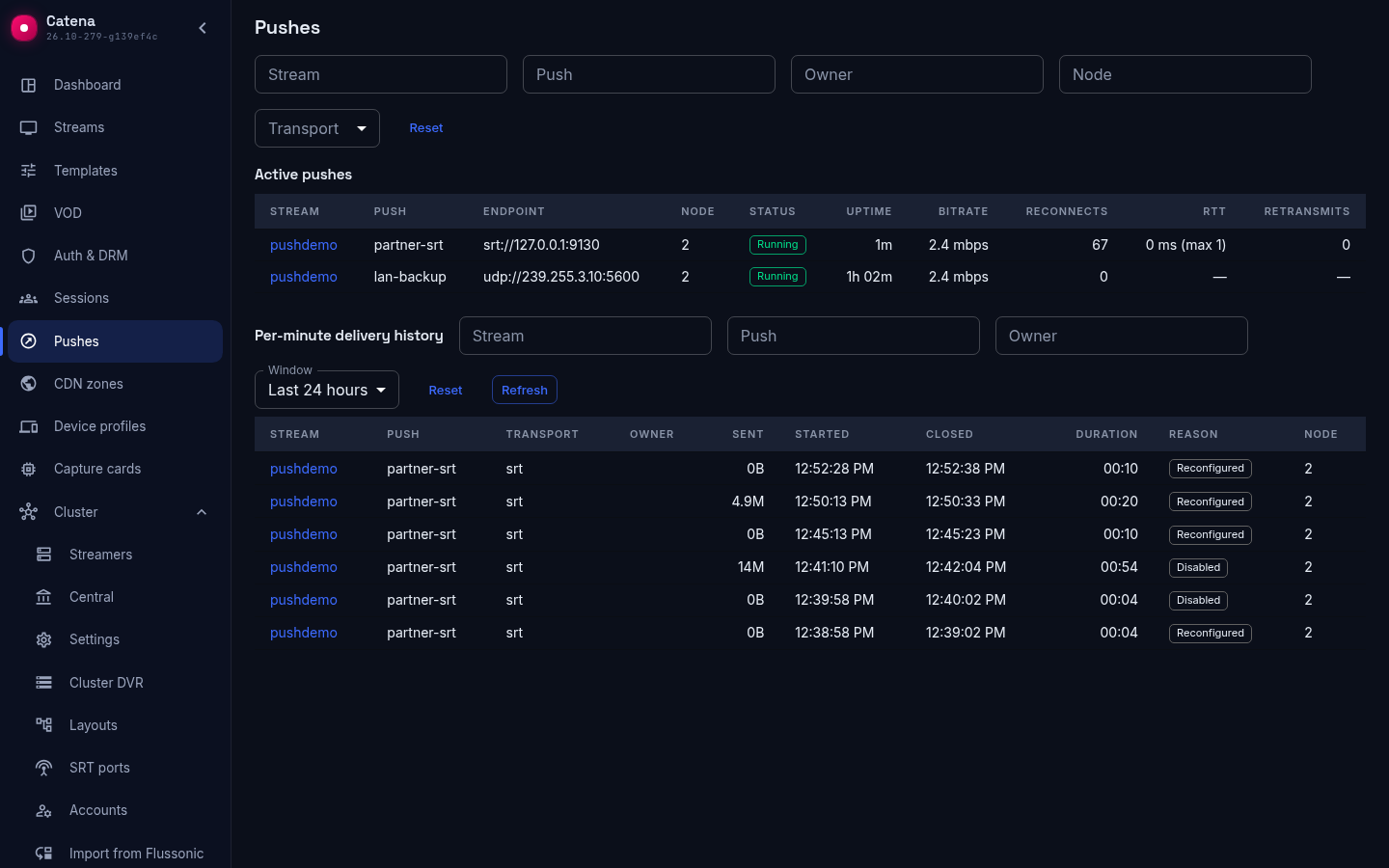
Click a row to see the detail panel with per-minute charts over the push's history period. For a UDP push it shows bitrate and the lag behind the fanout ring — frames and MPEG-TS packets; for an SRT push it adds RTT, loss breakdown and retransmits versus NAKs. For pushes with an owner, the detail carries the ring of recent events — send errors with their text and stops with a reason: send failure, peer closed the connection, disabled, reconfigure, server restart — and the stop totals by reason.
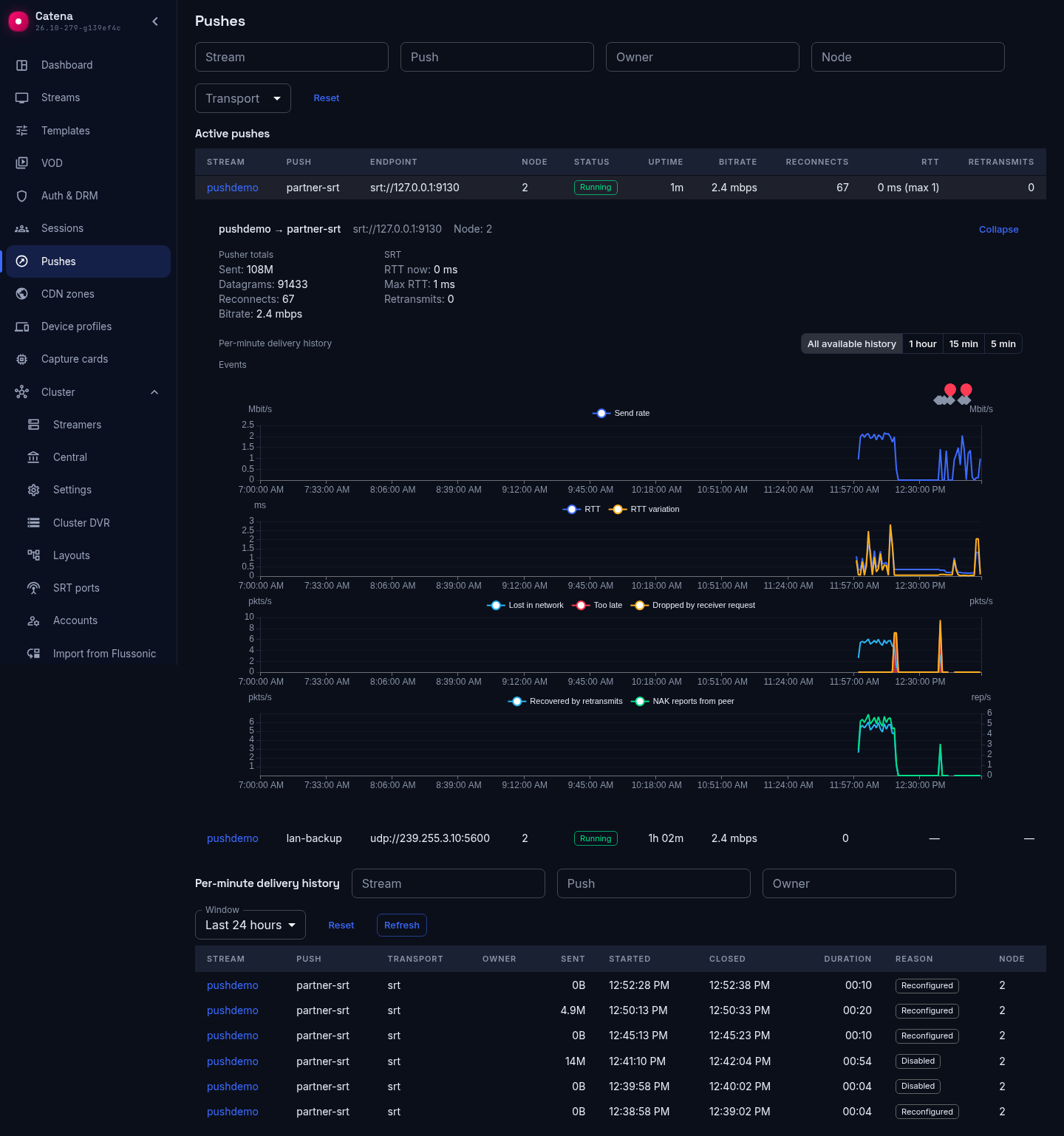
A pusher change does not break the record and does not count as a network failure: the reconnect counter grows only when a pusher dies, while operator stops — disabling and editing the configuration — show up in the history with their own reasons.
Closed records keep their accumulated values and charts, so you can look back at why a push stopped and how losses developed during its lifetime.
Worth knowing
- A push does not affect the stream's status. The status reflects the source; a fallen push receiver does not color the stream. Verify delivery on the receiving side.
- Restreaming moves with the stream. Pushes and SRT play are part of the stream's configuration: whichever streamer runs the stream does the pushing. For SRT play that means the listener's address changes when the stream moves to another streamer — keep that in mind when handing the address to a partner.