Programme guide
The programme guide in Catena arrives as XMLTV files: the operator adds a source, the server downloads the file on a schedule and keeps the programmes of those channels that are bound to streams. From there the guide reaches every consumer at once — the viewer's storefront, the channel card in the console and the XMLTV export for third-party players.
The console section is Programme guide.
Add a source
Press Add a source and fill in the fields:
- Name — how the source is called in the console; it must be unique in the installation.
- File URL — where the XMLTV export is downloaded from. A gzipped file works too: compression is detected by content, not by the extension in the address.
- Refresh every, hours — the interval of the scheduled refresh.
- Keep history, days — how long past programmes are kept in the database.
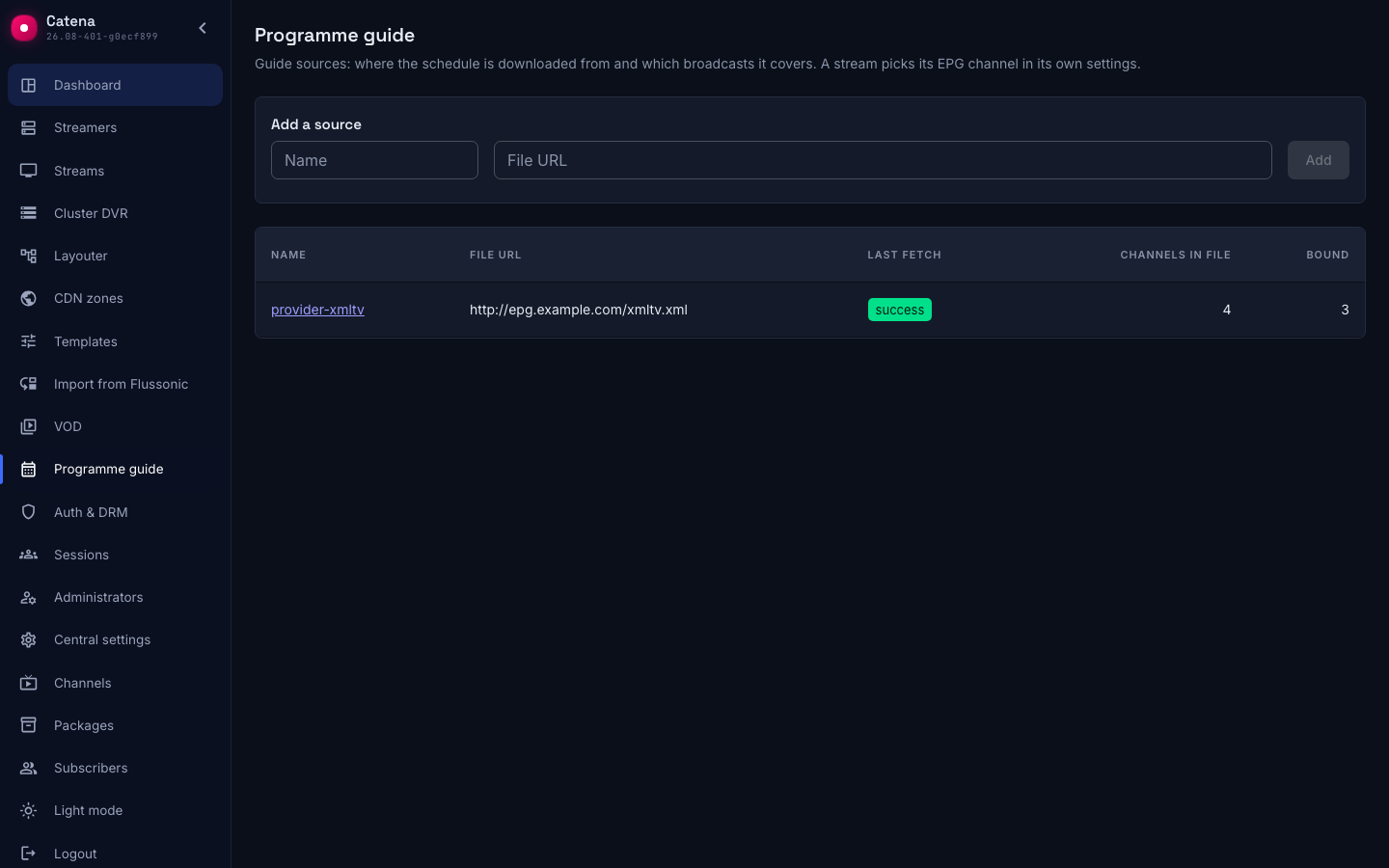
One source usually covers many channels: at a provider it is a single file for a whole package.
Bind streams to the channels of the file
While no stream is bound, the import stores the catalogue of the file's channels but not the programmes themselves: keeping the schedule of four thousand channels when two hundred are broadcast is pointless.
The binding lives in the stream's settings, block Programme guide:
- Guide source — which source the schedule comes from. A stream has exactly one.
- EPG channel — the channel's id inside that file.

One EPG channel can be bound to many streams: the SD and the HD version of one broadcast share a schedule. The opposite does not happen — a stream never has two schedules, and guides from different sources are never merged.
If a channel disappears from a fresh file, the binding stays and is marked This EPG channel is missing from the source catalogue. That is a display state, not a broken installation: fix it by picking another channel, or by getting the old one back into the export.
A new binding does not wait for the scheduled fetch — the server re-imports the source by itself, merging edits made back to back into one fetch. That re-import uses the stored file; nothing is downloaded again.
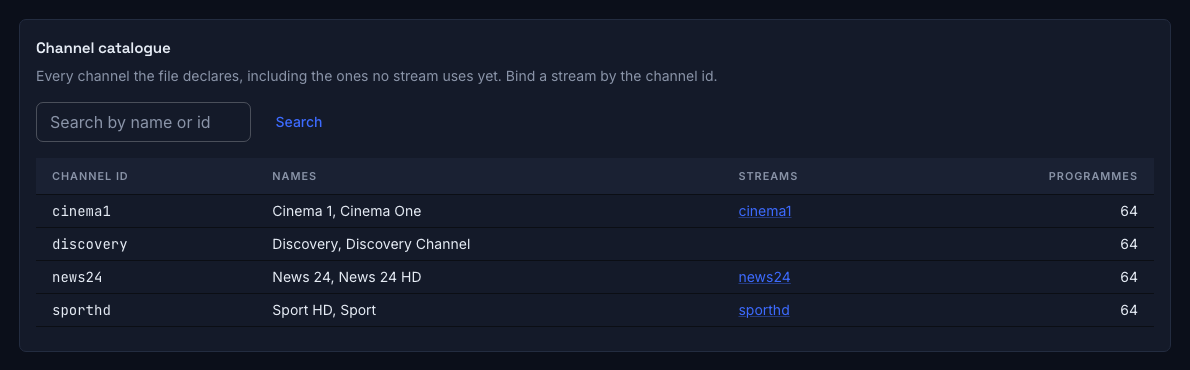
The channel catalogue of the file
The Channel catalogue tab shows everything the file declares, including channels no stream uses yet: the id, the names, the number of programmes and the streams bound to it. Search covers names and ids at once — providers hand out several aliases per channel.
Bulk assignment
Match by name pairs streams with catalogue channels and shows the result as a proposal. A proposal is not a decision: only the ticked rows are written, and every row can be corrected before Assign is pressed.
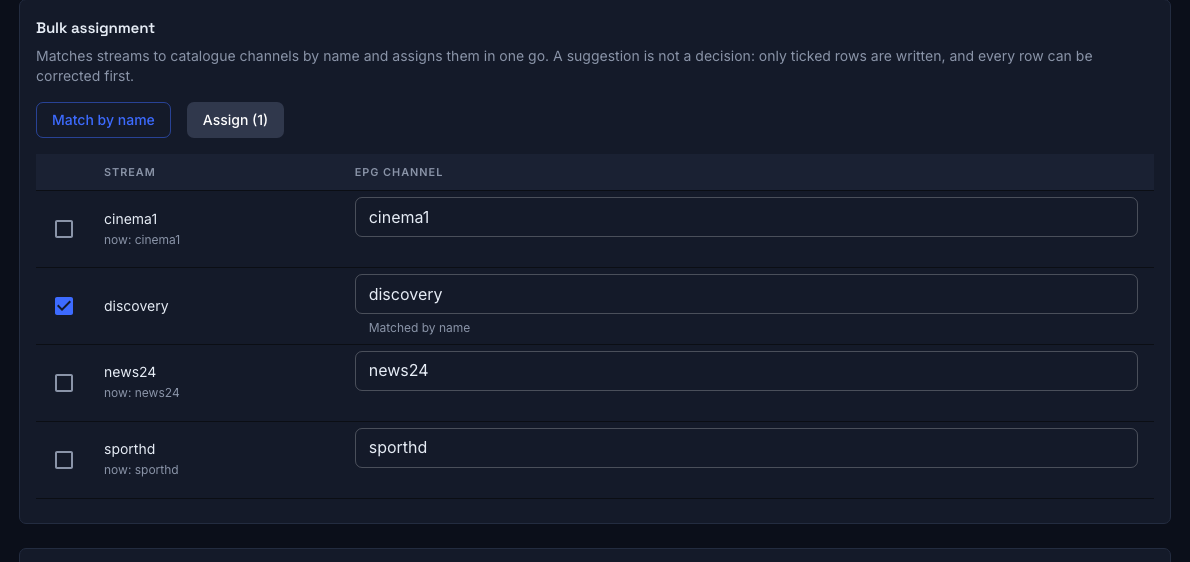
This is the practical way to bring a guide to an existing installation: nobody binds two hundred streams by hand.
What an import does
Refresh now starts a fetch immediately. Both the scheduled and the manual refresh always download the file again — "refresh" never quietly imports yesterday's copy.
An import replaces a window: the contents of the interval the file describes are brought into exact agreement with the file. A programme that moved moves, a programme that was cancelled disappears, and history outside the window is left alone. A reader sees either the previous guide or the new one, never a mixture.
A broken element of the file is skipped with a warning and does not sink the whole fetch; only XML that cannot be parsed at all stops it — a provider's error page instead of the export, for instance. In that case the guide stored earlier is left unchanged.
Starting an import of the same source while one is running is refused — the running fetch is neither interrupted nor duplicated.
Fetch history
Every source shows its Last fetch, and the Fetch history tab keeps the previous ones. The statuses are:
- never fetched — the source has just been added;
- running — a fetch is in progress, and its message names the current stage;
- success — the file was parsed and written;
- failed — the message explains why.
Next to the status stand the counters: Programmes (found in the file), Stored, Channels in file, Bound. This is the answer to "why is the guide empty": a successful fetch with hundreds of channels and zero bound means the file is fine and the bindings are missing.
Where the guide shows up
- The viewer's storefront — the guide on the yellow button, and catch-up of programmes from the archive (Storefront).
- The channel card in the console — the Programme guide block with the next day.
- The XMLTV export — the same catalogue for a third-party player (Playlist and XMLTV).
The guide is always read as a window: both bounds are required, and the span and the number of streams are capped — no more than 7 days and 200 streams per request. A wider request is refused with the limit named rather than quietly truncated.
A viewer only ever gets their own channels: the access formula is applied before the guide is read, and a channel outside their packages never appears in the answer, even when named explicitly.
Channel logos
An export declares not only a name for a channel but an icon as well. Catena downloads it itself and stores the bytes: the provider's address never reaches the answer — otherwise every viewer, including a TV with no route to the outside world, would have to go and fetch that picture from someone else's network.
On the channel card the logo and the name are offered, not applied: the operator's own name and picture are never overwritten by an import. With no stream assigned there is nothing to offer — the logo is found along the chain "stream → binding → channel of the file".
Reading an empty guide
Top to bottom:
- The fetch failed — read the message: most often the address serves an error page or an authorization prompt instead of the export.
- The fetch succeeded, bound is zero — bind the streams, by hand or with bulk assignment.
- The binding is there, no programmes — check that the channel in the catalogue has a non-zero programme count: the provider may have shipped a file without it.
- Programmes are there, the storefront is empty — check that the catena channel points at that stream: the guide is addressed by broadcast, and a channel with no stream has no schedule.
What's next
- Storefront — the guide as the viewer sees it.
- Playlist and XMLTV — the guide exported for third-party players.
- Channels — how a catena channel is tied to a stream.