Adding a streamer
A streamer is a machine that joins an existing installation and starts carrying streams. Central admits it through a time-boxed join window; nothing is approved by hand.
Before you start, have the streamer list open — that is where the new machine appears.
A streamer runs the catena-base package — exactly the same server as on the first machine. The difference is one answer during installation: a streamer joins the cluster, while the first machine starts one by adding the catena package with the console and the database on top.
Prepare the machine
Connect the repository, put a license in place, and install:
curl -L http://apt.flussonic.com/repo/master/dev.key > /etc/apt/trusted.gpg.d/dev.gpg
echo "deb http://apt.flussonic.com/branch/sapsan/master repo/" > /etc/apt/sources.list.d/flussonic.list
apt update

mkdir -p /etc/catena
cp license.txt /etc/catena/license.txt
chmod 600 /etc/catena/license.txt

apt install --install-recommends catena-base
The installer asks three things: the license key, the central address and the join token. You already have the key — paste it, and the package writes /etc/catena/license.txt itself. There is no token yet at this point: leave the last two answers empty, the next step fills them in.
Every streamer needs its own license key — the service does not start without one. --install-recommends keeps the transcoder plugins, without which the streamer can carry streams but not encode them.
There is no configuration to write at all: a streamer has no main config file, and everything it needs to know about the cluster is three variables in /etc/catena/secrets.env.
Open a join window
On central, go to Streamers and press Permit join.
Central issues a join token — it starts with jt- — and opens a window lasting exactly one hour. The duration is fixed and not configurable. The panel then shows:
- the token, shown here once at issue — after a page reload it comes back masked, and the eye reveals it again;
- a countdown to the window closing;
- Extend, which pushes the deadline out another hour and keeps the same token, so machines you already handed it to stay valid;
- a ready-to-paste command for the streamer.
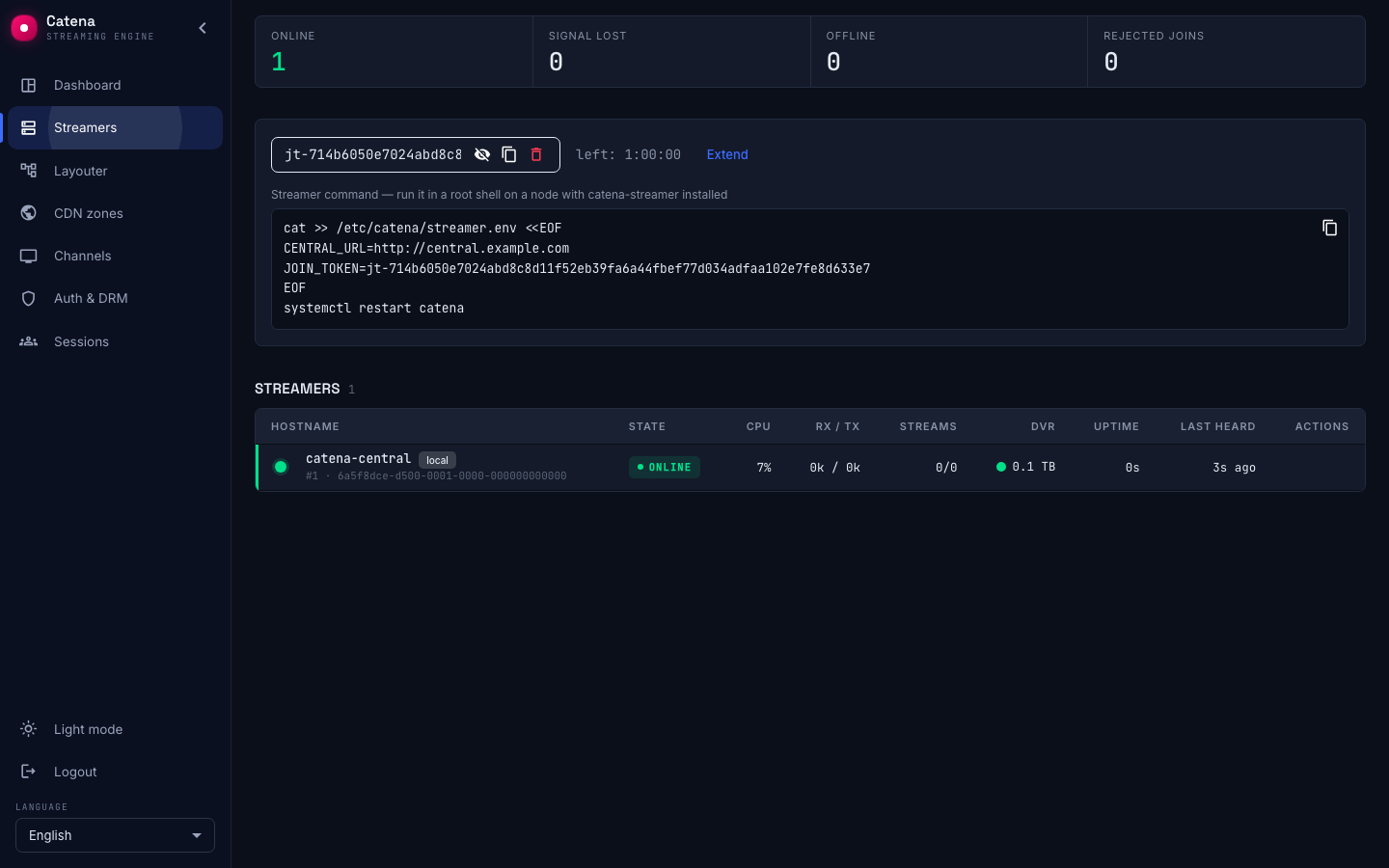
There is no approval step and no confirmation queue. A valid, unexpired token admits a streamer on its own; your control is the length of the window, not a per-machine decision. Treat the token accordingly, and close the window with the delete button once the machines you meant to add are in.
Configure and start the streamer
Copy the command from the panel and run it in a root shell on the streamer:
cat >> /etc/catena/secrets.env <<EOF
CENTRAL_URL=http://central.example.com
JOIN_TOKEN=jt-...
EOF
systemctl restart catena
The values are appended, deliberately. The package created this file at install time, and the last assignment wins — so the same command can be run again when the streamer moves to another cluster or when the token had to be reissued.
Check CENTRAL_URL before you run it. The panel fills it in from the address of the browser you are looking at it in. If you reach the console by a name the streamer cannot resolve, or through a reverse proxy on another address, fix it by hand. This is the most common reason a new streamer never shows up.
The same file holds NODE_NAME — the operator's label for the machine, its hostname by default — and HTTP, a permanent override of the HTTP port.
Unattended rollout
The install questions go through debconf, so the answers can be preseeded with the standard deb tooling — ansible needs to know nothing special:
debconf-set-selections <<EOF
catena-base catena-base/license_key string l4|...
catena-base catena-base/central_url string http://central.example.com
catena-base catena-base/join_token password jt-...
EOF

DEBIAN_FRONTEND=noninteractive apt install --install-recommends catena-base
Not a single question is asked, and the machine comes up and joins on its own. Passing the values as environment variables of the install itself does the same:
CENTRAL_URL=http://central.example.com JOIN_TOKEN=jt-... \
  DEBIAN_FRONTEND=noninteractive apt install --install-recommends catena-base
Environment variables win over debconf answers. Neither way overwrites what the machine already has: an address and a token already in place survive both a reinstall and a package upgrade.
Watch it arrive
Within seconds the streamer registers and appears in the registry. Central mints its node_id and hands back a key, which the streamer stores together with the id in its state directory (/var/lib/catena by default).
From that moment the join token is irrelevant to this machine: on every restart the streamer authenticates with its key and does not register again. Closing or expiring the window does not disturb streamers that already joined.
A fresh streamer arrives carrying nothing. Deciding which streams run on it is central's job, not something you configure per machine.
If the streamer does not appear
Rejected joins is counting up. The streamer is reaching central and central is turning it away: the window has closed, or the token is wrong or expired. Open a window again and re-copy the token. A refused registration is not a hard failure — the streamer keeps retrying with backoff, so it admits itself the moment a valid window exists, with nothing to do on the machine.
The counter does not move and nothing arrives. Then the streamer is not reaching central at all. Check the address from the machine's own shell — it must resolve and answer there, not just from your workstation — and read the log:
journalctl -u catena -n 50
The streamer appears twice. Registration is not idempotent: every accepted registration creates a new record with a new node_id. Re-running it on a machine that had already joined — most often by wiping the state directory and starting over — leaves the old record in place and marks both rows duplicate. Delete the stale one.