Trying a central group in Docker
Redundancy explains how a central group is built, and A central group on separate servers explains how to deploy one. This page is about seeing it work with your own eyes: on one machine, out of containers, in ten minutes and without renting a single server.
The stand is disposable. On it you can — and should — do what one does not do to a working installation: kill processes mid-flight and watch what comes of it.
What you need
- Docker with compose — nothing else to install.
- A license key. Every process needs one: both centrals and all three streamers.
- Free ports 8081 and 8082 on the local machine.
What the stand is made of
Six containers:
- postgres — one database for the whole group.
- central-a and central-b — two control-plane instances over that database, with consoles on ports 8081 and 8082.
- streamer-1 and streamer-2 — two streamers split between the instances: the first goes to central-a, the second to central-b.
- streamer-3 — a streamer that was given one address only, central-b. It can learn about the second instance from central alone.
Splitting the streamers between instances is not decoration, it is the point of the stand. The picture of what is happening right now is one per group, and the whole park has to be visible at either of the two addresses even though the machines report to different ones. The third streamer is the position of every machine of an existing park on the day a second instance is added to the installation: nobody is going to rewrite the config on a thousand machines.
Download docker-compose.yaml into an empty directory. Below are the parts of it that it was written for; the rest is ordinary plumbing.
The first instance claims all four roles, migrate included:
central:
  admin_keys:
    - lab-admin-key
  roles: [run, migrate, layouter, stats]
  advertise_url: http://central-a
The second one is the same without migrate: the schema is applied by one process, or two of them race each other through the migrations.
central:
  admin_keys:
    - lab-admin-key
  roles: [run, layouter, stats]
  advertise_url: http://central-b
The layouter and stats roles are claimed by both, and that is not a double start: a role is a claim, and the executor is chosen by a mandate.
A streamer is given not the address of an instance but the list of the group's addresses; the order is the order of preference:
managed_by:
  name: streamer-1
  url:
    - http://central-a
    - http://central-b
  join_token: ${JOIN_TOKEN}
The second streamer has the same list in the opposite order. The third is given a single address — the one the lab will stop later on:
managed_by:
  name: streamer-3
  url: http://central-b
  join_token: ${JOIN_TOKEN}
The streamers run the same image as central: a streamer of a Catena cluster is the same Catena binary, and it needs the same license.
Bringing it up
The stand does not come up with a single docker compose up: the join window is opened by a live central, and the join token exists only after it starts.
First the database and both control-plane instances:
export CATENA_VERSION=latest
export LICENSE_KEY='your key'
docker compose up -d postgres central-a central-b
Wait for the console to open at http://127.0.0.1:8081 and log in as admin with the password pass. On the first login the console asks for a named account — create one.
Open Cluster → Streamers, press Permit join and copy the join token. Bring the streamers up with it:
JOIN_TOKEN=jt-... docker compose up -d streamer-1 streamer-2 streamer-3
All three machines appear in the streamer list within seconds. Close the join window afterwards — the park is assembled.
Create a few streams, so that the cluster has something to place. The syntetic input is the built-in generator; the stand needs no external source:
for i in 1 2 3 4 5 6; do
  curl -s -X PUT -H 'Authorization: Bearer lab-admin-key' \
    -H 'Content-Type: application/json' \
    -d '{"inputs":[{"syntetic":{}}]}' \
    "http://127.0.0.1:8081/central/api-v4/streams/configs/cam$i"
done
The group as a whole
Open Cluster → Central.
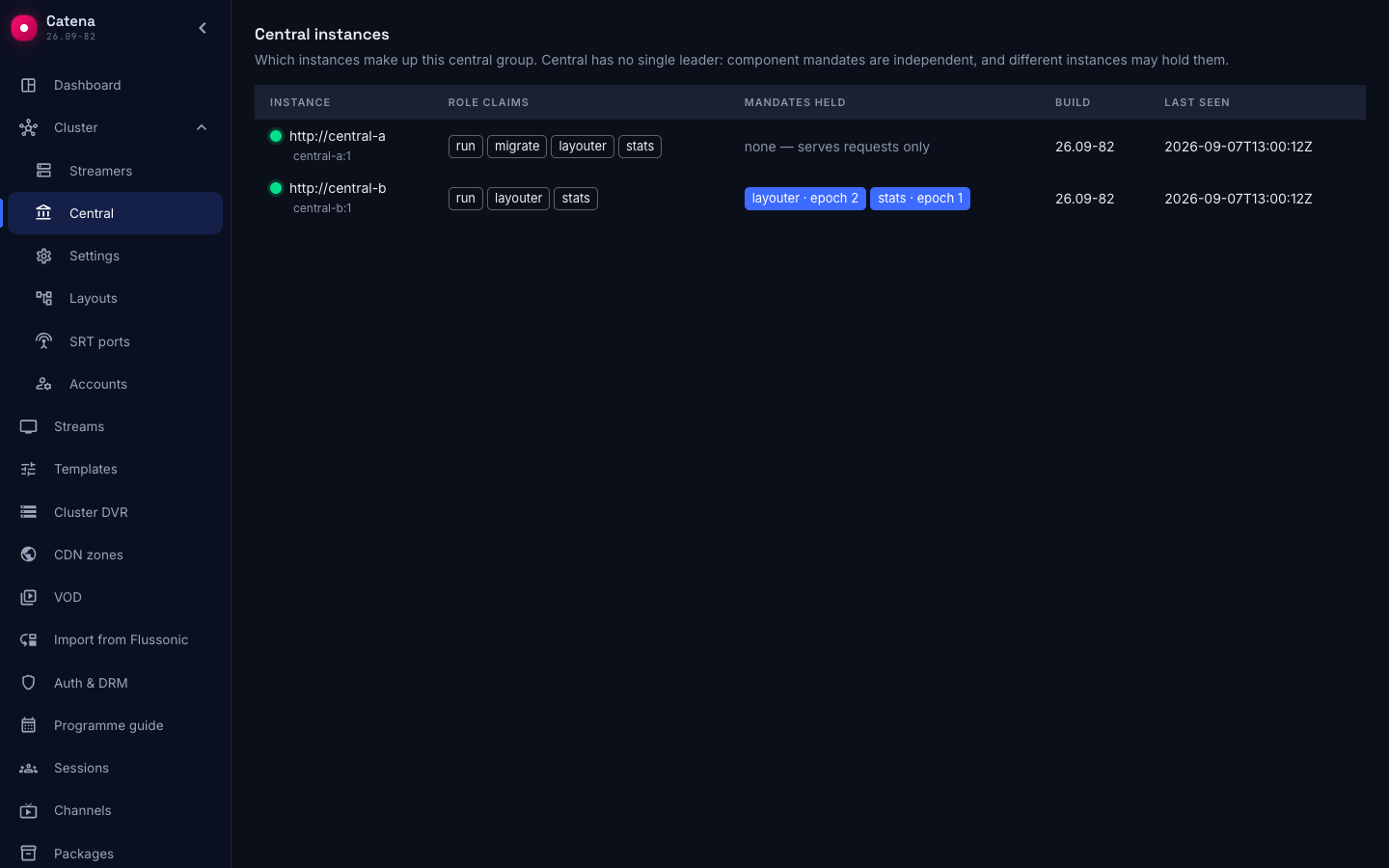
The table has two rows — the entire group — and every instance shows it identically: the registry lives in the shared database.
- Role claims are almost the same on both:
migrateis claimed only bycentral-a, everything else by both machines. - Mandates held is filled in on one row only. That is the answer to "who is in charge here": nobody is, there are holders of individual mandates.
- The second row says none — serves requests only. Such an instance is neither a spare nor asleep: it fully answers the console, the API and the streamers; it just is not the one doing background work right now.
On your stand the mandates may sit differently — both on one machine, or one on each. Mandates are independent and their arrangement depends on who got there first; there is no wrong arrangement here.
The park is visible at either address
Without leaving the instance, open Cluster → Streamers.
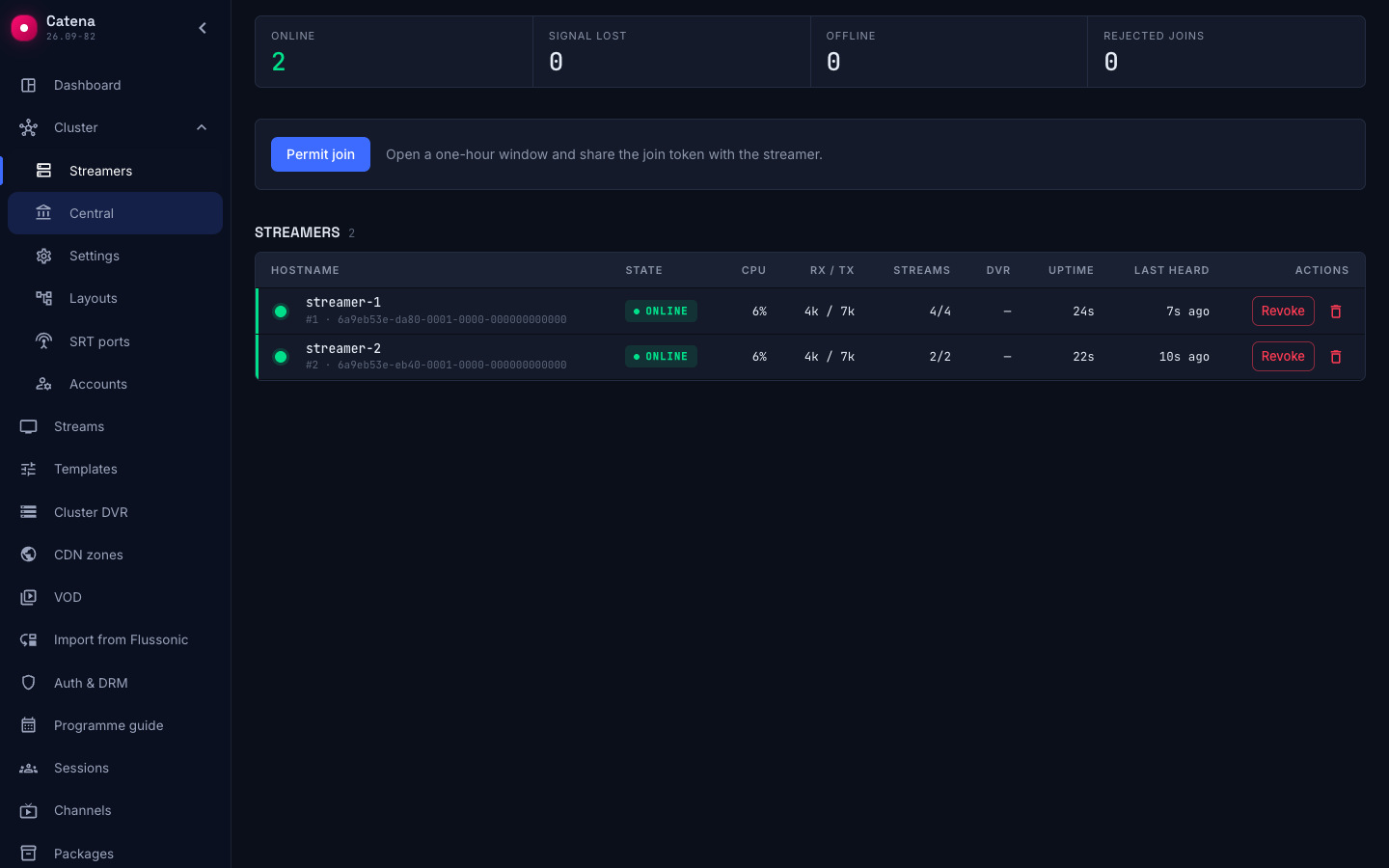
All three machines are on air, although only one of them reports to this instance. The others send their sync to the neighbour and are visible here because the picture of right now is one per group: an instance without the stats mandate reaches it over the network — at exactly that advertised address.
Open the same page at http://127.0.0.1:8082 and you will see the same thing. This is the check the split of streamers between instances exists for.
Killing the mandate holder
Now for the thing the stand is disposable for. Kill the instance holding the mandates — in the screenshots above that is central-b:
docker compose stop central-b
Go back to Cluster → Central on the live instance and wait a few seconds.
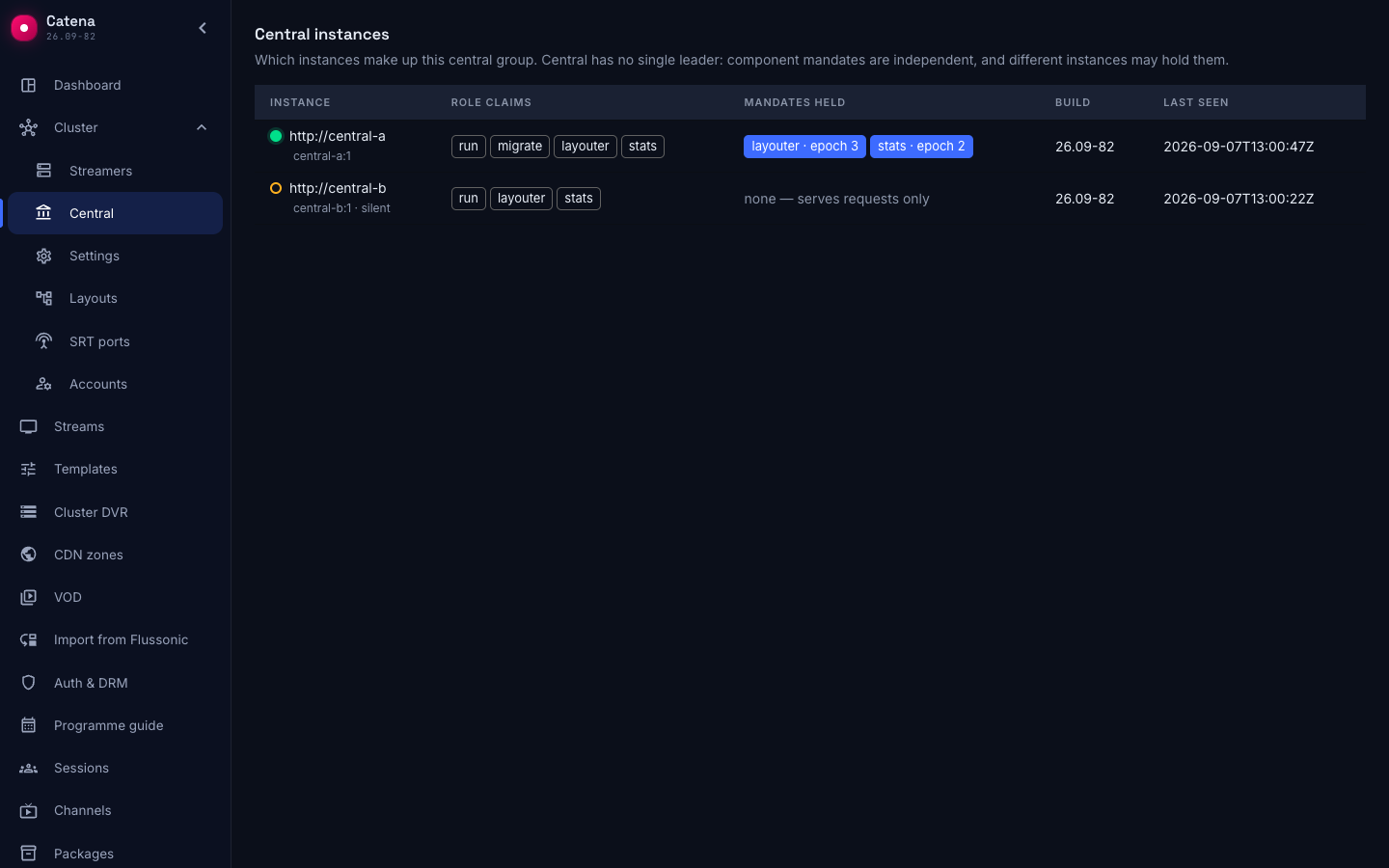
Three things have changed:
- The row of the killed instance did not disappear, it is marked: "silent — the process has most likely died". The group remembers its membership, not just its living members.
- The mandates moved to the live instance. Nobody handed them over: a mandate lives on a connection of its own to PostgreSQL and is released together with the death of that session, and the neighbour comes for the freed one by itself.
- The epoch number grew. It grows on every change of holder and travels with every write: an instance that wakes up no longer the holder is refused at the write instead of corrupting the placement after the fact.
The handover takes seconds. There is nothing to confirm by hand, and no way to.
The streamer that knew one address
Open Cluster → Streamers — still on the live instance.
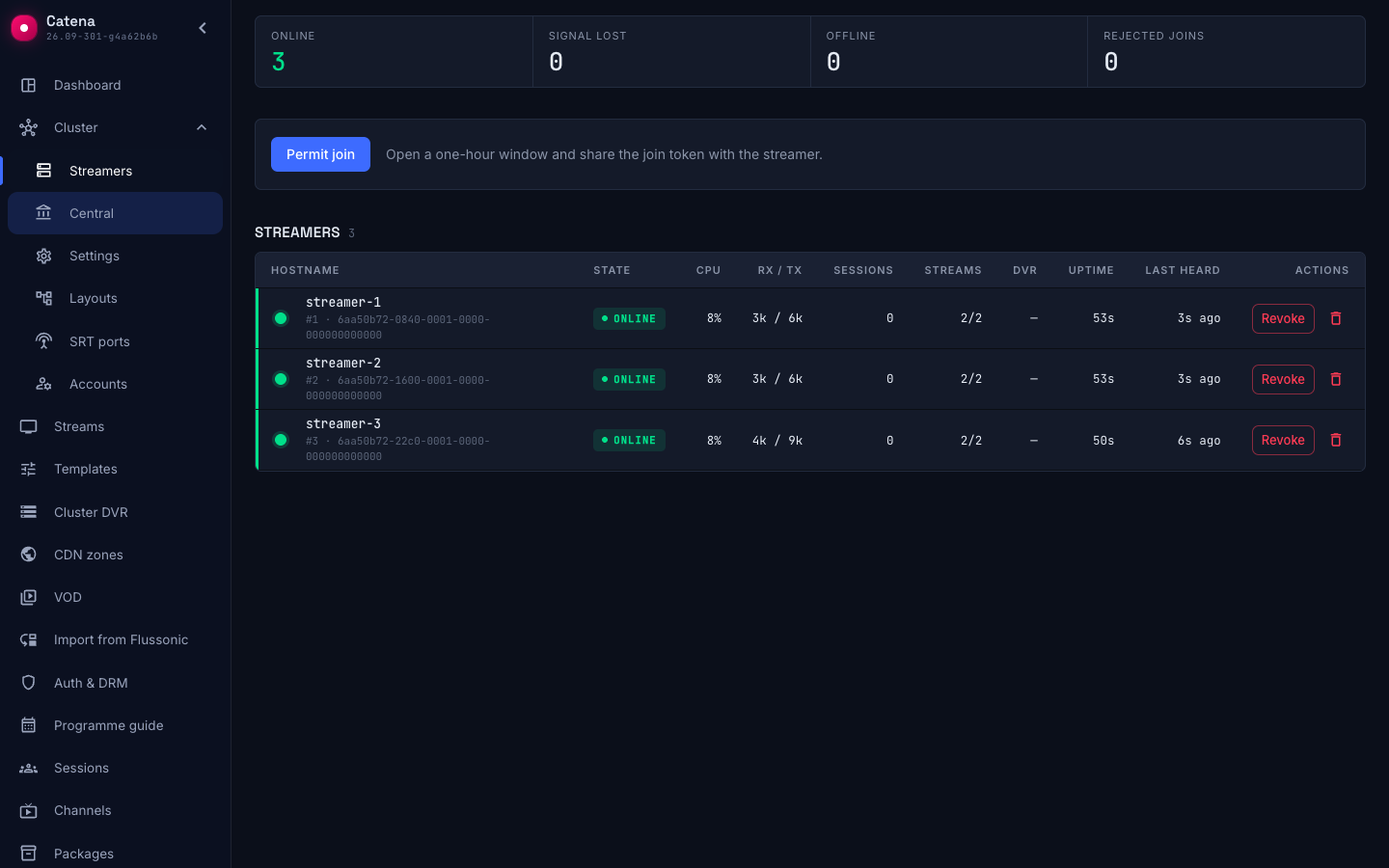
All three machines are on air, and the third of them is the one whose config names only the central-b you just stopped. It did not know the second address from its config and still moved to it after one failed request: central never even had time to consider it lost.
It learned the address from central itself. Every answer to a sync carries the group roster — the addresses of the live instances that serve streamers — and the streamer appends them to the addresses it was given in its config. What it learned is kept on disk next to the rest of the machine's state, so it survives a restart:
docker compose cp streamer-3:/var/lib/catena/group.json group.json && cat group.json
{
  "announced": [
    "http://central-a"
  ]
}
In the streamer's log the moment is marked by the line the central group roster changed — the addresses from the config come first in it, the learned ones follow. The switch itself is the line switching to the next central address.
Check the restart too: docker compose restart streamer-3 with central-b still stopped brings the streams up from the cache without waiting for the network, and after one failed request to central-b takes the machine to central-a — the address is read from disk, although its config knows nothing of a second instance.
What the announcement does not replace is the first answer. A streamer that has never synced yet and has lost its only address knows nothing about the group: a minute and a half later it counts as offline, and the layouter moves its streams to other machines. That is why the machines a park is brought up with are given both addresses, and the announcement covers everything else — adding instances to a park that is already running.
The air never noticed
Open Streams.
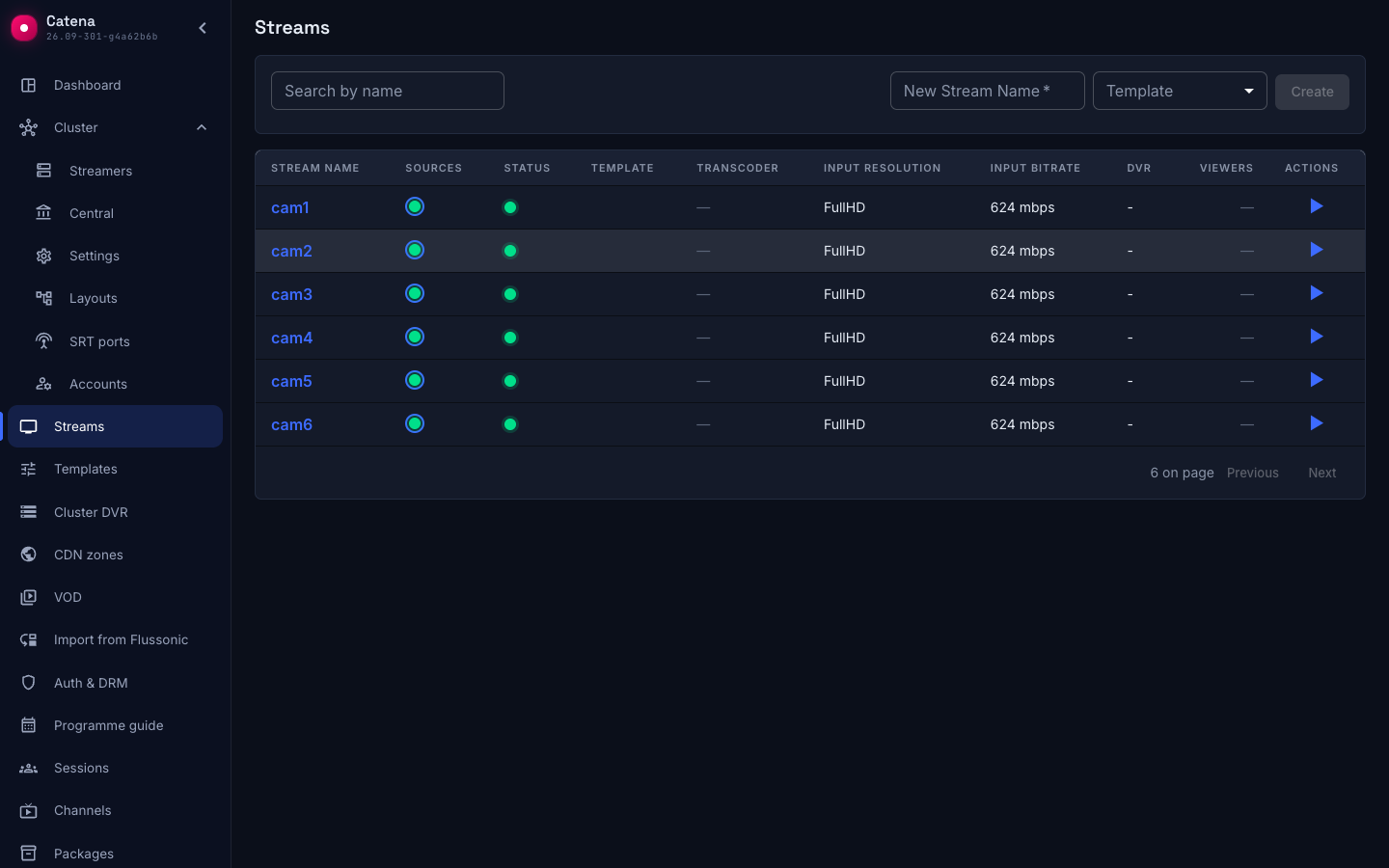
All six streams are running. Those living on the streamers that reported to the killed instance never noticed the move: a change of the control-plane address is not an event for the air.
Bringing the instance back
docker compose start central-b
The row lights up again. The mandates do not move back — and that is a decision rather than an omission: there is nothing to be gained by taking them away, the holder is working, and a change of holder costs a new incarnation of the current picture.
The streamers, however, do come back. Once every five minutes a streamer tries the first address on its list with an ordinary sync request: central-b answered, so streamer-2 and streamer-3 go to it again, because the order of the list is the operator's preference, not a starting hint. Wait five minutes and look at the log:
docker compose logs --since 6m streamer-2 | grep -i 'preferred'
A successful return is marked by the line trying the preferred central address again with nothing after it; were the address still dead, it would be followed by the preferred address is still down, and the streamer would stay where it was.
The original arrangement of the mandates can be restored with a restart — that is what a disposable stand is for — but production does not need it: the group works in any arrangement.
Taking the stand down
docker compose down -v
The -v flag removes the volumes as well: the database, the streamers' state, their identity in the cluster and the group addresses they learned. Without it the next start inherits half-foreign state.
What this stand does not show
- A database failure. Here the database is single and has no replica: kill it and the control plane stops entirely while the air goes on. That is true, but database redundancy is the database's own job.
- The network. Every container is on one docker network, with no loss and no latency between them.
- Load. Six synthetic streams say nothing about how the group behaves on a real park.
- The operator entry point. On the stand there are two of them, one per instance; in production one address with failover is what is needed.