Email branding
Watcher sends password reset emails and password change notifications. Configure a mail service and sender address to deliver them. Replace their templates if needed.
Configure an SMTP server
Open Admin → Settings → Mail and select SMTP.
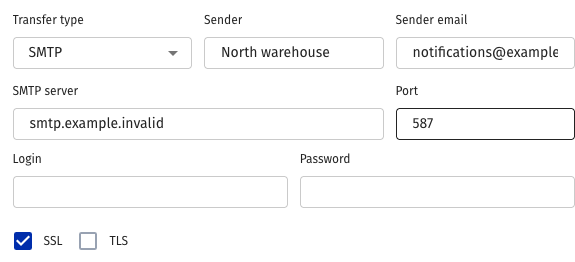
Fill in:
- Sender — the display name and email address used to send mail.
- Server and port — the SMTP service address and port supplied by your mail provider.
- Login and password — the mail account credentials.
- Connection security — SSL/TLS according to the provider's settings.
Save the form. Test password recovery with a test account that has a valid email address: the message should arrive and its link should open the password change form.
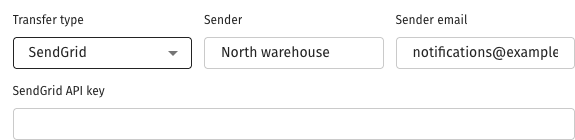
Instead of SMTP, select SendGrid and enter its API key with the sender details. Do not leave credentials for different delivery methods expecting automatic failover.
If mail does not arrive, check the sender settings, service reachability from the Watcher server and the service log. Changing a template does not fix missing mail configuration.
For SendGrid delivery, fill in sender details and the API key, then save. Test receipt of an email in the same way as SMTP.
Replace a template
Templates are in the installed Watcher template directory. A package installation uses /opt/flussonic/lib/vsaas/watcher/templates; with other installation methods the path depends on the application's location.
- Back up existing files.
- Create plain-text templates
custom_password_reset_request.emailandcustom_password_changed.emailfrom the standardpassword_reset_request.emailandpassword_changed.email. - If HTML is needed, add
custom_password_reset_request.email.htmlandcustom_password_changed.email.htmlbeside them. - Test each email with a test account.
The file contains a subject header between --- lines, followed by the email body. Use variables appropriate to each email:
- Password reset —
data.reset_path,data.tokenanddata.login. Build the link fromdata.reset_pathanddata.token. - Password changed —
data.base_url, containing the Watcher address.
Example custom_password_reset_request.email:
---
subject: "Password reset"
---

To change your password, follow this link:
{{data.reset_path}}{{data.token}}

Your login: {{data.login}}.
Example custom_password_reset_request.email.html:
---
subject: "Password reset"
---
<html>
<body>
<p>To change your password, open the
<a href="{{data.reset_path}}{{data.token}}">password reset form</a>.</p>
</body>
</html>
A custom plain-text template selects custom templates for that email type; HTML is included when the corresponding file exists. Keep your versions outside the application directory so you can check and restore them after a package upgrade.