MPEG-TS multiplexer
A multiplexer combines prepared streams into one transport stream at a constant bitrate, for delivery to a modulator or headend. Several destinations can receive the same ready-made TS simultaneously.
The Multiplexers section has its own list, separate from streams. A multiplexer name must be unique among streams and multiplexers. Programs use streams as sources; a multiplexer cannot be another multiplexer's source. To configure the tables of a single stream, see Outgoing MPEG-TS.
Multiplexer list
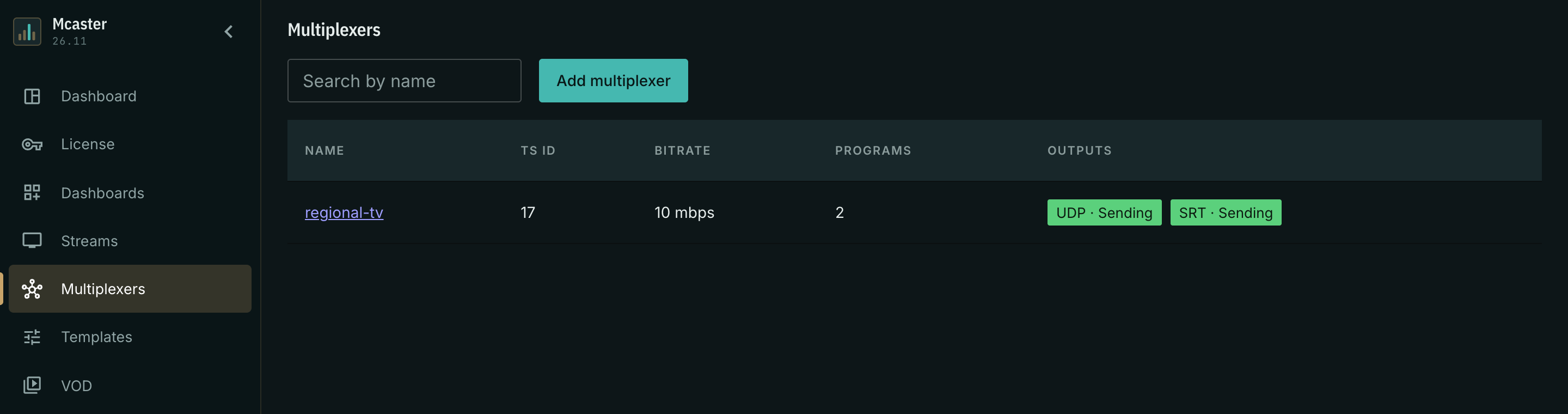
The list shows the TS ID, bitrate, program count and output states. Search by name, then click a name to edit its configuration. Streams remain in Streams.
Before you begin
Prepare the source streams and check that the required tracks are available. Configure encoding and source failover on each source stream: the multiplexer selects and packages tracks while preserving their codecs. Use CBR settings to limit the encoded video bitrate.
You need permission to edit configuration, sufficient outgoing bandwidth and a receiver reachable from the assigned streamer. Sources may run on different streamers: Mcaster delivers their prepared tracks to the streamer producing the complete TS. Ensure this streamer can reach the HTTP listeners on the source streamers. External UDP carrying ready-made PIDs must be directly reachable on the multiplexer streamer. For ASI, identify the streamer with the card and its V4L2 output device beforehand.
Create a multiplexer
- Open Multiplexers and choose Add multiplexer.
- Enter a name, such as
regional-tv, and a TS ID, such as17. - Set the total bitrate, for example
9990000bit/s. This is the rate of the entire TS, including signalling and null packets. - Add programs and at least one output as described below.
- Save, reopen the card and check the assigned streamer and output states.

Saving confirms that the configuration was accepted. Check actual delivery separately, using the output state and the receiver.
Programs and tracks
Select an existing source stream for each program. Set its PNR, PMT PID, track-to-PID mapping and the PID of the track carrying PCR. Program numbers must differ. Table and component PIDs must be unique across the TS, except for an explicitly shared external PID.
Example with two television programs:
| Program | Source | PNR | PMT PID | Video | Audio | PCR PID |
|---|---|---|---|---|---|---|
| News | news |
1 | 100 | v1 → 101 |
a1 → 102 |
101 |
| Culture | culture |
2 | 200 | v1 → 201 |
a1 → 202 |
201 |
For radio, the selected audio track carries PCR. PAT is available immediately from the configuration. A program's PMT starts after its source supplies track information.
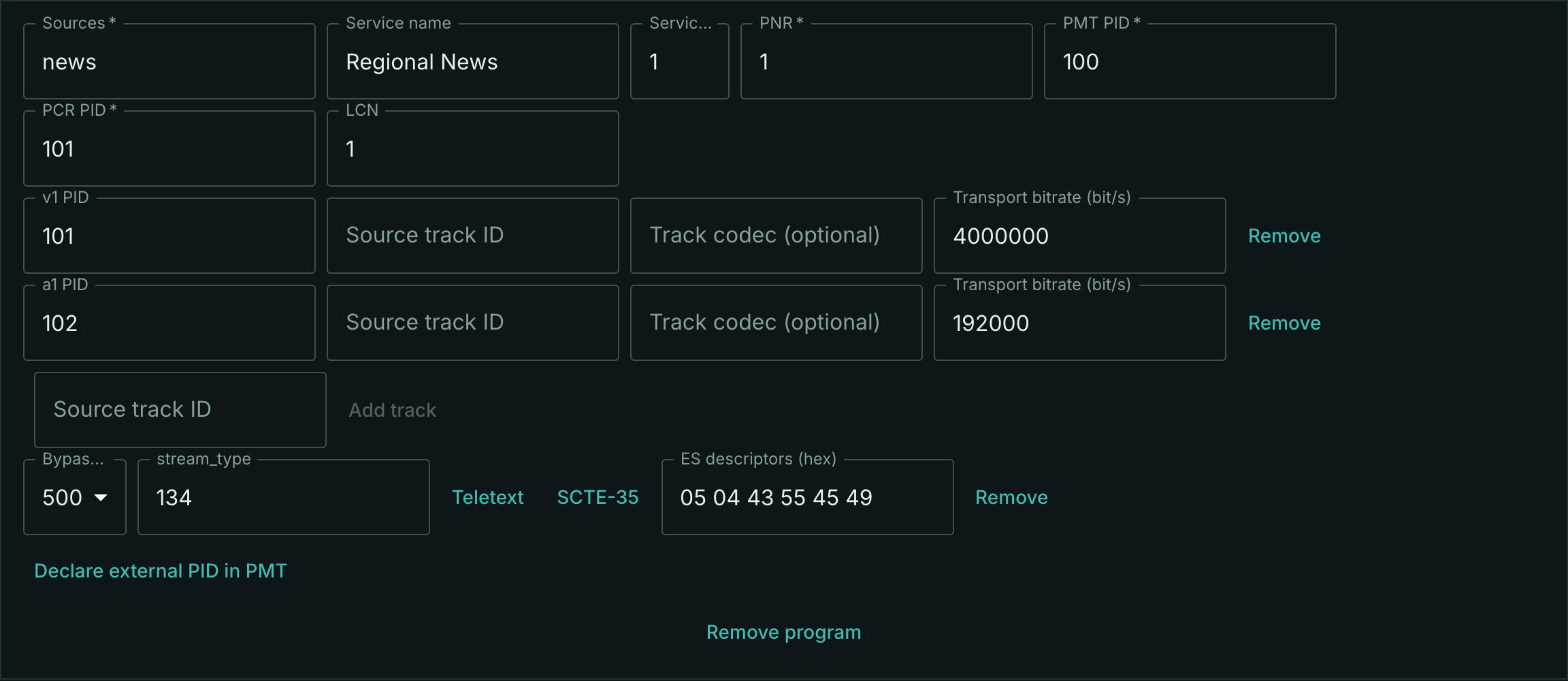
A mapping row uses its own ID as the source track ID by default. If Teletext and SCTE-35 share source ID l1, create rows l1 and l2, set Source track ID to l1 in both and set Track codec (optional) to ttxt and scte35 respectively. Assign different output PIDs. An empty codec field selects the codec from source metadata.
Bitrate and source loss
Track rates are transport bitrates, including packed PES and TS overhead. An empty rate enables measurement from packed data. Explicit rates plus mandatory signalling must fit the total bitrate. At 9.99 Mbit/s, for example, allocate 4 and 3 Mbit/s to video and 192 kbit/s to each audio track; the remainder accommodates signalling, admissible bursts and null packets.
An empty slot becomes a null packet. When a source disappears, admitted data drains first, then null packets replace its bandwidth. The total bitrate and neighbouring programs continue; the PID map does not change automatically. Once the missing source's admitted data ends, it stops producing PCR.
A burst may borrow free bandwidth. Data that cannot arrive before its decoding deadline is dropped; video resumes at a safe random access point. FLMD events in null packets report borrowing and loss. For sustained overload, reduce encoding bitrate at the source or revise the total budget.
Outputs
Every output receives the same complete TS. An error or connection attempt on one destination does not stop the others. Select the protocol when adding an output.
UDP and RTP
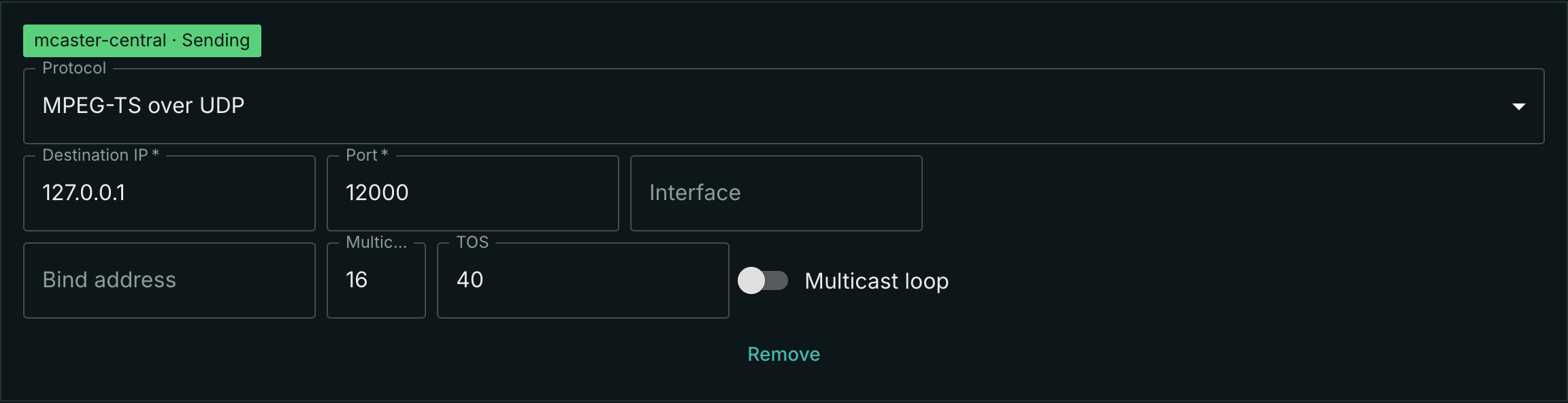
Enter the receiver address and port. Choose MPEG-TS directly over UDP or RTP. For multicast, configure the interface, TTL and local packet loopback; set the socket bind address and TOS if required.
Standby delivery is available for multicast: it starts after the group has remained silent for the configured interval. Check the group's traffic source and follow Standby delivery.
SRT
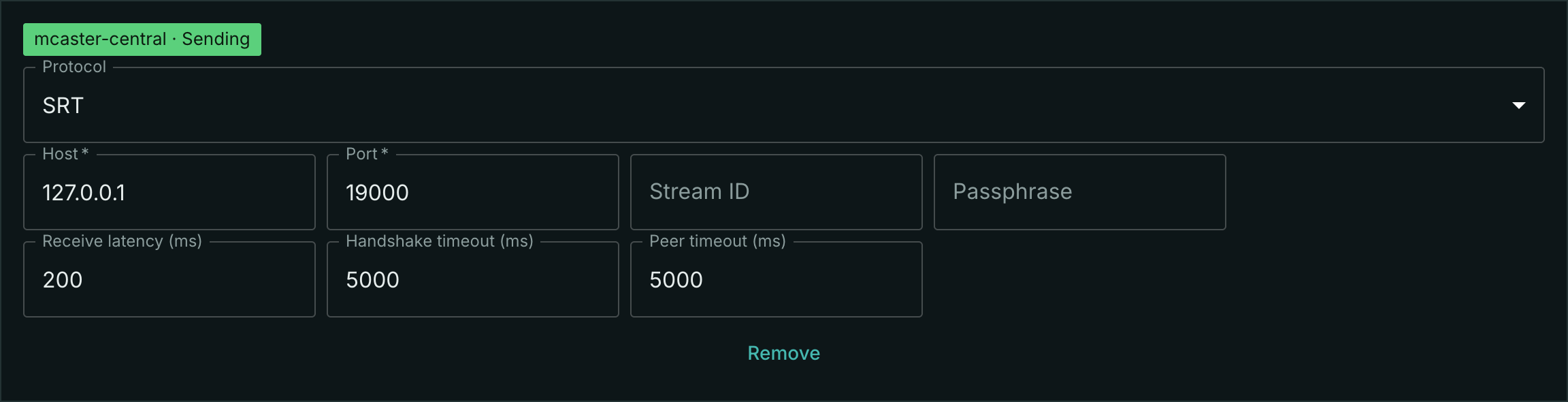
The output is a caller: Mcaster connects to an SRT receiver listening on the configured address and port. Set Stream ID if the receiver requires it. Encryption passphrases must match on both ends; a nonempty passphrase contains 10–79 bytes.
Latency is in milliseconds and provides time for packet recovery; choose it according to RTT and packet loss. The handshake timeout limits connection setup; the peer timeout limits operation without acknowledgements. Mcaster reconnects after a failure. Verify reception of every program, as well as the SRT connection itself.
ASI
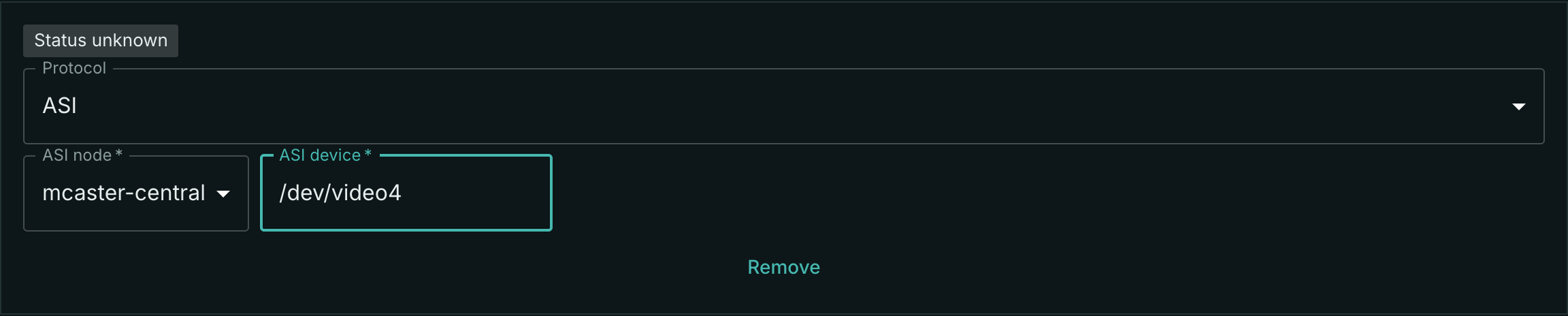
Choose the streamer with the card and enter its local device path, for example /dev/video4. The driver must expose a V4L2 MPEG output supporting read/write delivery and transport bitrate control. Mcaster needs device access and an unused output port. Obtain the verified ASI output path from the administrator of the selected Linux streamer before configuring it. Capture cards explains port functions; identify the V4L2 path on the streamer itself. An input or SDI port does not substitute for an ASI output.
All ASI outputs of one multiplexer must be on the same streamer and use different devices. The multiplexer is assigned to that streamer; it cannot automatically move to a same-named device elsewhere. The driver receives the total transport bitrate; this output supports up to 216 Mbit/s.
Connect an independent ASI receiver and verify lock, total bitrate, tables and both programs. The console's sending state confirms driver acceptance and does not replace a physical-line check.
DVB signalling
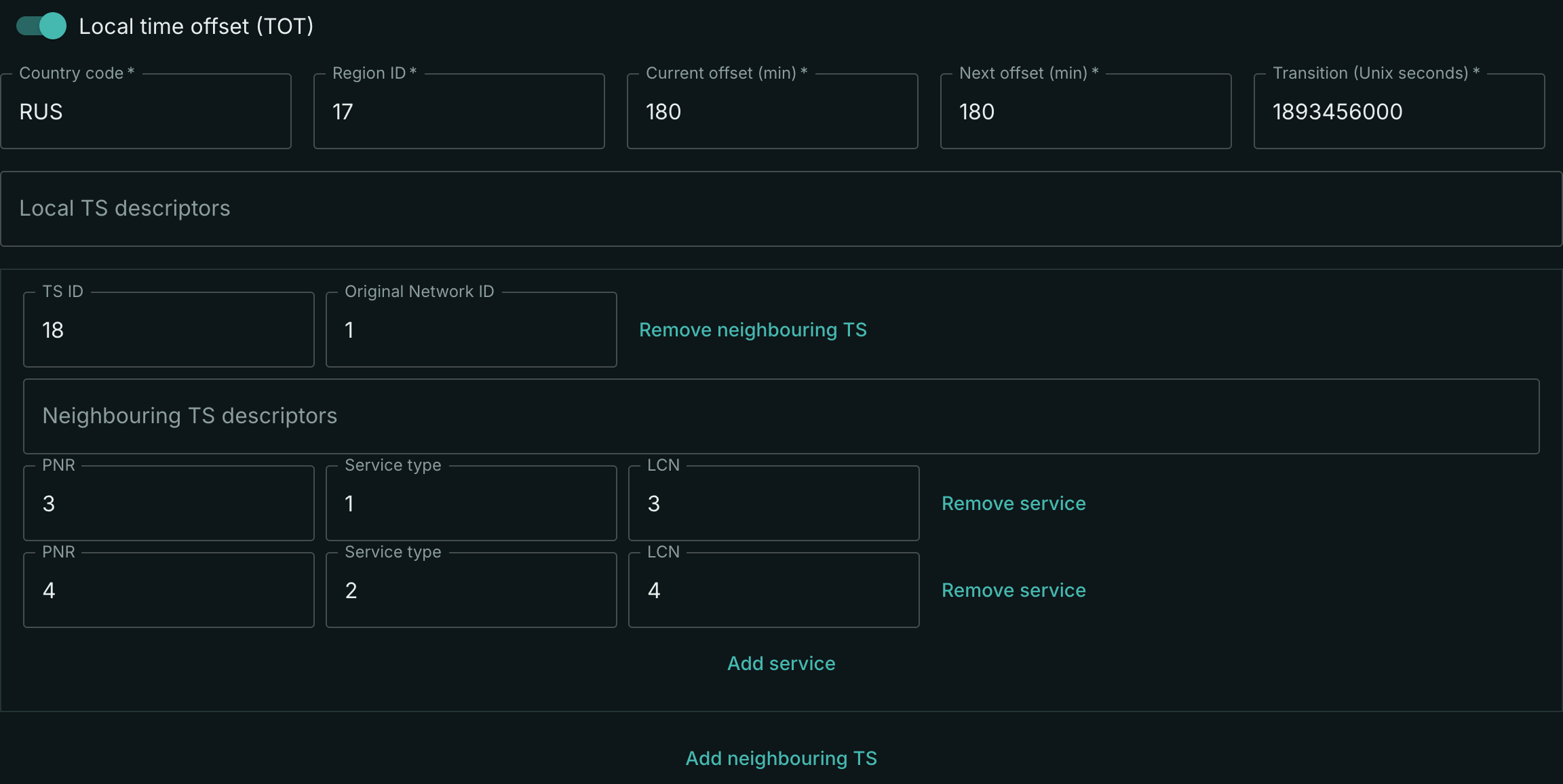
Set Original Network ID and provider name. Each program may have a service name, type and LCN. An empty LCN omits it; an explicit 0 advertises channel number zero.
Set Network ID to enable NIT. It includes the network name, this TS's descriptors and neighbouring TS descriptions. A neighbour description contains its identifiers and services; it does not subscribe to the neighbour's media.
For local time, specify country code, region, current and next offsets in minutes, and the UTC transition time as Unix seconds. These values are transmitted in TOT.
External PIDs
Add each external PID once: select its UDP source stream, PID and mandatory transport bitrate. EIT uses PID 18 (0x12). Incoming TS packets retain all 188 bytes and their order; Mcaster need not understand their payload.
To announce an external component in a program, link that PID with its stream type and ES descriptors. Multiple programs may reference one shared PID. Enter TS and ES descriptors as hexadecimal tag, length and content bytes.

The bitrate defines the PID's bandwidth and a queue holding two seconds of complete TS packets. At 300 kbit/s it holds 398 packets. During a pause, admitted packets drain before null packets replace their slots. A full queue drops new packets and reports losses in FLMD.
Verify operation
Open the saved card and check each output on the assigned streamer:
- Sending — the transport accepts data for delivery.
- Standby — a multicast output waits for the group to become silent.
- Retrying — opening a failed destination is being retried.
- Status unknown — the streamer has not supplied a current report.
At the receiver, check total bitrate and program list. For each program verify PNR, PMT PID, tracks and PCR; for a broadcast profile, also verify SDT, NIT, LCN and time. Use TR 101 290 checks and independently confirm picture and audio.
Edit or delete
Open the multiplexer in the list, edit its fields and save. This command changes the PID map. A source format change updates PMT content and version in the running multiplexer's memory. After a restart the version may return to its configured baseline. Changes to total bitrate or destinations may restart delivery; check output state and reception again.
To delete, use the delete action in the card and confirm it. The object disappears and its outputs stop. Source streams remain separate objects.
Troubleshooting
| Symptom | Check | Action |
|---|---|---|
| PAT present, program PMT missing | Source tracks and MediaInfo | Restore the source and check selected IDs and codecs |
| Output sends but a program disappears | Source data and the selected PCR carrier | Restore the source; null packets occupy its bandwidth during the pause |
| SRT keeps reconnecting | Receiver listener, address, firewall, Stream ID and passphrase | Correct both ends and verify reception |
| ASI keeps retrying | Assigned streamer, device path, permissions, availability and driver capabilities | Free the ASI port and check the card on the selected streamer |
| ASI has no assignment | Availability of the explicitly selected streamer | Restore it or explicitly choose another streamer with a card |
| Receiver reports loss | Track budgets, external PID rate, FLMD and transport | Reduce load or repair the connection, then verify the TS again |