Receiving MXL
MXL (Media eXchange Layer) is the exchange fabric of the DMF (Dynamic Media Facility) architecture: neighbouring media functions — decoders, mixers, CG — write uncompressed media into a shared directory, and consumers pick it up from there without a network and without copies. Mcaster reads such a directory as an ordinary stream source: tracks enter the pipeline, get transcoded, and leave through the same means as signal from a satellite or SRT.
Like ST 2110, the input carries uncompressed media — but the transport is different: not IP multicast, but files in a directory on a shared machine. No network preparation is needed at all; all you need is a folder the publishers write into.
What a domain and a flow are
The directory the media functions write into is called a domain. Inside it, every logical track is its own flow subdirectory named by a UUID: 5fbec3b1-….mxl-flow. A flow carries a description of itself (flow_def.json, in NMOS format), a header with the writer's state, and data slots; the reader polls the header and picks up the frames as they appear. A domain can hold any number of writers and readers, unaware of one another.
One domain carries one programme: there is a single video flow and there may be several audio flows. The input takes the first video flow and the first audio flow it finds; picking a flow by name is not possible in the current version.
Two media types are read:
video/v210— uncompressed 10-bit 4:2:2 video in v210 packing; frame size and rate come from the flow description.audio/float32— uncompressed floating-point audio, one plane per channel.
Other formats — video with an alpha channel (video/v210a), ANC ancillary data — are skipped with a journal entry: their layout is not read yet.
Only progressive video is accepted. A flow declared as fields (interlace_mode: interlaced_tff or interlaced_bff) is skipped with a journal entry, and if the domain has no other video, the input does not start and reports interlaced flow. This follows a decision of the MXL project itself: an interlaced signal is converted to progressive before it is written to the domain and back after it is read, and only full frames travel inside MXL.
Configuring the input
Create a stream and press + Add source on the Sources tab. Choose the MXL protocol.

The input has two fields:
- MXL domain — the path to the domain directory on the streamer's machine, for example
/dev/shm/mxl. This is a local directory, not a network address: the streamer and the publishers must see the same folder. - Peer timeout (ms) — how long to wait for new frames before declaring the source dead. Defaults to 30 seconds.
Uncompressed tracks are not segmented on their own: as with 2110 and SDI, plan a transcoder — an H.264/AAC output for OTT delivery, or a RAW output for SDI.
The capability is licensed
MXL ingest is sold as the media_ingest grid position and is gated by the licence, not by the build: the input section exists on any installation, but without the capability in the licence its fields are inactive and highlighted with an explanation. The number of mxl inputs is counted from the configuration — one per stream with such an input.
How the input behaves at runtime
- Live edge. The ring of slots is finite, and a reader that falls behind loses older frames: the input jumps to the fresh ones and continues, the gap showing as a jump in timestamps. This is not an error — a live programme is worth more than continuity.
- Corrupted frames are skipped. A writer may mark a frame invalid or leave it unfinished; such a frame never becomes a track in the stream, the input simply moves on.
- A silent writer is covered by the peer timeout: the input gets an error, and the stream restarts by the common rules — the same as every other source.
Try the input without hardware
MXL needs neither a capture card nor a media network: a demo publisher ships with the open SDK. Clone dmf-mxl/mxl and build the tools following docs/Building.md in that repository — you need mxl-gst-testsrc; ready-made test flow descriptions live in examples/flow-configs/ of the same repository. For a guided tour of MXL as a whole there is the mxl-hands-on workshop.
The publisher writes a test programme into the domain — SMPTE bars with a running clock and a stereo tone:
mkdir -p /dev/shm/mxl
mxl-gst-testsrc -d /dev/shm/mxl \
  -v examples/flow-configs/flow-video-v210.json \
  -a examples/flow-configs/flow-audio.json
The domain directory must be visible to both the publisher and the Mcaster machine: on one machine it is simply a shared path, between containers a mounted volume.
What you will see in Mcaster:
- Create a stream, press + Add source on the Sources tab and choose the MXL protocol. Fill MXL domain with the path —
/dev/shm/mxl— and save the stream. - As soon as the input opens, an incoming tracks block appears in the stream card:
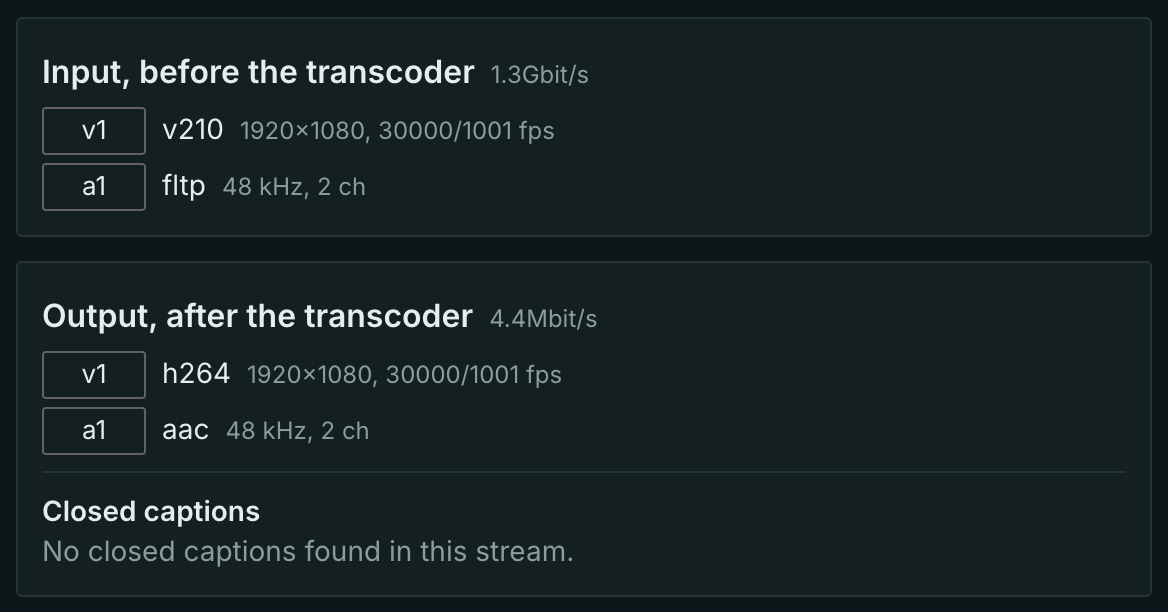
v2101920×1080 andfltp48 kHz — reception has started. - Enable the transcoder (H.264/AAC): an output tracks block appears next to it, and the stream opens over HLS in any player — bars, a running clock, sound.