SDI ingest
Overview
The SDI input captures video and audio from the SDI ports of DekTec cards. The signal enters the system only through a cable into a card port, and what sits at the other end of that cable — the control room, a router, a satellite receiver — makes no difference to the input. Cards other than DekTec are not supported.
Supported cards and standards
DekTec cards are supported. Testing runs on the DTA-2178 (HD and 12G up to 3840×2160p50) and the DTA-2174B (HD). Other DekTec cards on the same driver have not been tested.
The signal standard is detected by the card itself, and the input does not tell SD, HD, 3G and 12G-SDI apart: what arrives upstream are frames with their own self-description — size, scan, rate as a rational number. A change of standard on the line is a routine restart of the capture, not an error: that is what a switch on the router looks like.
The port layout of a card is set by its firmware variant, not by the port number. Which cards are installed in a machine, what ports they have and what signal is on them is shown by the Capture cards section.
Blackmagic (DeckLink), Magewell and other V4L-compatible cards are not supported by this input.
Setting the input up
The streamer with the card must have the dektec-bridge package installed: it brings the capture process and the card probe. Without it the input fails with the "capture process unavailable" cause, see below.
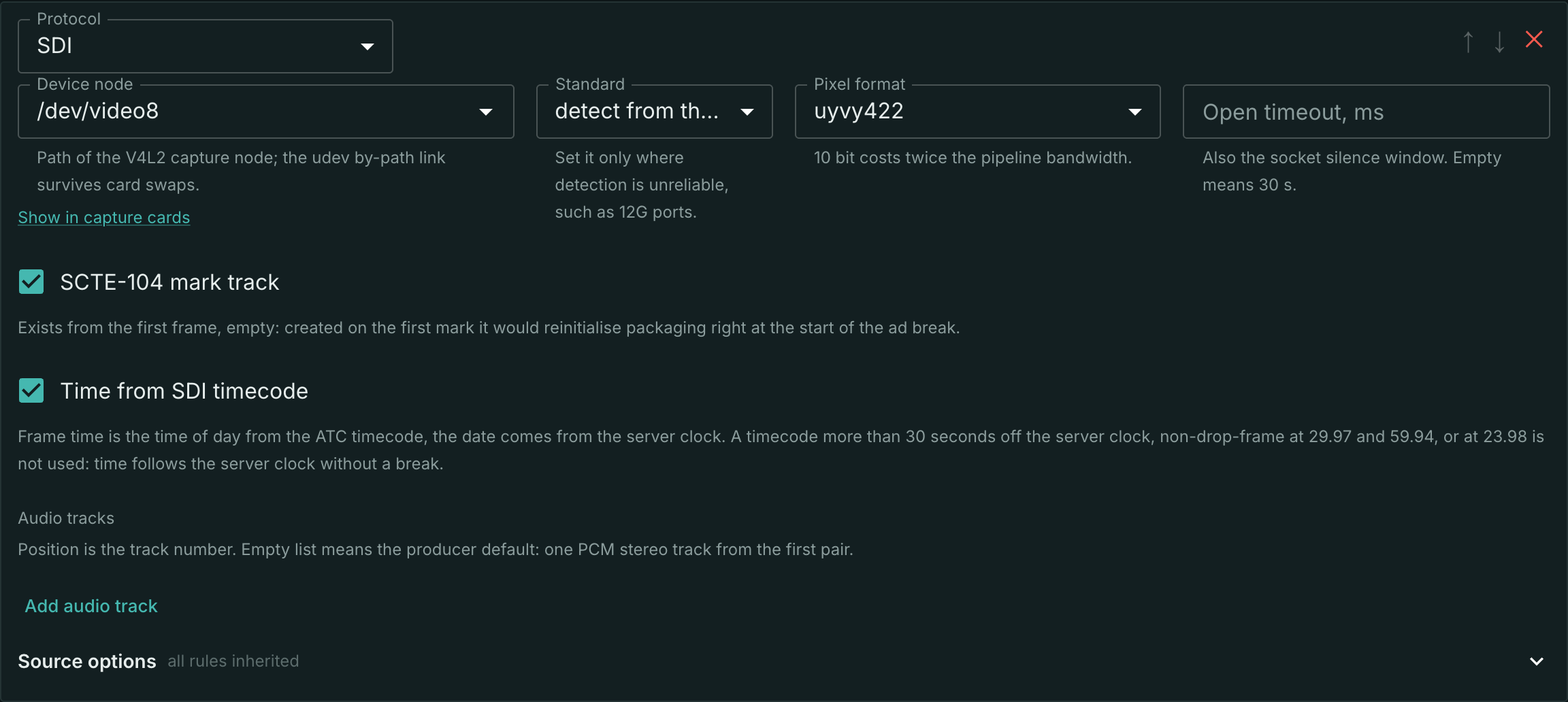
Create a stream, open the Sources tab and click + Add source. The protocol is SDI (DekTec).
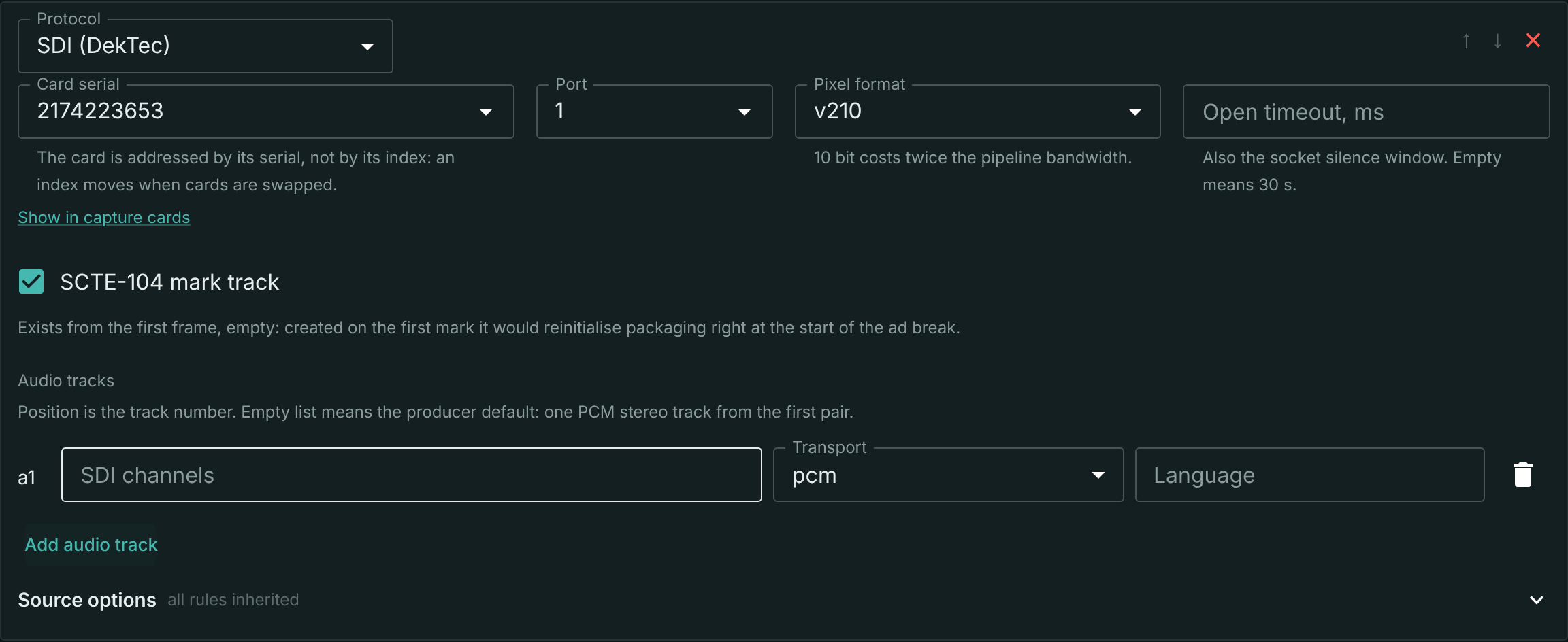
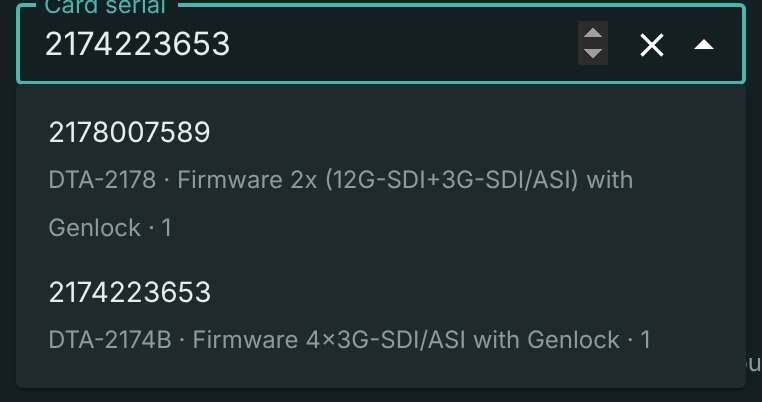
The card is chosen by serial number — not by its index in the system: an index changes when cards are swapped and when the driver load order changes, and the stream would silently start capturing somebody else's signal. The card list is assembled from the inventory of the whole cluster, and an option names the card in full: model, firmware variant and the streamer the card is installed in.
The port list holds every port of the fleet you can plug a cable into, grouped by card, the chosen card first. Three kinds of port are missing from it, because there is nothing to capture off any of them:
- genlock — a reference input;
- the virtual port — there is no connector at all;
- internal output — the firmware wires the port to a neighbouring port of the same card.
A row from another card's group changes both the card and the port at once: an input moves to a neighbouring card with a single pick.
An output port stays in the list with the label "not an input": the card does not always report the direction correctly, and a connector that exists on the bracket is better shown with a label than hidden. Picking such a port ends in a "port busy" failure, see below.
A busy port is labelled with the stream that took it, and if that stream's capture process is stuck, with the state as well: "Stream: tv1 · held by a wedged process". That is how a jammed port is told apart from a normally busy one.
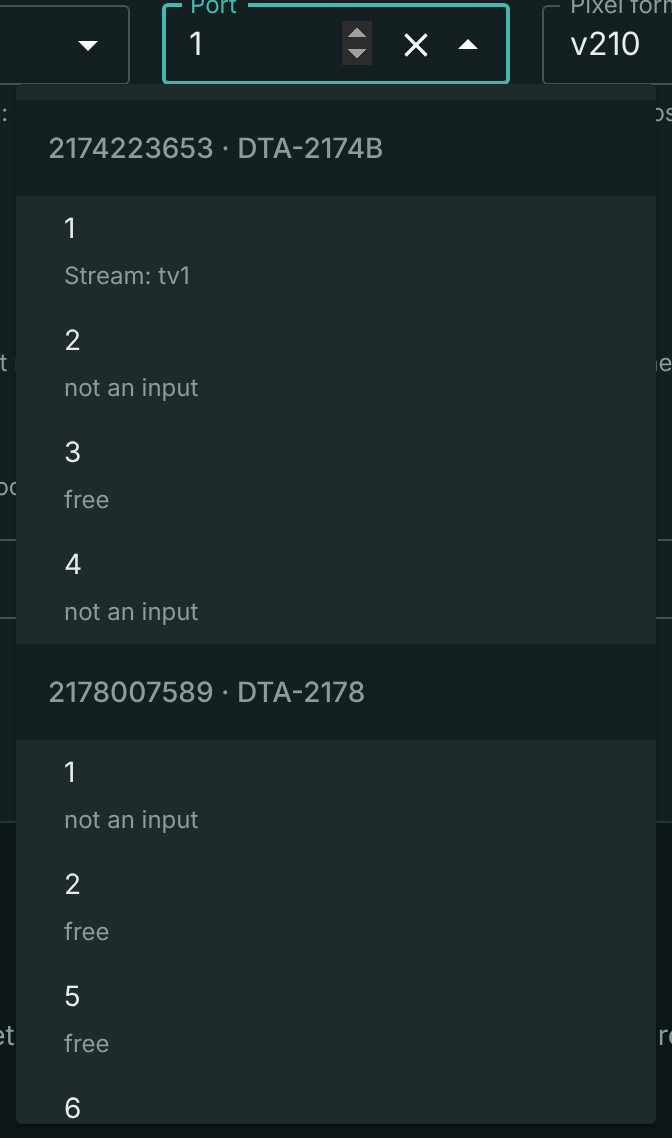
The list is a hint, not a restriction: the serial number and the port can be typed by hand, and the form accepts both an unknown serial and an output port. That matters when the card is not installed yet or sits on another streamer: the card list is refreshed once a minute and may lag. If there is no list at all (the streamer is silent or the probe is not installed), the fields work as plain text fields.
The remaining fields of the section:
| Field | Meaning |
|---|---|
| Pixel format | uyvy422 (8 bit, default) or v210 (10 bit). Ten bits cost twice the bandwidth inside the pipeline and about a third more on the PCIe bus |
| Open timeout, ms | how long to wait for frames before declaring the source dead; the same value is the socket silence window. Empty means 30 s |
| SCTE-104 mark track | enabled by default, see below |
| Audio tracks | the embedded audio map, see below |
Don't forget to Save: an input edit reaches the server only on the button.
One port cannot be assigned to two streams: the configuration is rejected, and the error names the stream that already holds the port. Different ports of the same card work independently: the driver's exclusivity applies to a port, not to a card.
Raw video off the card is not playable: until the stream has encoded tracks, HLS, DASH and the archive stay empty. To fill them, enable the transcoder.
The track list is shown on the Basic Settings tab, in the Media info block:
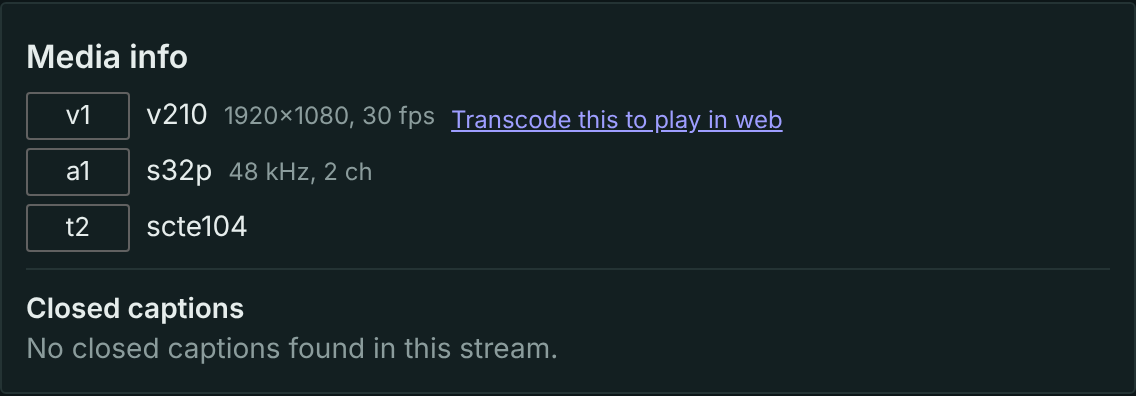
The codec names the wire layout, not what the stream will turn into: v210 is raw video in the chosen pixel format, s32p is uncompressed 32-bit audio, scte104 is the mark track. The Transcode this to play in web link leads to the transcoder settings.
Multichannel audio
Audio arrives already laid out into tracks: the track map is declared by the input section, and de-embedding is done by the capture process. A track's position in the list is its number in the stream (a1, a2, …).
A track has three fields:
- SDI channels — numbers from 1 to 16: SDI carries at most eight pairs, that is sixteen channels. The order of the numbers sets the channel layout of the track;
- transport — uncompressed audio or an SMPTE 337 wrapper: compressed audio such as AC-3 or Dolby E packed into a pair of PCM channels;
- language — per ISO 639-2.
The language is declared rather than derived from the signal: SDI carries no language descriptors, and the only party that knows the language is whoever laid the programmes out across the pairs.
An empty track list means not "there is no audio" but the default: one PCM stereo track from the first pair.
Uncompressed audio arrives as 32-bit and is decoded with the declared channel count. A track wider than stereo is accepted honestly, but the encoder folds it down to stereo — that is the transcoder's boundary, not the input's.
AC-3 bypass over SMPTE 337
A track with the smpte337 transport arrives as ready AC-3 or E-AC-3 frames: the wrapper is stripped by the capture process, and the media server neither parses nor decodes the audio bitstream. Only one variant is supported: SMPTE 337 encoded in two channels. Such a track must declare exactly two channels, or the configuration is rejected.
That is how 5.1 reaches the output intact. Gaps in a compressed track — silence between packets — are legitimate and are not counted as errors.
The kind of audio is declared, not detected from the data: a pair carrying AC-3 today and silence tomorrow must not change the stream's track list.
Teletext and subtitles
Ancillary data arrives in the VANC of every frame, the ancillary area above the picture, and the input routes it to its destinations.
OP-47 teletext goes into the common captions pipeline — by the same path as OP-47 from ST 2110, and with the same result: teletext and subtitles reach the output.
VBI teletext matters for legacy SD broadcast systems. In SD teletext rides not in an ANC packet but in a blanking line — the area in which no picture is transmitted. The input sends such lines into the same pipeline as OP-47, and on the output they become the same teletext. There is nothing to configure here.
CEA-608/708 closed captions (CDP) are parsed and counted by the input but not yet published as a separate track: the carrier for captions in the pipeline is SEI of the encoded output, and insertion there is common to all inputs and not done yet. The counter exists so that "there are no captions in the signal" and "there is nowhere to deliver the captions" do not look the same from the outside.
SCTE-104 marks
SCTE-104 messages from VANC are parsed into the same mark model as SCTE-35 sections from MPEG-TS and leave on a separate mark track. At an MPEG-TS output they become SCTE-35 sections, in HLS and DASH — tags and events, see Ad marks.
The track is on by default and exists from the first frame, even while there are no marks yet. If it appeared with the first mark, the stream's track list would change right at the start of the ad break and packaging would restart. MPEG-TS works the same way: the mark PID is declared in the table long before the first message. The price of the default is one empty track on streams that carry no marks.
Time from the timecode
The facility stamps every frame with a timecode — the time of day in an ATC packet (SMPTE ST 12-2) in VANC. The input can run the stream time by it: the frame timestamp becomes the time of day from the timecode, and the date comes from the server clock. The archive, the playlists and the marks then follow the facility time rather than the moment the frame reached the server.
Turn it on with the Time from SDI timecode checkbox in the input section; it is checked by default.
The timecode is used only when it can be trusted:
- it is no more than 30 seconds off the server clock — a timecode counted from the start of the material or in a local time zone is ignored;
- at 29.97 and 59.94 it is drop-frame, otherwise it drifts 3.6 seconds an hour;
- the rate is not 23.98, which has no drop-frame at all.
An unusable timecode breaks nothing: the stream time follows the server clock, as without a timecode, with no break. If the timecode disappears mid-air, the stream keeps the offset it had. If the timecode jumps and stays there for more than a second, the stream time moves onto it, and packaging starts new segments from that point.
Whose time the stream follows right now is shown on the Basic Settings tab, under the stream status:
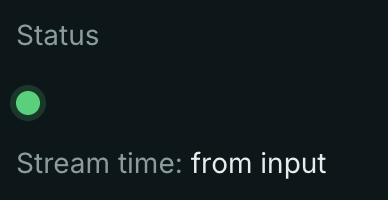
- Stream time: from input — the timecode has locked, and the time follows it;
- Stream time: server clock — there is no timecode, it is off, or it cannot be trusted.
The line is shared by all inputs, not only SDI: "from input" also appears for sources that carry wall-clock time themselves — RTSP with RTCP sender reports, HLS with PROGRAM-DATE-TIME. Until the stream receives its first frame, the line is absent.
Why a timecode was not accepted is told by the Prometheus counters: stream_input_sdi_timecode_missing_total (gone after locking), …_rejected_total (unusable as time of day), …_untrusted_total (more than 30 seconds off the clock) and …_jumps_total (re-locks). Whose time the stream follows is the stream_dts_source gauge: 1 — server clock, 2 — input.
What you see when something is wrong
The state of the input is on the Sources tab, in the Source health block.
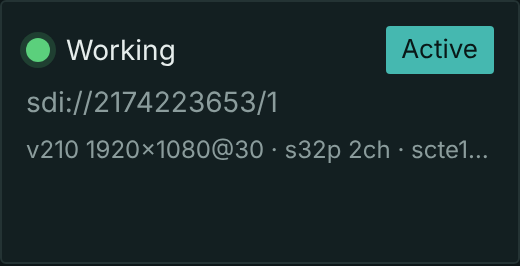
The block shows the status, the input address in the form sdi://<serial number>/<port> and the track list. On a failure the cause from the table below stands in place of "Working", and each cause calls for its own action:
| Cause | What happened | What to do |
|---|---|---|
| no signal | there is no detectable signal on the port | check the cable and the source |
| port busy | the driver refused the port | 1) look at the port direction in the Capture cards section: an output port answers with the same code; 2) check whether your own capture process is stuck; 3) only then look for an outside process |
| capture process unavailable | the binary is missing or will not start | install the dektec-bridge package |
| device error | the capture process exited with a non-zero code that has no dedicated meaning: unknown serial, a port without the required capability, a setup failure | the stage is named by the startup event in the log |
| process will not die | it exits neither on stdin close nor on SIGKILL |
a sign of a jammed card; deal with it on the host |
| process killed from outside | the capture was killed by the OOM killer, systemd or a person | find out who terminated the process rather than fixing the stream |
| version mismatch | the capture process sends data but the media server cannot parse it | the versions of dektec-bridge and the media server have diverged; they are rolled out together |
There are no terminal failures here: after any of them the input tries to come up again, with a growing interval between attempts, and comes back up on its own as soon as the cause is gone.
Signal loss on the fly is a case of its own. The capture process does not exit: it keeps delivering frames on schedule, repeating the last frame and silence, and to the liveness check a source with a cut cable looks perfectly healthy. So the input, seeing a persistent "no signal", stops handing frames on — otherwise a frozen frame would go on air until somebody intervened. From there the backup source takes over, and the next retry brings the capture up as soon as the signal returns.
The panel shows the current cause, not the history. The history is in the Prometheus counters under the stream_input_sdi_ prefix. Always present:
- line state;
- capture process restarts;
- losses on the process boundary, from both sides of the boundary.
The "extended counters" licence option adds truncated and unparsed packets from the capture process and the VANC breakdown.
What the module does not do
- It does not send a signal into a card: this is an input, and Mcaster has no SDI playout yet.
- It does not decode AC-3 or Dolby E into PCM.
- It does not publish a CEA-608/708 closed caption track.
- It does not watch card health: temperature, fan speed and the port layout are shown by the Capture cards section.
What's next
- Transcode the stream — the step after which a raw signal plays and records.
- Capture cards — what is installed in the machines and what is on the ports.
- Add a backup input — a second source and the switching rules.
- Input errors — what the counters mean when a signal degrades.