Standby delivery
A single station in a multicast group is a single point of failure: the machine goes down, its network interface drops, the process hangs — and the group stays silent until someone steps in. A standby push removes that point without any external control. Several stations receive the same signal and push it to the same group. One sends, the others listen to the group and stay silent. When the group goes quiet, one of them starts sending on its own.
The stations tell each other nothing and know nothing about each other. Each decides only by what it hears in the group, so the scheme works between machines that are not connected in any way — a shared network is enough.
Enable standby
On every station — the Egress tab, the Pushes block, a push with the MPEG-TS/UDP or MPEG-TS/RTP protocol to the group address (how to create one is on the Delivery to the network page).
| Field | What it sets | Default |
|---|---|---|
| Standby push | the push sends to the group only while no other sender is heard there | off |
| Takeover window, ms | how long the group must be silent before the push starts sending | 1000 |
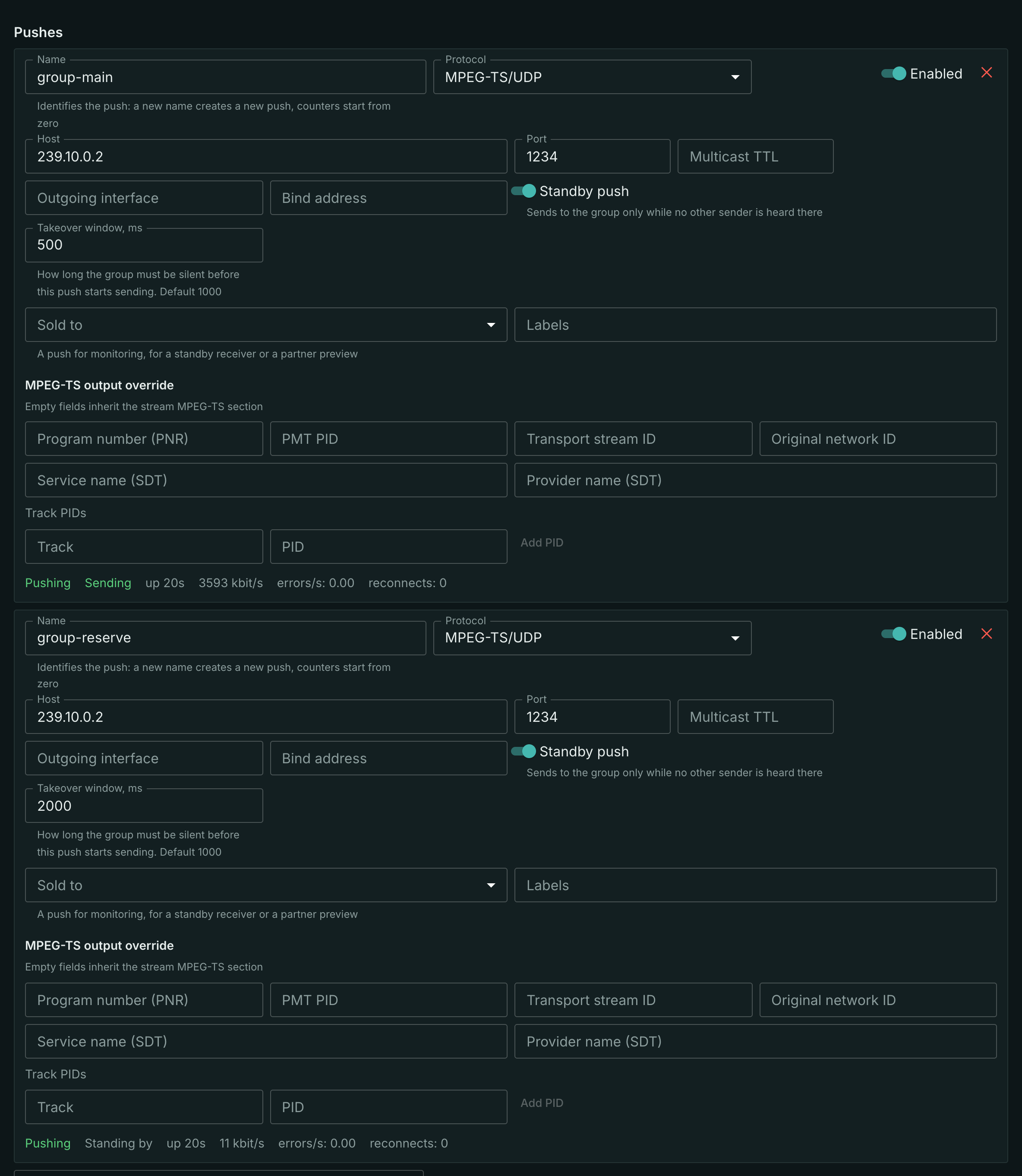
The Standby push switch appears only when the Host field holds a multicast group address — IPv4 from 224.0.0.0 to 239.255.255.255, or IPv6 starting with ff. A unicast address has no shared group, there is nothing to listen to, and standby is impossible there. A host name instead of an address does not work either: the address itself is required.
In every other respect this is an ordinary push: the same Multicast TTL, Outgoing interface, output tables and statistics row.
How a station decides whether to send
There is one rule for all:
- another sender is heard in the group — the push stays silent;
- the group is silent longer than the takeover window — the push starts sending;
- while sending, the push hears another sender — the push goes silent, and the group stays with the one that is heard.
A station tells its own packets from foreign ones by itself: a packet that comes back to it from the group is not taken for another sender. A second push of the same station to the same group is another sender, just like a neighbouring machine.
After a start — station startup, a push edit, switching the push on — the push first stays silent for one window: if another station is already sending, the new one will not cut into the group before it hears it.
A silent push keeps preparing the stream, so a takeover does not wait for a keyframe or service tables: the very first packets after the window are a complete stream.
Which window to set
The window is both the reaction time and the only thing that sets the seniority of the stations.
- The freeze a viewer sees on a failure is roughly the takeover window: that is how long the group is silent before a standby picks it up. The default is 1000 ms: a live stream is hundreds of packets per second, and a second of silence is a failure, not network jitter. A window shorter than 200–300 ms will start firing on hiccups of the sending station.
- The shorter window wins. If the stations start at the same time or both have gone silent, the one with the shorter window starts sending first; the others hear it and stay in standby.
- Different windows for different stations. With equal windows, stations that come up at the same time may pass the group back and forth a few times before one settles. The main station gets a shorter window, the standby one a longer window, for example 500 and 2000 ms.
Two schemes
- Standby on every station. A station that comes back after a failure hears that the group is taken and waits: the group does not switch back, and there is no extra freeze. A station becomes the sending one only when the current sender fails.
- The main station without standby, the others with it. The main station always sends. While it is alive, the standby stations stay silent; when it comes back after a failure, the standby station hears it and goes silent — the group returns to the main station. Every return is one more switch for the viewer.
Standby on every station is the default choice: a switch happens only on a failure.
What the network must provide
The stations must hear the group they send to.
- One segment or multicast routing. Each station joins the group on the same interface it sends from; packets of another station must reach it. Set the Outgoing interface to the media network explicitly on all stations.
- IGMP snooping. A station subscribes to the group just like a receiver, and a switch with IGMP snooping delivers the neighbour's packets to it. Without a subscription — for example, on a port where a filter cuts multicast — the station will not hear its neighbour.
- TTL must carry one station's packets to the other if there are routers between them.
- The same signal at the input. Standby replaces the sender, not the content: the stations receive the same source and produce the same output tables, otherwise the receiver sees a different stream after the switch.
What to check
For a standby push, the live statistics row shows the standby status next to the overall status:
- Sending — the push is sending to the group right now;
- Standing by — another sender is heard in the group, the push is silent.
Silence in standby is not an error: the overall status stays Pushing, reconnects do not grow. The bitrate of a waiting push is zero — packets that did not go to the network are not counted as sent; the bitrate and the byte counter show which station was sending. The counters are explained on the Delivery monitoring page.
A healthy group is exactly one station with the Sending standby status.
- Both send for longer than the window — the stations do not hear each other: check the Outgoing interface, IGMP snooping and port filters, TTL.
- Nobody sends, all are Standing by — there is a third sender in the group: another push, another machine. The station writes its address to its log when it switches to waiting.
- The Error status on a standby push — the station could not join the group on the given interface; the reason is in the statistics row.
What's next
- Delivery to the network — address, port, TTL and interface of a push.
- Input redundancy — when it is the source that fails, not the station.
- Delivery monitoring — counters and alerts.