Delivery to the network
The headend's main output is a transport stream sent into the network: into a cable operator's multicast group, to a modulator, to a receiver's unicast address. The station is the active side here: it sends by itself, nobody connects to it.
A delivery destination is called a push, and every push has a Name. The name is its identity: the destination is found by it in the settings, in the statistics and in the metrics. The panel warns about this right under the field: changing the name creates a new push, and the counters start from zero.
Send the stream into a group
The Egress tab, the Pushes block, the + Add push button. The protocol is MPEG-TS/UDP.
| Field | What it sets | Default |
|---|---|---|
| Name | the destination's identity | — |
| Host | the multicast group or the receiver's unicast address | — |
| Port | the receiver's port | — |
| Multicast TTL | how many routers the datagram survives | 10 |
| Outgoing interface | which network card the multicast leaves from | chosen by the system |
| Bind address | the local address the socket is bound to | chosen by the system |
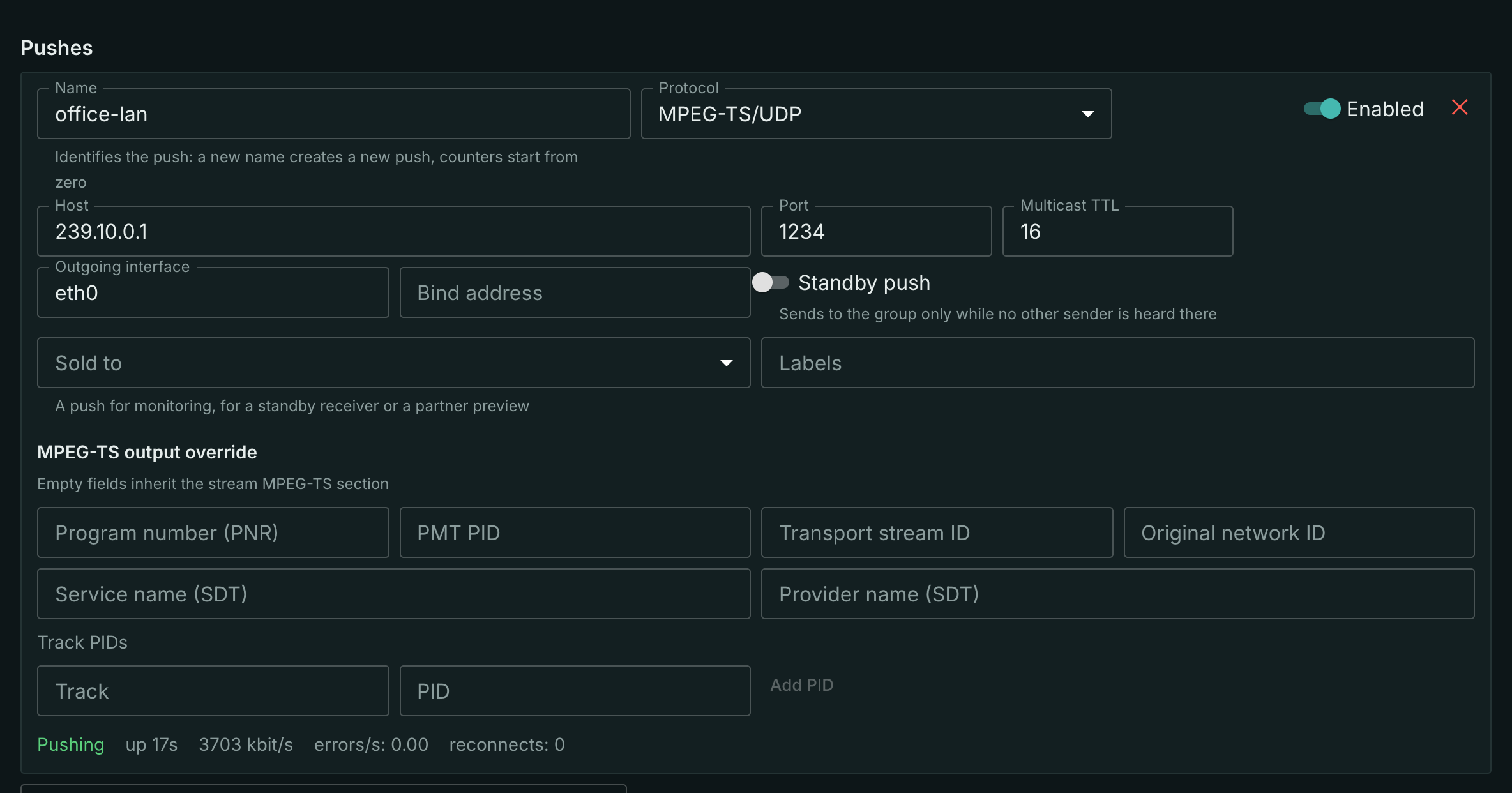
The Enabled switch next to the name turns a destination off without deleting it. For unicast, enter the receiver’s address. Multicast TTL and Outgoing interface apply only to multicast.
Selecting the outgoing interface
On the Egress tab, set Outgoing interface for a MPEG-TS/UDP or MPEG-TS/RTP push: a network card name such as eno4, or its local IPv4 address such as 192.168.40.10. Set Host to group 239.255.2.77 and Port to 5500, then press Save. Multicast leaves through the selected card regardless of the default route.
Incoming and outgoing interfaces are independent: you can receive through eno2 and send through eno4. Each push has its own outgoing interface. An empty field lets the OS routing table choose; clear the field and save to restore that behaviour. This setting applies to IPv4 multicast. For unicast, routing selects the outgoing interface; Bind address sets the socket’s local address and serves a different purpose.
The interface must exist on the sending streamer and have an IPv4 address. An incorrect name or address prevents the push from starting and produces an error. Changing the outgoing interface restarts the push. In a cluster, check that the interface is available on every streamer that may send this stream.
Ingest is configured separately — see selecting the incoming interface.
Multicast in a real network
Three things delivery trips over, and all three are settled by the fields above.
- The wrong network card. On a machine with several interfaces the system picks the outgoing interface from the routing table, and for multicast that choice is often not the intended one. If the signal is "being pushed" but the receiver does not see it, set the Outgoing interface explicitly first.
- TTL. The default of 10 lets the packet survive routing — the kernel's own default of 1 would not let the stream out of the subnet at all. Across several routers the TTL is raised; for a strictly isolated segment it is lowered.
- The receiver has to subscribe. The station sends into the group regardless of whether anyone is listening: the packets leave with no subscribers at all. "Nothing arrives" on the receiver's side is usually its own subscription or IGMP snooping on the switch, not the station.
RTP instead of bare TS
Some receivers expect MPEG-TS wrapped into RTP per RFC 2250 / SMPTE ST 2022-2 rather than a bare stream over UDP. It is the same output with a different encapsulation: choose the MPEG-TS/RTP protocol instead of MPEG-TS/UDP.
The datagram gets an RTP header; everything else — addressing, TTL, interface, counters — is shared with an ordinary UDP push.
The neighbouring option in the same list is RIST, for when the receiving side expects exactly that.
Several destinations at once
A stream has as many pushes as needed, and they work independently: a dead receiver on one destination does not touch the rest.
Destinations with identical effective output settings share one byte-identical stream: a hundred identical pushes cost as much as one. What makes them different is only their own service tables — a destination's own PNR and PIDs; then the tables and the PIDs are rewritten for it, while the packet layout, the PCR and the continuity counters stay those of the shared output.
Behaviour on failure
The pusher has no retry policy of its own — the stream revives it. Once every five seconds the stream reconciles the running destinations with the settings and replaces a dead pusher with a new one; the reconnect counter counts exactly those replacements.
Hence the practical consequence: sending to an unreachable destination never gives up and never needs a manual restart. It will keep coming back for as long as the destination is enabled.
Not counted as reconnects:
- editing the settings — the pusher restarts too, but that is the operator's decision, not a channel failure;
- disabling and enabling — disabling is not deleting: the settings and the accumulated counters stay, only the sending stops.
Deleting a destination deletes its statistics as well: the counters are tied to the name.
What to check
A live statistics line runs under every push: the status — Pushing, Error or Disabled — the rate in kbit/s, errors per second, reconnects, and for a failed one the reason as well. All the fields and the alerting recipes are on the Delivery monitoring page.
The Pushing status with a zero rate means there is nothing to send: the problem is on the input, not on the output.
What next
- Selected tracks in a push — one rendition of the ladder to its own destination.
- Outgoing MPEG-TS — PNR, PIDs and SDT, including per-destination ones.
- CBR for DVB — when the signal goes to a modulator.
- Standby delivery — several stations in one group: one sends, the others wait.
- Delivery monitoring — counters and alerts.