ST 2110 ingest
ST 2110 is the studio signal carried over an IP network: uncompressed video, audio and ancillary data travel as separate multicast groups, tied together by a shared PTP clock. Mcaster takes such a signal as an ordinary stream source: the tracks enter the pipeline, get transcoded, recorded and delivered by the same means as a satellite feed or an SRT source.
One thing sets 2110 apart from every other input, and configuration starts with it: the source here is not one address but a set of tracks. Video, audio and ancillary data are three different groups with three different sets of parameters, and the stream is assembled from them rather than from a single URL.
What must be true in the network
An uncompressed flow is gigabits per second, and the network is prepared for it before anyone opens the panel.
- Bandwidth per flow. 1080p60 at 10-bit depth is about 2.5 Gbit/s and 260 thousand packets per second. A 10 Gbit/s interface holds three such flows, not four: the rest is headroom for bursts.
- The port is marked on the machine, not in the stream. The station learns which port receives 2110 from the hardware markup: the port carries the udev property
ST2110—1for the default media network or a label of a named one (ST2110=ob). The stream names only the network, and comes up unchanged on any machine with a port marked in it. A port with insufficient bandwidth is the most common diagnosis: the flow "arrives" while the picture falls apart, because the switch is the one dropping packets — and the host's own counters stay clean. - PTP is mandatory. The 2110 clock comes from the PTP domain, and the station reconciles its own time scale against it. A diverged clock shows in the stream status separately from receive errors — these are not the same thing.
- Multicast and IGMPv3. Groups are delivered by the station's subscription; when several senders feed one group and you need one of them, its address goes into the Source (SSM) field.
Connect the tracks
Create a stream, open the Sources tab and click + Add source. The protocol is ST 2110.
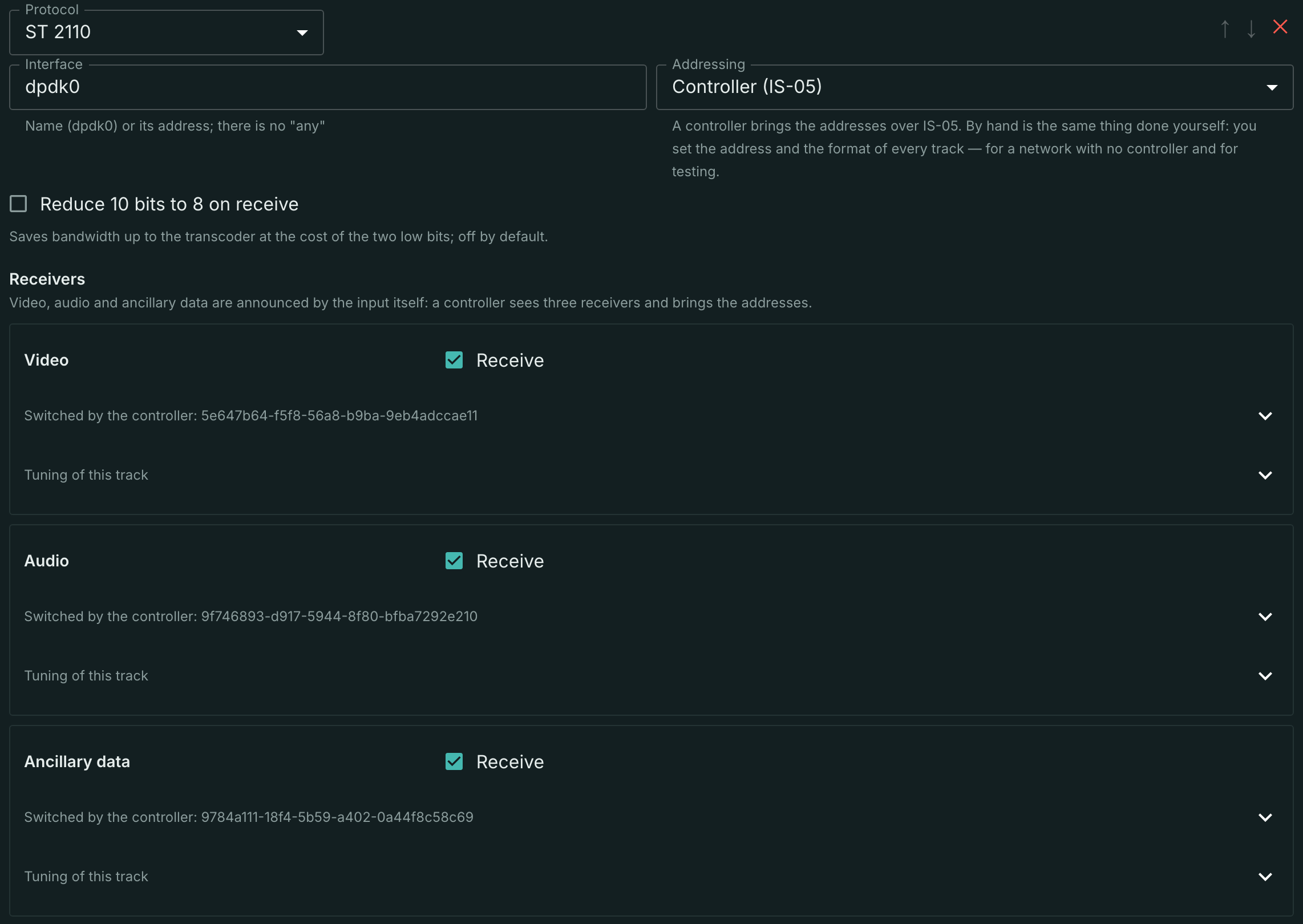
The input-wide fields:
- Media network — the network label from the port markup on the machine; an empty field is the default network (
ST2110=1). The station picks the port in that network itself: among the marked ones, the one with link up, and among equals the first by PCI address, and keeps it while the stream lives. If the machine has no port in the named network, the input does not open, and the stream status showsno_st2110_portwith the network name. - Addressing — who gives the tracks their addresses. The next section is about it.
- Reduce 10 bits to 8 on receive — saves bandwidth up to the transcoder at the cost of the two low bits. Off by default.
The receivers are announced by the input itself: video, audio and ancillary data are always shown, and their role is not asked for. A controller sees exactly these three receivers and brings them addresses. Such a track is absent from the configuration until there is something to say about it.
There may be more tracks of one kind: a second audio track for another language is created with Add track in the Added tracks block. There you name the role (audio 2) yourself, and its kind has to be named explicitly — it cannot be derived from a free string. An edit to the role applies when the field loses focus.
Every track has a Receive checkbox: clearing it keeps the track in the configuration with all its parameters, but no socket is opened.
Don't forget to Save: an input edit reaches the server only on the button.
Two ways to address a track
The way is chosen by the Addressing field and applies to the whole input rather than to a single track: a network is either run by a controller or it is not, and a controller-switched track next to a hand-typed one is not a scenario but a misunderstanding someone would have to debug.
- Controller (IS-05) — the main path. The operator turns the input on and names the interface; where to receive from is told by the controller, for every track at once.
- By hand — the same thing done yourself: the operator types the address and the format of every track. It is for a network with no controller, and for testing.
A transport file is deliberately not on that list. SDP is sent by the controller, and it describes a connection already made rather than being a way to set one up: nobody writes SDP by hand. Whether a track is switched and whether the receive is running is shown by the source health card — status, track set and bitrate — not by an input field.
Manual addressing looks like this:
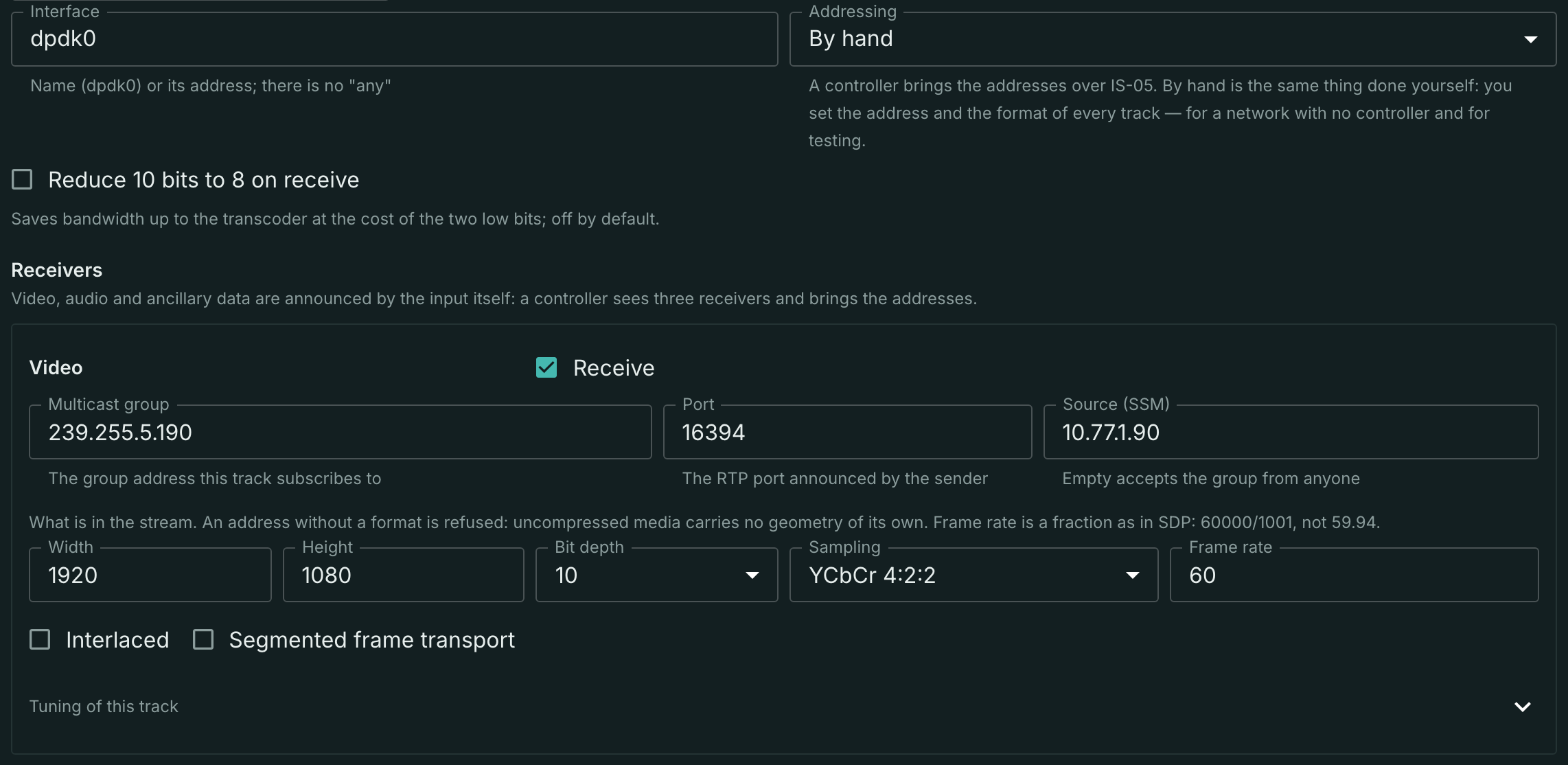
An address without a format is refused, and that is not pedantry: uncompressed media carries no geometry of its own inside the stream. A 2110-20 packet states neither frame size, nor rate, nor sampling — the receiver has to know them up front, or there is nothing to parse the lines against. Hence the field set: Width, Height, Bit depth, Sampling, Frame rate, Interlaced, Segmented frame transport.
The rate is written as a fraction, the way SDP does it: 60000/1001, not 59.94. The rounding is not a detail here — you cannot reconstruct the timestamp grid from it.
Of the sampling schemes, the one that currently reaches the pipeline is YCbCr 4:2:2 at 8 or 10 bits. The others — 4:2:0, 4:4:4, RGB — are parsed and laid out into pixel groups, but no frame is assembled from them: the track stops and the reason names the scheme and the depth.
The station stitches the two fields of an interlaced frame itself; deinterlacing stays the transcoder's job.
Switching by an NMOS controller
Addressing by hand is the fallback. The station does what studio infrastructure expects of it: it announces itself to a controller over IS-04 and hands the controller the switching of its receivers over IS-05. The station applies the controller's request itself and at once, waiting for nobody's answer, and keeps it as a separate record rather than as an edit of the stream document. That way operator and controller do not overwrite each other: the operator owns the set of tracks and the Receive checkbox, the controller owns the addresses.
The announcement is configured in the node settings, section NMOS. The Announce the node to an NMOS controller switch turns it on: off, and the node does not appear in the registry at all; on, and the node takes the data ports of its 2110 tracks and the announced interface from the machine markup, so the fields of the section may stay empty.
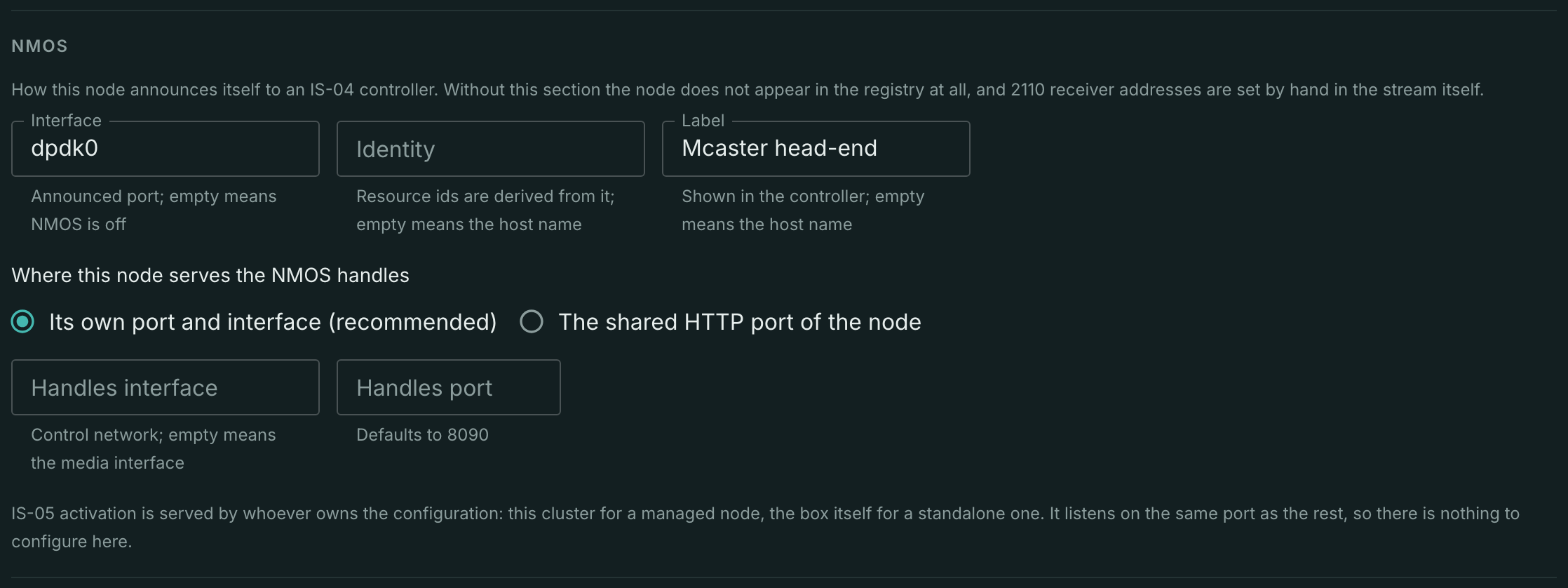
- Interface — the announced port. Empty means the port with the
managerole from the machine markup, or, without one, the port of the default media network; name it only when the controller has to see the node through another port. - Identity — resource ids are derived from it; empty means the host name. Change it and every id of the node changes, so the controller sees a new device.
- Label — what is shown in the controller.
- Where this node serves the NMOS handles — Its own port and interface (recommended) or The shared HTTP port of the node. The own one is set by Handles interface (the control network; empty means the announced interface) and Handles port (8090 by default).
The choice is about access, not convenience: IS-05 activation is not authenticated, and on the shared port the handles appear on every HTTP port of the node, public ones included. Only the network can limit who reaches them — which is why a separate port on the control network is the recommendation.
The IS-05 handle is always served by the node itself — both a standalone box and a node managed by a cluster. It checks the request against its own configuration, applies the address, answers the controller, and only then reports the applied switching to the cluster. There is nothing to choose here, and the cluster settings carry no such switch: central has no switching handle at all.
Two useful consequences follow. Reception opens within a single request and does not depend on the cluster being reachable: an unavailable central does not cancel the switching, it only delays the record reaching the journal. And because the record belongs to the track rather than to the machine, the switching survives both a node restart and the stream moving to another node — the controller does not have to switch it again.
One thing matters about receivers: a node never has spare ones. The controller sees exactly those derived from streams, and an activation does not create a stream. So the stream to be switched is created in advance, with an ST 2110 input in Controller (IS-05) mode, where the tracks have no addresses yet. Until the stream exists, the controller has nothing to switch.
The controller's request does not edit the stream document, and the track form does not show it: that the switching is applied shows in the source health card — the receive is running, and the tracks in it are the declared ones.
The station looks for a registry itself and, having found one, registers in it and keeps the registration alive with a heartbeat. With no registry in the network it talks to the controller directly, peer-to-peer.
What arrives in the stream
The stream starts as soon as the first track begins to arrive and does not wait for the rest. The state of reception is on the Sources tab, in the Source health block:
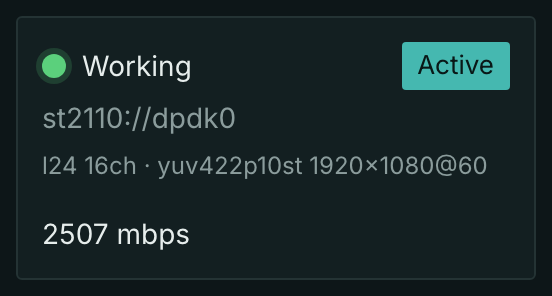
The card shows the status, the input address, the track set and the receive bitrate. The numbers in the shot are real: 2507 Mbit/s is one 1080p60 10-bit video track plus sixteen channels of L24 audio.
The track set is on the Basic settings tab, in the Media info block:
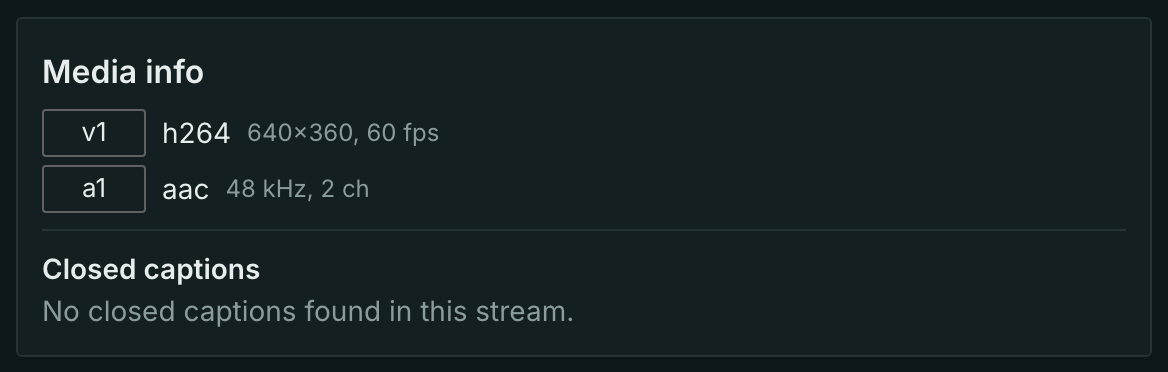
The codec names the wire layout rather than what the flow will become: yuv422p10st for 10-bit video and l24 for audio. The station does not downmix channels — it takes as many as the sender declared and delivers them as one track.
A raw flow needs transcoding
A stream with nothing but a 2110 input is a working state, not a fault: it starts, receives data and passes frames to subscribers. But there is no segmentation in it, and the master playlist arrives without a single track: a raw track cannot go into it — a player would break parsing its codec instead of getting an honest "nothing to play".
That is why the panel offers a link next to the track set — Transcode this to play in web: it opens the Transcoder tab with a ready rendition. After that the stream plays, records to the archive and feeds pushes like any other.
The raw-pipeline and inactive-segmentation signs show in the stream status separately, so this state is not mistaken for a malfunction.
Preview shots of a raw flow work without a transcoder: they are taken from the raw track directly, including into the archive.
Ancillary data and captions
A track of the ancillary data kind (2110-40) is received and parsed into DID/SDID pairs. What happens next depends on what the data is:
- OP-47 teletext reaches the stream as a teletext track — the same one teletext from MPEG-TS produces.
- CEA-708/608 captions are parsed and the counter for their DID/SDID pair grows, but no subtitle track appears on the stream: such captions belong inside encoded video, and delivering them to the output is not yet part of the station.
- Unknown pairs are counted and dropped: there is no "raw ancillary data" track going out.
A packet that fails its checksum is dropped with a counter; broken parity is counted but does not discard the packet.
Tuning
Usually unnecessary: an empty field means the station's default, not "off". It lives in two collapsed blocks.
Tuning of this track — what belongs to one group:
- CPU core — pins the track's receive thread to a core. Each track has its own thread, which is why each has its own field. Empty leaves it to the scheduler.
- AF_XDP queue — the card queue the track takes over, bypassing the ordinary socket. Empty means the ordinary socket.
Tuning of the input — what is shared:
- Socket buffer (bytes) — how much the kernel holds in the receive buffer of every socket.
- Frame queue (bytes) — the ceiling of one track's queue between reception and the pipeline. On overflow the excess is dropped with a counter: reception does not stall.
- Audio frame (ms) — the granularity of audio messages. Lower means less delay and more messages.
What is supported
| Capability | State |
|---|---|
| 2110-20 video: YCbCr 4:2:2 at 8-bit and 10-bit depth | yes |
| 10 bits kept in the wire layout, without reduction | yes |
| Other 2110-20 schemes: 4:2:0, 4:4:4, RGB | no, parsed but yield no frame — the reason names the scheme |
| Interlaced: two fields are stitched into one frame | yes |
| Segmented frame transport | the checkbox is accepted but does not yet affect reception |
2110-30 audio: L16 and L24, any channel count, ptime from SDP |
yes |
| 2110-40 ancillary data: depacketization, checksum, counters | yes |
| OP-47 teletext as a teletext track | yes |
| CEA-708/608 captions | parsed and counted, not delivered as a track |
| Addressing by a transport file (SDP) sent by a controller | yes |
| Subscription to a specific sender (SSM, IGMPv3) | yes |
| Several tracks of one kind in one input | yes |
| NMOS IS-04: node announcement, mDNS, registration in a registry | yes |
| NMOS IS-05: receivers switched by a controller | yes |
| The station discovering foreign senders on its own | no, the address comes from a controller or an operator |
| SDP with several media lines in one track | no, one addressing block describes one track |
| 2110 output (the station as a sender) | no |
Applying changes
Changing the group, the port, the sender or the transport file recreates the socket with a new subscription — reception on that track is interrupted while the others keep running. Fields that do not affect reception apply on the fly.
Verification
Check in this order, because each step is only meaningful once the previous one has passed:
- Packets do arrive —
tcpdump -i <interface> host <group>on the station's own machine. A check from a neighbouring machine does not answer this question: group delivery follows the subscription, and the station is the one that made it. - Tracks came up — the card in the Source health block shows the track set and the receive bitrate.
- The clock has not diverged — clock drift in the stream status. Without synchronization the archive and rewind stop working, and the cure is in the PTP domain, not in the input settings.
- The picture is the one you expected — the stream preview: geometry and sampling are set by hand in manual addressing, and a mistake there yields skewed lines rather than a refusal to receive.
A script for a stand with no controller
A test stand usually has no NMOS controller, yet the group addresses are needed: with most senders they change from activation to activation, so writing them down once does not work.
For that case a small script is attached — nmosctl.py. It needs only Python 3; there are no dependencies, and avahi-browse is used to find nodes.
python3 nmosctl.py discover                       # nodes in the network (mDNS)
python3 nmosctl.py list 10.0.0.90:8090            # devices, senders, receivers
python3 nmosctl.py enable 10.0.0.90:8090 <sender> # enable a sender
python3 nmosctl.py sdp 10.0.0.90:8090 <sender>    # its transport file
The text sdp returns is what a controller brings when it switches a track: on a stand it serves to check addressing by hand, and the group, the port and the format are copied out of it.
The two things people trip over most often:
- Until a sender is enabled there is no transport file —
sdpanswers with an error, because the group address appears only on activation. - The address changes on every activation. Take it anew rather than from your notes: a subscription to the previous group silently yields zero packets.
What's next
- Transcode the flow — the rendition after which a raw signal plays and records.
- Add a backup input — a second source and the switching rules.
- Input errors — what the counters mean when a signal degrades.
- Deliver the signal back to the network.