SRT delivery
SRT carries the signal where multicast does not reach: to another city, to a partner, across the internet. There are two ways to hand it over, and they differ in who establishes the connection:
- Push — the station dials the destination itself and pushes the stream. That is how a signal is handed to a site that expects an incoming connection.
- Serving (play) — the station raises a listener and waits for the partner to pull the stream. Convenient when the counterparty has its own schedule and its own equipment: you give the address and the key, the rest is theirs.
Sending to a destination
The Egress tab, + Add push, the SRT protocol:
| Field | What it sets |
|---|---|
| Name | the destination's identity |
| Host, Port | the receiving side's SRT listener |
| Passphrase | the AES encryption key; on a mismatch the receiving side refuses at the handshake |
| Stream ID | the identifier by which the receiver knows what it was sent |
| Handshake timeout (ms), Peer timeout (ms) | the connection and inactivity timeouts |
An address pasted whole as srt://203.0.113.10:9000 is split into the fields, and the SRT URL assembled back is shown next to them — that is what you copy and give to the receiving side.
A dead push comes back up by itself, once every five seconds, like any other delivery destination.
Serving from the stream's port
The SRT playback block: turn on Allow SRT pull (play), set the Port and the lock — a shared Passphrase or a client map.
A single port passphrase is a shared key: everyone you handed it to holds it. The Clients map gives partners personal locks: a record is created by a name from the directory, and the server generates the secret on save — it is never typed by hand, only copied, rotated or removed; addresses and subnets are the record's optional filter. The lock's shape shows as a badge on the block, before reading any fields:
- Shared password — one passphrase for the port.
- No encryption — a port without a lock, the pull is open.
- Clients: N — a map of records; a passwordless record with addresses is marked as unencrypted, an empty one — the secret will be assigned on save.
Switching the delivery from a shared passphrase to the map comes with a warning before saving: the shared key is removed, and the current viewers reconnect with their new keys.
Next to a client record is a button copying a ready-made link of the form srt://…?mode=caller&passphrase=…; for a passwordless address record the link carries no encryption parameters. In the channel's playback links list, a delivery with a map gives a separate SRT line to every client — with their own secret for a record with a password, and without encryption parameters for an address one. A delivery without a map keeps the single line, as before.
The partner pulls the stream by connecting to srt://<station-address>:<port> with their key. The port belongs to the stream entirely — one port per stream; a port conflict between streams is rejected on save rather than discovered on air.
Serving from a dedicated port may have its own outgoing MPEG-TS section: the partner receives the signal under the program number they need, without touching the other destinations.
Watching SRT play sessions
When a partner pulls the stream over SRT, the session appears on the Sessions page. The row shows the viewer's IP, the client map entry as the user, and a Quality chip for SRT sessions.
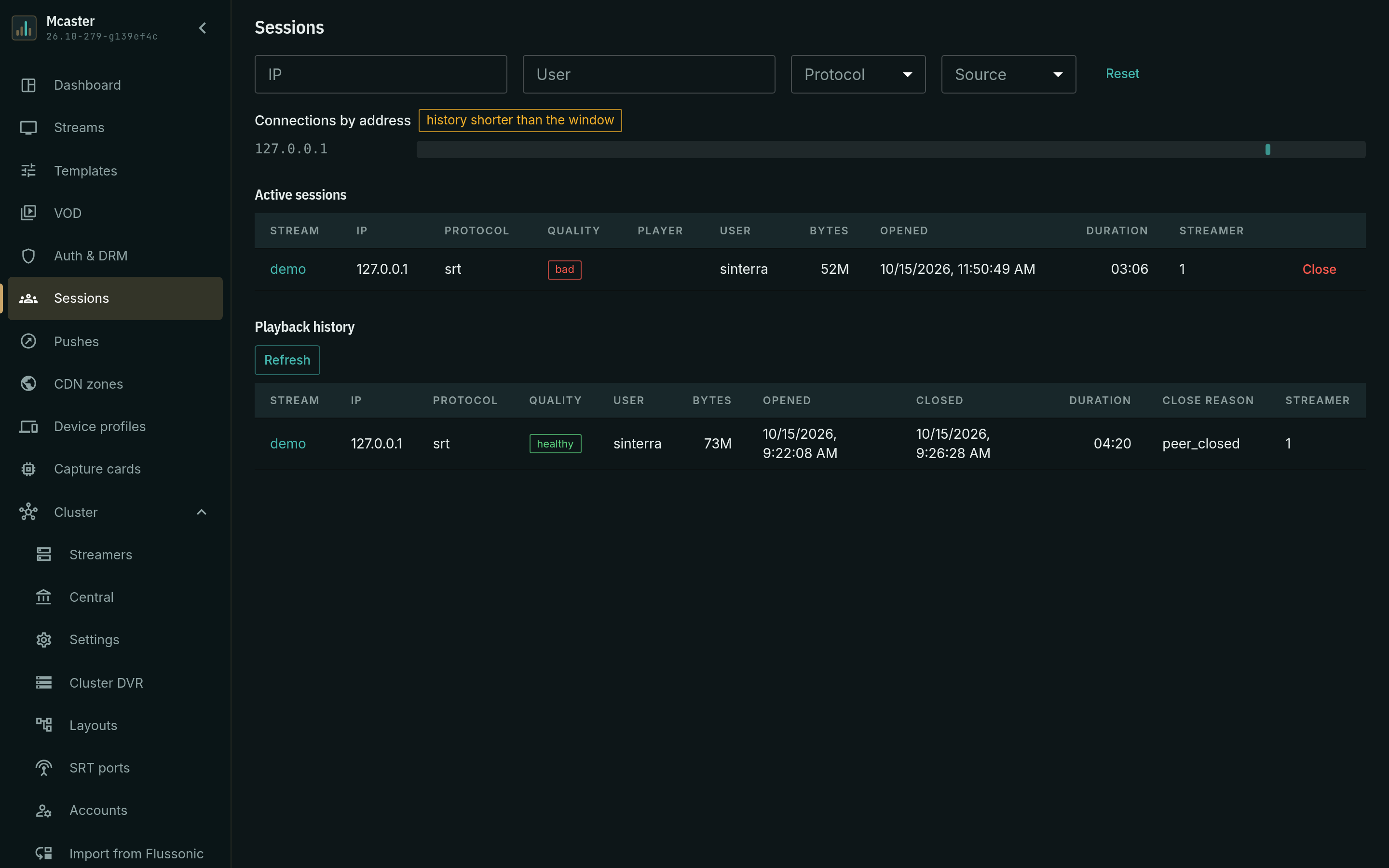
The chip color reflects the current health verdict of the SRT session: green for ok, yellow for degraded, red for bad. It changes as the path recovers or degrades.
Click the chip to open the detail panel. It lists the current accumulated values — packets sent, lost, retransmitted, NAKs received, RTT and send buffer — and draws per-minute charts:
- RTT — round-trip time and its maximum.
- Loss — lost, too-late and drop-request packets.
- Recovery — retransmitted packets against NAK reports.
- Bitrate — bytes served to the session.
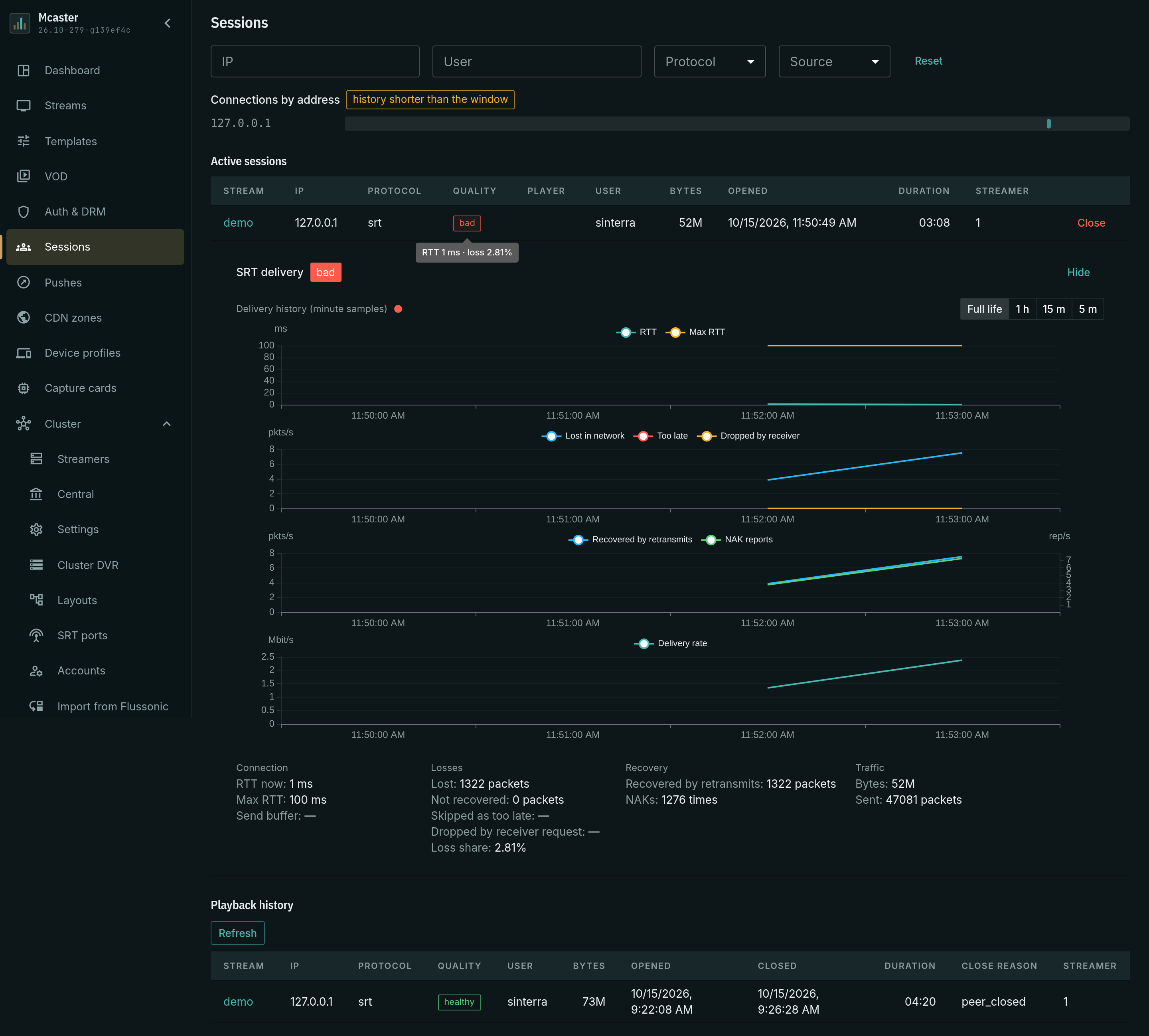
The charts carry the client's cross-session history, not only the open session: on a shared time axis are all the sessions of the same user within the store window. Each session is its own line, named by the device's address; a joint between lines is a reconnect, a gap is a pause between sessions. Devices of one client do not mix: the lines run side by side and are told apart by their names.
Above the charts is the horizon selector: full available history, 1 hour, 15 minutes, 5 minutes. It narrows the window to its tail without changing the slice: the history stays per client. Zooming inside the window is by wheel or pinch, synchronously across all the charts.
Next to them is the connections-by-address chart: intervals of "the address was connected" on the time axis, and a click on an interval opens the session. When the window's history does not fit into a single fetch, the chart says so and is built from the window's latest sessions, not its full depth.
The health verdict stands in the panel header of an active record. A closed record keeps no verdict: how its life ended is read from the charts, and the accumulated values and history are available in the playback history, frozen at the session's lifetime window.
What matters
- Egress does not colour the stream. The stream status reflects the input. A dead push destination does not turn the stream red — delivery is checked by the destination's counters.
- The latency on the output is the receiver's budget. How much time the receiving side has for loss recovery is set by them; the "three to four RTTs" rule is the same on both sides — see SRT ingest.
- Retransmits are normal while there are few of them. A destination's retransmit counter grows when the path loses packets: the transport is doing its job. What is alarming is not the fact but the trend and its company — reconnects alongside.
What next
- Delivery monitoring — status, rate, errors and retransmits per destination.
- Outgoing MPEG-TS — an own PNR and own PIDs for a particular partner.
- Delivery to the network — multicast and RTP.