Audio loudness
Loudness measurement monitors one audio program at the stream input, before transcoding or other audio processing. It decodes a copy of the selected track at its original sample rate and preserves its channels. It does not change the stream's audio.
Enable measurement
Open the stream's Processing tab, turn on Measure input loudness and save the configuration. The default is the first audio track, stereo channels 0, 1, measured with BS.1770 / EBU R128. Turn the switch off and save to stop measurement.
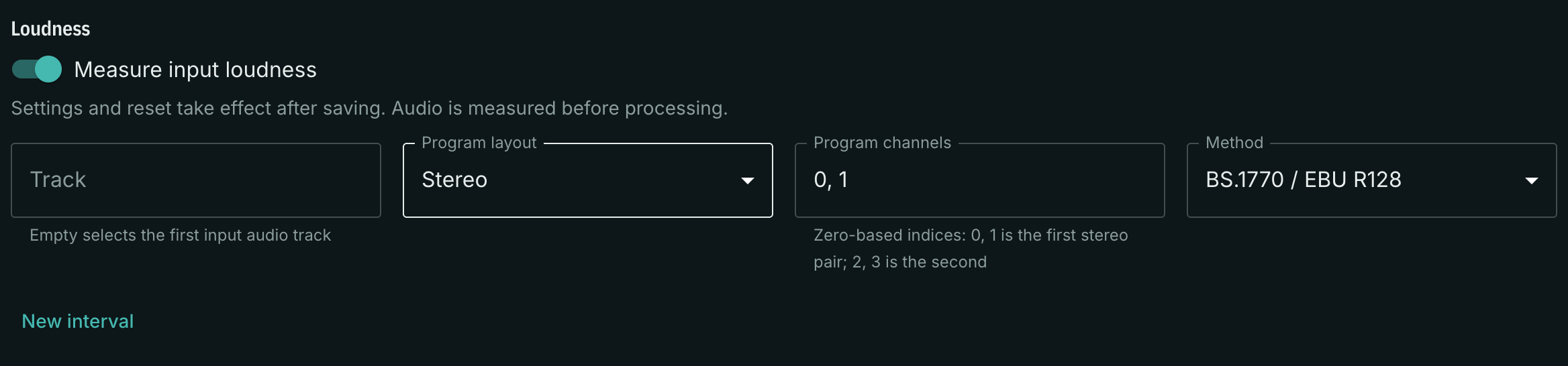
| Setting | Meaning |
|---|---|
| Audio track | A track ID such as a1. Empty selects the first audio track. |
| Program layout | Mono, stereo or 5.1. |
| Input channels | Comma-separated, zero-based channel indices. Select one for mono, two for stereo or six for 5.1. Indices must be distinct and below 64. |
| Method | BS.1770 / EBU R128, or raw energy. |
| Silence threshold | Raw energy only: an integer from −120 to 0 dBFS. Default −60 dBFS. |
For a stereo pair on channels 15 and 16 of a capture input, enter 14, 15. For 5.1, list channels in the order L, R, C, LFE, Ls, Rs. The LFE channel is excluded from the weighted BS.1770 loudness sum and remains included in True Peak measurement.
The selected layout is one program, not a request to measure every stereo pair on the input. The panel supports one program per stream. Supported sample rates are 44.1, 48, 96 and 192 kHz. A missing selected track shows No audio; an unsupported format shows a diagnostic in the panel.
Choose a method
BS.1770 / EBU R128 provides gated integrated loudness in LUFS, using the standard channel weights and K-weighting. Use it for loudness monitoring of broadcast programs. The measurement itself does not certify a program against a delivery specification or automatically normalize its level.
Energy integral integrates the sum of squared normalized input samples over accepted 100 ms blocks, in FS²·s. Only blocks whose mean power exceeds the selected absolute silence threshold are accepted. The panel also shows the accepted duration. This result is energy, not integrated LUFS; it does not apply K-weighting, relative gating or LFE exclusion.
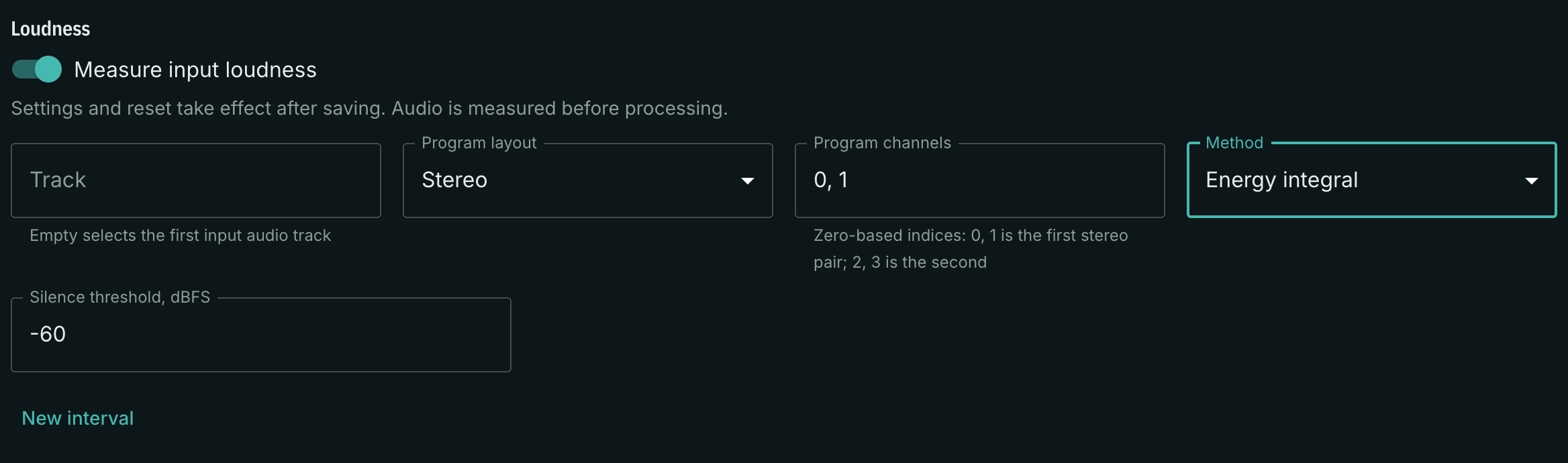
Both methods provide momentary loudness, short-term loudness and True Peak. Click New interval, then save to start a new interval. A change of track, channel selection or method also starts a new interval.
Read the values and graph
The panel shows the selected track, interval duration, last measurement time and these values:
- M — momentary loudness over 400 ms, in LUFS.
- S — short-term loudness over 3 seconds, in LUFS.
- I — integrated gated loudness since the interval began, in LUFS; available in BS.1770 mode.
- True Peak — the peak since the interval began, in dBTP.
A dash means the result is not yet available or has no finite numerical value. Silence and absence of audio are separate states. After 1.5 seconds without audio, current levels are cleared.
The graph shows the last hour stored by the local metrics service. It refreshes every 10 seconds and uses the normal metrics reporting cadence; it is not a display of every 100 ms DSP result. LUFS and dBTP have separate axes. New measurements fill the graph after measurement has been enabled; previous measurements are not reconstructed.
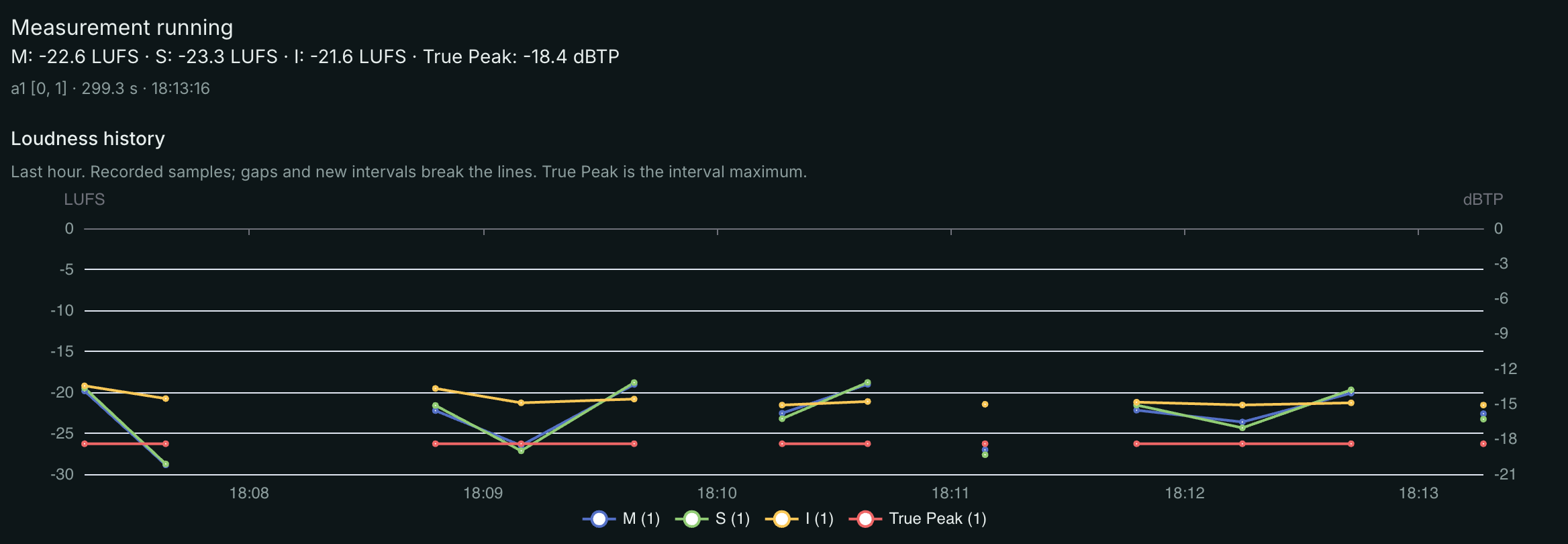
Resets, source changes, audio discontinuities, queue overruns and missing or stale telemetry produce gaps. A gap is not a measured zero. If the metrics service is unavailable, the panel reports the history error while current measurements remain available. History retention follows the existing local metrics service settings.