Recordings
The meeting is over, and half an hour later somebody asks for it. The broadcast has an archive and it can be watched — but the meeting itself has neither a name nor borders in it: there are only two times somebody keeps in their head. Those are what gets passed around: "have a look somewhere after three".
The record button closes that gap. The operator presses it when the meeting starts and again when it ends — and the stretch gains a name, borders, a row in a list and a To VOD button.
The archive and a recording answer different questions. The archive answers "are we keeping the broadcast". A recording answers "where is that meeting".
Hence the one limitation that matters: a recording is a stretch of what is already being written. Only a broadcast that is running and writing its archive can be recorded; the button itself neither starts the broadcast nor switches its archive on.
Recording a meeting
Recordings live on the Recordings tab of a broadcast's card. The button is on the left, the settings on the right, and the list of what has been recorded is below.
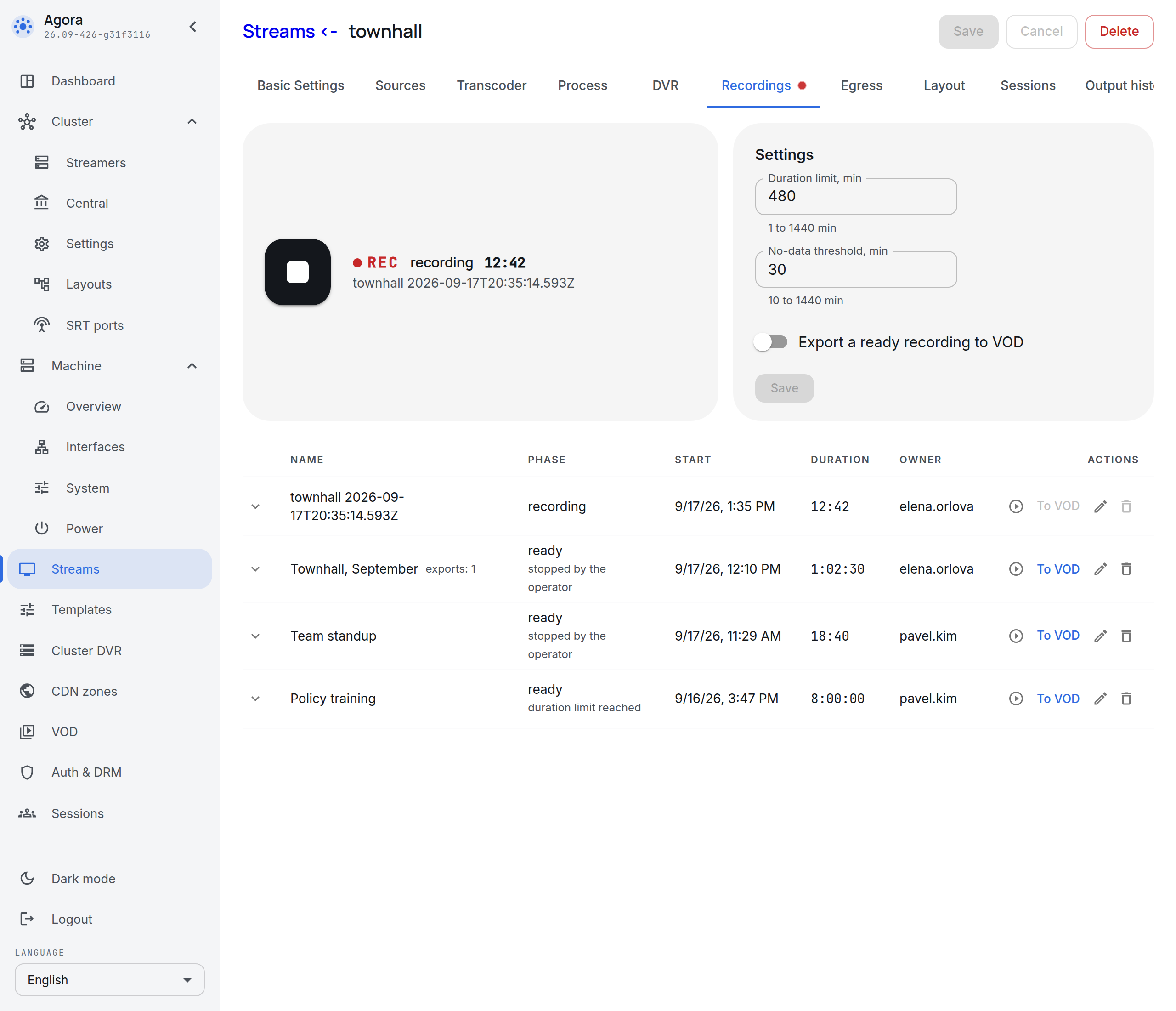
The round red button starts a recording, the square one ends it. While a recording runs, a red dot burns on the tab itself in the row of tabs: the card can be seen from any other tab.
The first name is given for the operator — the name of the broadcast and the moment of the start. A meeting is better called by a human name: the pencil in the list row renames a recording at any time, including after it has ended.
A recording starts when the button is pressed, not some seconds before it. Its borders are what the operator decided; they are not edited after the fact.
While a recording runs
The button states what is going on in words: the REC mark, the time from the start and the name of the recording.
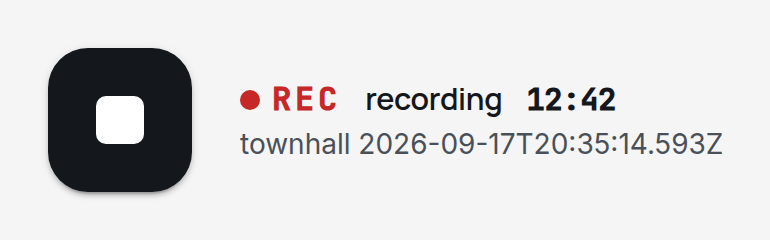
The state lives on the server rather than in the open tab, and the tab keeps it current on its own: a second operator who opens the same card sees the same recording and the same counter.
A line saying "no data since 2:07 PM" may appear under the button. It means the broadcast's archive stopped arriving at that moment — the source went silent, or the archive stopped being written. The recording is not interrupted by it: when the signal comes back the same recording goes on, and the archive keeps a hole for the length of the silence.
When a recording ends
A recording ends in one of three cases:
- The operator pressed stop — the ordinary end of a meeting.
- The duration limit was reached — the limit set in the recording settings.
- Data stopped arriving — the archive has not arrived for longer than the no-data threshold.
The moment of the end is taken from the cause, not from when the system noticed it. A recording closed on silence ends where the archive is written up to: if the source went quiet at 2:00 PM and the system worked it out at 2:30 PM, the recording ends at 2:00 PM and does not carry the extra half hour.
The cause is shown in the list, under the phase of the recording:
| What it says | What happened |
|---|---|
| stopped by the operator | the stop button was pressed |
| duration limit reached | the recording was left running |
| data stopped arriving | the archive stopped arriving while the broadcast was running |
| the stream stopped | the broadcast stopped running |
| the archive was removed from the stream | archive recording was switched off on the broadcast |
| the stream was deleted | the broadcast was deleted from the configuration |
A recording that closed on its own is as good as one stopped by hand: what was recorded before it closed is watched and exported by the same rules. The row outlives the broadcast as well — deleting a broadcast takes its configuration away, but not the list of its recordings and not the files of exports already made.
Recording settings
The settings sit to the right of the button and are set per broadcast.
| Field | What it sets | Default | Bounds |
|---|---|---|---|
| Duration limit, min | how long a recording may run before it closes itself | 480 (8 hours) | 1 to 1440 min |
| No-data threshold, min | how long the archive may fail to arrive before the recording closes | 30 | 10 to 1440 min |
| Export a ready recording to VOD | export every ready recording with no press | off | — |
| Start a recording on each wake-up | start a recording when the broadcast wakes up; on-demand broadcasts only | off | — |
The duration limit covers a forgotten button: a recording nobody stopped would take the whole archive by morning. The no-data threshold covers a source gone silent: the meeting ended, the camera was switched off, and the recording is still running.
A no-data threshold shorter than ten minutes cannot be set, and that is not arbitrary: the control plane learns how far the archive is written from the streamer every few minutes, and a shorter threshold would close healthy recordings between two reports.
A recording takes the settings at the moment of the start and lives by them to the end. Editing the settings under a running recording does not affect it — the operator who pressed the button gets exactly the limits they saw — and takes effect from the next recording.
Automatic recording on wake-up
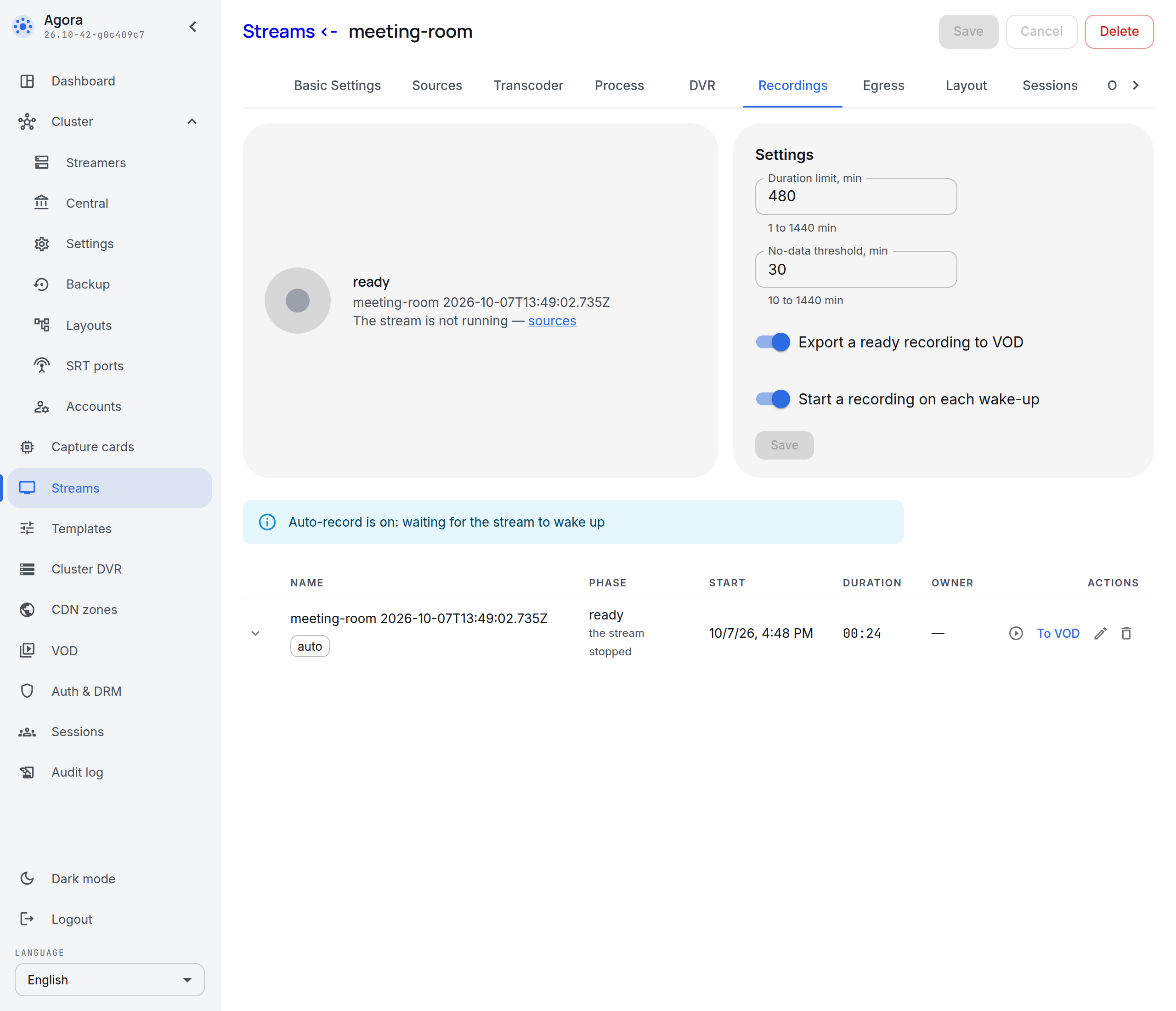
An on-demand broadcast sleeps while nobody is watching or publishing to it: it wakes up for a viewer or a publisher and goes out again once they leave. Events on it naturally come in sessions: awake — a session, asleep — it is over. And there are places that want their recordings in exactly those sessions: lectures in a classroom, meetings in a meeting room — every event as a recording of its own and a file of its own in VOD.
The button does the same job, but two presses per session plus an export afterwards is a routine you can already feel by the second lecture. The Start a recording on each wake-up toggle in the recording settings takes it away: a wake-up starts the recording by itself, and the broadcast going out ends it — and with auto export on, the session lands in VOD as a file by itself. The toggle exists only on on-demand broadcasts; permanent ones do not have it — there "record while it runs" would mean "record everything".
An automatic recording is marked auto in the list: that is how you tell what started by itself from what was pressed by hand.
The recording starts at the wake-up moment, not at the moment the system noticed it — the first seconds of the meeting are not lost. And it ends not after the no-data threshold but with the broadcast going out, with the cause "the stream stopped" — ready for watching and export in a minute or two instead of half an hour. Auto export to VOD works on it by the usual rules.
One wake-up, one recording. Once it ends for any reason — stop, the duration limit, silence — the automation stays quiet until the next wake-up: it does not restart a recording stopped by hand. The button stays and works as on an ordinary broadcast: you record by hand with it when auto record is off, and you start a recording again with it after a manual stop — the automation cannot restart its own, but the button can. When the broadcast goes out, the recording stops either way, manual or automatic.
The list of recordings
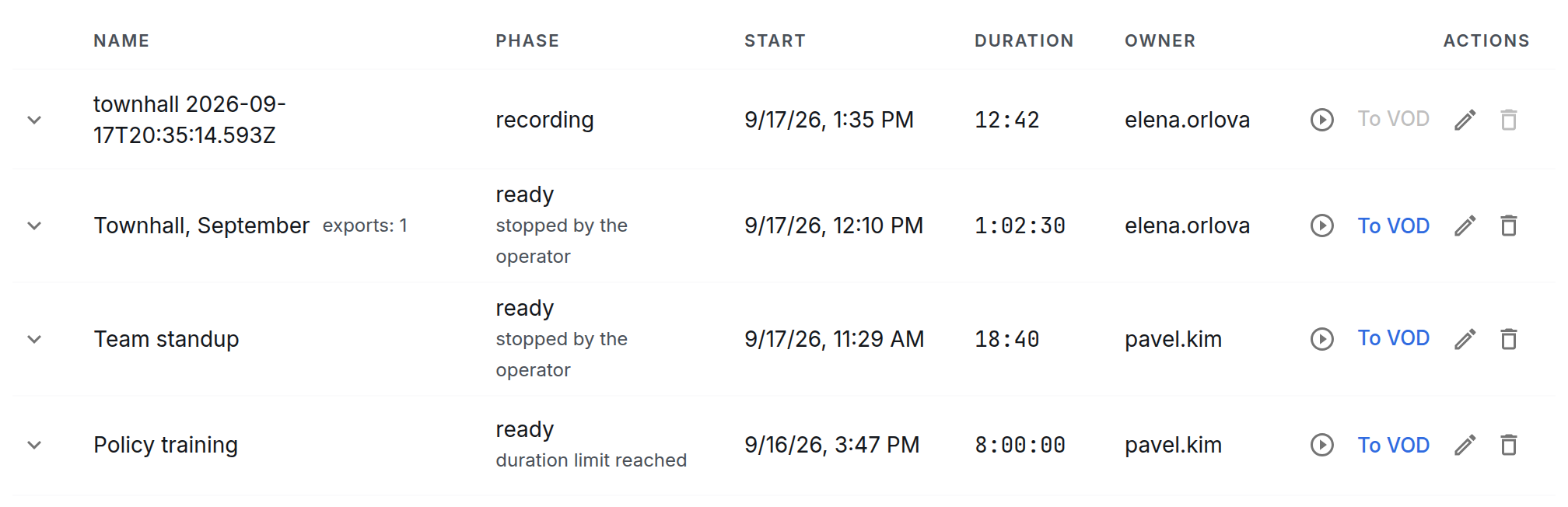
Recordings are listed newest first and show the name, the phase, the start, the duration and the owner — the login of whoever pressed the button. The bottom row in the shot is a recording that was left running: it went on for exactly eight hours and closed itself on the duration limit.
There are three phases, and a recording goes through them in order:
- recording — there is no end mark yet.
- saving — stop has been pressed and the streamer is writing the last fragments of the archive. The phase is short, and a recording leaves it on its own.
- ready — the whole interval of the recording is in the archive, and the recording can be watched and exported.
The actions in a row: Watch opens the player on the interval of the recording, To VOD orders an export, the pencil renames, the bin deletes. A running recording cannot be exported: an export takes the whole recording, and it has not ended yet.
The archive is not kept forever, and cleanup eats the edges of old recordings first. Marks next to the name say so:
- in archive 2:20 PM – 5:00 PM — part of the recording is left, and watching and export work on that part.
- archive erased — the interval is no longer in the archive. The row stays in the list, and its links to exports already made still work.
- no data — nothing reached the archive for the interval of the recording.
Deleting takes the recording away, not what was recorded: the archive stays until its own cleanup, and the files of exports made stay in VOD. A running recording cannot be deleted — stop it first.
Someone else's recording — one started by another operator — can be stopped, renamed or deleted, but the panel asks for confirmation and names the owner. One press cuts off somebody's hours-long meeting, and there is nothing to bring it back with.
Exporting a recording to VOD
The To VOD button on a ready recording orders a file: the server builds the interval of the recording out of the archive into an mp4 and puts it into the VOD catalogue as an asset of its own. Progress and outcome are shown in the recording itself — unfold the row with the arrow on the left.

The export row shows the interval, the state and, once the file is built, the Asset and Download links. The finished file appears in the VOD section of the panel — under a key of the form recordings/townhall/2026-09-17/16-37-34, that is, by broadcast and by the moment the recording started.
That is what an export is for: the archive holds a window of the depth you set and displaces the old with the new, while an asset in the catalogue lies there until it is deleted. A meeting that will be watched for another six months belongs in VOD, not in the archive.
The rest about exports, briefly:
- Auto export. The toggle in the settings exports every ready recording of the broadcast with no press. An empty recording is skipped — there is nothing to build.
- Cancelling. While the file is being built, the export is cancelled from the same row: an export of the wrong recording occupies the server for a long time.
- Exporting again. A ready recording can be exported once more — as many times as needed, for as long as the archive still holds its interval. The earlier asset is left untouched: the repeat gets an asset of its own, with its own key and its own name, told apart from the first by an ordinal.
- A break inside the recording. If the source went away in the middle of the meeting, the file comes out shorter than the interval by that time — the builder joins the break.
An encrypted broadcast is not exported: a file cannot be built out of it, and the panel says so with a refusal.
When recording is not possible
A broadcast with no archive has nothing to record, and there is no button on the tab at all — a hint with a link to the archive settings stands in its place.
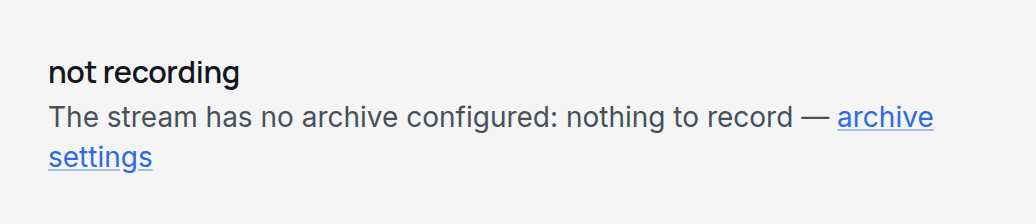
In the other cases the button is there but locked, and the obstacle is named before the press — together with a link to whatever fixes it:
| What it says | What to do |
|---|---|
| The stream has no archive configured: nothing to record | Switch the archive on, on the DVR tab. |
| The stream is not placed on any node | Check the broadcast's placement. |
| The stream is not running | Deal with the source: the broadcast is not running, and there is nothing to record. |
| The stream is running, but node N is not writing its archive | Check the disks and the archive settings on that streamer: the broadcast runs, but nothing reaches the archive. |
| Node N is not reachable: the stream state is unknown | Check the link between the streamer and the control plane. |
| The stream state is unknown: no stats | Wait: the panel has not received the state of the broadcast yet. The lock lifts by itself. |
The last three causes differ on purpose: "not running" sends you to the source, "not writing its archive" to the disks, "not reachable" to the link between the streamer and the control plane.
Who may record
The button, the recording settings, exports, renaming and deleting are done by administrators — the admin and superadmin roles. Everyone else sees the recordings but cannot act on them.
Every such action reaches the audit log with the login of whoever did it. Automatic decisions — closing a recording on the duration limit or on silence, and auto export — are not in the log: they are explained by the cause in the recording itself.
What next
- The archive — without which recordings do not exist.
- Broadcasts — the card whose tab all of this lives on.
- The audit log — who recorded what and when.