Broadcasts
A broadcast in Agora is one transmission: an all-hands, a webinar, a training session, a round-the-clock internal channel. In the panel broadcasts live in the Streams section.
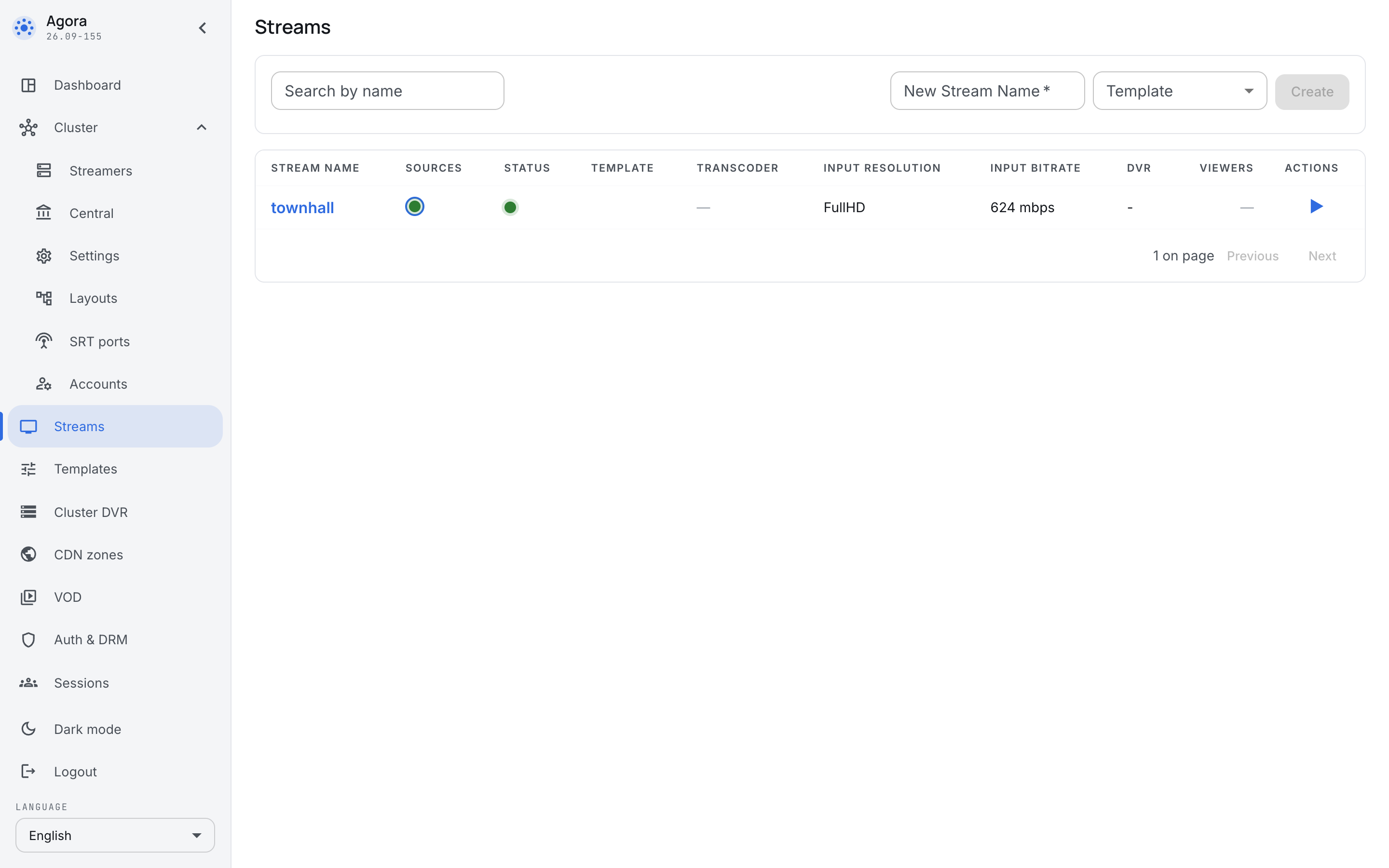
A broadcast is created in advance, not at the moment the camera is switched on: it has a name, a source, encoding parameters and viewing rights, and all of that is prepared before the meeting. The presenter is left with turning the encoder on.
The list
The columns answer the questions of whoever is on duty without making them open the card:
- Stream name — the broadcast is addressed by it everywhere, the viewer's link included.
- Sources and Status — two different lights. The first is about whether the signal arrived, the second about whether the broadcast is running. They do diverge: a source can be alive while the broadcast is stopped, and the other way round.
- Template — which template the broadcast inherited its settings from.
- Transcoder, Input resolution, Input bitrate — what arrived and what it turns into.
- DVR — whether the archive is being recorded.
- Viewers — how many people are watching right now.
The New stream name field and the Create button create a broadcast right there, from the list.
The source
The source is where the signal comes from. It is picked by protocol in the source row on the Sources tab; which protocols make sense depends on what the equipment can send:
- SRT — the usual choice for a studio encoder and for a presenter in another city: the protocol survives network loss.
- Publish — receiving an external encoder. For RTMP, configure publishing with a stream key.
- RTMP — reading a stream from another RTMP server.
- MPEG-TS — intake from broadcast equipment.
- RTSP — a camera in a meeting room.
- Synthetic — the built-in generator: it proves that delivery and playback work before the studio is connected at all.
Selecting the incoming interface
When multicast arrives through a separate network card, set Incoming interface for the MPEG-TS/UDP input on the Sources tab. For example, set Host to 239.255.1.77, Port to 5500 and Incoming interface to eno2. You can use the card’s IPv4 address instead of its name, for example 192.168.20.10. The group subscription is created on that interface even when the default route uses eno1.
The field applies to IPv4 multicast, including source-specific multicast (SSM). Leave it empty for IPv6: explicit interface selection for IPv6 is not supported. For unicast, this field does not select the receiving interface. Clear the field and save to restore selection through the OS routing table. Changing the interface recreates the subscription and briefly interrupts ingest.
The name or address must belong to the streamer receiving the feed. If the interface cannot be found or has no IPv4 address, the source will not start; its input status shows the reason. In a cluster, check the setting on every streamer where this stream may be placed.
For a source configured by URL, use udp://239.255.1.77:5500?interface=eno2. The format udp://eno2@239.255.1.77:5500 is also supported; when the interface parameter is present as well, it takes precedence.
The interface for sending multicast is configured separately for each push.
Input failover
A broadcast may have several sources, and their order in the list is the order of preference. The server runs the broadcast from the first live one: when the signal goes, it moves to the next; when it comes back, it returns.
That is what a second source is for: a meeting has no second take. The typical pair for corporate broadcasting is the main encoder in the studio and a spare on the presenter's laptop.
The Placeholder on source loss row says what to show a viewer when no live source is left. Without it the viewer sees a black screen and cannot tell whether the fault is theirs or yours.
The transcoder
The same broadcast is watched from an office laptop and from a phone over VPN. The transcoder makes several variants out of the input — a ladder — and the player takes the one the viewer's link can carry.
The Standard ladder 1080/720/360 + AAC preset covers the ordinary case with one press. Individual rungs are configured in the same place when a set of your own is needed.
Transcoding is the heaviest work in the installation, and it is computed on the server the broadcast runs on. That is worth remembering when planning how many meetings run at once.
Selecting the outgoing interface
Open the Egress tab. In the Pushes block, press + Add push, set the Name and select the protocol.
On the Egress tab, set Outgoing interface for a MPEG-TS/UDP or MPEG-TS/RTP push: a network card name such as eno4, or its local IPv4 address such as 192.168.40.10. Set Host to group 239.255.2.77 and Port to 5500, then press Save. Multicast leaves through the selected card regardless of the default route.
Incoming and outgoing interfaces are independent: you can receive through eno2 and send through eno4. Each push has its own outgoing interface. An empty field lets the OS routing table choose; clear the field and save to restore that behaviour. This setting applies to IPv4 multicast. For unicast, routing selects the outgoing interface; Bind address sets the socket’s local address and serves a different purpose.
The interface must exist on the sending streamer and have an IPv4 address. An incorrect name or address prevents the push from starting and produces an error. Changing the outgoing interface restarts the push. In a cluster, check that the interface is available on every streamer that may send this stream.
Ingest is configured separately — see selecting the incoming interface.
The card's tabs
- Basic settings — the name, the template, whether it is enabled, the built-in player and the "what came in, what goes out" summary.
- Sources — the sources, their health and their timeouts.
- Transcoder — the ladder.
- Processing — subtitles, teletext, thumbnails.
- DVR — the archive.
- Egress — sending the broadcast out, including as one rendition of the ladder, and SRT publishing.
- Layout — where the broadcast is placed, see Stream placement.
- Delivery — viewer counts, outgoing bitrate and push errors over the last 24 hours, followed by active and completed sessions for this broadcast.