Pushing selected tracks
A broadcast with a transcoder carries several renditions of the ladder at once: the Standard ladder 1080/720/360 + AAC preset gives three videos and shared audio. That suits a viewer in the player, but an outside receiver — a public streaming platform, a partner, the office TV network — usually needs one rendition. A push is told which tracks of the broadcast it sends.
Pushing a broadcast
Sending a broadcast out is called a push. The Egress tab, the Pushes block, the + Add push button. A push has a Name and a Protocol:
- RTMP — public streaming platforms and most cloud services;
- SRT — a partner or a CDN receiving the broadcast over a lossy network;
- MPEG-TS/UDP, MPEG-TS/RTP and RIST — broadcast equipment and multicast inside the office network.
The Enabled switch turns a push off without deleting it.
Pick the tracks
The Tracks field in the push card. The options come from the current broadcast tracks and are labelled so that a rendition is recognisable without knowing its id: the track id, the resolution for video or the language for audio, and the codec — v2 · 1280x720 · h264. Tick the video of the rendition you need and the audio that goes with it.
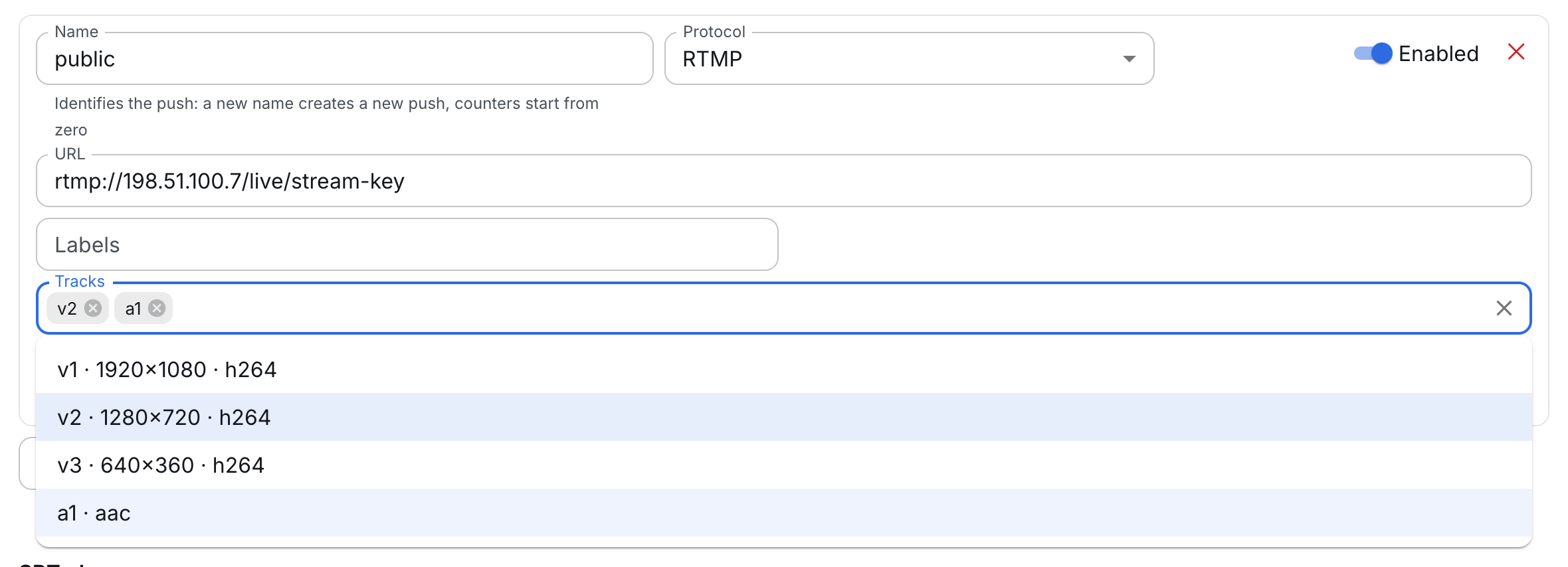
An empty field is the protocol default, and the panel says right under the field what will be sent:
- RTMP — the video and audio with the lowest id, that is, the first rendition of the ladder;
- the other protocols — all broadcast tracks.
The order of the ticks does not matter.
720p to an outside platform
A broadcast on the Standard ladder 1080/720/360 + AAC preset: v1 is 1080p, v2 is 720p, v3 is 360p, audio is a1. The platform takes 720p over RTMP:
- The + Add push button, name
public, protocol RTMP, the platform address with the stream key. - In the Tracks field tick
v2anda1. - Save the stream.
Without step 2 the platform would get 1080p — the first rendition. The other renditions do not go to the platform and spend no uplink.
One track of a kind over RTMP
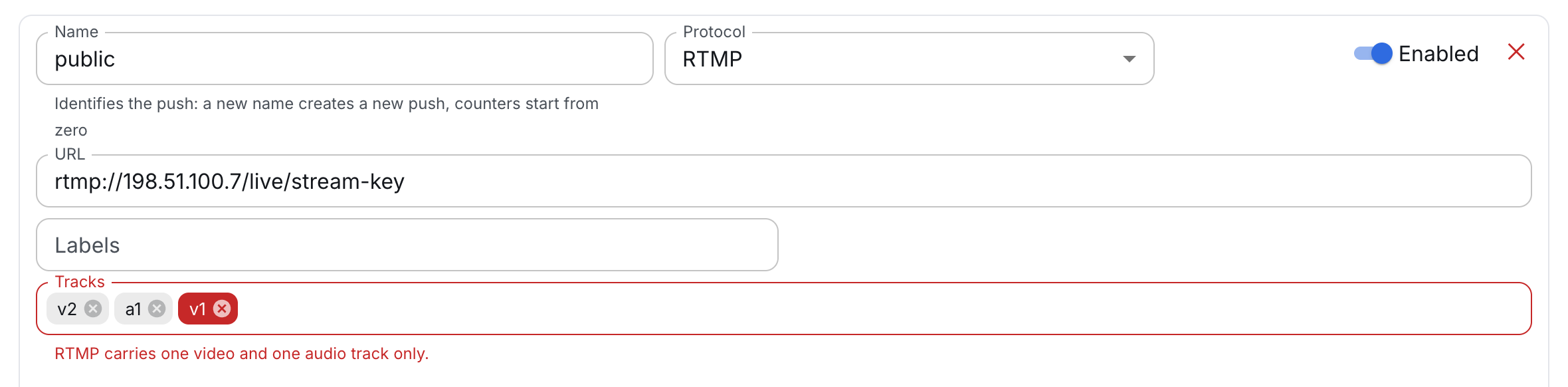
RTMP carries one video track and one audio track. A second video or audio track, or subtitles, in the set of an RTMP push are flagged by the panel before saving: "RTMP carries one video and one audio track only". A stream with such a push cannot be saved.
SRT and MPEG-TS have no such limit: the set may hold several renditions or audio in two languages, and the receiver gets them as one program. A track leaves on the same PID as in the output with all tracks, so a receiver does not retune PIDs when it moves to the stream with a set.
A track that is not there yet
A track id can be typed into the field by hand even when the broadcast does not have that track right now: v3, a2. The panel accepts it and marks it: "The stream has no such track right now; it will be sent once it appears". This way a push is set up before the meeting starts, while the studio encoder is still off. Only a track id can be typed — v1, a1, t1; the panel rejects anything else and names it.
An id points to a track
An id points to a track, not to a rendition. Video ids follow the order of the renditions on the Transcoder tab, so a new rendition in the middle of the ladder shifts the ids of all the following ones. A push with the set v2 then sends whichever rendition has become second.
After editing the ladder, check the track sets of the pushes.
A broadcast with encryption
On a broadcast with MPEG-TS encryption the Tracks field of MPEG-TS pushes is unavailable: one common stream with all tracks is encrypted. If encryption is turned on for a broadcast where a set is already given, the panel asks to clear the tracks of those pushes — otherwise the stream will not be saved. Track selection stays available for RTMP pushes.