Streamers
An Agora installation grows by adding streamers. A streamer is a server that does the work on a broadcast: it takes the signal, encodes it, records the archive and serves viewers. The control plane decides on its own which broadcast lives on which streamer — see Stream placement.
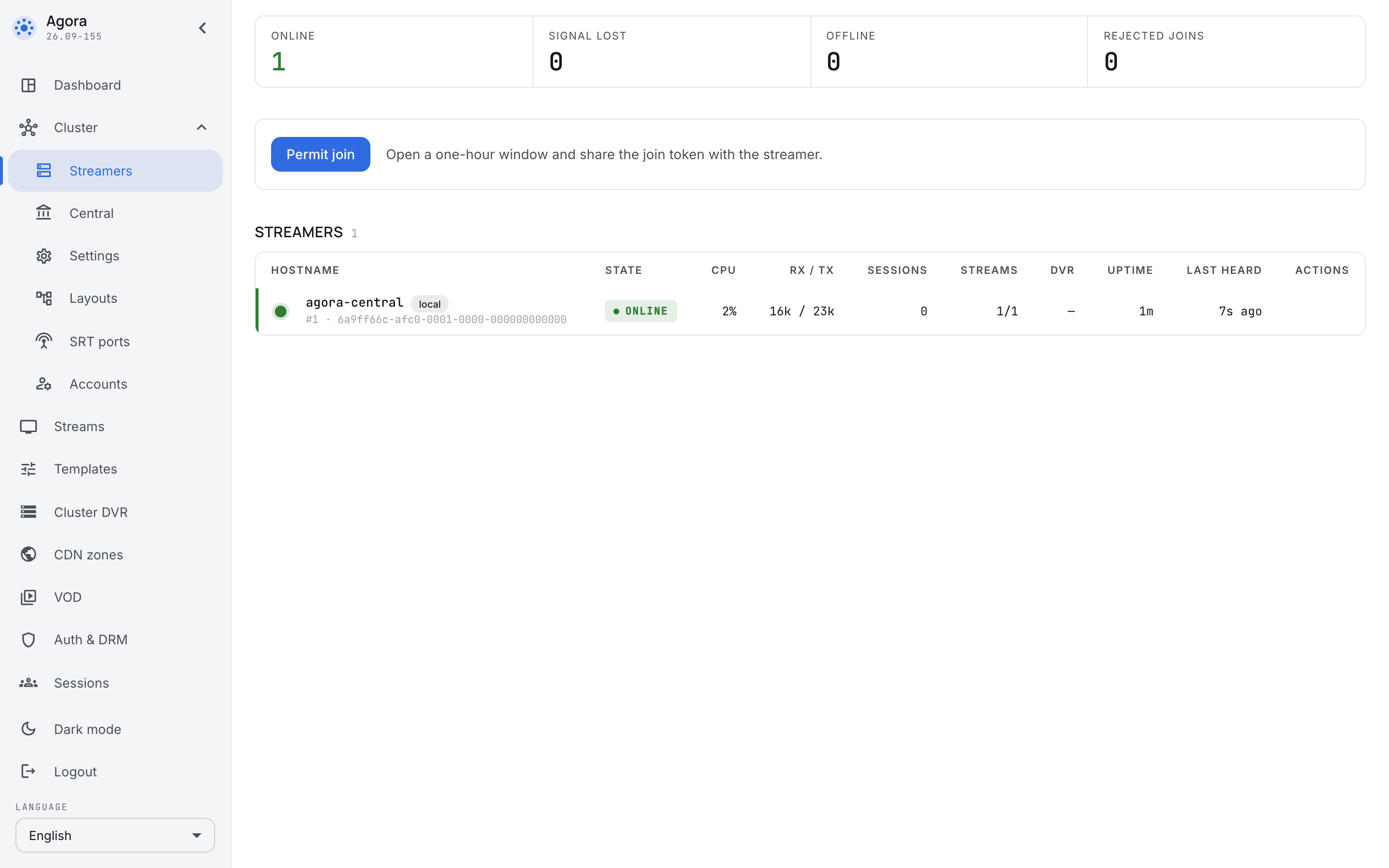
The Cluster → Streamers section shows every server of the installation.
What the counters say
The four tiles at the top answer "is everything all right" without making you read the table:
- On air — servers that are in touch and doing the work.
- Signal lost — the streamer has stopped syncing with central; this is the server connection state, not source quality.
- Offline — the streamer has not synced for longer than the offline threshold, or has never reported.
- Rejected attempts — somebody tried to join and was not accepted. Zero here is the normal state; anything else means either a mistake in the token or a stranger's machine knocking on your control plane.
A server's row
- Host name and the server id. The machine the control plane itself lives on is marked local.
- State — the same as in the tiles, but about this machine.
- CPU — the load. It shows who needs relieving.
- RX / TX — how much the server takes in and how much it sends out.
- Sessions — how many viewers are watching from it right now.
- Streams — how many broadcasts are running on it out of how many are assigned.
1/1means "one assigned, one running";0/1means assigned but not running. - DVR — the state of the archive on its disks.
- Uptime and last sync — how long the server has been running and when it last received configuration from the control plane. A growing "last sync" is the first sign that the link to the control plane is gone, well before the server turns offline.
The local streamer
On a single machine the control plane and the streamer are one process, and the list holds that one machine, marked local. It neither needs nor allows joining separately: it is part of the same installation.
Such a machine works in full. The difference from a cluster is not in what it can do but in the fact that a single machine's headroom ends when the machine does.
Joining a server
A streamer joins with a join token valid during the join window. One token admits several machines; after registration, a streamer uses its own key. See Adding a streamer for installing agora-base, configuring /etc/agora/secrets.env and checking registration.
What to do when a server goes offline
An offline server means the link to the control plane is gone, not necessarily that the broadcast is: it keeps running and serving the broadcasts already assigned to it. The control plane, meanwhile, stops considering it fit for new assignments and after a while moves broadcasts onto live servers.
The order of investigation is the usual one: look at last sync first — when the link was last alive — then check the network between the server and the control plane, and only then the server itself.