Playback and access
Internal broadcasting differs from public broadcasting in one thing: it has viewers who are not allowed to watch. An all-hands with the quarter's figures is not something you open to everyone with a link. That is why playback in Agora is closed by default.
A viewer who comes for a broadcast without permission is refused (403). That is the installation's initial state, not the consequence of a misconfiguration.
Access settings live in the Auth & DRM section.
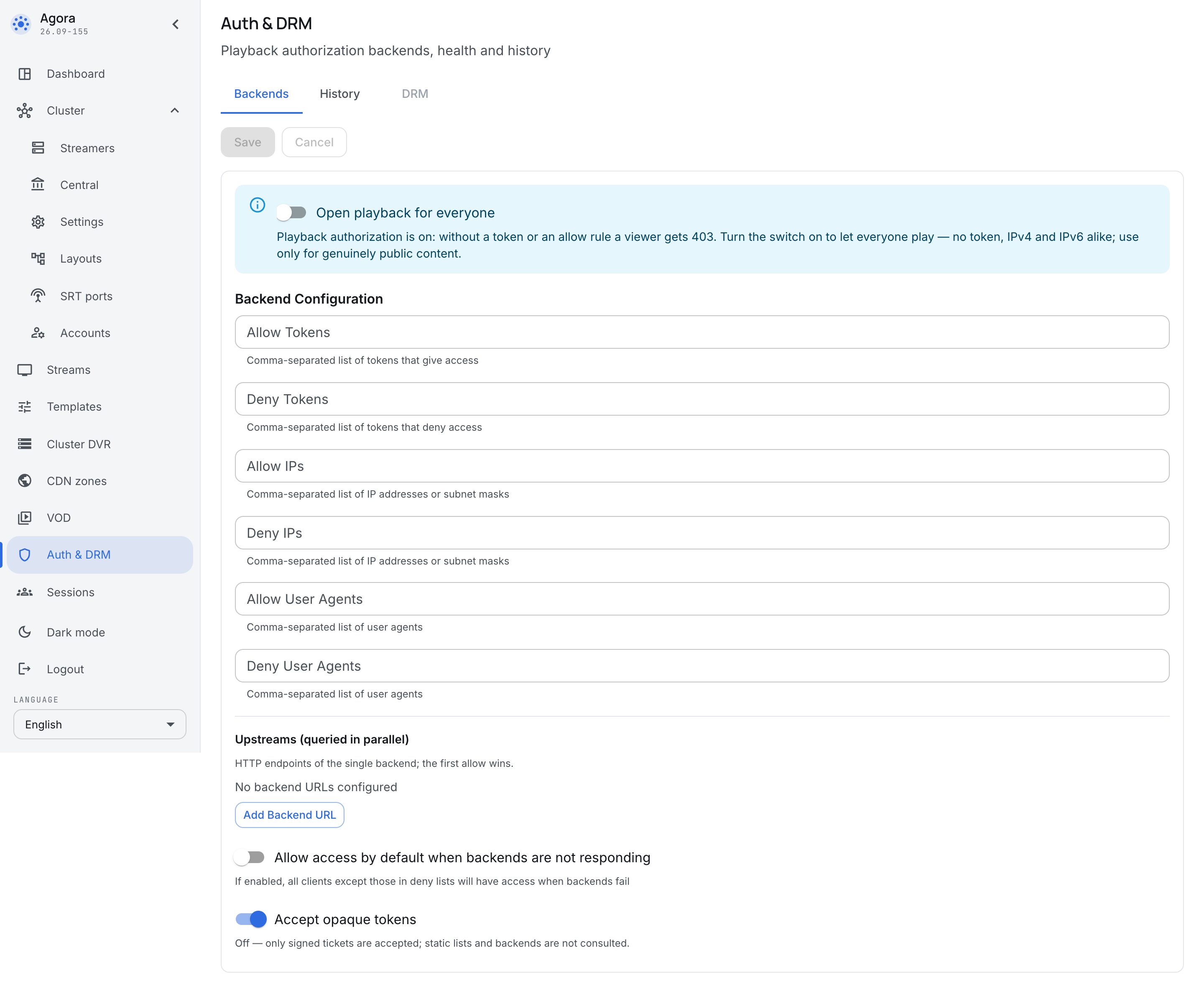
Three ways to allow playback
A ticket is the main way. Your internal portal asks Agora for a ticket for a particular broadcast and a particular employee, and puts it into the player's link. A ticket is limited in time and in the number of simultaneous views, so a link forwarded to a colleague stops working by itself.
Lists are a simple rule set right here. Access can be allowed or denied on three signs:
- token — a string in the link;
- IP — an address or a subnet mask, an office subnet for instance;
- User Agent — the application doing the watching.
Each sign has two lists, allowing and denying. Lists suit a rule that is simple and permanent: "watching is allowed from the office subnets".
An external backend — your own system decides who may watch. Agora asks it over HTTP on every access request; the Upstreams field takes several addresses, they are asked in parallel, and the first one to allow wins. This is how access to a broadcast is tied to what the company already knows: the staff directory, the composition of a department, the list of people invited to a meeting.
Open playback
The Open playback for everyone toggle removes the check entirely: the broadcast plays for anyone who knows the link.
It is worth turning on only for what is genuinely public — a company welcome video, a broadcast for an outside audience. For an internal broadcast this is not "simplifying the configuration" but "publishing the meeting": the link will be forwarded, and nothing will stand between it and the recording.
What to do when the backend fails
The Allow access by default when backends do not answer toggle decides what happens when your authorization system is unreachable.
This is a choice between two bad outcomes, and there is no right answer in general — only a right one for a given broadcast:
- off — when the backend fails, nobody watches. The meeting is ruined, but nothing leaked.
- on — when it fails, everyone watches except those on the denying lists. The meeting goes ahead, but the check is suspended for its duration.
For internal broadcasting the usual choice is off. It is turned on for broadcasts where a ruined meeting costs more than a leak.
Opaque tokens
The Accept opaque tokens toggle says whether an arbitrary string in the link is accepted (it is then checked against the lists and the backend) or only signed tickets issued by Agora itself.
Turning it off cuts off every way but tickets: the lists and the backend are not consulted at all. It is the strictest setting, and it is appropriate once the portal knows how to ask for tickets.
Access history
The History tab shows access decisions: who was refused and why. It is where a "it does not open for me" complaint is investigated — it answers whether the installation refused and on what grounds, instead of guesswork about the network and the browser.
Who is watching right now is the question of the neighbouring section, Sessions.