Standby delivery
A broadcast goes to a multicast group of the office network from the streamer the installation runs it on. If the streamer fails, stream placement moves the broadcast to another one, but the group stays silent until the control plane notices the failure and the new streamer picks up the source: for a viewer that is a break of tens of seconds.
When a second installation cannot be joined into one cluster with the first — another site, a separate control plane, an independent machine next to the installation — a standby push closes that break. Both sides receive the same signal and push the broadcast to the same group. One sends, the other listens to the group and stays silent. When the group goes quiet, the other side starts sending on its own, without the control plane and without a person.
The sides tell each other nothing and know nothing about each other. Each decides only by what it hears in the group, so the scheme works between installations that are not connected in any way — a shared network is enough.
Send the broadcast to a group
The broadcast card, the Egress tab, the Pushes block, the + Add push button. The protocol is MPEG-TS/UDP, or MPEG-TS/RTP if the receivers expect RTP.
| Field | What it sets | Default |
|---|---|---|
| Name | the identity of the direction: it is found by it in statistics | — |
| Host | the multicast group address | — |
| Port | the receiver port | — |
| Multicast TTL | how many routers the datagram survives | 10 |
| Outgoing interface | which network card the multicast leaves from | chosen by the system |
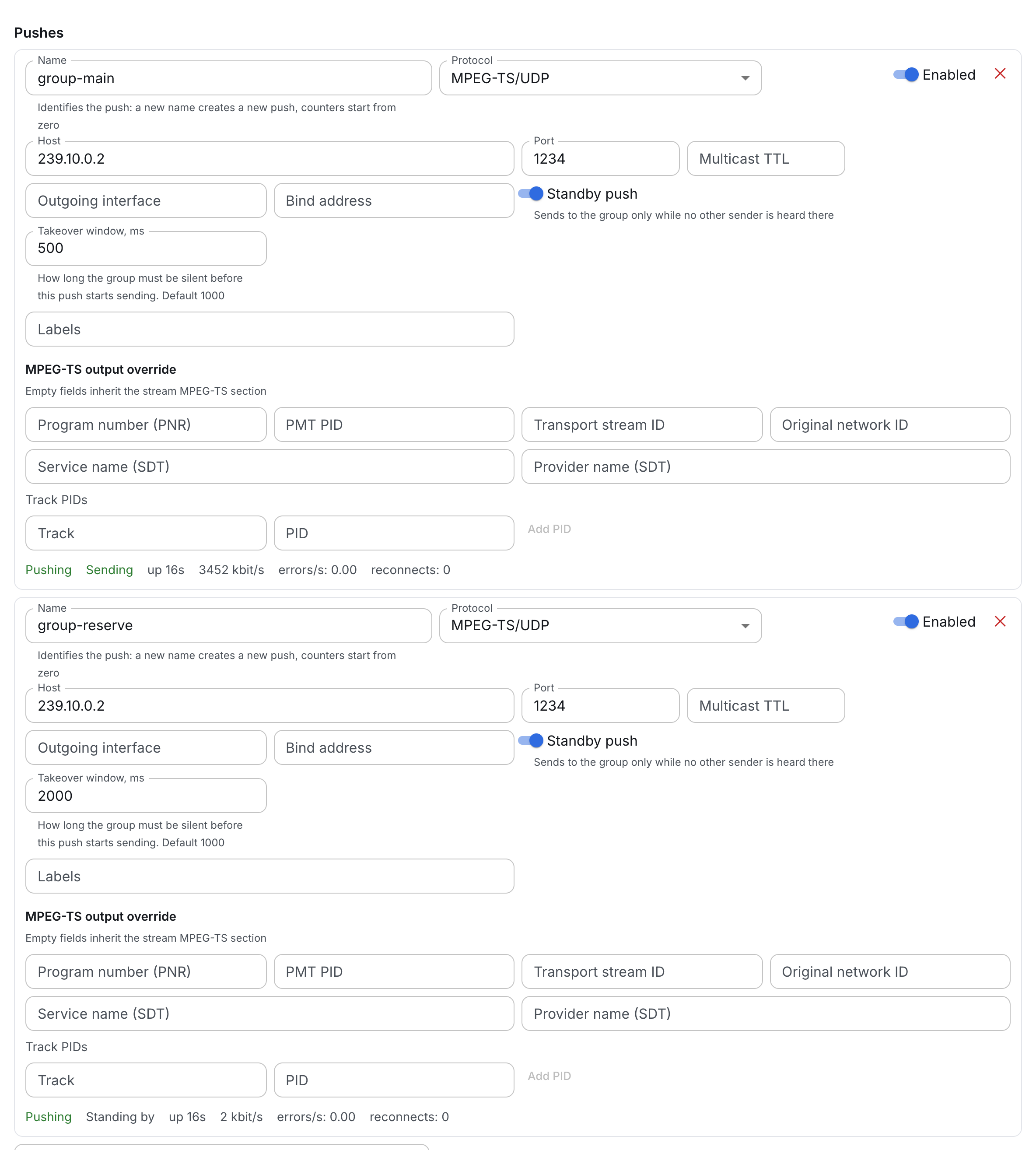
Enable standby
On the push of both sides:
| Field | What it sets | Default |
|---|---|---|
| Standby push | the push sends to the group only while no other sender is heard there | off |
| Takeover window, ms | how long the group must be silent before the push starts sending | 1000 |
The Standby push switch appears only when the Host field holds a multicast group address — IPv4 from 224.0.0.0 to 239.255.255.255, or IPv6 starting with ff. A unicast address has no shared group, and standby is impossible there. A host name instead of an address does not work either: the address itself is required.
How a side decides whether to send
There is one rule for all:
- another sender is heard in the group — the push stays silent;
- the group is silent longer than the takeover window — the push starts sending;
- while sending, the push hears another sender — the push goes silent, and the group stays with the one that is heard.
The push does not take its own packets coming back from the group for another sender. A second push of the same broadcast to the same group is another sender.
After a start — streamer startup, a broadcast move, a push edit — the push first stays silent for one window: if the other side is already sending, it will not cut into the group before it hears it. A silent push keeps preparing the stream, so a takeover does not wait for a keyframe: the very first packets after the window are a complete stream.
Which window to set
The window is both the reaction time and the only thing that sets the seniority of the sides.
- The break a viewer sees on a failure is roughly the takeover window. The default is 1000 ms: a live stream is hundreds of packets per second, and a second of silence is a failure, not network jitter. A window shorter than 200–300 ms will start firing on hiccups of the sending side.
- The shorter window wins. If the sides start at the same time or both have gone silent, the one with the shorter window starts sending first.
- Different windows for the sides. With equal windows, sides that come up at the same time may pass the group back and forth a few times. The main side gets a shorter window, the standby side a longer one, for example 500 and 2000 ms.
Put the standby push on both sides: a side that comes back after a failure hears that the group is taken and waits, so the group does not switch back and there is no extra break.
What the network must provide
The sides must hear the group they send to.
- One segment or multicast routing between the streamers of both sides. Each joins the group on the same interface it sends from: set the Outgoing interface explicitly.
- IGMP snooping. A streamer subscribes to the group just like a viewer, and the switch delivers the other side's packets to it. On a port where a filter cuts multicast, the other side cannot be heard.
- The same signal at the input. Standby replaces the sender, not the content: otherwise the viewer sees a different broadcast after the switch.
What to check
For a standby push, the live statistics row shows the standby status next to the overall status:
- Sending — the push is sending to the group right now;
- Standing by — another sender is heard in the group, the push is silent.
Silence in standby is not an error: the overall status stays Pushing, reconnects do not grow, the bitrate is zero — packets that did not go to the network are not counted as sent.
A healthy group is exactly one side with the Sending standby status.
- Both send for longer than the window — the sides do not hear each other: check the Outgoing interface, IGMP snooping and port filters, TTL.
- Nobody sends, all are Standing by — there is a third sender in the group.
- The Error status on a standby push — the streamer could not join the group on the given interface; the reason is in the statistics row.
What's next
- Broadcasts — the broadcast source and input redundancy.
- Stream placement — how the control plane moves a broadcast when a streamer fails.
- Streamers — the state of the installation's servers.