Backup
The Agora configuration — streams with their sources, transcoder settings, pushes, templates, delivery zones, access policy, streamer settings — lives in the database of the control plane. The Cluster → Backup section downloads it as a file and uploads it back.
A backup is needed in two cases:
- the box is lost — a server, a disk or the database is gone, and the configuration has to be brought up on a new machine without typing a hundred streams in again;
- rollback — a bad change is easier to undo with a backup taken before it than by remembering how things were.
Only a superadministrator sees the section: the backup file carries the secrets of the installation.
What the backup contains
- Streams — with all their settings: sources, transcoder, pushes, archive.
- Templates and CDN zones.
- Access policy — how playback is protected.
- Central settings and recording policies.
- Streamer settings — what is edited on the streamer card: archive disks and the rest.
- VOD catalog — asset descriptions and the record of which streamers' disks hold their files. The media files themselves are not in the backup; they stay on the disks.
The backup does not contain:
- Cluster membership — which machines joined and with which keys. A streamer key is issued when the machine joins and is kept on the streamer itself; a backup with the old keys would be useless after a reinstall.
- Administrators. A restored list of administrators would lock out the person doing the restore.
- History — the audit log, viewer sessions, statistics.
- Media — the archive and VOD files.
The backup file contains secrets: DRM keys and passwords in source and push addresses. Keep it as carefully as the server itself: do not e-mail it and do not put it in shared folders.
Taking a backup
- Open Cluster → Backup and click Create backup.
- The backup is built in the background. While it is being built, its row in the Backups list shows in progress. There is no need to stay on the page: a finished backup can be picked up later.
- When the status turns ready, click Download. The file is named
agora-config-<date>-<number>.jsonl.gz.
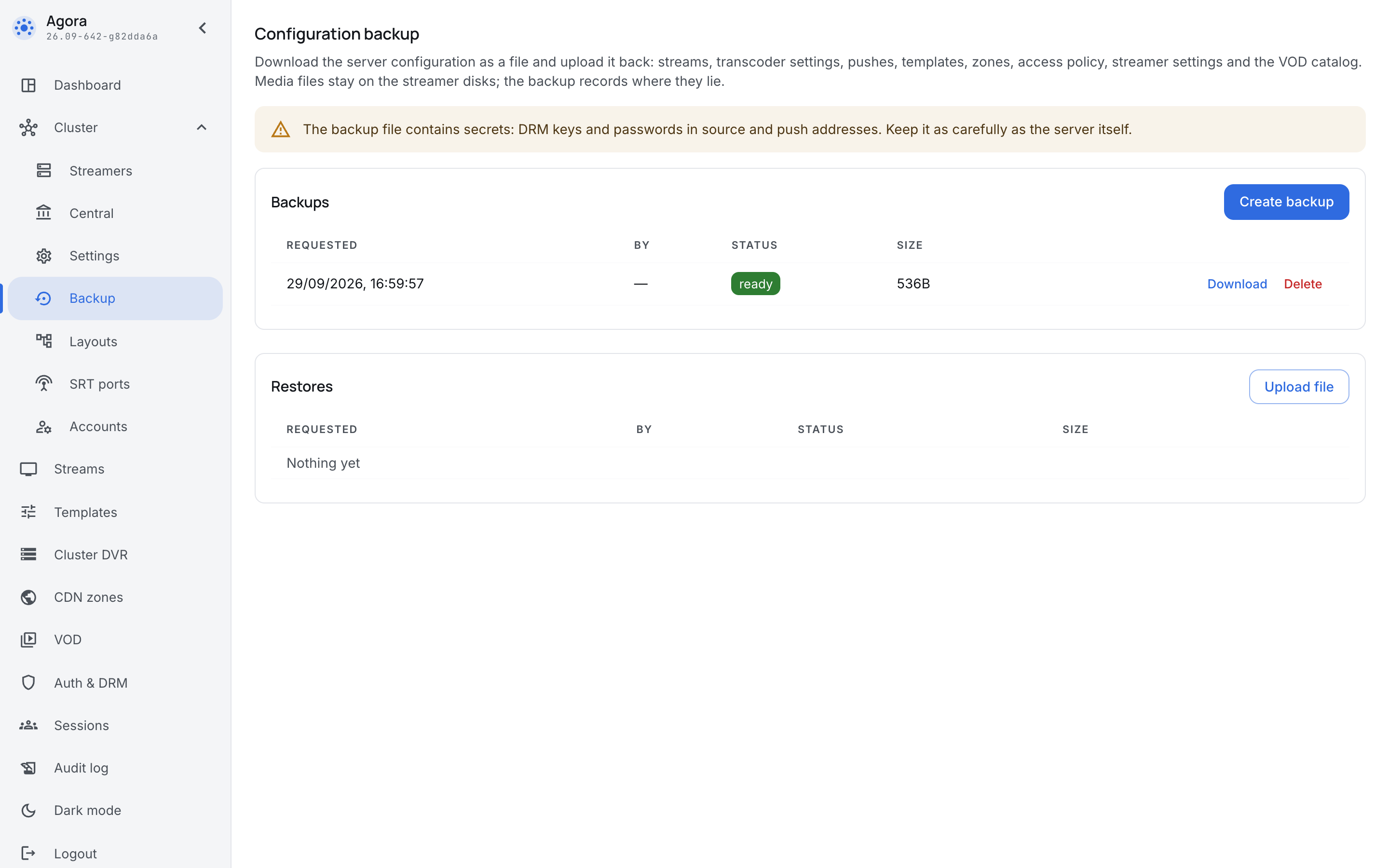
A backup is not kept in a directory on disk but in the database of the control plane, next to the configuration — which is why any central instance can serve the download. In a Docker installation that is the PostgreSQL database volume. Backups live there for 30 days and are then deleted.
The main consequence: a backup on the box dies together with the database. Only a downloaded file survives a disaster — take it off the box.
Take a backup before a noticeable change — before moving streams, changing the access policy, editing templates in bulk.
Restoring
A restore takes three steps: upload the file, review the plan, confirm. Nothing in the configuration changes before the confirmation.
- In the Restores block click Upload file and choose the backup file.
- The box reads the file and builds a plan — exactly what will change. The restore row moves to waiting for confirmation. Click it to open the plan.
- Review the plan and click Restore.
Reading the plan
The plan is a table by backup section:
- Create — not on the box yet; it will appear.
- Overwrite — present but different; the backup version replaces the box version.
- Delete — present on the box but not in the backup. A restore returns the configuration to the moment of the backup, so streams created after the backup will be deleted. Their names are listed under the section row; read them before confirming.
- Unchanged — matches the backup.
- Waiting for a streamer — settings of a streamer that has no machine yet (see A streamer left for later).
The VOD catalog is restored by addition only: assets missing from the backup stay where they are. Deleting an asset erases its files from the disks, and a rollback must not do that.
If the plan has errors — for example, the backup holds more streams than the licence of the new box allows — the Restore button stays locked until the cause is fixed.
If someone changes the configuration between the moment the plan was shown and the confirmation, the box recalculates the plan and asks to confirm it again: only the plan you saw is applied.
A restore leaves traces in the audit log: a config_restore.apply entry and entries for every changed stream, template and zone carrying the restore number.
A cluster of several streamers
On a single box that is the whole restore. A cluster has one more question: which machine gets the settings of which streamer.
Why streamers do not take their places by themselves
Every streamer of a cluster has a number, issued by the box when the machine joins. Streamer settings are tied to that number. A new box with a clean database issues numbers anew, in the order machines join: the machine that was streamer #3 may become #2, while #3 goes to a different machine altogether. Restoring settings by number would hand the archive disks of one machine to another.
That is why the backup keeps the settings of each streamer together with the marks of its machine — its identity (the server identifier, the same one the licence sees) and its host name. During a restore the plan looks for a machine for them:
- the box's local streamer gets its settings automatically;
- the same machine — a streamer that joined the new cluster with the same identity is recognized automatically, whatever number it got;
- the rest is up to you: pick a streamer in the plan or leave the decision for later.
A host name alone does not lead to a match: machines deployed from one image often share it. In the plan it is a hint for you.
Example
A box and two streamers, edge-1 and edge-2, carry four cameras with an archive. The backup is taken on the living cluster:
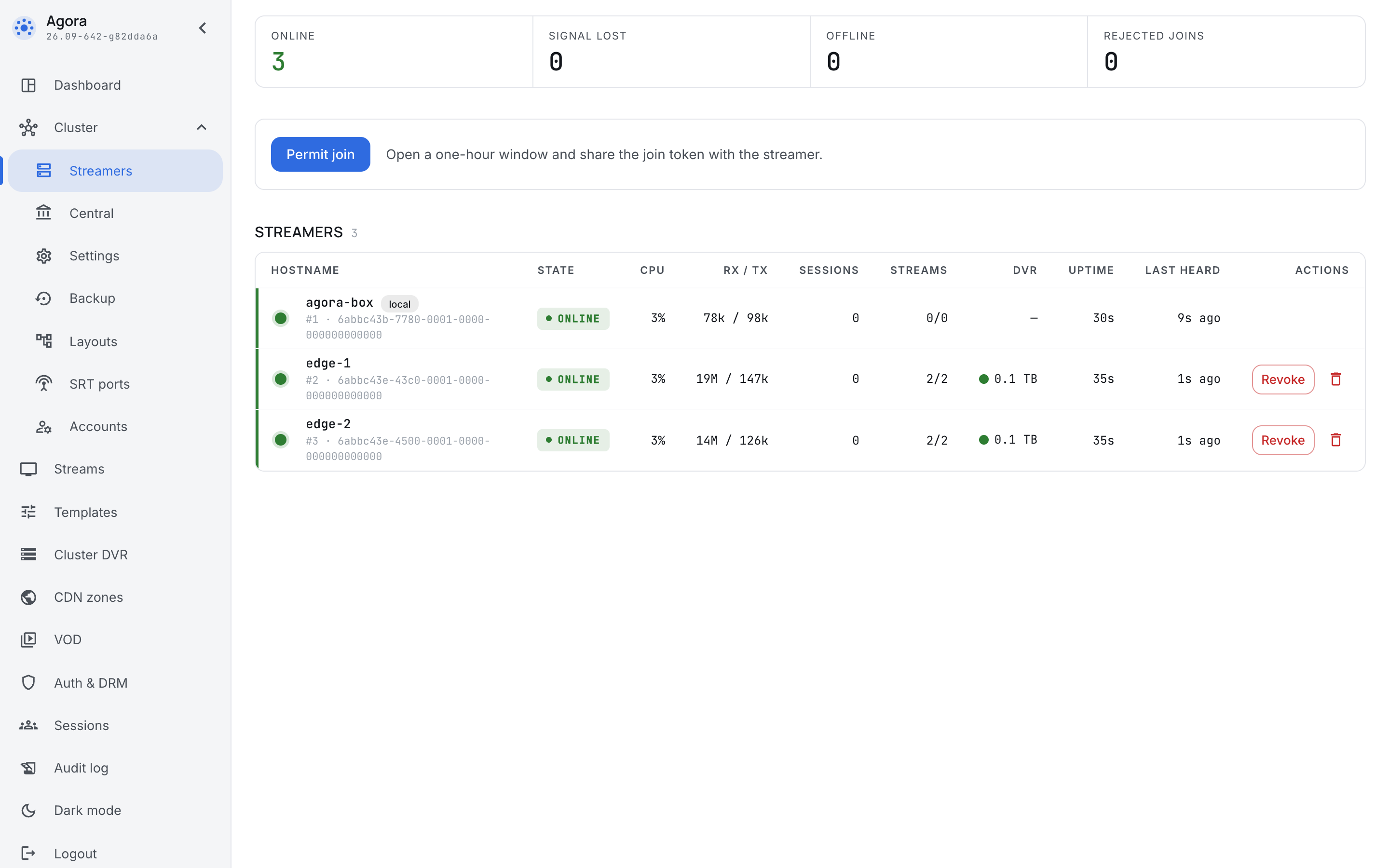
Then the box is lost together with its database. edge-1 survives, edge-2 is gone, and a new machine, edge-3, is prepared to replace it.
While there is no box, the streamers keep carrying the streams they had: they hold the last configuration they received and only miss the changes.
Restore procedure
- Install a new box — the
agorapackage, as in the first installation (see Installation). Log in with the static credentials from/etc/agora/secrets.envand create the first administrator (see Administrators): administrators are not in the backup. - Open the join window: Cluster → Streamers → Permit join (see Joining a server).
-
Bring the surviving streamers back. The new box does not know the key issued by the lost one, and the machine will not get in by itself — the streamer log shows it as
node key rejected. On every surviving streamer put the new token into theJOIN_TOKEN=line of/etc/agora/secrets.env(and the box address intoCENTRAL_URL=if it changed), remove the old key and restart the service:rm /var/lib/agora/identity.json systemctl restart agoraRemove only the key file. Leave the rest of
/var/lib/agoraalone: it also holds the identity of the machine, by which the plan recognizes it and to which the licence is bound. Streams on this machine are interrupted while it restarts. -
Install the replacement machines — the
agora-basepackage with the same token, as for any cluster extension (see Installation). -
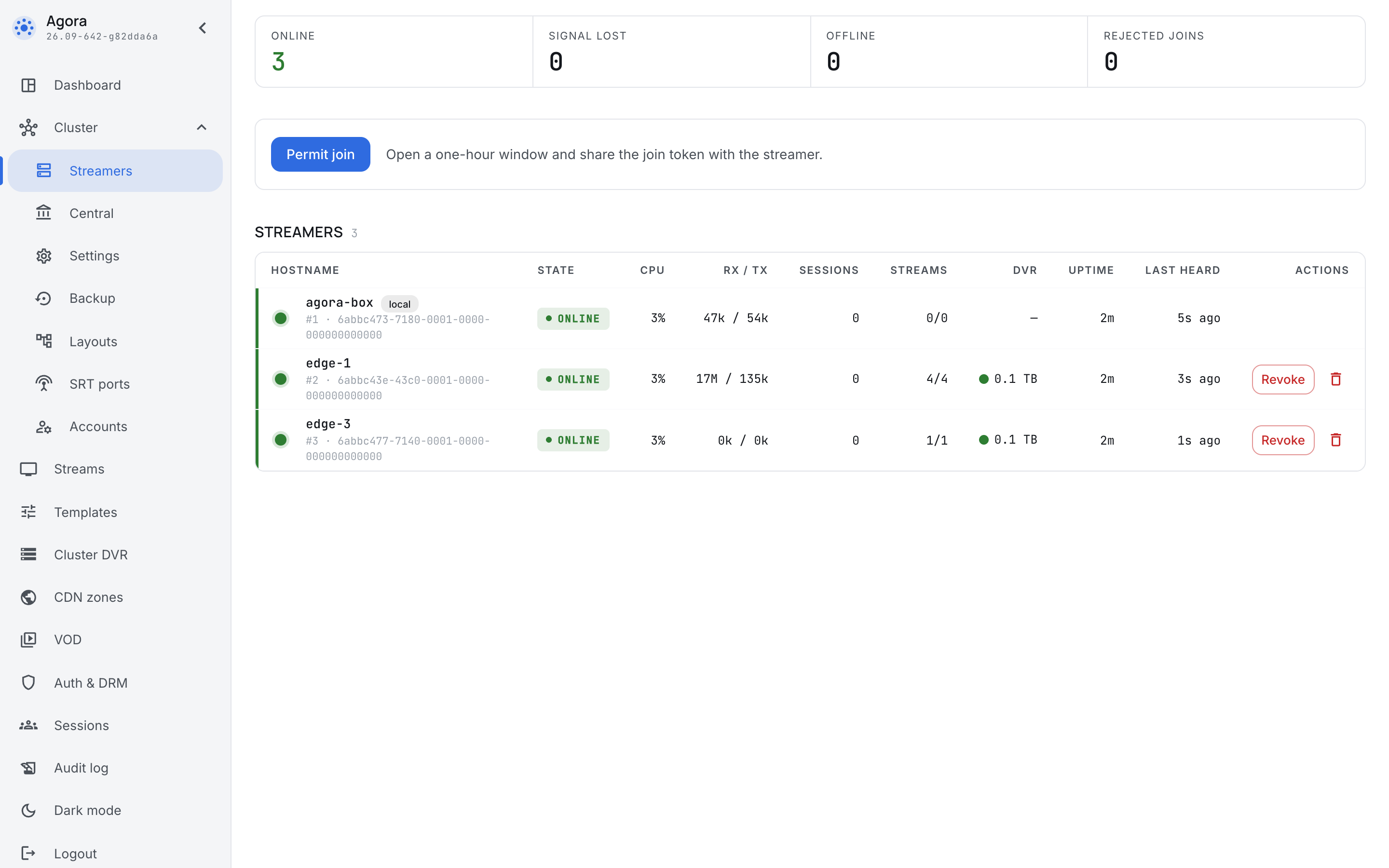
Check the membership in Cluster → Streamers. The machines have new numbers:
edge-1joined second and got #2. The streamers have no settings yet — no archive disks, no addresses, hence the no address mark: the backup brings them back.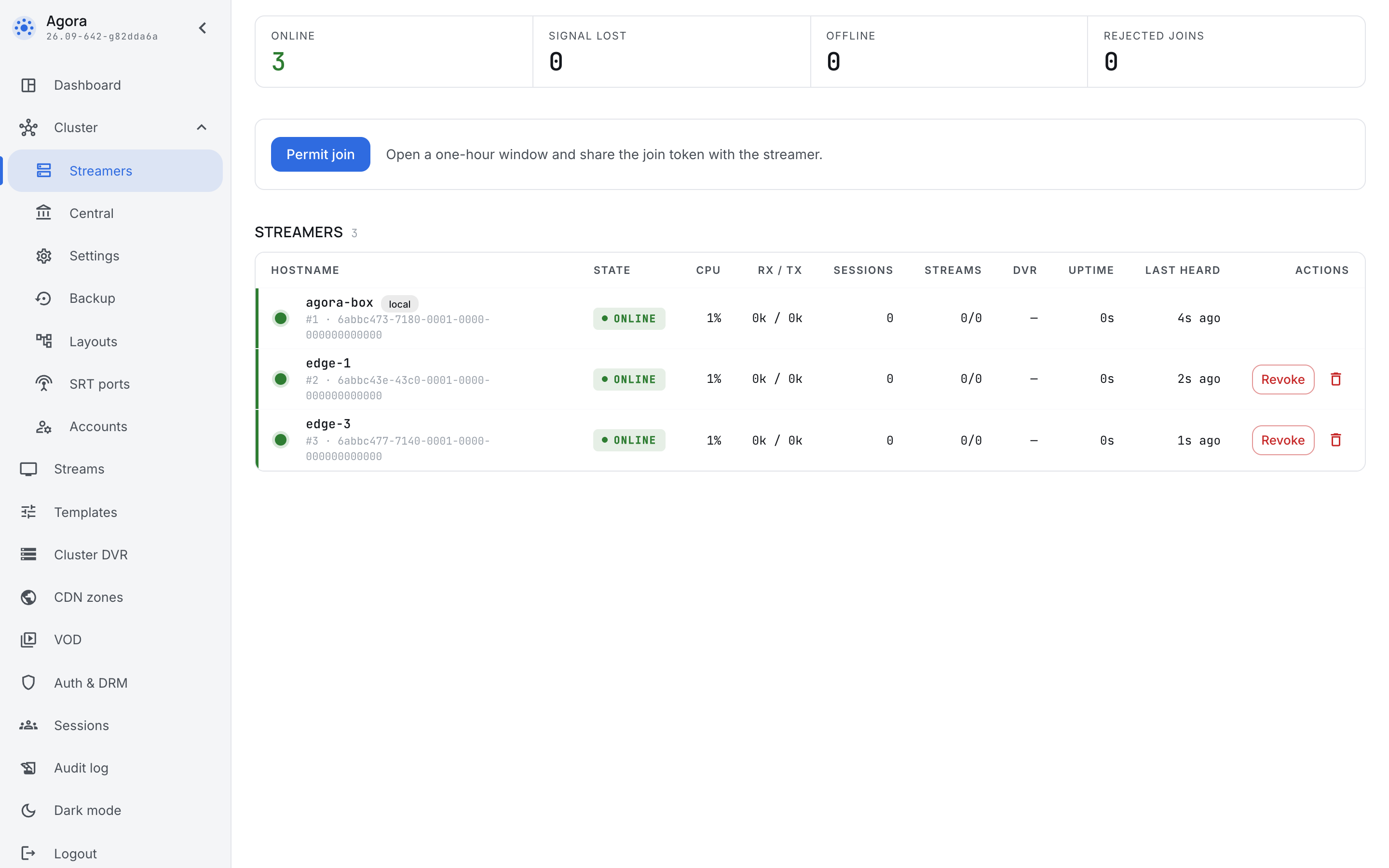
-
Upload the backup and open the plan. The Streamers block shows where the settings of each streamer from the backup will go: the local one to the local one,
edge-1recognized as the same machine, andedge-2without a machine, so the choice is yours.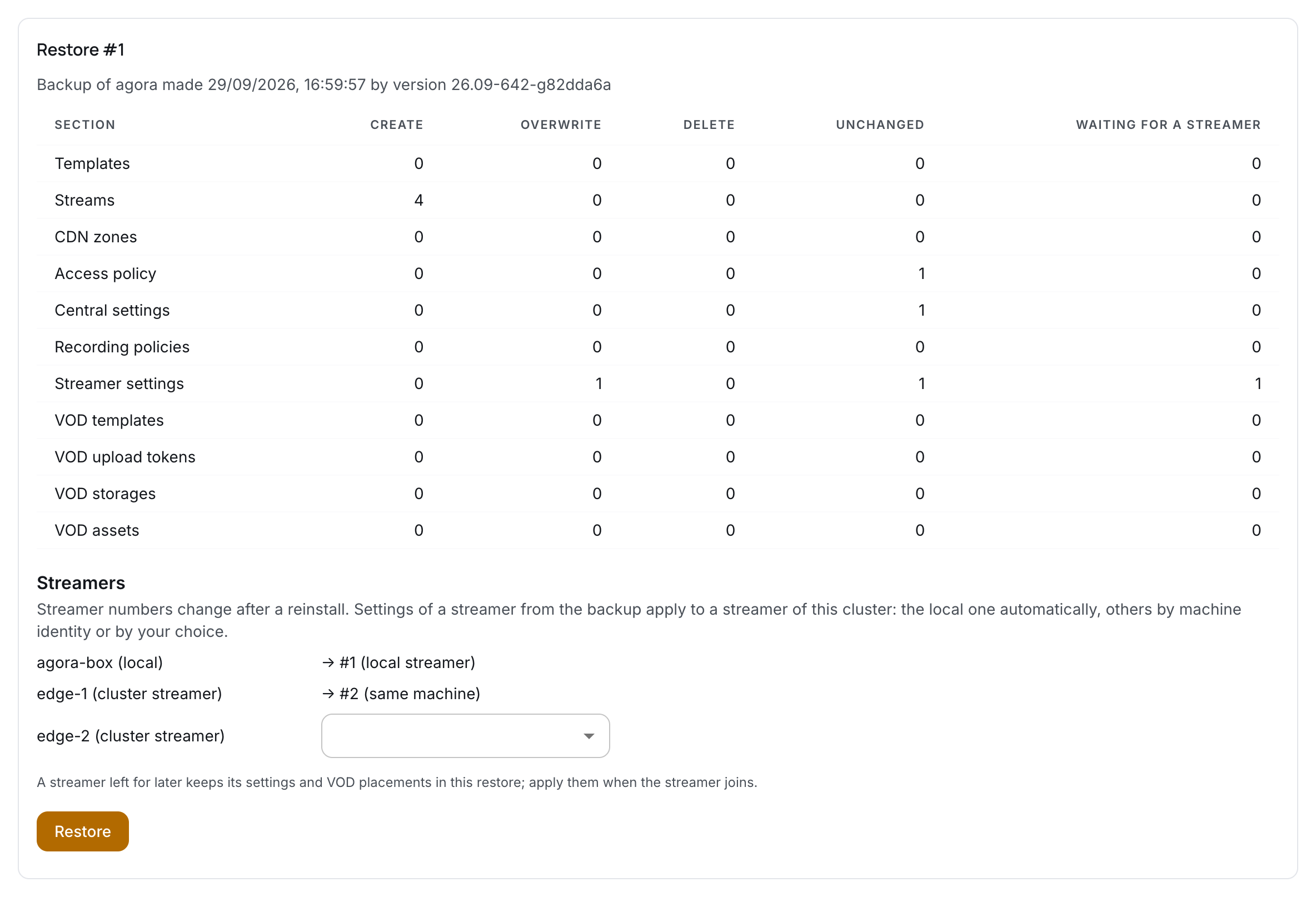
-
Choose a machine for the unrecognized streamer. The list holds the free streamers of the new cluster. The same machine mark stands next to a candidate with the same identity;
edge-3has none, it is a different machine, and choosing it is your decision. If the replacement machine is not ready yet, leave Later.
-
Click Restore. The configuration is applied, and the box places streams on streamers just as after any other change.
A streamer left for later
Settings left for later are kept on the restore card together with the VOD file placements on that machine's disks. Until they are applied, the cluster has no machine with those settings: streams with an archive are placed on the streamers that already have disks. In the example all four cameras go to edge-1.
When the replacement machine joins the cluster, open the restore card, choose it in the Streamers waiting for their settings block and click Apply to streamer.
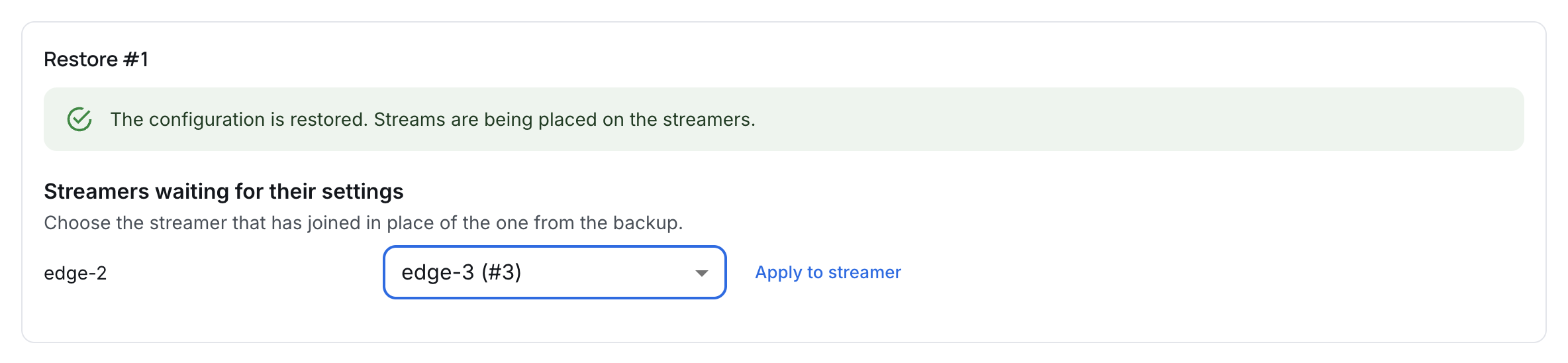
The streamer gets the settings from the backup — archive disks and the rest — and the box can place work on it again. A replacement machine keeps its own addresses: the backup carries addresses only onto the same machine, otherwise central would keep calling the lost one. If the streamer shows the no address mark, enter its address on the streamer card.
Settings left for later are applied only by an operator, with the button. A machine that joins the cluster does not take someone else's settings by itself: a machine joining must not change the configuration without a person.
Rollback on a living cluster
If the box is intact and the backup is needed to undo a bad change, the reinstall steps are not needed: the streamers stay in the cluster with their numbers and identity, and the plan matches them automatically. Upload the backup, read what the Delete column says and confirm.