SAR and anamorphic video
media.transcode.sar
What SAR describes
Sample Aspect Ratio (SAR) is the ratio of the width of an image sample to its height. SAR 1:1 means square pixels; any other ratio means anamorphic video. Players use SAR to display the picture.
- Raster — the encoded frame dimensions, for example 720×576.
- SAR — the pixel shape, for example 64:45.
- DAR — the displayed picture aspect ratio:
(raster width / raster height) × SAR.
For example, 720×576 with SAR 64:45 displays as 1024×576 (16:9). SAR 16:11 on the same raster gives a width of about 1048: it follows a different PAL active-picture convention. These ratios are not interchangeable.
How SAR interacts with resizing
Input SAR describes the source. The resize strategy determines how the picture is fitted, cropped or stretched. Explicit output SAR determines the raster for the resulting display dimensions. Changing SAR alone preserves the display aspect ratio and resamples the raster; it requires transcoding rather than just changing metadata.
For a 720×576 source with SAR 64:45 and H.264:
| Resize | Output SAR | Raster | Display dimensions |
|---|---|---|---|
| None | Auto | 720×576 | 1024×576 |
| None | 1:1 | 1024×576 | 1024×576 |
| None | 16:11 | 704×576 | 1024×576 |
| Fit, height 360 | Auto | 450×360 | 640×360 |
| Fit, height 360 | 1:1 | 640×360 | 640×360 |
| Fit, height 360 | 4:3 | 480×360 | 640×360 |
Rounding the raster to even dimensions can introduce a difference of a few pixels. For SAR below one, Sapsan reduces raster height instead of increasing width.
With explicit SAR, resize width and height specify the display box:
- Fit retains the whole picture and adds padding when necessary.
- Crop crops around the centre.
- Scale stretches to the box.
For example, Scale 640×480 with SAR 4:3 produces a 480×480 raster displayed at 640×480: a 16:9 input is stretched to 4:3.
In Auto mode, H.264/HEVC without resizing, with Fit or with Crop preserve input SAR. Scale dimensions specify the raster: for anamorphic input SAR is recalculated to preserve DAR; for square-pixel input SAR stays 1:1 and stretching is possible. Switching from Auto to explicit SAR with the same Scale dimensions can therefore change the result.
Configuration and verification
In the Mcaster console, open a transcoder rendition, click More and set Pixel shape (SAR). See the Mcaster guide for steps and screenshots.
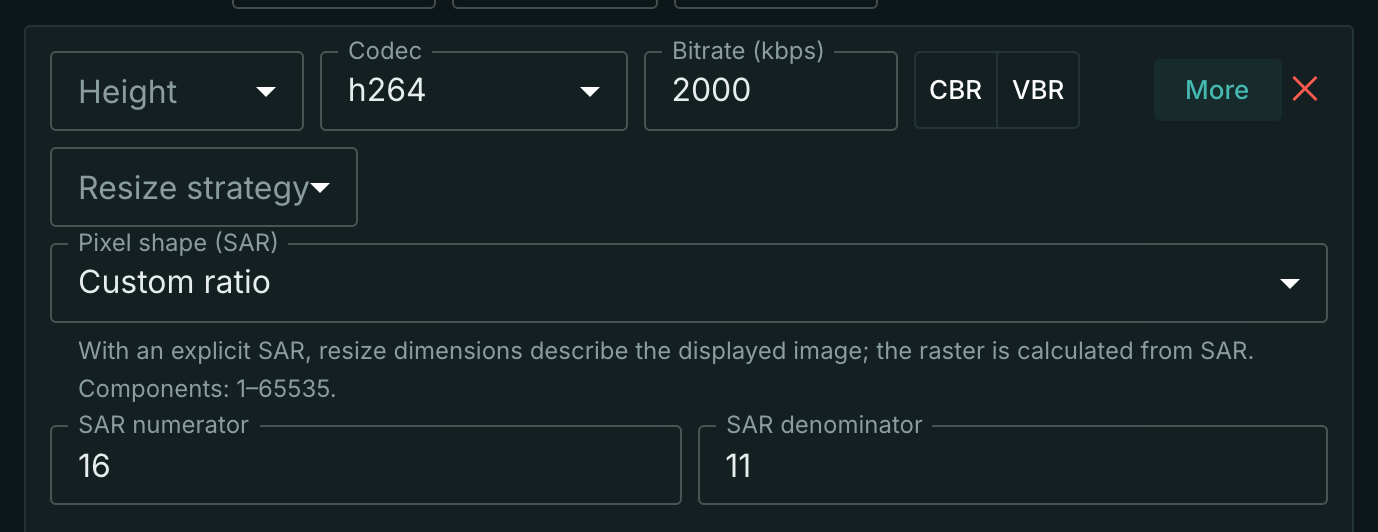
A real H.264 rendition: SAR 16:11, no resize; source 720×576, SAR 64:45, output 704×576, SAR 16:11.
The API setting is transcoder.output[].params.video.sar:
{"sar": {"width": 16, "height": 11}}
An absent field means Auto; explicit 1:1 requests square pixels. Remove the field to return to Auto; send sar: null with JSON Merge Patch. Each component must be an integer from 1 to 65535.
PATCH replaces the entire transcoder.output array: send all renditions with their other settings intact; individual array elements cannot be patched by index.
In track statistics, width and height describe display dimensions, pixel_width and pixel_height describe the raster, and sar_width and sar_height describe SAR. A raster equal to display dimensions and unit SAR may be omitted: use display dimensions and 1:1 in that case. The console ladder preview shows display dimensions and configured SAR, rather than the actual encoded raster.
Restrictions and usage accounting
- Transcoding — explicit SAR requires an output codec; passthrough
samewith SAR is rejected. - AV1 and JPEG 2000 — support Auto or square SAR.
- MPEG-2 — requires SAR that can be represented by a supported DAR at the selected raster size.
A ratio that reduces a raster dimension below two pixels is also rejected.
The media.transcode.sar feature is counted per stream: at least one rendition with explicit SAR, including 1:1, counts as one. More renditions do not increase the count. Auto and anamorphic input without an explicit setting are excluded. Telemetry sends the current count as usage.media_transcode_sar; zero is omitted. This is separate from video encoding under media.transcode.video.