Episodes
vision.index.episodes
An episode describes a stream event and links it to a moment in the video. Central stores the latest episode state and its images; the history is available through the API and the Optic console.
Stream episodes in Optic
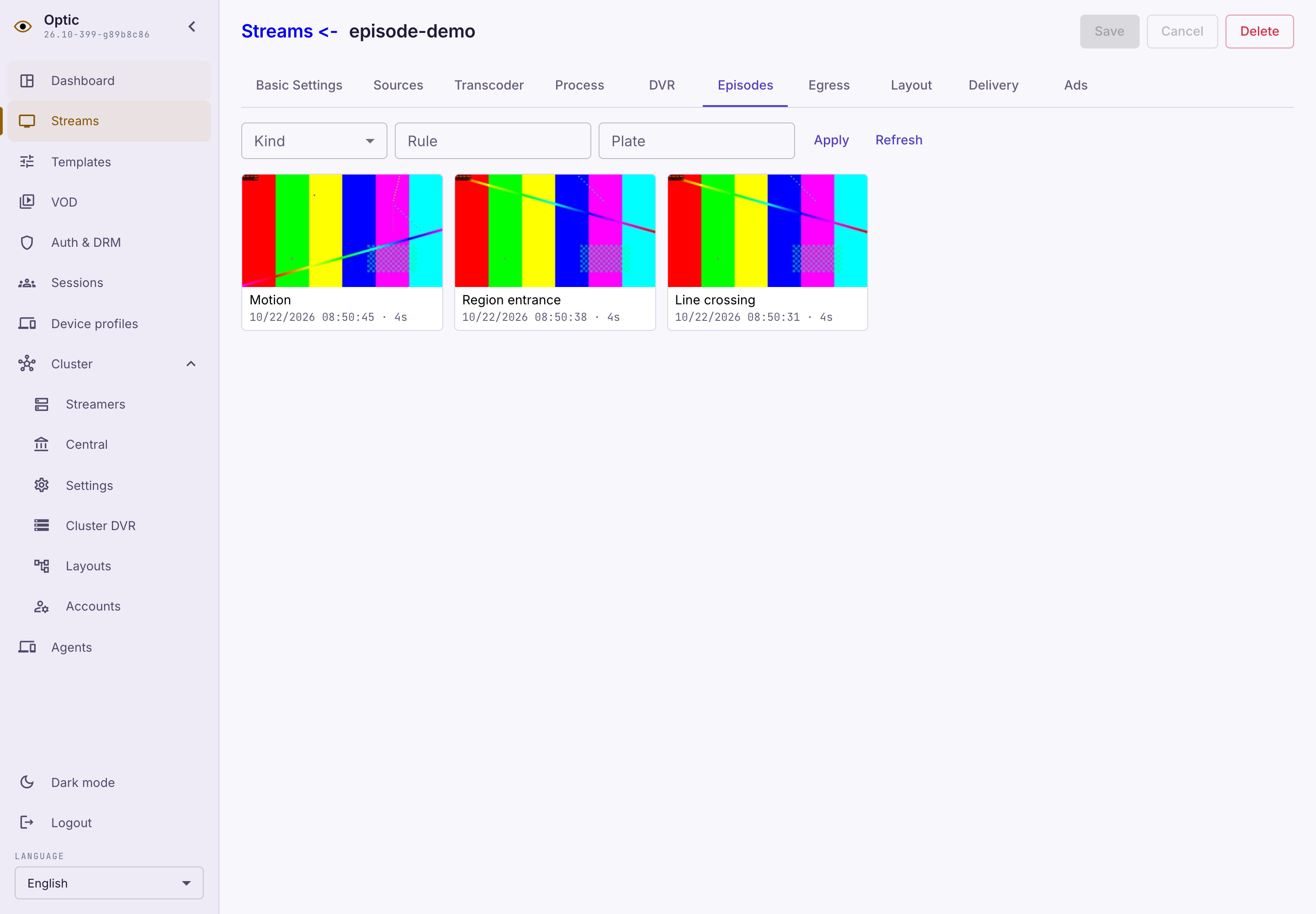
Open the stream page and its Episodes tab. It shows saved episodes for this stream, newest first. Each tile contains a preview and event time, and a vehicle plate when available. This tab is enabled only in Optic.
If the camera sent an event without an image, the tile and card load a frame from the video archive at the episode start time. This also works for previously stored events. The frame is available while the corresponding preview remains in the archive; if it cannot be read, the interface shows an image loading error.
Set the search filters and click Apply:
- Kind — the episode type.
- Rule — the rule code for activations, for example
lcd. - Plate — the exact recognized vehicle plate.
Load more retrieves the next page with the same filters. Refresh reads the history from the beginning again; the list does not refresh automatically.
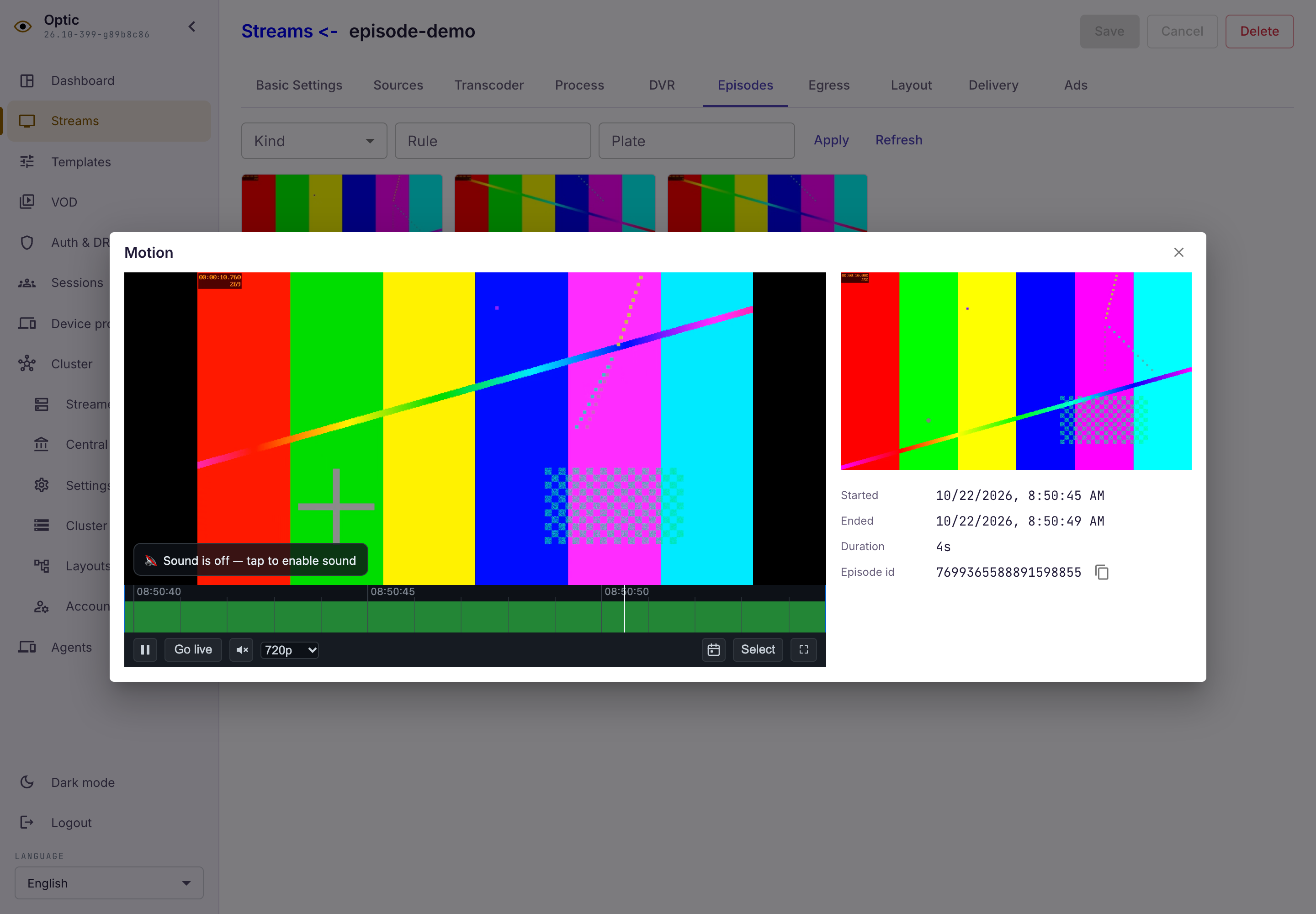
Click a tile to open its card. The card shows the description and the full frame, when stored. When a video archive is configured, the card opens the player with five seconds before and after the episode. An episode can remain in the history after its video has been deleted: metadata retention is configured separately.
Episodes created through the API in a recording stream:
Episode card playing the video archive:
Episode retention in central
Central harvests the latest episode state and its images from streamers and stores them in PostgreSQL. Retained episodes remain readable while the source streamer is unavailable. This storage is independent of video recording.
In the stream or stream template DVR settings, Additional episode retention (hours) sets dvr.episodes_additional_depth; the API and YAML use seconds. The total is dvr.max_depth + dvr.episodes_additional_depth. An unset additional depth means zero. An unset max_depth in a present DVR section means ten years; explicit zero remains zero. Without a DVR section, or with a zero total, central does not retain episodes.
For closed episodes, the retention period starts at closed_at; for open episodes, it starts at updated_at. Changing the effective DVR settings, including the template, recalculates retention for all remaining episodes. A stream's own DVR section replaces the template section as a whole. Deleting a stream removes its episodes and images. Once background cleanup physically removes an episode, increasing retention cannot restore it.
Episode API
GET /central/api-v4/episodes reads history from PostgreSQL. GET /central/api-v4/episodes/{episode_id} reads one episode. The streamer source feed is GET /streamer/api-v4/episodes and contains its current in-memory window; gaps are possible after a prolonged outage.
These are management API routes; the viewer role can read them. Viewers can use the streaming and playback APIs with the stream play token. The card gets video through the regular playback API.
The default limit is 100, the maximum is 1000, and a serialized page including its envelope is limited to 32 MiB. Follow next_cursor; offset is forbidden. An oversized episode is skipped with a counter so it cannot block further progress. The default history order is -opened_at; opened_at, -updated_at, and updated_at are also available through sort. The episode ID breaks ties in the same direction. History pagination is not a global incremental changefeed.
Filters include comma-separated media, episode_type, episode_subtype, episode_id, exact license_plate_text, and SQL LIKE license_plate_text_like. from and to are Unix milliseconds and select lifetime overlap with [from,to). An open episode continues beyond its last update. Each of opened_at, started_at, updated_at, and closed_at also supports _gt, _gte, _lt, and _lte. Different filters combine with AND; values within a list combine with OR. Retention expiry does not hide an episode until background cleanup physically removes it.
The JSON has a tagged details.type. Vehicle attributes inside details use purpose, emergency_subtype, facing_side, color, and model without a vehicle_ prefix. preview.data is an inline base64 preview, and its time is preview.timestamp. Full images carry sha256 and MIME metadata without URLs. The caller constructs GET /central/api-v4/episodes/{episode_id}/images/{sha256}. That operation checks that the hash belongs to the current episode snapshot. Original image bytes and MIME are preserved; missing MIME uses application/octet-stream.
Central closes abandoned open episodes after episodes_stale_timeout_secs without a new source version, default 86400 seconds. The close time is the previous updated_at. A newer source version can reopen the episode. Repeated versions do not reset the timeout. Global ID uniqueness and a global changefeed remain separate deployment prerequisites. The timeout is measured from the episode’s updated_at; delivery time does not extend it. Central leaves updated_at unchanged when closing an abandoned episode.
Set this in the console on the Central settings page. It is stored in the shared /central/api-v4/config document and applies without restarting. Clearing the field restores the default timeout.
Read with a stream token
Episodes and their images accept the same tokens as stream video. These requests do not require management access. Use Authorization: Bearer or the token query parameter; the query parameter takes precedence when both are present.
Paths relative to /playback on central and /streaming on a node:
GET /v/{stream_name}/episodes
GET /v/{stream_name}/episodes/{episode_id}
GET /v/{stream_name}/episodes/{episode_id}/preview
GET /v/{stream_name}/episodes/{episode_id}/images/{sha256}
Playback reads PostgreSQL history, including externally created episodes, even when the node is unavailable. Filters and sorting match management history; media is forbidden because the path already names the stream. Node streaming reads its current in-memory analytics window and supports cursor and limit; request persistent history from central. A stream token cannot open another stream's episodes or images.
Reading a list, episode, preview or full image does not create or refresh a session, start on-demand capture or recording, or count as a video view. Access is checked on every request; responses use Cache-Control: no-store. Video opened separately through playback is accounted for as usual.
curl -H "Authorization: Bearer $PLAY_TOKEN" \
  "$CENTRAL/playback/v/episode-demo/episodes?limit=100"
Create an external episode
External systems send episodes to POST /central/api-v4/episodes. Only the stream name is needed: central writes the episode and images directly to PostgreSQL. The node may be unavailable and video may be absent. Management API write permission is required; the viewer role cannot create episodes.
Create episode.json. Times are Unix milliseconds on the video timeline; replace the stream name and event times with your own values.
{
  "media": "episode-demo",
  "opened_at": 1700000000000,
  "closed_at": 1700000004000,
  "details": { "type": "motion", "is_motion": true }
}
Send the document using your central address and credentials:
curl --user "$API_LOGIN:$API_PASSWORD" \
  --header 'Content-Type: application/json' \
  --data-binary @episode.json \
  "$CENTRAL_URL/central/api-v4/episodes"
The first request returns 201 and an episode_id as a decimal string. The episode is immediately available through GET and Refresh on the Episodes tab. A repeat with the same media, opened_at, and details.type returns 200 and the original ID without changing the data or retention deadline. Other attributes, including the trigger rule, are outside the key. Custom episodes use the literal tag custom. Physical deletion of the episode releases the key.
details uses the same shape as read responses. You can include preview and frame_preview with base64 data and mime_type; the preview time is preview.timestamp. Send full image bytes: a sha256 reference alone is insufficient. Central assigns the ID and updated_at. The complete request is limited to 32 MiB.
The stream must exist and its effective DVR settings must enable episode retention. Error responses:
- 404 — unknown stream.
- 409 — retention is disabled.
- 422 — invalid document, with field paths.
- 413 — request size exceeded.
After a timeout, retry the same key. POST creates an episode; replay does not close or update an existing open episode. Episodes produced by node analytics continue to arrive through the harvester.
Additional episode data
For a complete example of saving, updating and searching meta, see Custom episode data.