Installing Watcher Cluster and Single
Watcher can run on one server or distribute management and video processing across servers. The following procedure uses Linux APT packages. NVR has a separate installation procedure.
Installation sequence
- Choose the management server's role and install the corresponding Watcher package.
- For a cluster, install
watcher-streameron servers ingesting video and recording archives. - Add the streamers in Watcher and configure addresses and storage.
- Connect a test camera and verify live video and archive recording.
Prepare DNS, time synchronization and network connectivity first. The management server needs access to streamer APIs; clients need access to the interface and video delivery addresses. Do not expose PostgreSQL or Redis to clients.
Install Flussonic Watcher
Choose one option:
| Task | Package | Installed components |
|---|---|---|
| One server for management and video, or management with a local streamer | flussonic-watcher |
Watcher VMS, watcher-streamer, PostgreSQL, Redis and Central |
| Cluster management server without video processing | watcher-standalone |
Watcher VMS, Angie, PostgreSQL, Redis and Central; no separate streamer is included |
| Additional video ingest and delivery server | watcher-streamer |
Watcher media layer, managed through Watcher |
In the 26.11 package distribution, watcher-streamer depends on flussonic version 26.09 or later. This is the media layer dependency's technical package name. APT selects an available version according to repository settings; the watcher-streamer package version need not match the running media engine version. Installing these packages does not automatically switch the server to another engine.
Run the following commands as root. Use a prepared Ubuntu 24.04 LTS x86-64 server for this procedure. Check the hardware calculation before installation.
Add the release repository:
apt-get update
apt-get install --yes ca-certificates curl gnupg
install -d -m 0755 /usr/share/keyrings
curl --fail --location --silent --show-error \
  https://apt.flussonic.com/repo/binary/gpg.key \
  -o /usr/share/keyrings/flussonic.gpg
printf '%s\n' 'deb [signed-by=/usr/share/keyrings/flussonic.gpg] https://apt.flussonic.com/repo binary/' \
  > /etc/apt/sources.list.d/flussonic.list
apt-get update
For installation with a local streamer:
apt-get install flussonic-watcher=26.11
For a management server without a local streamer, first add the Angie repository for your OS. For Ubuntu 24.04:
curl --fail --location --silent --show-error \
  https://angie.software/keys/angie-signing.gpg \
  -o /usr/share/keyrings/angie-signing.gpg
printf '%s\n' 'deb [signed-by=/usr/share/keyrings/angie-signing.gpg] https://download.angie.software/angie/ubuntu/24.04 noble main' \
  > /etc/apt/sources.list.d/angie.list
apt-get update
apt-get install watcher-standalone=26.11
Wait for package configuration to finish. Set the administrator username and password in the installer. Then open http://watcher.example.com/watcher/client/, replacing the domain with your server address, and sign in with those credentials.
Check installed versions:
dpkg-query -W -f='${Package}    ${Version}\n' \
  watcher-vms flussonic-central postgresql redis-server
systemctl --failed
A single-server installation creates a local streamer automatically. With watcher-standalone, add a separate streamer before connecting cameras.
Configure the domain
Use a DNS name reachable from user, streamer and Agent networks. Create the DNS record, configure the OS hostname and check resolution from each side:
hostname -f
getent hosts watcher.example.com
timedatectl status
The video delivery address can differ from the management address. If the interface uses HTTPS, the browser also needs HTTPS access to video with a valid certificate. Public address settings are described under streamers.
Watcher Standalone
Angie handles HTTP(S) on the management server. Choose how to configure it before running commands:
- Let’s Encrypt — automatic issuance for an externally reachable DNS name. Follow the next subsection.
- Your own certificate — an organization-issued certificate or a private network. Go to manual configuration; do not run automatic issuance.
Automatic Let’s Encrypt issuance
After configuring DNS and HTTP reachability, request a certificate:
/opt/flussonic/bin/watcher-ssl-enable.sh watcher.example.com
Check the command result and open https://watcher.example.com/watcher/client/. If issuance fails, check DNS and external reachability; the package installation may continue using HTTP.
Your own certificate
For a private network or organization-issued certificate, configure HTTPS in Angie manually. Prepare a certificate with its trust chain and a private key for Watcher's DNS name; clients and Agents must trust the issuing certificate authority.
- Add
SKIP_SSL=TRUEon a separate line in/etc/watcher/watcher.conf. This prevents automatic certificate issuance by subsequent package configuration. It does not disable existing HTTPS. Do not runwatcher-ssl-enable.shover your custom configuration: the command overwrites the HTTPS file. -
Place the certificate and key in your selected server directory. Restrict private key access. Back up
/etc/angie/watcher-standalone-ssl.conf, then write this configuration to it, replacing the domain and paths:server { listen 443 ssl http2 default_server; listen [::]:443 ssl http2 default_server; server_name watcher.example.com; ssl_certificate /etc/angie/certs/watcher-fullchain.pem; ssl_certificate_key /etc/angie/certs/watcher-key.pem; include /opt/flussonic/contrib/nginx-standalone-ssl-params.conf; client_max_body_size 100M; client_header_buffer_size 16k; large_client_header_buffers 4 16k; include /opt/flussonic/contrib/nginx-standalone-locations.conf; }The package supplies the files in
/opt/flussonic/contrib/. Retain bothincludestatements: the first sets TLS parameters for Agent compatibility; the second supplies Watcher and Central routes, including/endpoint. Replacing them with a web-interface-only configuration can break Agent connections. -
Check and apply the configuration:
angie -t && systemctl reload angie -
Set
API_URL=https://watcher.example.comin/etc/watcher/watcher.conf. Set the same address forAPI_URLandUPSTREAM_URLin/etc/central/central.conf. Replace existing values rather than adding duplicate lines. Restart services during a maintenance window:systemctl restart central central-layouter watcher-vms watcher-go -
Check HTTPS from a client network, user login, an existing Agent connection and video from its camera. The sign-in page alone does not verify
/endpointor Agent TLS.
This procedure configures the management server's certificate. When changing an existing installation's DNS name, separately check the address saved in Agents: changing API_URL does not reconfigure their previous connection address. For streamers, check their own certificates, API URL and Public payload URL.
Cluster only: install and configure Watcher Streamer
Before adding a separate streamer, you must configure API_URL on the management server in /etc/watcher/watcher.conf. Set it to the Watcher URL with a domain name or IP address reachable from every streamer, for example:
API_URL=http://watcher.example.com
Use your installation's scheme and port. If API_URL already exists, replace its value. Do not use localhost or 127.0.0.1: when requesting external configuration, the streamer would connect to itself instead of the management server. An internal address works for servers on the same network; connections over the internet require a publicly reachable address.
Apply the change on the management server:
systemctl restart watcher-vms watcher-go
This is a Watcher configuration parameter; the API URL field in an individual streamer's settings specifies the address of that streamer.
-
On each dedicated server, add the same release repository and install:
apt-get update apt-get install watcher-streamer=26.11 systemctl start flussonic -
Open
http://STREAMER-IP/, whereSTREAMER-IPis the streamer's IP address, and enter the license key in the web interface. -
Choose a secret key for connecting this streamer to Watcher. When adding the server in Watcher, enter exactly the same value in Cluster key. Do not publish the key in integration documentation or a client application.
The package does not automatically create
cluster.confwith your key. On a new streamer, create the directory and file with the following commands, replacingEXAMPLE_CLUSTER_KEYwith your chosen key first. If the file already exists, change onlycluster_keyand preserve the other settings; do not run the file overwrite command.install -d /etc/flussonic/flussonic.conf.d cat > /etc/flussonic/flussonic.conf.d/cluster.conf <<'EOF' {"cluster_key":"EXAMPLE_CLUSTER_KEY"} EOF -
Apply the setting:
systemctl reload flussonic systemctl status flussonic --no-pager -
Check time synchronization and management server access to the streamer API. Prepare archive disks and mount points.
The watcher-streamer package disables the media layer's own administrative interface. Change cameras and streamer settings through Watcher.
Move existing streamers to the watcher-streamer package
Before changing packages, back up configuration and inspect the APT plan:
apt-get update
apt-get --simulate install watcher-streamer=26.11
If the plan matches the selected version, install during a maintenance window. The watcher-streamer package itself applies settings by reloading the running service. Updating its dependency may restart the media layer, so the installation command alone cannot guarantee uninterrupted streams.
Cluster only: create a multiserver cluster
-
Open Streamers → Create streamer. In manual mode, specify a unique hostname and Cluster key, using the exact
cluster_keyvalue from thecluster.conffile you created on the streamer, then save.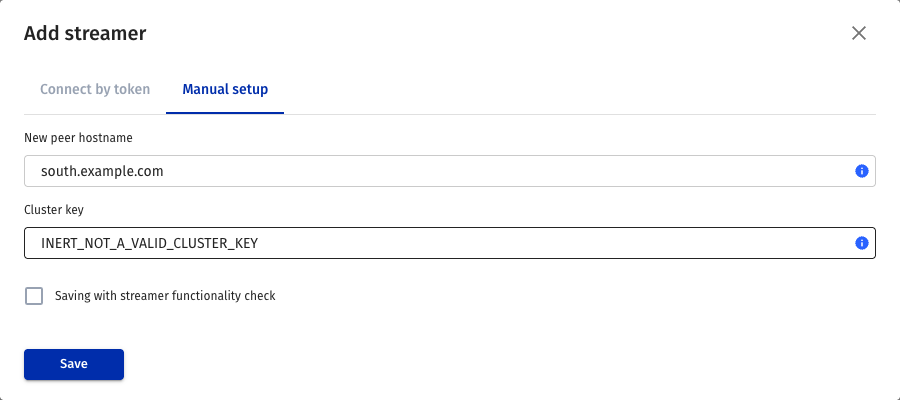
Manual streamer creation: hostname and cluster key.
-
On the streamer page, check API URL, the API address reachable by the management server. Set Public payload URL, the address users will receive video from.



Management and video delivery addresses; domain and aliases are configured separately.
-
Configure storage on the DVR tab, then open the streamer's State and check for errors. If the key check fails, compare the value in Watcher with
cluster_keyin the file on the streamer; after changing the file, runsystemctl reload flussonic. See streamer state for details.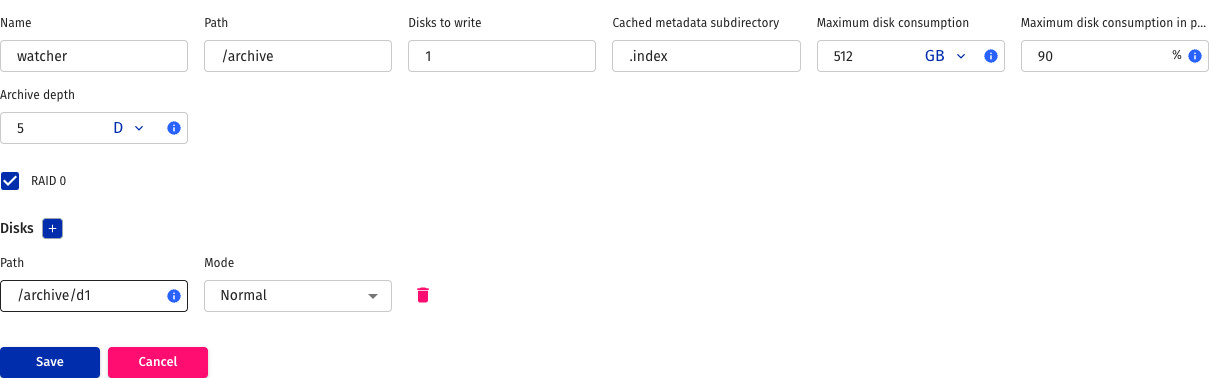
DVR storage configuration. Check camera recording after saving.
-
Connect a test camera. Check the stream in a browser and the recorded interval after recording begins.
Adding a server record alone is insufficient: API connectivity, camera video ingest and client delivery access must work. Use zones to restrict camera placement.