Data disks
appliance.os.storage
Hard drives are attached, formatted, and mounted by the operating system — through a web interface, without logging into a shell. The operator sees the list of disks, their health (SMART), and free space; attaching a new disk is one button.
How this differs from a regular Linux
On a server running Ubuntu, attaching a new disk for archive storage looks like this: SSH in, find the disk with lsblk, unmount if mounted, wipe old signatures (wipefs), partition (sgdisk), create a filesystem (mkfs.ext4), add to /etc/fstab, mount. One mistake in fstab — and the machine fails to boot.
InfraMedia does the same thing in one operation, and takes on all the guarantees:
- The OS disk is never touched. The system disk is identified and protected from all data disk operations. Accidentally wiping it is impossible.
- Disks are mounted by UUID. A disk moved to a different bay keeps working; a foreign disk placed in our bay does not mount even for a moment.
- Boot does not wait for disks. A missing or failed disk does not delay boot by a single second: mounting is started by the configurator after the device appears, not the other way around.
- Disks are never automatically repaired. A corrupted filesystem is not a reason for an automatic
fsckon twenty terabytes (that is minutes of boot time). The disk is shown as "present, not mounted", the reason is in the log, and the decision belongs to a human. - Disconnecting does not erase data. "Disconnect disk" stops the mount and removes the record; the disk's contents are unchanged. Plugged back in, the disk mounts with all its data.
Attaching a disk
The operator inserts a disk into the machine and opens the "Disks" screen in the web interface:
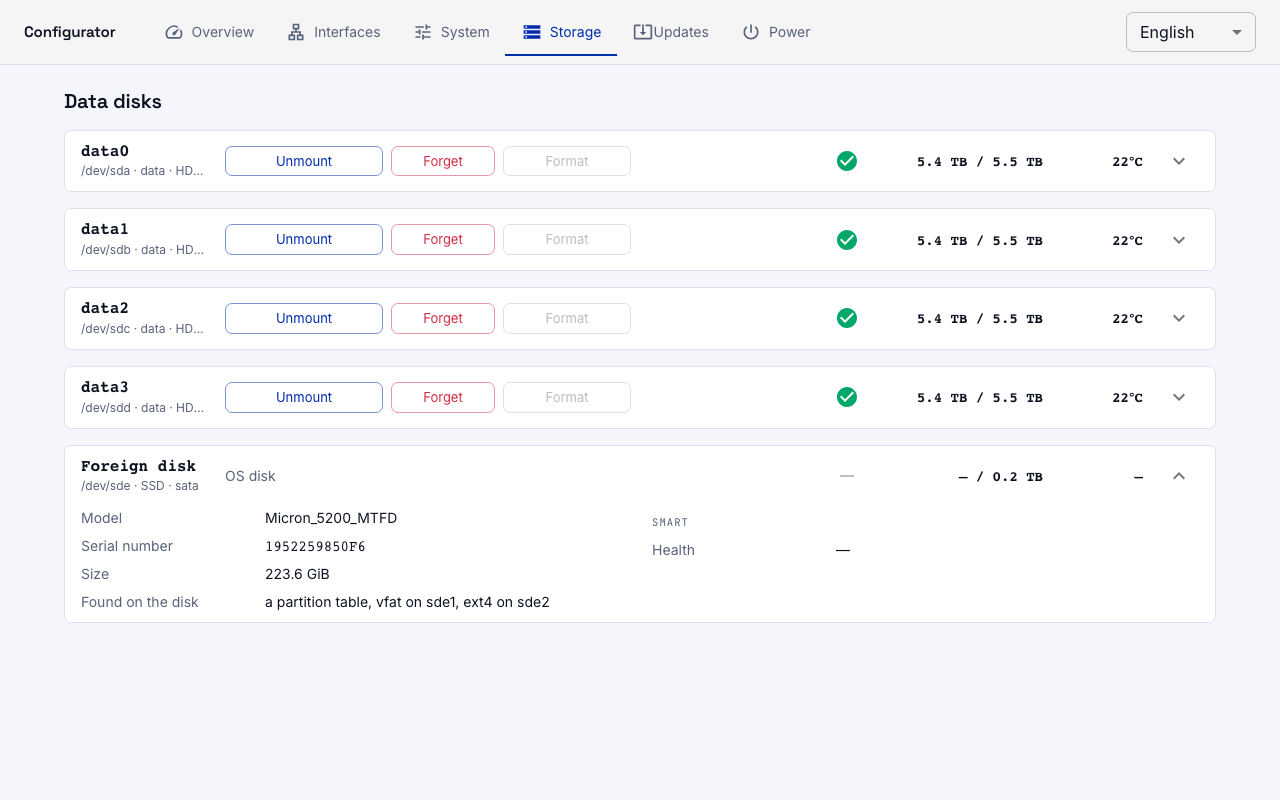
Each disk is a row with its name, device (/dev/sda), media type, status, capacity, free space, and temperature. A stranger disk (not in the settings store) shows what was found on it and offers to connect it.
Attaching with erasure requires typing the device name (sda) as confirmation: the button stays disabled until the typed name matches.
- A blank disk — formatted and attached immediately, no dialog.
- A disk with foreign content — the configurator rejects the request and names what was found; erasure only after confirmation.
- A disk with our archive — attached without erasure, data remains intact.
What the screen shows
| Label | Meaning |
|---|---|
| Mounted | disk is attached and available to the workload |
| Present, not mounted | disk is in the machine, mounting was stopped by the operator |
| Missing | the record exists but the disk is not in the machine — removed or replaced |
| Wrong disk in bay | a different disk is in the recorded bay (filesystem is not ours) |
| Stranger | disk is in the machine but not attached by the operator |
| OS disk | system disk; all operations on it are rejected |
SMART
Health indicators (SMART overall, temperature, power-on hours, reallocated sectors) are read when a disk is attached and then every six hours. This is a report, not an action: the machine does not turn anything off based on SMART readings — predicting failure is a reason for a human to look, not for the machine to stop writing.
API
# List disks
curl -u admin:password http://machine:8090/system/storage

# Attach a disk (blank ones are formatted, foreign ones require erase)
curl -u admin:password -X PUT \
     http://machine:8090/system/storage/disks/data0 \
     -H 'content-type: application/json' \
     -d '{"place": "/dev/disk/by-path/pci-0000:05:00.0"}'

# Unmount (record and data remain)
curl -u admin:password -X POST \
     http://machine:8090/system/storage/disks/data0/unmount

# Mount back
curl -u admin:password -X POST \
     http://machine:8090/system/storage/disks/data0/mount

# Forget (record removed, data untouched)
curl -u admin:password -X DELETE \
     http://machine:8090/system/storage/disks/data0